The Apify Model Context Protocol (MCP) server at mcp.apify.com enables your AI agents to extract data from social media, search engines, maps, e-commerce sites, and any other website using thousands of ready-made scrapers, crawlers, and automation tools from Apify Store. It supports OAuth, allowing you to connect from clients like Claude.ai or Visual Studio Code using just the URL.
🚀 Use the hosted Apify MCP Server!
For the best experience, connect your AI assistant to our hosted server at
https://mcp.apify.com. The hosted server supports the latest features - including output schema inference for structured Actor results - that are not available when running locally via stdio.
⚠️ Legacy SSE transport removed. The
https://mcp.apify.com/sseendpoint has been removed in favor of Streamable HTTP. Migrate your client tohttps://mcp.apify.com— drop the/ssesuffix from your configuration.
💰 The server also supports agentic payments: buy a token from AGI to run any Actor, or pay per-request via direct x402 (Pay Per Event Actors only) or Skyfire.
Apify MCP Server is compatible with Claude Code, Claude.ai, Cursor, VS Code and any client that adheres to the Model Context Protocol.
Check out the MCP clients section for more details or visit the MCP configuration page.
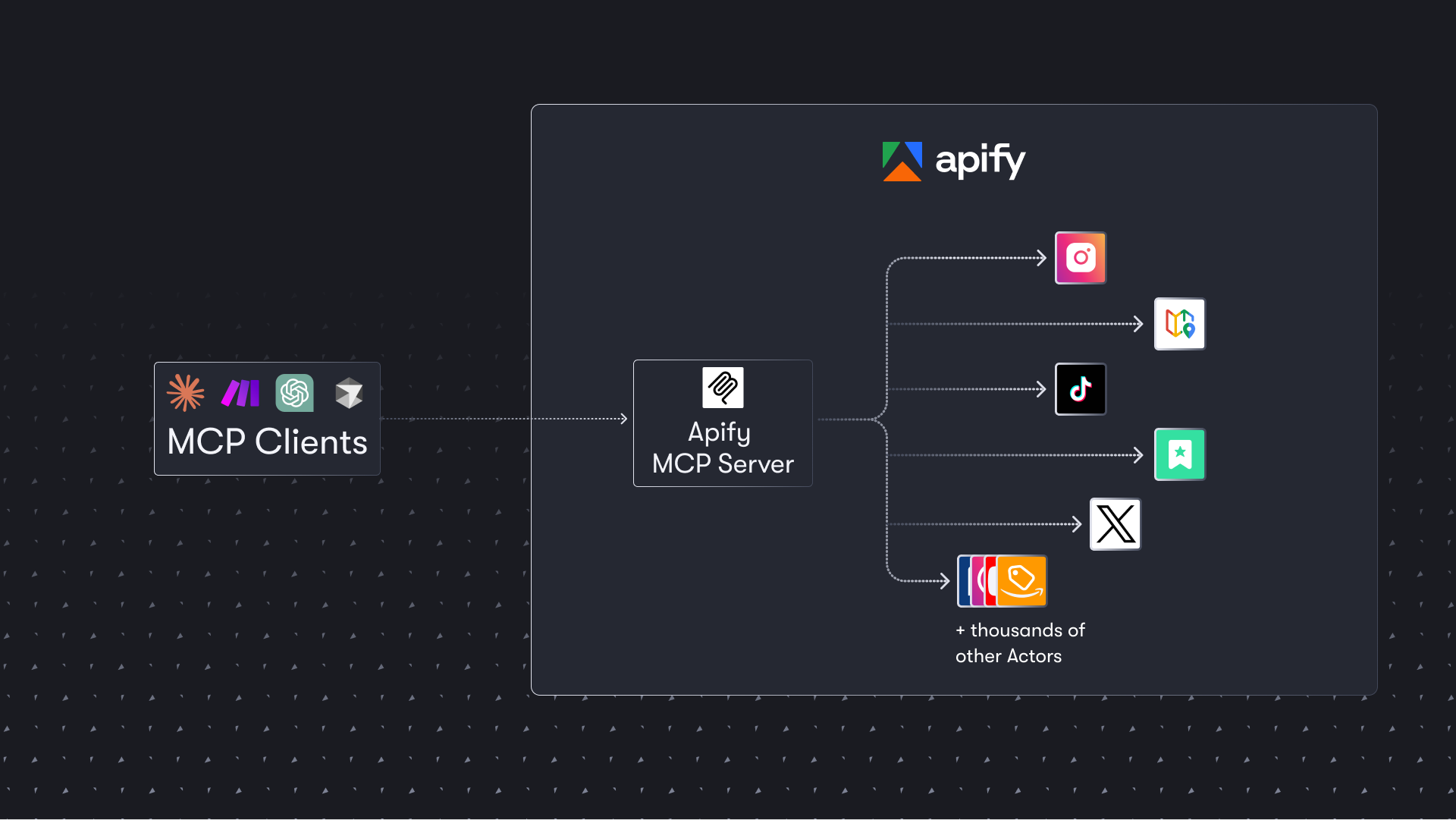
Table of Contents
- 🌐 Introducing Apify MCP Server
- 🚀 Quickstart
- 🤖 MCP clients
- 🪄 Try Apify MCP instantly
- 💰 Agentic payments
- 🛠️ Tools, resources, and prompts
- 📊 Telemetry
- 💬 Usage examples
- 🐛 Troubleshooting
- ⚙️ Development
- 🔒 Privacy policy
- 🤝 Contributing
- 📚 Learn more
🌐 Introducing Apify MCP Server
The Apify MCP Server allows an AI assistant to use any Apify Actor as a tool to perform a specific task. For example, it can:
- Use Facebook Posts Scraper to extract data from Facebook posts from multiple pages/profiles.
- Use Google Maps Email Extractor to extract contact details from Google Maps.
- Use Google Search Results Scraper to scrape Google Search Engine Results Pages (SERPs).
- Use Instagram Scraper to scrape Instagram posts, profiles, places, photos, and comments.
- Use RAG Web Browser to search the web, scrape the top N URLs, and return their content.
- Use Web Fetch to fetch any URL and return its content as Markdown, plain text, HTML, or links — with JavaScript rendering and anti-bot protection.
Video tutorial: Integrate 8,000+ Apify Actors and Agents with Claude

🚀 Quickstart
You can use the Apify MCP Server in two ways:
HTTPS Endpoint (mcp.apify.com): Connect from your MCP client via OAuth or by including the Authorization: Bearer <APIFY_TOKEN> header in your requests. This is the recommended method for most use cases. Because it supports OAuth, you can connect from clients like Claude.ai or Visual Studio Code using just the URL: https://mcp.apify.com.
https://mcp.apify.comstreamable transport
Standard Input/Output (stdio): Ideal for local integrations and command-line tools like the Claude for Desktop client.
- Set the MCP client server command to
npx @apify/actors-mcp-serverand theAPIFY_TOKENenvironment variable to your Apify API token. - See
npx @apify/actors-mcp-server --helpfor more options.
You can find detailed instructions for setting up the MCP server in the Apify documentation.
🤖 MCP clients
Apify MCP Server is compatible with any MCP client that adheres to the Model Context Protocol, but the level of support for dynamic tool discovery and other features may vary between clients.
To interact with the Apify MCP Server, you can use clients such as Claude Desktop, Visual Studio Code, or Apify Tester MCP Client.
Visit mcp.apify.com to configure the server for your preferred client.
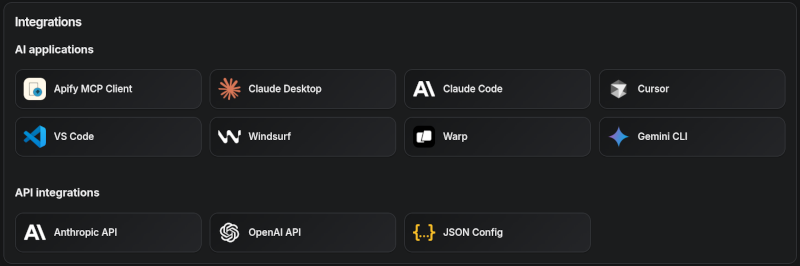
Tested clients
- Claude Desktop
- Claude.ai (web)
- ChatGPT
- VS Code (Genie)
- Cursor
- OpenCode
- Kiro
- Apify Tester MCP Client — designed for testing Apify MCP servers
🪄 Try Apify MCP instantly
Want to try Apify MCP without any setup?
Check out Apify Tester MCP Client
This interactive, chat-like interface provides an easy way to explore the capabilities of Apify MCP without any local setup. Sign in with your Apify account and start experimenting with web scraping, data extraction, and automation tools!
Or use the MCP bundle file (formerly known as Anthropic Desktop extension file, or DXT) for one-click installation: Apify MCP Server MCPB file
💰 Agentic payments
You can pay for Actor runs without an Apify API token using AGI, direct x402, or Skyfire.
- AGI (agi.apify.com) mints a prepaid Apify API token in exchange for an x402 or MPP payment. Use the token like a normal API token against
mcp.apify.comandapi.apify.com— works for any Actor, not just Pay Per Event ones. Recommended for new integrations; see AGI (recommended) below. - Direct x402 pays with USDC on Base per request and does not require a separate platform account. It is fully supported by
mcpc(brew install apify/tap/mcpcornpm install -g @apify/mcpc). We usemcpcbecause it is one of the few MCP clients that supports the latest features and the x402 protocol natively. - Skyfire pays with PAY tokens and requires a Skyfire account with a funded wallet. It does not require a special MCP client; the entire payment flow is handled directly through the MCP tool call parameters.
ℹ️ Scope: Both direct x402 and Skyfire are limited to Pay Per Event Actors, don't support Standby Actors, and settle per run instead of minting a token.
How agentic payments work
Actor run costs vary, so both payment methods use a prepaid balance model. The payment flow happens in four steps:
- Discovery: The agent discovers Actors with
search-actorsorfetch-actor-details. Those calls are free. - Prepayment: Before running a paid Actor tool, the agent funds a prepaid balance.
- Direct x402:
mcpcautomatically signs a $1.00 USDC transaction. - Skyfire: The agent creates a PAY token (minimum $5.00) using Skyfire's
create-pay-tokentool.
- Direct x402:
- Execution: The agent calls the Actor tool.
- Direct x402: Handled automatica