Maintainer of this skill?
by n1byn1kt
CLI, MCP server, and npm library that turns any website into an API — no docs, no SDK, no browser.
# Add to your Claude Code skills
git clone https://github.com/n1byn1kt/apitapLast scanned: 7/20/2026
{
  "issues": [
    {
      "type": "npm-audit",
      "message": "@hono/node-server: @hono/node-server: Middleware bypass via repeated slashes in serveStatic",
      "severity": "medium"
    },
    {
      "type": "npm-audit",
      "message": "express-rate-limit: Vulnerability found",
      "severity": "medium"
    },
    {
      "type": "npm-audit",
      "message": "fast-uri: fast-uri vulnerable to path traversal via percent-encoded dot segments",
      "severity": "high"
    },
    {
      "type": "npm-audit",
      "message": "hono: Hono missing validation of cookie name on write path in setCookie()",
      "severity": "high"
    },
    {
      "type": "npm-audit",
      "message": "ip-address: ip-address has XSS in Address6 HTML-emitting methods",
      "severity": "medium"
    },
    {
      "type": "npm-audit",
      "message": "js-yaml: JS-YAML: Quadratic-complexity DoS in merge key handling via repeated aliases",
      "severity": "medium"
    },
    {
      "type": "npm-audit",
      "message": "path-to-regexp: path-to-regexp vulnerable to Denial of Service via sequential optional groups",
      "severity": "high"
    },
    {
      "type": "npm-audit",
      "message": "qs: qs has a remotely triggerable DoS: qs.stringify crashes with TypeError on null/undefined entries in comma-format arrays when encodeValuesOnly is set",
      "severity": "medium"
    }
  ],
  "status": "WARNING",
  "scannedAt": "2026-07-20T06:44:55.569Z",
  "npmAuditRan": true,
  "pipAuditRan": true,
  "promptInjectionRan": true
}See how apitap compares with popular alternatives.
apitap is an open-source ai agents skill for AI coding assistants such as Claude Code, Codex CLI, and ChatGPT, built by n1byn1kt. CLI, MCP server, and npm library that turns any website into an API — no docs, no SDK, no browser. It has 128 GitHub stars.
apitap returned warnings in SkillsLLM's automated security scan. It has no critical vulnerabilities, but review the flagged issues in the Security Report section before adding it to your workflow.
Clone the repository with "git clone https://github.com/n1byn1kt/apitap" and add it to your Claude Code skills directory (see the Installation section above). apitap ships a SKILL.md manifest, so compatible agents can discover and load it automatically.
apitap is primarily written in TypeScript. It is open-source under n1byn1kt on GitHub, so you can review or fork the full source.
Yes. SkillsLLM lists many other AI Agents skills you can browse and compare side by side. Open the AI Agents category from the badge at the top of this page, or use the Related Skills and comparison links further down to weigh apitap against similar tools.
No comments yet. Be the first to share your thoughts!
Requires a passing catalog security scan.
⚠️ Third-Party Software Notice
This skill is third-party open-source software developed and hosted independently on GitHub. SkillsLLM is an informational directory and does not control or maintain the underlying repository.
Any security checks, ratings, or warnings displayed by SkillsLLM are automated and limited in scope. They do not constitute a security certification or guarantee that the software is safe, error-free, or free from malicious code, vulnerabilities, compromised dependencies, or prompt-injection risks.
Review the source code, permissions, dependencies, and configuration before installing or running any third-party skill. Use is at your own risk. To the maximum extent permitted by applicable law, SkillsLLM is not liable for losses arising from third-party software.
No docs, no SDK, no browser. Just data.
ApiTap gives AI agents cheap access to web data through three layers:
apitap_peekZero-cost URL triage. HTTP HEAD only — checks accessibility, bot protection, framework detection.
apitap_peek(url: string) → PeekResult
Use when: You want to know if a site is accessible before spending tokens. Check bot protection, detect frameworks.
Returns: { status, accessible, server, framework, botProtection, signals[], recommendation }
recommendation is one of: read | capture | auth_required | blocked
Example:
apitap_peek("https://www.zillow.com") → { status: 200, recommendation: "read" }
apitap_peek("https://www.doordash.com") → { status: 403, botProtection: "cloudflare", recommendation: "blocked" }
apitap_readExtract content from any URL without a browser. Uses side-channel APIs for known sites and HTML extraction for everything else.
apitap_read(url: string, maxBytes?: number) → ReadResult
Use when: You need page content, article text, post data, or listing info. Always try this before capture.
Returns: { title, author, description, content (markdown), links[], images[], metadata: { source, type, publishedAt }, cost: { tokens } }
Site-specific decoders (free, structured):
| Site | Side Channel | What You Get |
|---|---|---|
.json suffix |
Posts, scores, comments, authors — full structured data | |
| YouTube | oembed API | Title, author, channel, thumbnail |
| Wikipedia | REST API | Article summary, structured, with edit dates |
| Hacker News | Firebase API | Stories, scores, comments, real-time |
| Grokipedia | xAI public API | Full articles with citations, search, 6M+ articles |
| Twitter/X | fxtwitter API | Full tweets, articles, engagement, quotes, media |
| Everything else | og: tags + HTML extraction | Title, content as markdown, links, images |
Examples:
# Reddit — full subreddit listing, ~500 tokens
apitap_read("https://www.reddit.com/r/technology")

# Reddit post with comments
apitap_read("https://www.reddit.com/r/wallstreetbets/comments/abc123/some-post")

# YouTube — 36 tokens
apitap_read("https://www.youtube.com/watch?v=dQw4w9WgXcQ")

# Wikipedia — 116 tokens
apitap_read("https://en.wikipedia.org/wiki/Artificial_intelligence")

# Grokipedia — full article with citations, 6M+ articles
apitap_read("https://grokipedia.com/wiki/SpaceX")

# Grokipedia — search across 6M articles
apitap_read("https://grokipedia.com/search?q=artificial+intelligence")

# Grokipedia — site stats and recent activity
apitap_read("https://grokipedia.com/")

# Twitter/X — full tweet with engagement, articles, quotes
apitap_read("https://x.com/elonmusk/status/123456789")

# Twitter/X article (long-form post) — full text extracted
apitap_read("https://twitter.com/writer/status/987654321")

# Any article/blog/news — generic extraction
apitap_read("https://example.com/blog/some-article")

# Zillow listing (bypasses PerimeterX via og: tags)
apitap_read("https://www.zillow.com/homedetails/123-Main-St/12345_zpid/")
apitap_searchFind available skill files by domain or keyword.
apitap_search(query: string) → { found, results[] }
Use when: Looking for captured API endpoints. Search by domain name or topic.
apitap_replayCall a captured API endpoint directly — no browser needed.
apitap_replay(domain: string, endpointId: string, endpointParams?: object, maxBytes?: number) → ReplayResult
Use when: A skill file exists for this domain. This is the cheapest way to get structured API data.
Returns: { status, data (JSON), domain, endpointId, tier, fromCache }
Example:
# Get live stock quote (Robinhood, no auth needed)
apitap_replay("api.robinhood.com", "get-marketdata-quotes", { symbols: "TSLA,MSFT" })

# Get NBA scores (ESPN)
apitap_replay("site.api.espn.com", "get-apis-personalized-v2-scoreboard-header")

# Get crypto trending (CoinMarketCap)
apitap_replay("api.coinmarketcap.com", "get-data-api-v3-unified-trending-top-boost-listing")
apitap_replay_batchReplay multiple endpoints in one call.
apitap_replay_batch(requests: Array<{ domain, endpointId, endpointParams? }>, maxBytes?: number)
apitap_captureLaunch a headless browser to capture API traffic from a website.
apitap_capture(url: string, duration?: number) → { sessionId }
Use when: No skill file exists and apitap_read doesn't give you the data you need. This is expensive but creates a skill file for future free replays.
apitap_capture_interactSend browser commands during an active capture session.
apitap_capture_interact(sessionId: string, action: string, ...) → result
Actions: click, type, navigate, snapshot, scroll, wait
apitap_capture_finishEnd capture session, generate skill file, verify endpoints.
apitap_capture_finish(sessionId: string) → { skillFile, endpoints[] }
apitap_browseAutomatic escalation: cache → skill file → discover → read → capture_needed.
apitap_browse(url: string, query?: string, maxBytes?: number) → result
Use when: You don't know which tier to use. This tries the cheapest option first and escalates automatically.
apitap_inspectGet details about a skill file's endpoints.
apitap_inspect(domain: string) → { endpoints[], metadata }
apitap_statsUsage statistics across all skill files.
apitap_stats() → { domains, endpoints, tiers }
Need web data?
│
├─ Know the domain? → apitap_search → found? → apitap_replay (cheapest)
│
├─ Unknown URL → apitap_peek first (free)
│   ├─ recommendation: "blocked" → STOP, tell user
│   ├─ recommendation: "read" → apitap_read (no browser)
│   ├─ recommendation: "capture" → apitap_capture (browser)
│   └─ recommendation: "auth_required" → needs human login
│
├─ Just need article/post content → apitap_read directly
│
└─ Need structured API data → apitap_capture → creates skill file → future replays free
Instagram blocks all normal scraping (Googlebot UA, oembed, noembed). But the mobile API works:
curl -s 'https://i.instagram.com/api/v1/users/web_profile_info/?params={"user_name":"TARGET_USERNAME"}' \
  -H 'User-Agent: Instagram 275.0.0.27.98 Android (33/13; 420dpi; 1080x2400; samsung; SM-G991B; o1s; exynos2100)' \
  -H 'X-IG-App-ID: 936619743392459'
Returns: Full profile JSON — bio, follower/following counts, post count, contact info (email, phone), category, highlights, recent posts with captions/engagement.
When to use: Need Instagram profile data, follower counts, contact info, or recent post summaries. Works without auth.
Limitations: Only public profiles. Rate-limited if abused. Does NOT return full post feeds — just recent edge.
# Scan multiple subreddits
for sub in ["technology", "wallstreetbets", "privacy"]:
    apitap_read(f"https://www.reddit.com/r/{sub}")
# Live quote via captured API
apitap_replay("api.robinhood.com", "get-marketdata-quotes", { symbols: "TSLA" })

# Company fundamentals
apitap_replay("api.robinhood.com", "get-fundamentals", { symbol: "TSLA" })
# 1. Read Wikipedia summary (established knowledge)
apitap_read("https://en.wikipedia.org/wiki/Topic")

# 2. Read Grokipedia article (AI-curated, with citations)
apitap_read("https://grokipedia.com/wiki/Topic")

# 3. Check Reddit discussion (community sentiment)
apitap_read("https://www.reddit.com/r/relevant_sub")

# 4. Read a linked article
apitap_read("https://news-site.com/article")
# Peek first — is it worth reading?
result = apitap_peek("https://some-site.com")
if result.recommendation == "read":
    apitap_read("https://some-site.com")
elif result.recommendation == "blocked":
    # Don't waste tokens
    pass
| Method | Cost per page | Notes |
|---|---|---|
| Browser automation | 50-200K tokens | Full DOM serialization |
| apitap_read | 0-10K tokens | No browser, side channels |
| apitap_replay | 1-5K tokens | Direct API call, needs skill file |
| apitap_peek | ~0 tokens | HEAD request only |
All MCP tools are also available as CLI commands:
apitap peek <url> [--json]
apitap read <url> [--json] [--max-bytes <n>]
apitap search <query> [--json]
apitap replay <domain> <endpointId> [--params '{}'] [--json]
apitap capture <url> [--duration <sec>] [--json]
apitap inspect <domain> [--json]
apitap stats [--json]
Every command supports --json for machine-readable output.


The CLI, MCP server, and npm library that turns any website into an API — no docs, no SDK, no browser.
ApiTap is a CLI, MCP server, and npm library that lets AI agents (and you) browse the web through APIs instead of browsers. Point it at a site: it captures the internal API from real traffic, generates a portable signed skill file, and replays requests directly with fetch(). Credentials never live in the file — they stay in encrypted storage and are injected at replay — and replays are matched against the captured route shapes, so your agent learns an endpoint drifted before it fails mid-task. No DOM, no selectors, no flaky waits. Token costs drop 20-100x compared to browser automation. Sites that publish OpenAPI specs can skip capture entirely via apitap import (APIs.guru directory built in).
The web was built for human eyes; ApiTap makes it native to machines.
# Capture a site's private API once…
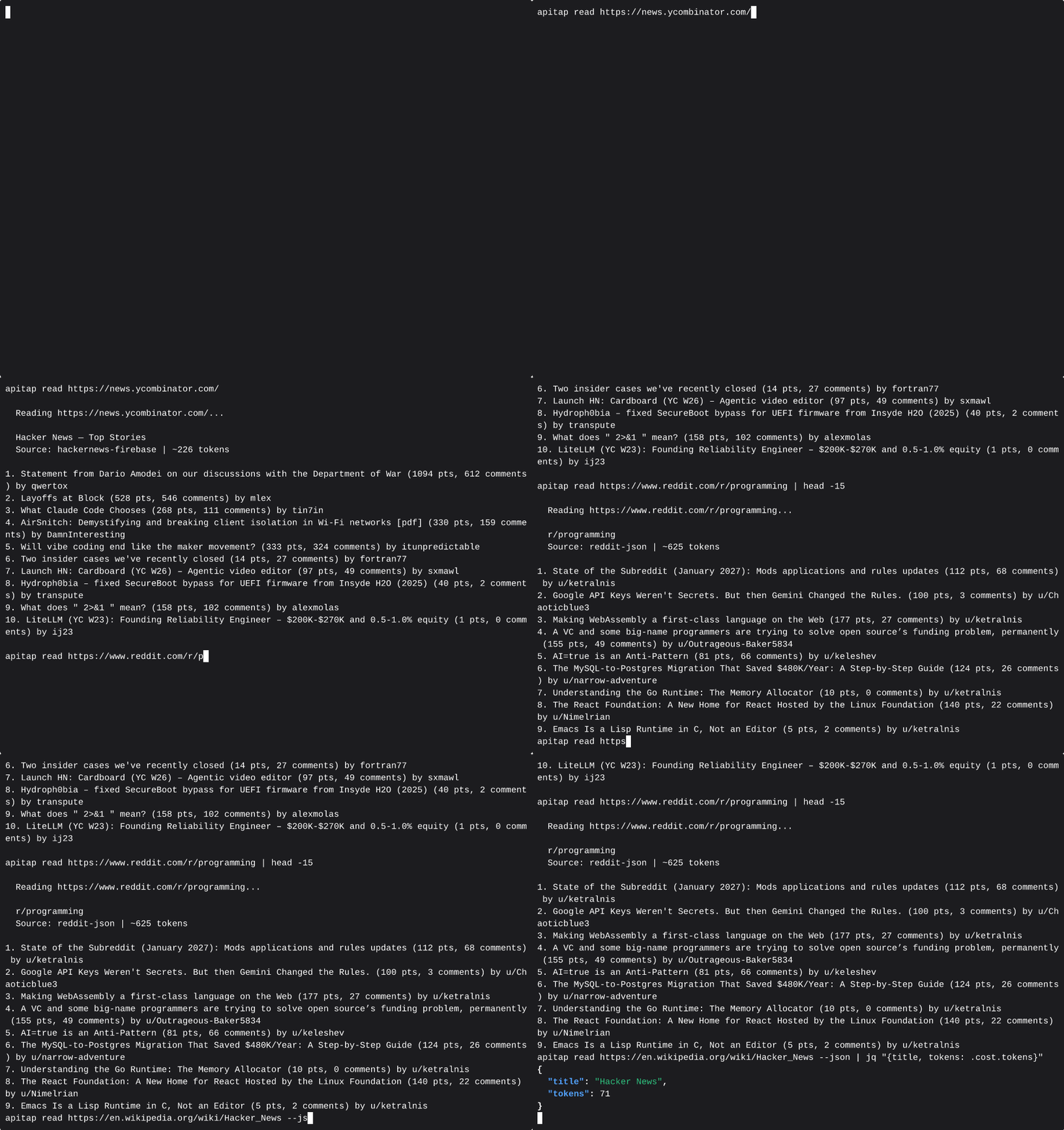
apitap capture https://polymarket.com

# …then replay it forever — no browser in this path
apitap replay gamma-api.polymarket.com get-events

# Read page content without a browser
apitap read https://en.wikipedia.org/wiki/Node.js
  ✓ Wikipedia decoder: ~127 tokens (vs ~4,900 raw HTML)

# Or import published OpenAPI specs directly
apitap import --from apis-guru --search stripe
apitap replay api.stripe.com get-listcharges limit=5
No scraping. No browser. Just the API.
ApiTap has three ways to build its API knowledge:
apitap attach to capture from your already-running Chrome.All three paths produce the same artifact: a skill file — a portable JSON map of an API's endpoints, stored at ~/.apitap/skills/.
Import:   OpenAPI spec → Converter → Merge → skill.json (confidence 0.6-0.85)
Capture:  Browser → CDP listener → Filter → Skill Generator → skill.json (confidence 1.0)
Attach:   Running Chrome → CDP attach → Filter → skill.json (confidence 0.8-1.0)
Replay:   Agent → Replay Engine (skill.json) → fetch() → API → JSON response
                                                ↑ no browser in this path
Every endpoint tracks how it was discovered:
| Source | Confidence | Meaning |
|---|---|---|
| Captured with response body | 1.0 | Full capture — response shape verified |
| OpenAPI import, high quality | 0.85 | Spec has response examples |
| CDP skeleton (real traffic, no body) | 0.8 | Endpoint exists, body was evicted from Chrome buffer |
| OpenAPI import, base | 0.6 | Thin spec, no examples |
Imported endpoints auto-upgrade to confidence 1.0 on first successful replay. The merge is additive — captured data is never overwritten by imports, imports fill gaps that capture missed.
npm install -g @apitap/core
Claude Code — one command to wire it up:
claude mcp add -s user apitap -- apitap mcp
That's it. 12 MCP tools, ready to go. Requires Node.js 20+.
Note:
npx @apitap/core mcpdoes not work due to npm scoped package bin resolution. Usenpx apitap mcporapitap-mcpinstead.
Optional: To use
captureandbrowse(which open a real browser), also run:npx playwright install chromiumThe
read,peek,discover, andimporttools work without it.
Hermes Agent users can install ApiTap as a skill:
hermes skills install n1byn1kt/apitap/skills/hermes/apitap
Or straight from the raw file:
hermes skills install https://raw.githubusercontent.com/n1byn1kt/apitap/main/skills/hermes/apitap/SKILL.md
The skill drives the apitap CLI through Hermes' terminal toolset, so it
needs npm install -g @apitap/core on the machine running Hermes. Once
installed it is also a slash command: /apitap read <url>.
For heavy use, wire the MCP server into config.yaml instead — the skill's
last section has the block.
# Import from the APIs.guru directory (2,500+ public APIs)
apitap import --from apis-guru --limit 100

# Import a specific API by name
apitap import --from apis-guru --search stripe

# Import a single OpenAPI spec from URL
apitap import https://api.apis.guru/v2/specs/stripe.com/2022-11-15/openapi.json

# Import a local spec file (JSON or YAML)
apitap import ./my-api-spec.json

# Skip auth-required APIs (open endpoints only)
apitap import --from apis-guru --limit 500 --no-auth-only

# Preview what would be imported
apitap import --from apis-guru --search twilio --dry-run

# Update previously imported APIs (skip unchanged)
apitap import --from apis-guru --update
Import produces a diff showing what changed:
Importing api.stripe.com from OpenAPI 3.0 spec...

  ✓ 12 existing captured endpoints preserved
  + 34 new endpoints added from OpenAPI spec
  ~ 8 endpoints enriched with spec metadata
  · 0 skipped (already imported)

  Skill file: ~/.apitap/skills/api.stripe.com.json (54 endpoints)
Captured endpoints are never overwritten. Import fills gaps and adds metadata (descriptions, response schemas, query param enums) from the spec.
# Capture from a single domain (default)
apitap capture https://polymarket.com

# Capture all domains (CDN, API subdomains, etc.)
apitap capture https://polymarket.com --all-domains

# Include response previews in the skill file
apitap capture https://polymarket.com --preview

# Stop after 30 seconds
apitap capture https://polymarket.com --duration 30
ApiTap opens a browser window. Browse the site normally — click around, scroll, search. Every API call is captured. Press Ctrl+C when done.
# Launch Chrome with remote debugging enabled
google-chrome --remote-debugging-port=9222

# Attach to your signed-in Chrome — captures all tabs
apitap attach --port 9222

# Filter to specific domains
apitap attach --port 9222 --domain *.github.com

# Ctrl+C to stop — generates signed skill files for each captured domain
No separate browser, no re-login. Captures from your real Chrome sessions with all your cookies and auth tokens. When response bodies are evicted from Chrome's buffer (common on high-traffic pages), skeleton endpoints are written at confidence 0.8 instead of being dropped.
# List all skill files
apitap list
  ✓ api.stripe.com             446 endpoints   5m ago   [imported-signed]
  ✓ gamma-api.polymarket.com     3 endpoints   2h ago   [signed]
  ✓ api.github.com             499 endpoints   1h ago   [imported-signed]

# Show endpoints for a domain
apitap show api.stripe.com
  [ ] GET    /v1/account                    object (22 fields)
  [ ] GET    /v1/charges                    object (4 fields)
  [ ] GET    /v1/customers/:customer        object (30 fields)

# Search across all skill files
apitap search stripe
# Replay with captured defaults
apitap replay gamma-api.polymarket.com get-events

# Override parameters
apitap replay gamma-api.polymarket.com get-events limit=5 offset=10

# Machine-readable JSON output
apitap replay gamma-api.polymarket.com get-events --json
ApiTap includes a text-mode browsing pipeline — peek and read — that lets agents consume web content without launching a browser. Seven built-in decoders extract structured content from popular sites at a fraction of the token cost:
| Site | Decoder | Typical Tokens | vs Raw HTML |
|---|---|---|---|
reddit |
~627 | 93% smaller | |
| YouTube | youtube |
~36 | 99% smaller |
| Wikipedia | wikipedia |
~127 | 97% smaller |
| Hacker News | hackernews |
~200 | 90% smaller |
| Grokipedia | grokipedia |
~150-5000+ | varies by article length |
| Twitter/X | twitter |
~80 | 95% smaller |
| Any other site | generic |
varies | ~74% avg |
Average token savings: 74% across 83 tested domains.
# Triage first — zero-cost HEAD request
apitap peek https://reddit.com/r/programming
  ✓ accessible, recommendation: read

# Extract content — no browser needed
apitap read https://reddit.com/r/programming
  ✓ Reddit decoder: 12 posts, ~627 tokens

# Works for any URL — falls back to generic HTML extraction
apitap read https://example.com/blog/post
For MCP agents, apitap_peek and apitap_read are the fastest way to consume web content — use them before reaching for apitap_browse or apitap_capture.
--max-bytes--max-bytes (MCP: maxBytes) is a hard cap on the full serialized response envelope, not just on the data or content field. It applies uniformly across apitap replay, apitap browse, and apitap read (including every built-in decoder — Wikipedia, Hacker News, Reddit, etc.), so a bounded call returns a bounded envelope no matter which path served it.
apitap replay gamma-api.polymarket.com get-events --json -
