AutoQA-Agent





A "Docs-as-Tests" automated acceptance testing CLI tool based on Claude Agent SDK + Playwright.
Current Status: Core capabilities of Epic 1-7 have been implemented:
autoqa initinitialization,autoqa runexecution loop, assertions + self-healing guardrails, action IR recording with automatic export to@playwright/testcases, intelligent web application exploration (autoqa plan-explore), automated test plan generation (autoqa plan-generate), and comprehensive configuration support with enhanced CLI.
📖 Table of Contents
- Overview
- Quick Start
- How It Works
- AutoQA Agent vs Playwright Codegen
- Implemented Features
- Usage Guide
- Configuration
- Usage Examples
- Artifacts
- Development Guide
- Roadmap
- Contributing
- License
Overview
Built with BMAD-METHOD: This project is developed using the Breakthrough Method for Agile AI-Driven Development, featuring 21 specialized AI agents and structured workflows that scale from bug fixes to enterprise platforms.
AutoQA-Agent is an innovative automated testing tool that enables QA and product managers to write acceptance tests in natural language Markdown, which are directly converted into executable test flows.
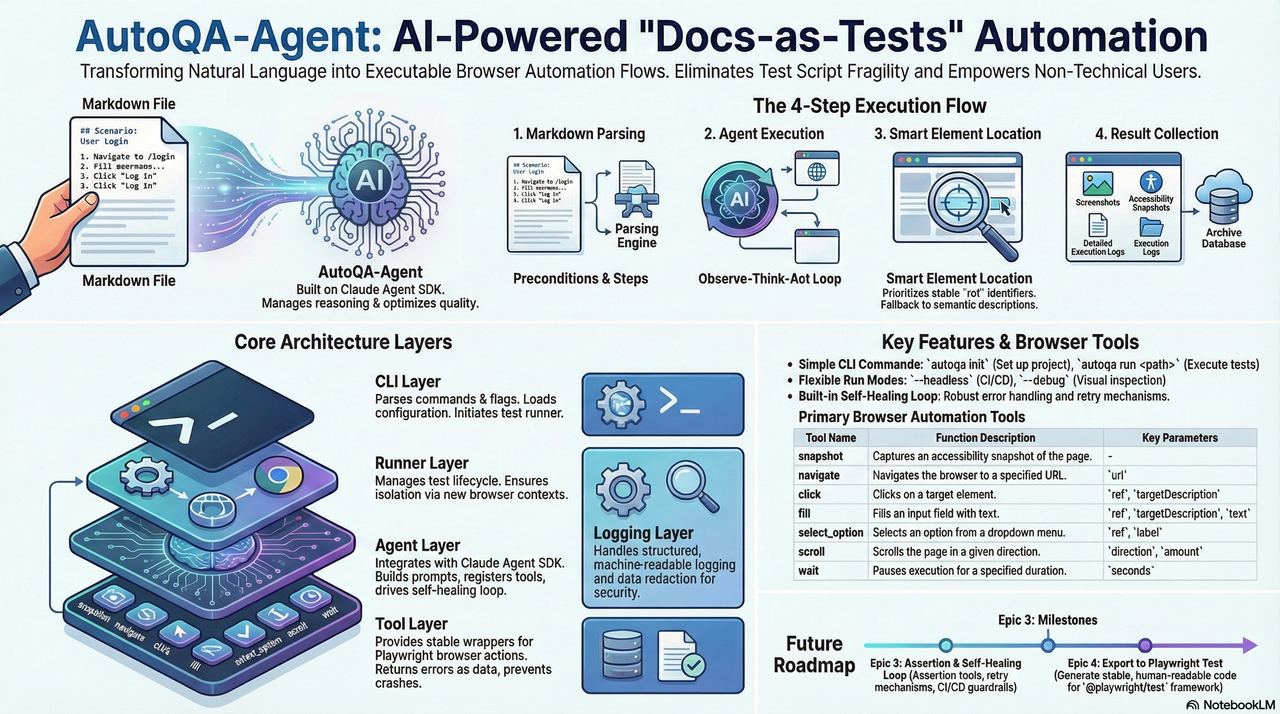
For more detailed architecture boundaries and constraints, please refer to docs/architecture.md.
Core Objectives
- Eliminate Script Fragility: Reduce test maintenance costs caused by minor UI changes through intelligent locator strategies
- Docs as Tests: Write test cases in Markdown, allowing non-technical personnel to participate in test writing
- Lightweight Agent Architecture: Rely on Claude Agent SDK to manage reasoning loops, focusing on optimizing browser tool quality
Quick Start
Prerequisites
- Node.js >= 20
- npm or yarn
- Claude Code authorized (recommended) or set
ANTHROPIC_API_KEY
Note: Since Agent SDK requires a Claude Code subscription account or API key which can be costly, you may consider using GLM Coding Plan (first month only ¥100, API call count basically unlimited) as an alternative.
Installation
# Option 1: Install from NPM (Recommended)
npm install -g autoqa-agent

# Option 2: Install from Source
git clone https://github.com/terryso/AutoQA-Agent.git
cd AutoQA-Agent

# Install dependencies
npm install

# Build project
npm run build

# Global installation (optional)
npm link
Initialize Project
# Initialize configuration
autoqa init

# This will create:
# - autoqa.config.json - Configuration file
# - specs/ - Test case directory
# - specs/login-example.md - Example Markdown case (created if not exists)
Run Your First Test
# Run a single test (built-in example)
autoqa run specs/saucedemo-01-login.md --url https://www.saucedemo.com/

# Run all tests in directory
autoqa run specs/ --url https://www.saucedemo.com/

# Debug mode (show browser interface)
autoqa run specs/saucedemo-01-login.md --url https://www.saucedemo.com/ --debug
How It Works
flowchart TD
    A["Markdown Test Case"] --> B["Parser<br/>Extract Preconditions & Steps"]
    B --> C["Claude Agent SDK<br/>ReAct Loop Execution"]
    C --> D["MCP Browser Tools<br/>snapshot/navigate/click/fill"]
    D --> E["Playwright Engine<br/>Actual Browser Operations"]
    E --> F["Artifacts<br/>Screenshots/Snapshots/Logs/Traces"]
    E --> G["Action IR<br/>.autoqa/runs/<runId>/ir.jsonl"]
    G --> H["Export Code<br/>tests/autoqa/*.spec.ts"]

    style A fill:#e3f2fd,stroke:#2196f3,color:#0d47a1
    style B fill:#f3e5f5,stroke:#9c27b0,color:#4a148c
    style C fill:#e8eaf6,stroke:#3f51b5,color:#1a237e
    style D fill:#fff3e0,stroke:#ff9800,color:#e65100
    style E fill:#e8f5e9,stroke:#4caf50,color:#1b5e20
    style F fill:#fce4ec,stroke:#e91e63,color:#880e4f
    style G fill:#f1f8e9,stroke:#7cb342,color:#33691e
    style H fill:#e0f7fa,stroke:#00acc1,color:#004d40
Execution Flow
- Markdown Parsing: Extract preconditions and test steps
- Agent Execution: Claude Agent SDK manages "observe-think-act" loop
- Intelligent Locating: Prioritize stable ref references, fallback to semantic descriptions on failure
- Assertions & Self-Healing: Execute assertion tools for Verify/Assert steps; flow back error context for retry on failure, limited by guardrails
- Result Collection: Automatically record screenshots, snapshots, traces, and structured logs
- Persistence & Export: Record action IR, and automatically export
@playwright/testcases totests/autoqa/after spec success
Architecture Overview
flowchart TD
    %% Main CLI Layer
    CLI["autoqa CLI"] --> Plan["Plan Commands"]
    CLI --> Run["Run Command"]
    CLI --> Init["Init Command"]

    %% Plan Command Architecture
    Plan --> Explore["explore"]
    Plan --> Generate["generate"]
    Plan --> Full["explore + generate"]

    %% Exploration Flow
    Explore --> Config["Configuration Loading"]
    Config --> Browser["Browser Creation"]
    Browser --> ExploreAgent["Explore Agent"]
    ExploreAgent --> ExploreTools["Planning Tools"]
    ExploreTools --> ExploreOutput["Exploration Artifacts"]

    %% Generation Flow
    Generate --> ExploreOutput
    Generate --> PlanAgent["Plan Agent"]
    PlanAgent --> TestPlan["Test Plan Generation"]
    TestPlan --> SpecOutput["Markdown Specs"]

    %% Configuration Layer
    Config --> ConfigFile["autoqa.config.json"]
    Config --> CliOptions["CLI Options"]
    Config --> Defaults["Default Values"]

    %% Browser & Tools Layer
    Browser --> Playwright["Playwright Engine"]
    ExploreTools --> BrowserTools["Browser Tools"]
    ExploreTools --> PlannerTools["Planner Tools"]

    %% Output Layer
    ExploreOutput --> ExploreGraph["Navigation Graph"]
    ExploreOutput --> Elements["Element Inventory"]
    ExploreOutput --> Transcript["Exploration Transcript"]

    SpecOutput --> MarkdownFiles["*.md Test Files"]
    SpecOutput --> TestPlanJson["test-plan.json"]

    %% Styling
    style CLI fill:#e3f2fd,stroke:#2196f3,color:#0d47a1
    style Plan fill:#f3e5f5,stroke:#9c27b0,color:#4a148c
    style Run fill:#e8f5e9,stroke:#4caf50,color:#1b5e20
    style Init fill:#fff3e0,stroke:#ff9800,color:#e65100
    style Explore fill:#e8eaf6,stroke:#3f51b5,color:#1a237e
    style Generate fill:#f1f8e9,stroke:#7cb342,color:#33691e
    style Config fill:#fce4ec,stroke:#e91e63,color:#880e4f
    style Browser fill:#e0f7fa,stroke:#00acc1,color:#004d40
    style ExploreAgent fill:#fff8e1,stroke:#ffc107,color:#f57c00
    style PlanAgent fill:#f9fbe7,stroke:#cddc39,color:#827717
    style ExploreOutput fill:#f3e5f5,stroke:#9c27b0,color:#4a148c
    style SpecOutput fill:#e8f5e9,stroke:#4caf50,color:#1b5e20
Plan Command Structure
flowchart LR
    subgraph "Plan Commands"
        Direction["Input Selection"]

        subgraph "Exploration Phase"
            StartURL["Start URL"]
            ExploreDepth["Depth: 1-10"]
            PageLimit["Max Pages"]
            Navigation["Navigation Graph"]
            ElementDiscovery["Element Discovery"]
        end

        subgraph "Generation Phase"
            TestTypes["Test Types"]
            PlanGeneration["Test Plan"]
            MarkdownSpecs["Markdown Specs"]
        end

        subgraph "Output Artifacts"
            GraphFile["navigation-graph.json"]
            ElementsFile["elements.json"]
            TranscriptFile["transcript.jsonl"]
            TestPlanFile["test-plan.json"]
            SpecFiles["specs/*.md"]
        end
    end

    Direction --> ExplorePhase
    Direction --> GeneratePhase

    ExplorePhase --> OutputArtifacts
    GeneratePhase --> OutputArtifacts

    style Direction fill:#e3f2fd,stroke:#2196f3,color:#0d47a1
    style ExplorePhase fill:#f3e5f5,stroke:#9c27b0,color:#4a148c
    style GeneratePhase fill:#e8f5e9,stroke:#4caf50,color:#1b5e20
    style OutputArtifacts fill:#fff3e0,stroke:#ff9800,color:#e65100
AutoQA Agent vs Playwright Codegen
AutoQA Agent represents the next evolution in automated testing, going beyond traditional code generation tools like Playwright's codegen:
| Feature | Playwright Codegen | AutoQA Agent | Assessment |
|---|---|---|---|
| Selector Priority | 5-layer priority strategy | 7-layer priority strategy | 🏆 AutoQA more comprehensive |
| AI Integration | Basic AI assistance | Claude Agent SDK | 🏆 AutoQA more advanced |
| Event Capture | Browser injection listening | Agent active exploration | 🏆 AutoQA more intelligent |
| Test Planning | No planning features | AI-driven planning | 🏆 AutoQA unique feature |
| Self-Healing | Limited smart retry |