blenderwright
Formerly blend-ai. Same project, new name, nothing else changed.
The most intuitive and efficient MCP Server for Blender. Control Blender entirely through AI assistants like Claude: create 3D models, set up scenes, animate, render, and more, all through natural language.
blenderwright goes beyond tool exposure: it guides the LLM to produce professional 3D results through expert prompts, proven workflows, visual feedback, and mesh quality analysis.
A shuttle launch from two questions: "do you want to have a go at the space shuttle launch?" and then "could you animate the launch?" Claude Code (Fable 5.1) modelled the orbiter, tank, boosters and service tower, lit the plumes as emissive volumes and grew the exhaust cloud from metaballs. Keyframes lift the stack and tilt the camera after it, drivers stream the plumes and boil the smoke, and all 60 Cycles frames come back from a single render_animation call, all through blenderwright with no manual modelling:

Watch it with sound. Launch audio courtesy of NASA: STS-131, "Sound of Launch."
The still it grew from, modelled and rendered in under twenty minutes:

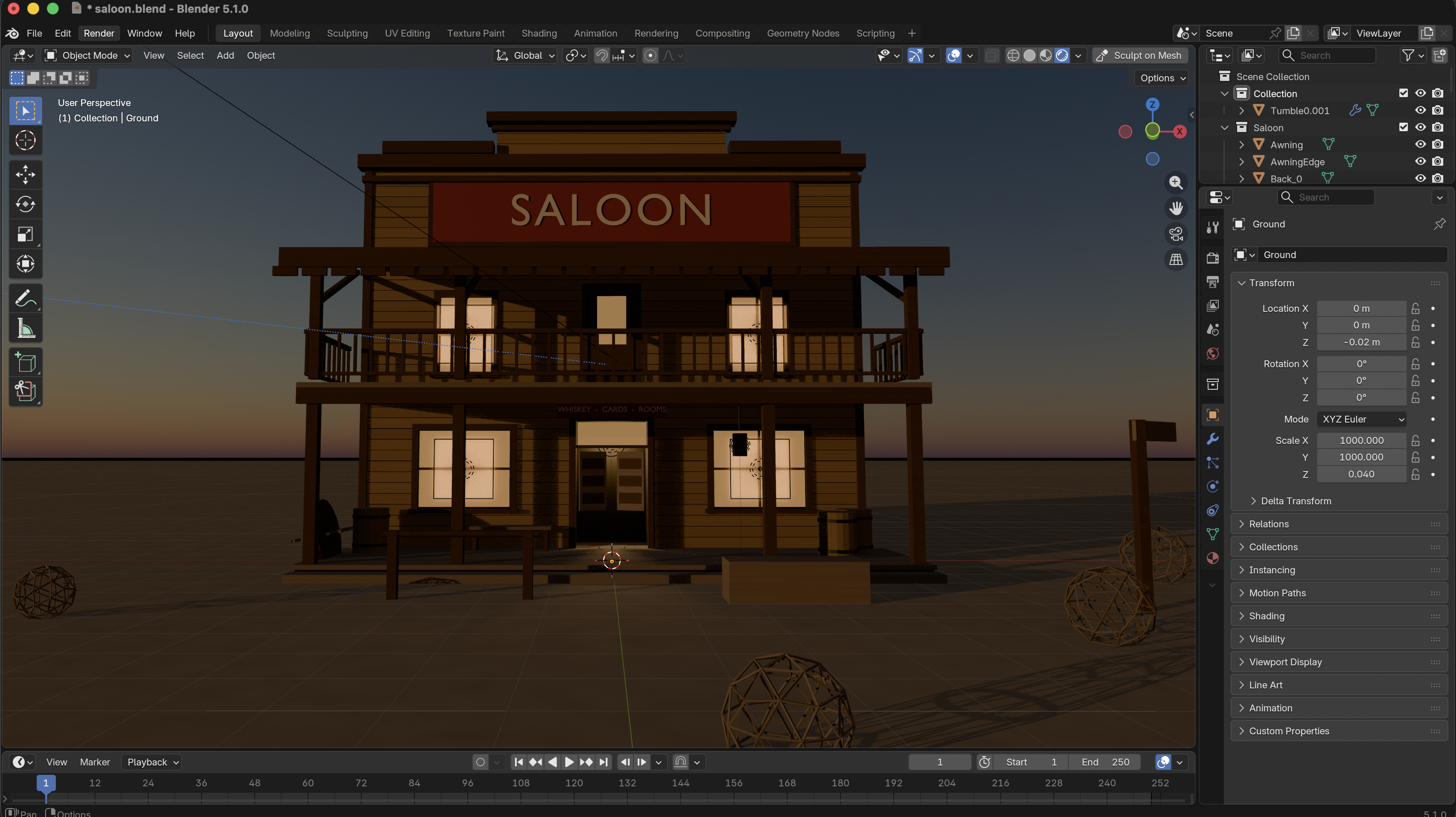
A two-storey Western saloon from a single sentence: "create a Western style 2-story saloon, the outside is more important than any inside detail." Claude Code (Fable 5.1) built the false front, plank siding, balcony, batwing doors and street dressing, then relit it for dusk, all through blenderwright, in about twenty minutes with no manual modelling:
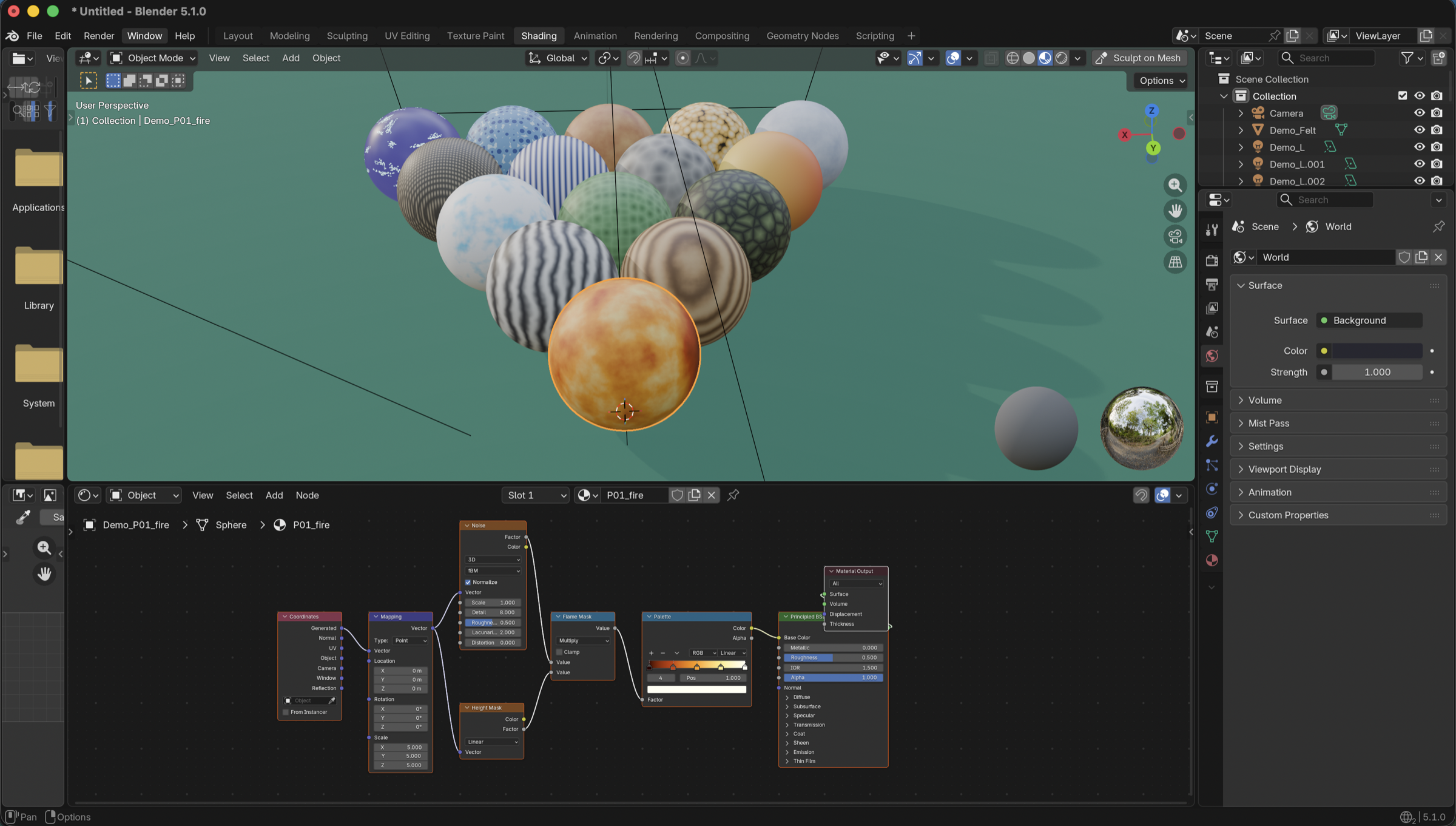
Fifteen procedural materials, each built by a single create_procedural_material call. The selected ball's node graph below was generated entirely by that one call: coordinates, mapping, noise, height mask, colour ramp, and Principled BSDF, laid out and wired:
Key Features
- 191 tools across 28 modules covering every major Blender domain: modeling, mesh editing, materials, shader nodes, lighting, camera, animation, rendering, sculpting, UV mapping, physics, geometry nodes, rigging, curves, sweeps along a path, 3D-print checking, annotations, collections, file I/O, Bool Tool, viewport control, mesh quality analysis, and extension suggestions
- 12 expert prompts: topology best practices, real-world scale references, lighting principles, studio setup, character basemesh workflow, PBR material guide, auto-critique feedback loop, and more
- Visual feedback loop: fast viewport screenshots via OpenGL render (~ms, not seconds) with auto-critique prompts that guide the LLM to check its own work
- Mesh quality analysis: structured reports covering non-manifold edges, loose vertices, zero-area faces, duplicate vertices, and wire edges
- Extension suggestions: proactively recommends Bool Tool, LoopTools, and Node Wrangler when a task would benefit from them (skips already-installed extensions)
- Sandboxed code execution:
execute_blender_codeblocks dangerous imports (os,subprocess,socket, etc.) and dangerous builtins (exec,eval,open) while allowing safe Blender operations - Render-aware: automatically detects when Blender is rendering and queues commands. Recovers from stuck render guards via
load_posthandler and reset command - Blender 4.2+ compatible: ships as a Blender Extension; tested against Blender 5.1 with EEVEE identifier, Annotation API, sculpt stroke_method, SLIM UV unwrap, Raycast shader node, and EEVEE light path intensity controls
- Custom port: configure the server port from the N-panel UI (default: 9876, range: 1024–65535)
- Zero telemetry: no usage tracking, no analytics, no data collection. Everything runs locally on
127.0.0.1 - Zero-dependency addon: the Blender addon uses only Python stdlib +
bpy. Nothing to pip install inside Blender - Thread-safe architecture: background TCP server with queue-based main-thread execution, TCP keepalive for stale connection detection
- 1190 tests: coverage across tools, handlers, validators, prompts, and the cross-platform installer (ubuntu/macos/windows × py3.11/3.13 in CI)
Quickstart
1. Install the MCP server
Nothing to install. With uv on your machine, uvx blenderwright fetches the server from PyPI and runs it; every client config below uses that one command. Prefer pip? pip install blenderwright gives you a blenderwright command instead.
git clone https://github.com/HoldMyBeer-gg/blenderwright.git
cd blenderwright
uv pip install -e .
Then point your client at uv run --directory /path/to/blenderwright blenderwright instead of uvx blenderwright.
2. Install the Blender addon
- Download the latest addon zip from GitHub Releases
- Open Blender 4.2 or later
- Go to Edit > Preferences > Get Extensions, click the dropdown (▾) top-right, and choose Install from Disk...
- Select the downloaded
.zipfile - Enable "blenderwright" in the extensions list
Blender 4.0 / 4.1 users: Not supported. blenderwright ships as a Blender Extension, which requires Blender 4.2 (LTS) or later. Please upgrade Blender from blender.org/download.
If you're developing on blenderwright, symlink the addon folder into Blender's user extensions directory instead. Replace <ver> with your Blender version (e.g. 4.2, 5.1).
# macOS
ln -s "$(pwd)/addon" ~/Library/Application\ Support/Blender/<ver>/extensions/user_default/blenderwright

# Linux
ln -s "$(pwd)/addon" ~/.config/blender/<ver>/extensions/user_default/blenderwright

# Windows (run as admin)
mklink /D "%APPDATA%\Blender Foundation\Blender\<ver>\extensions\user_default\blenderwright" "%cd%\addon"
Then enable the extension in Blender preferences under Get Extensions > User.
3. Start the server in Blender
In Blender's 3D Viewport, open the N-panel (press N), find the blenderwright tab. Set your preferred port (default: 9876), then click Start Server.
4. Connect your AI assistant
claude mcp add blenderwright -- uvx blenderwright
Make sure Blender is running with the addon server started before using the tools.
Usage:
$ claude

> Create a red metallic sphere on a white plane with three-point lighting

> Add a subdivision surface modifier to the sphere and set it to level 3

> Analyze the mesh quality of the sphere and fix any issues

> Set up a turntable animation and render it to /tmp/turntable/
Add blenderwright to your Claude Desktop config (~/Library/Application Support/Claude/claude_desktop_config.json on macOS):
{
  "mcpServers": {
    "blenderwright": {
      "command": "uvx",
      "args": ["blenderwright"]
    }
  }
}
Restart Claude Desktop. The Blender tools will appear in the tool list.
blenderwright is a standard MCP server using stdio transport. Any MCP-compatible client can connect by running the server directly:
uvx blenderwright
# or, after pip install blenderwright: blenderwright
The exact config location and format vary by client (typically JSON or TOML under ~/.<client>/). The command is uvx and the args are ["blenderwright"].
The server communicates over stdin/stdout using the MCP protocol. It connects to Blender's addon over TCP on 127.0.0.1:9876 (or your configured port).
Updating
Whichever way you installed, Blender must be fully restarted, not "Reload Scripts". The addon runs a background TCP server thread that survives a script reload, so reloading leaves a stale handler registered and the old socket still bound.
One command (zip installs)
python install_addon.py upgrade
With no argument it finds your Blender installations and offers them as a numbered list, so there is no path to get wrong. You can still pass one explicitly:
# macOS - the binary inside the bundle, not the .app itself
python install_addon.py upgrade /Applications/Blender.app/Contents/MacOS/Blender

# Linux
python install_addon.py upgrade /usr/local/bin/blender

# Windows
python install_addon.py upgrade "C:\Program Files\Blender Foundation\Blender 4.2\blender.exe"
It refuses to run while Blender is open, checks the path before touching anything,
removes every blenderwright install across all Blender version directories, rebuilds the
zip from addon/, and installs it through Blender's own extension machinery. It also
handles the case that bites people most: an older copy left behind under a previous
Blender version.
Two companion commands:
python install_addon.py doctor          # list every blenderwright install found, and where
python install_addon.py uninstall --yes # remove them all (omit --yes for a dry run)
Start with doctor if the addon is behaving strangely: a duplicate install under an
old Blender version is the usual cause