Maintainer of this skill?

Automated security scan — not a certification.
Open-source, multi-platform harness for AI agents - a native, multi-threaded operator's console (JVM, not Electron) to run Claude Code, Codex, Gemini or OpenCode with a real browser, terminal, editor, secrets & 200+ MCP tools. Built for enterprises, science & research.
# Add to your Claude Code skills
git clone https://github.com/risa-labs-inc/BossConsoleLast scanned: 7/25/2026
{
  "issues": [
    {
      "file": "README.md",
      "line": 93,
      "type": "remote-install",
      "message": "Install command (remote install script piped to a shell — review the source before running): \"curl -fsSL https://raw.githubusercontent.com/risa-labs-inc/BossConsole-Releases/\"",
      "severity": "low"
    }
  ],
  "status": "PASSED",
  "scannedAt": "2026-07-25T06:18:07.418Z",
  "npmAuditRan": true,
  "pipAuditRan": true,
  "promptInjectionRan": true
}See how BossConsole compares with popular alternatives.
BossConsole is an open-source ai agents skill for AI coding assistants such as Claude Code, Codex CLI, and ChatGPT, built by risa-labs-inc. Open-source, multi-platform harness for AI agents - a native, multi-threaded operator's console (JVM, not Electron) to run Claude Code, Codex, Gemini or OpenCode with a real browser, terminal, editor, secrets & 200+ MCP tools. Built for enterprises, science & research. It has 818 GitHub stars.
Yes. BossConsole passed SkillsLLM's automated security scan — a dependency vulnerability audit plus prompt-injection heuristics — with no high-severity issues. You can read the full report in the Security Report section on this page.
Clone the repository with "git clone https://github.com/risa-labs-inc/BossConsole" and add it to your Claude Code skills directory (see the Installation section above).
BossConsole is primarily written in Kotlin. It is open-source under risa-labs-inc on GitHub, so you can review or fork the full source.
Yes. SkillsLLM lists many other AI Agents skills you can browse and compare side by side. Open the AI Agents category from the badge at the top of this page, or use the Related Skills and comparison links further down to weigh BossConsole against similar tools.
No comments yet. Be the first to share your thoughts!
30 days in the Featured rail · terms & refunds
⚠️ Third-Party Software Notice
This skill is third-party open-source software developed and hosted independently on GitHub. SkillsLLM is an informational directory and does not control or maintain the underlying repository.
Any security checks, ratings, or warnings displayed by SkillsLLM are automated and limited in scope. They do not constitute a security certification or guarantee that the software is safe, error-free, or free from malicious code, vulnerabilities, compromised dependencies, or prompt-injection risks.
Review the source code, permissions, dependencies, and configuration before installing or running any third-party skill. Use is at your own risk. To the maximum extent permitted by applicable law, SkillsLLM is not liable for losses arising from third-party software.
Automated security scan — not a certification.
Create your own always-on agent with a real browser, terminal, editor, and an extensible toolbox. Choose its tools, keep it running in BOSS, and follow its work from anywhere.
Chat with your Fluck agents at fluck.ai. Open shared terminals and BOSS windows at cli.risaboss.com.
▶ Watch the 64-second film · Download BOSS · Explore the wiki · Open live sessions


Product website · Visual walkthrough · Contribute
Create an always-on agent around the work your business does. BOSS brings the browser, terminal, editor, and plugins together so you can build an agent for your team and customers.
Ask Optimist is an always-on healthcare agent for doctors and patients, built on BOSS.
Want early access to an always-on agent for your business? Connect with us at enterprise@risalabs.ai and tell us what you want to build.
Keep the page you are researching beside the agent working on it. Run commands, inspect files, review changes, and arrange everything into split panes and saved Spaces.
BOSS runs on the JVM with Kotlin and Compose Multiplatform. Its browser, terminal, editor, and other tools come from dynamic plugins, so the workspace can grow with the work.
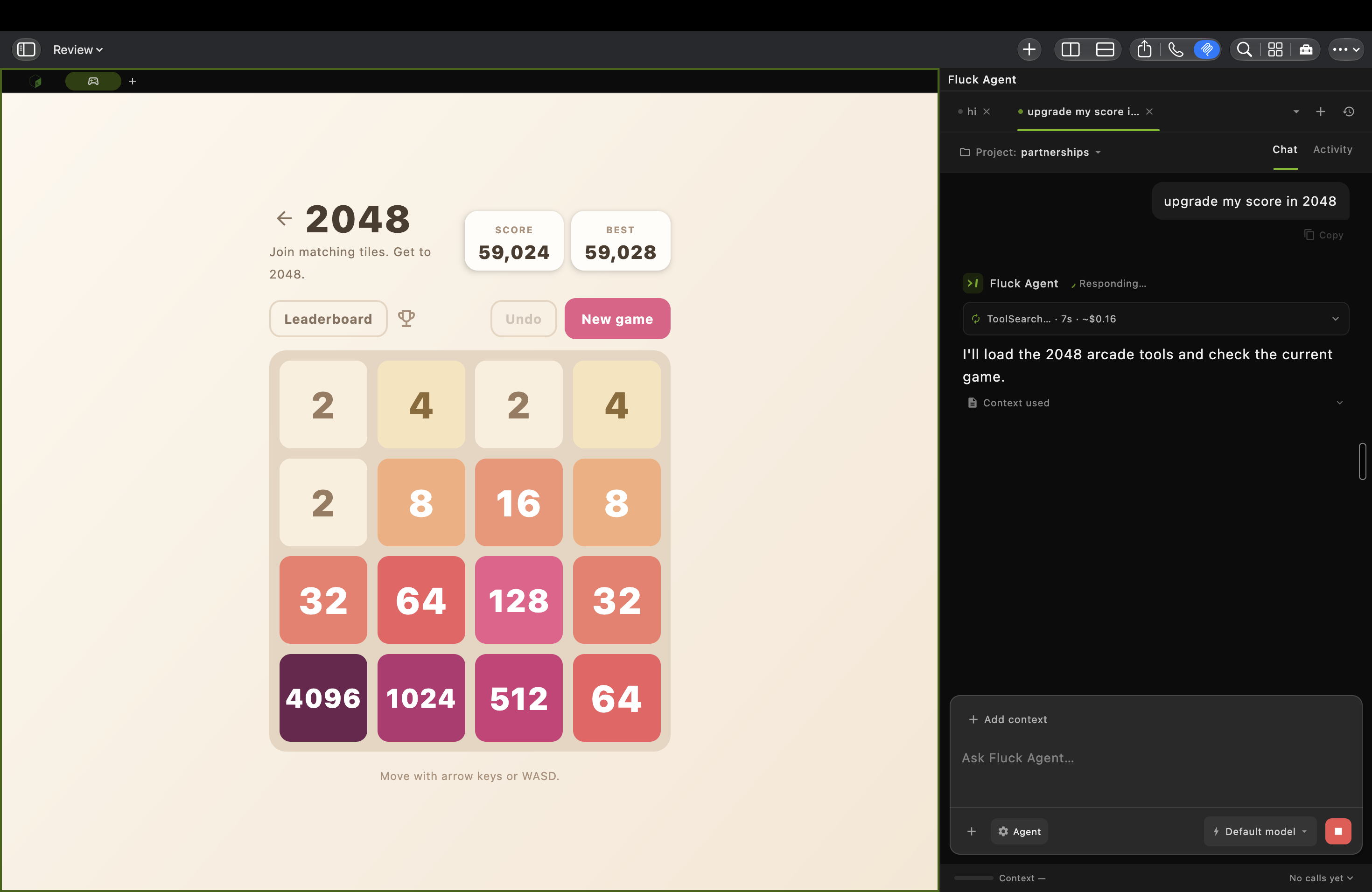
A real macOS workspace: a 2048 board beside Fluck Agent looking up tools. This capture shows work in progress.
| Browse | Build | Organize |
|---|---|---|
| Fluck Browser brings real webpages into the workspace, with agent tools for navigation and page interaction. | BossTerm + BossEditor put commands and code beside the task. Add Git, run configurations, and logs from Toolbox. | Spaces + split panes keep projects and activities together. Save layouts and move between tasks. |
Explore Spaces and everyday use →
Use Fluck Agent in BOSS to create an agent for your projects and everyday work. Give it access to the browser, terminal, editor, and plugins it needs, then keep BOSS and the agent running on a machine that stays online.
Return to your Fluck agents from another device at fluck.ai. To inspect or control shared terminal sessions and BOSS windows, sign in at cli.risaboss.com with the same BOSS account. Available access depends on your sharing settings.
Claude Code · Codex · Gemini CLI · OpenCode
Bring the CLI you already use. Open a BOSS terminal, connect it through Toolbox → MCP or the BossTerm AI menu, and choose which BOSS tools it can call. The local boss MCP server discovers tools from active plugins, including browser, terminal, editor, Git, and automation tools.
An agent can inspect the running workspace and act in it: read a terminal's output, open a file, navigate a browser tab, or run a command. The available tools depend on your installed plugins and access settings.
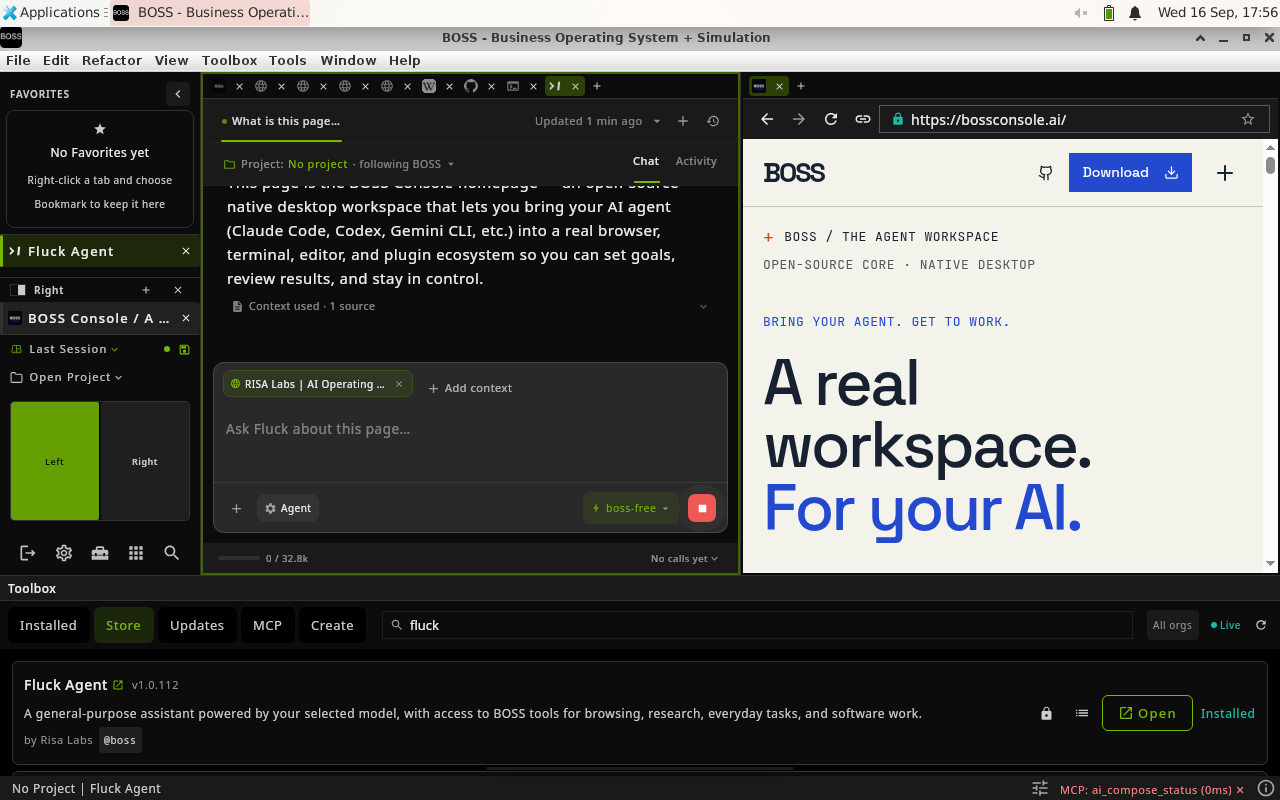
1. Give the agent context. In this Fluck Agent example, the current BOSS webpage is attached to the conversation while staying visible in the neighboring pane.
These three product captures show BOSS 9.5.19 on Linux. The current release may look different.
Connect your agent → · See the complete walkthrough →
Install the tools you need from the built-in Toolbox. Browse plugins, manage updates, enable or disable tools, and customize the workspace around your project.
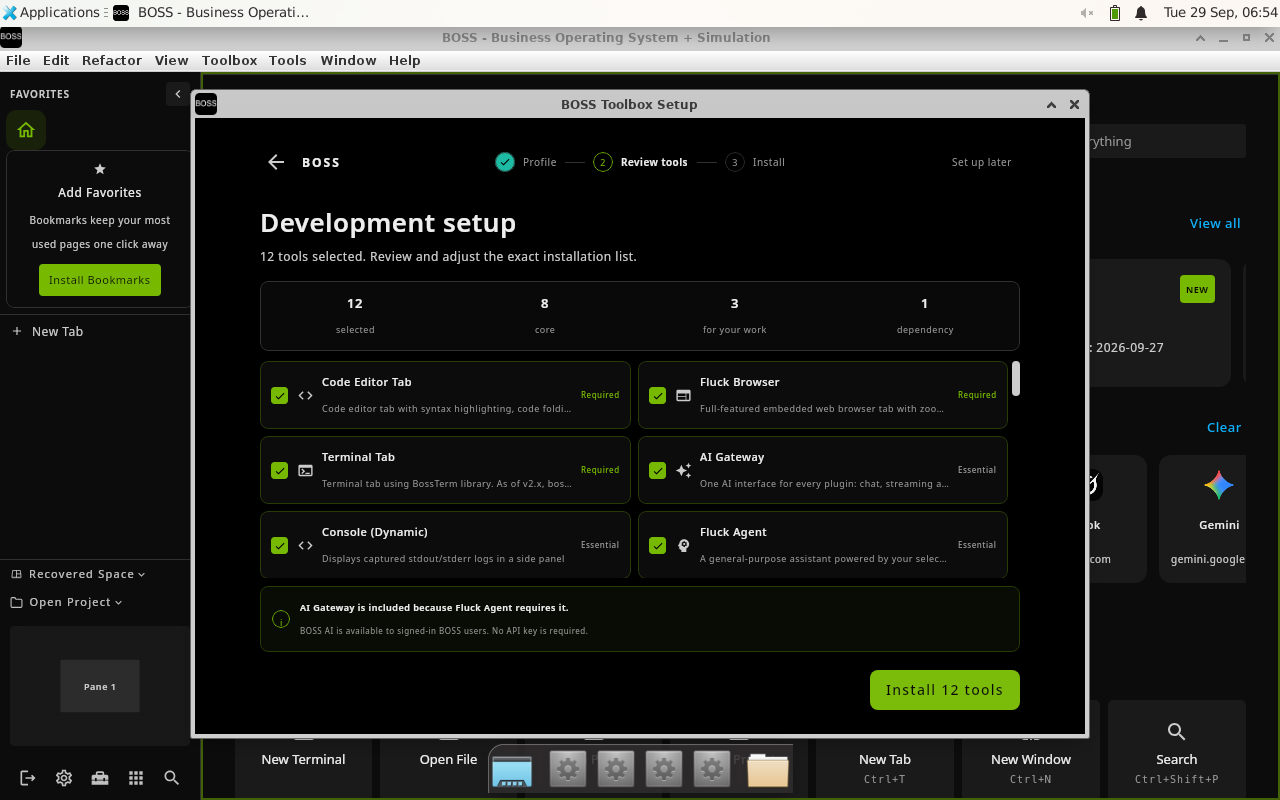
Development setup in BOSS 9.5.32 on Linux: review the selected tools before installing them.
Start with a browser, terminal, and editor. Add Docker or Kubernetes for infrastructure, notebooks for research, automation for repeatable browser work, or your own plugin.
Tool Creator scaffolds a plugin project. Tool Evolver helps inspect and improve an existing tool. Many plugins hot-reload while the host stays open; infrastructure updates can require a restart.
Discover and manage plugins → · Create and publish a plugin → · Developer CLI → · Browse the ecosystem →
Sign in with the same BOSS account to find your shared sessions. The portal separates terminals from application windows, so you can open the kind of session you need.
| BossTerm live sessions | BossConsole live sessions |
|---|---|
| Open shared terminals from standalone BossTerm or BossConsole. View output or control the terminal according to the share's access settings. | View and control a shared BOSS window from a browser or another BossConsole. One controller holds the input lease at a time. |
| BossTerm also offers View and Control links with QR codes for sharing to a phone or another device. | Full-window hosting is currently a macOS 14+ preview and needs Screen Recording permission. Desktop BOSS itself also supports Windows and Linux. |
Full-window sharing publishes one encrypted video stream per window through Cloudflare Realtime SFU for multiple viewers, with encrypted remote-control messages. Same-account access and automatic control are enabled by default for fresh preferences; saved opt-outs are preserved. The account backend remains trusted for admission and key delivery.
Sharing setup, access settings, and protocol diagram →
Choose the tool access that fits the task through Toolbox → MCP.
These controls apply to calls through BOSS. They do not sandbox an external agent, and plugins run in the host process. Disabling a tool does not cancel work already authorized. An authorized page or tool receiving a secret can still expose it.
Security and privacy → · Secret-reference guarantees → · **[Infrastructure plugin audit →](docs/INFRASTRUCTU
