Maintainer of this skill?

Automated security scan — not a certification.
by imshaikot
An agentic browser harness: an AI side panel & orb in your own logged-in Chrome, Edge, Arc, Brave or even Firefox run by the agent/subscription you already use (Claude Code, Codex, Antigravity). Free, open source, no API key. Also an MCP server.
# Add to your Claude Code skills
git clone https://github.com/imshaikot/browsenticLast scanned: 10/27/2026
{
  "issues": [
    {
      "file": "README.md",
      "line": 53,
      "type": "remote-install",
      "message": "Install command (remote install script piped to a shell — review the source before running): \"curl -fsSL https://browsentic.com/install.sh | sh\"",
      "severity": "low"
    }
  ],
  "status": "PASSED",
  "scannedAt": "2026-10-27T09:38:19.718Z",
  "npmAuditRan": false,
  "pipAuditRan": true,
  "promptInjectionRan": true
}See how browsentic compares with popular alternatives.
browsentic is an open-source ai agents skill for AI coding assistants such as Claude Code, Codex CLI, and ChatGPT, built by imshaikot. An agentic browser harness: an AI side panel & orb in your own logged-in Chrome, Edge, Arc, Brave or even Firefox run by the agent/subscription you already use (Claude Code, Codex, Antigravity). Free, open source, no API key. Also an MCP server. It has 186 GitHub stars.
Yes. browsentic passed SkillsLLM's automated security scan — a dependency vulnerability audit plus prompt-injection heuristics — with no high-severity issues. You can read the full report in the Security Report section on this page.
Clone the repository with "git clone https://github.com/imshaikot/browsentic" and add it to your Claude Code skills directory (see the Installation section above).
browsentic is primarily written in TypeScript. It is open-source under imshaikot on GitHub, so you can review or fork the full source.
Yes. SkillsLLM lists many other AI Agents skills you can browse and compare side by side. Open the AI Agents category from the badge at the top of this page, or use the Related Skills and comparison links further down to weigh browsentic against similar tools.
No comments yet. Be the first to share your thoughts!
30 days in the Featured rail · terms & refunds
⚠️ Third-Party Software Notice
This skill is third-party open-source software developed and hosted independently on GitHub. SkillsLLM is an informational directory and does not control or maintain the underlying repository.
Any security checks, ratings, or warnings displayed by SkillsLLM are automated and limited in scope. They do not constitute a security certification or guarantee that the software is safe, error-free, or free from malicious code, vulnerabilities, compromised dependencies, or prompt-injection risks.
Review the source code, permissions, dependencies, and configuration before installing or running any third-party skill. Use is at your own risk. To the maximum extent permitted by applicable law, SkillsLLM is not liable for losses arising from third-party software.
Automated security scan — not a certification.
https://github.com/user-attachments/assets/d5407fc3-be1f-4b1d-8f88-afb7468ec917
No account · No auth · No API key · No cloud · No telemetry · Local first
Your real, logged-in browser, driven from an AI side panel by the agent CLI you already have. Also an optional MCP server, so any MCP client can drive the same browser.
Browsentic is your browser's superpower, free and open source. One install sets up everything, the extension included.
macOS: one line installs the app, which brings Node and everything else:
curl -fsSL https://browsentic.com/install.sh | sh
Windows: one line in PowerShell installs the Windows app (experimental):
irm https://browsentic.com/install.ps1 | iex
Any platform, with Node.js 20 or newer:
npx browsentic@latest setup
Setup asks which browser you use and opens Browsentic's store page in it (the apps do the same from their Overview tab). Press Add to Chrome (Add in Firefox; Edge first asks you to allow extensions from other stores), and the extension connects to Browsentic Bridge by itself; if it asks for a code, enter the one setup shows. From then on it updates itself from its store.
The extension is on the Chrome Web Store for Chrome, Brave, Arc, Vivaldi and Opera, on Edge Add-ons for Edge, and Firefox gets an add-on signed by Mozilla:
If you added the extension from a store first, run the same line, and the two connect as soon as the Bridge is in place.
The side panel runs on an agent CLI you are signed in to: Claude Code, Codex or another supported one. It uses the one you already have, so there is no API key, no account and no extra subscription.
Full guide, Firefox and unpacked installs included: browsentic.com/docs/guide/install
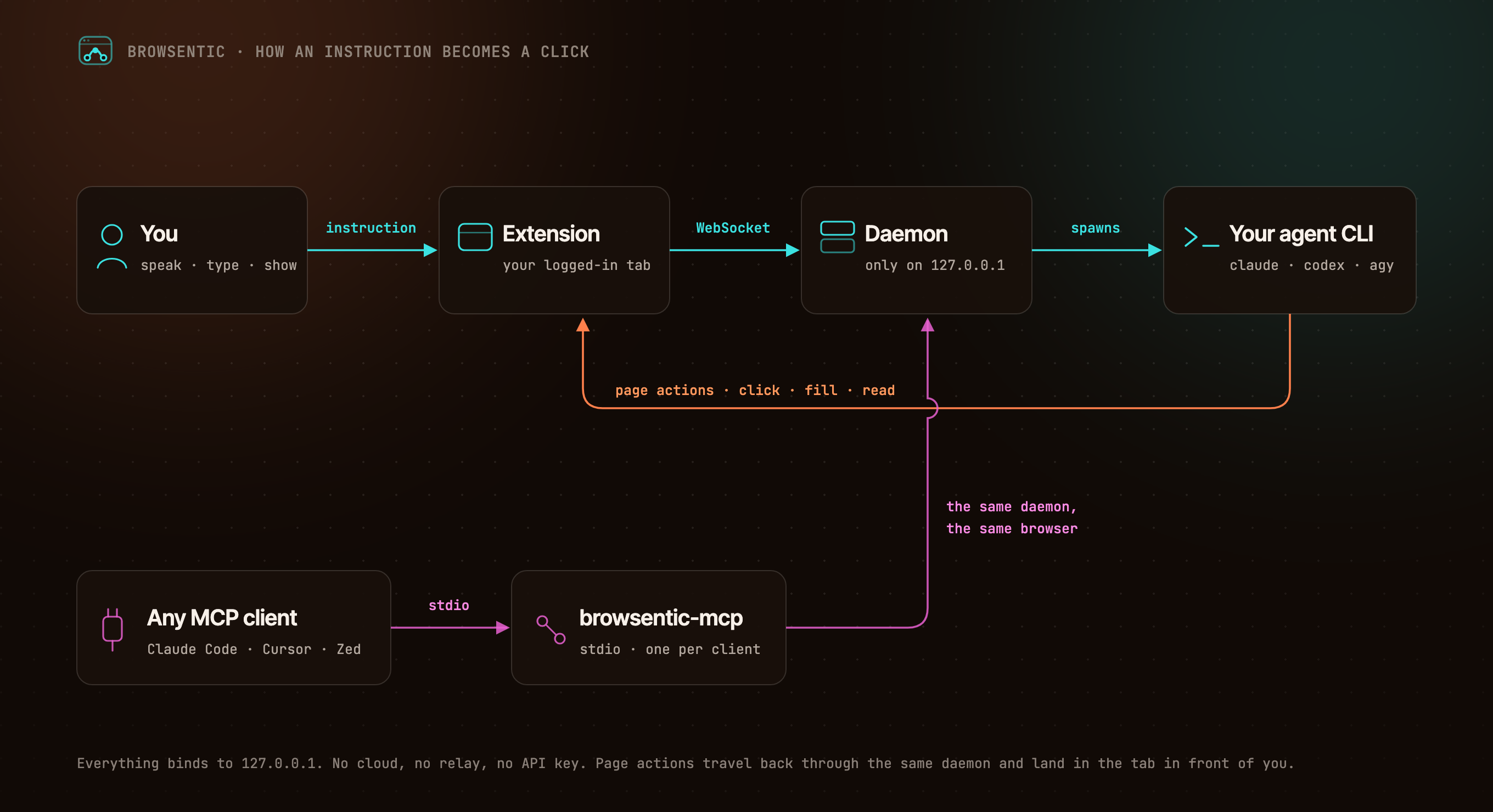
You ──speak or type──> Extension ──local WebSocket──> Browsentic Bridge ──spawns──> your agent CLI
                            ▲                                        (claude │ codex │ agy │ …)
                            └──────────────────── page actions ──────────────────────┘

Any MCP client ──stdio──> browsentic mcp ──> the same Bridge ──> the same browser
The extension dials out to Browsentic Bridge, because a Manifest V3 service worker cannot listen for connections. One Bridge owns the browser link, so several MCP clients can share one browser. Everything binds to 127.0.0.1.
