Maintainer of this skill?

Automated security scan — not a certification.
by sirmalloc
🚀 Beautiful highly customizable statusline for Claude Code CLI with powerline support, themes, and more.
# Add to your Claude Code skills
git clone https://github.com/sirmalloc/ccstatuslineGuides for using cli tools skills like ccstatusline.
Last scanned: 4/18/2026
{
  "issues": [],
  "status": "PASSED",
  "scannedAt": "2026-04-18T05:43:19.551Z",
  "semgrepRan": false,
  "npmAuditRan": false,
  "pipAuditRan": true
}See how ccstatusline compares with popular alternatives.
ccstatusline is an open-source cli tools skill for AI coding assistants such as Claude Code, Codex CLI, and ChatGPT, built by sirmalloc. 🚀 Beautiful highly customizable statusline for Claude Code CLI with powerline support, themes, and more. It has 13,685 GitHub stars.
Yes. ccstatusline passed SkillsLLM's automated security scan — a dependency vulnerability audit plus prompt-injection heuristics — with no high-severity issues. You can read the full report in the Security Report section on this page.
Clone the repository with "git clone https://github.com/sirmalloc/ccstatusline" and add it to your Claude Code skills directory (see the Installation section above).
ccstatusline is primarily written in TypeScript. It is open-source under sirmalloc on GitHub, so you can review or fork the full source.
Yes. SkillsLLM lists many other CLI Tools skills you can browse and compare side by side. Open the CLI Tools category from the badge at the top of this page, or use the Related Skills and comparison links further down to weigh ccstatusline against similar tools.
No comments yet. Be the first to share your thoughts!
Top skills in this category by stars
Based on votes and bookmarks from developers who liked this skill
From $49 · 30 days · terms & refunds
⚠️ Third-Party Software Notice
This skill is third-party open-source software developed and hosted independently on GitHub. SkillsLLM lists this project for discovery and does not control or maintain the underlying repository.
Any security checks, ratings, or warnings displayed by SkillsLLM are automated and limited in scope. They do not constitute a security certification or guarantee that the software is safe, error-free, or free from malicious code, vulnerabilities, compromised dependencies, or prompt-injection risks.
Review the source code, permissions, dependencies, and configuration before installing or running any third-party skill. Use is at your own risk. To the maximum extent permitted by applicable law, SkillsLLM is not liable for losses arising from third-party software.
Automated security scan — not a certification.
🎨 A highly customizable status line formatter for Claude Code CLI Display model info, git branch, token usage, and other metrics in your terminal








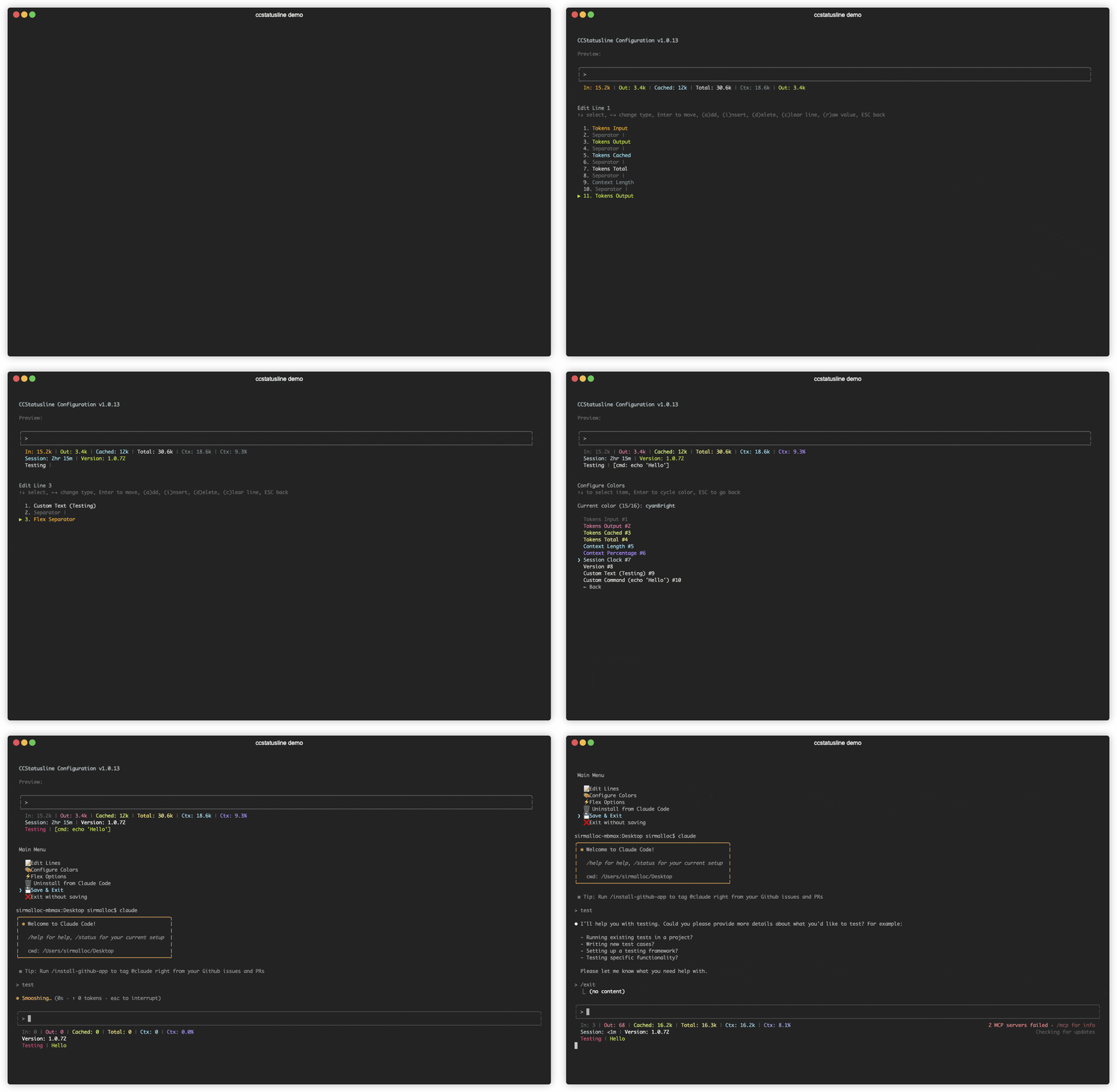
# Run the configuration TUI with npm
npx -y ccstatusline@latest

# Or use bunx, Bun's alternative to npx
bunx -y ccstatusline@latest
Startup time can vary with the package runner (npx or bunx), its cache, and your platform. If repeated status line launches are slow, consider the Pinned global install option described below to run ccstatusline directly.
Both commands launch the same TUI. During the initial setup flow, choose Pinned global install if you want Claude Code to stay on the ccstatusline version you are running instead of following @latest; the TUI will install that version globally with npm or Bun and write the pinned ccstatusline command to Claude Code settings. After a pinned install, you can run ccstatusline directly to launch the TUI in the future.
The interactive configuration tool provides a terminal UI where you can:
💡 Tip: Your settings are automatically saved to
~/.config/ccstatusline/settings.json
🔧 Custom Claude Config: If your Claude Code configuration is in a non-standard location, set the
CLAUDE_CONFIG_DIRenvironment variable:# Linux/macOS export CLAUDE_CONFIG_DIR=/custom/path/to/.claude
🌐 HTTPS proxy: Usage, Claude Status and update-check requests honor uppercase
HTTPS_PROXY, with exclusions from bothNO_PROXYandno_proxy. See proxy settings for host, domain, and port matching.
🪟 Windows Support: PowerShell examples, installation notes, fonts, troubleshooting, WSL, and Windows Terminal configuration are in docs/WINDOWS.md.
🫥 Status line empty in one folder? Claude Code only runs the status line command in trusted workspaces, and nested git repositories stopped inheriting trust in Claude Code 2.1.232. See Status line empty in one folder.
🧩 Skills always
nonewith a wrapper script? Skills needs Claude Code hooks, which are only added when the status line command containsccstatusline. See Skills always shows none.
When you install from the TUI, ccstatusline writes a statusLine command object to your Claude Code settings:
{
  "statusLine": {
    "type": "command",
    "command": "npx -y ccstatusline@latest",
    "padding": 0,
    "refreshInterval": 10
  }
}
refreshInterval defaults to 10 seconds on fresh installs when Claude Code supports it (>=2.1.97). Reinstalling preserves an existing value even if the version check fails. The TUI can set it to 1-60 seconds, or remove it by leaving the input empty.
Other supported command values are:
bunx -y ccstatusline@latestccstatusline (for self-managed/global installs)The status line command runs once per repaint, so what it costs to invoke is paid over and over. Under
Bun that cost depends on the specifier: bunx re-resolves the latest dist-tag against the registry
on every run, because a dist-tag is not cacheable. Measured on Windows with a warm cache, median of
five runs of --version, which exits before rendering:
| command | median |
|---|---|
bunx -y ccstatusline@latest |
633 ms |
bunx -y ccstatusline@2.2.27 |
202 ms |
bunx -y ccstatusline |
207 ms |
Dropping @latest is worth about 430 ms per repaint there. npm does not behave this way: npx -y ccstatusline@latest and npx -y ccstatusline@2.2.27 measured 1082 ms and 1135 ms, so pinning buys
nothing under npx. A Pinned global install, which writes "command": "ccstatusline", avoids the
resolution entirely on both.
For pinned installs, launch the TUI with npx -y ccstatusline@latest or bunx -y ccstatusline@latest, then choose Pinned global install. The TUI pins the active version by installing it globally and writing "command": "ccstatusline" to settings.json; afterward, you can run ccstatusline directly to open the TUI.
Includes all 47 merged PRs and the package-size badge fix since the v2.2.33 tag.
4m 52s and 4m52s.COLUMNS after CCSTATUSLINE_WIDTH, with full width minus five columns for truncation and alignment; the old width modes are removed.Includes all 56 PRs merged since the v2.2.32 tag.
5h: label; hide it at 100% and hide Block Reset Timer below 100% to swap the percentage for a reset countdown.