Maintainer of this skill?

Automated security scan — not a certification.
by Wangnov
Pro statusline for Claude Code | 功能强大的 Claude Code 状态栏
# Add to your Claude Code skills
git clone https://github.com/Wangnov/claude-code-statusline-proGuides for using ai agents skills like claude-code-statusline-pro.
Last scanned: 5/30/2026
{
  "issues": [],
  "status": "PASSED",
  "scannedAt": "2026-05-30T15:31:58.690Z",
  "npmAuditRan": false,
  "pipAuditRan": true
}See how claude-code-statusline-pro compares with popular alternatives.
claude-code-statusline-pro is an open-source ai agents skill for AI coding assistants such as Claude Code, Codex CLI, and ChatGPT, built by Wangnov. Pro statusline for Claude Code | 功能强大的 Claude Code 状态栏. It has 227 GitHub stars.
Yes. claude-code-statusline-pro passed SkillsLLM's automated security scan — a dependency vulnerability audit plus prompt-injection heuristics — with no high-severity issues. You can read the full report in the Security Report section on this page.
Clone the repository with "git clone https://github.com/Wangnov/claude-code-statusline-pro" and add it to your Claude Code skills directory (see the Installation section above).
claude-code-statusline-pro is primarily written in Rust. It is open-source under Wangnov on GitHub, so you can review or fork the full source.
Yes. SkillsLLM lists many other AI Agents skills you can browse and compare side by side. Open the AI Agents category from the badge at the top of this page, or use the Related Skills and comparison links further down to weigh claude-code-statusline-pro against similar tools.
No comments yet. Be the first to share your thoughts!
30 days in the Featured rail · terms & refunds
⚠️ Third-Party Software Notice
This skill is third-party open-source software developed and hosted independently on GitHub. SkillsLLM is an informational directory and does not control or maintain the underlying repository.
Any security checks, ratings, or warnings displayed by SkillsLLM are automated and limited in scope. They do not constitute a security certification or guarantee that the software is safe, error-free, or free from malicious code, vulnerabilities, compromised dependencies, or prompt-injection risks.
Review the source code, permissions, dependencies, and configuration before installing or running any third-party skill. Use is at your own risk. To the maximum extent permitted by applicable law, SkillsLLM is not liable for losses arising from third-party software.
Automated security scan — not a certification.
See comparison



Claude Code Statusline Pro - 为Claude Code量身定制的智能状态栏系统。
PMBTURS, MT, BT)git2 仓库分析:直接获取分支、状态、stash 等信息,避免频繁 Shell 调用,在大型仓库中依然流畅.jsonl,并通过原子写入持久化快照,避免大型日志反复全量扫描在开始使用之前,请确保您的系统满足以下要求:
# 检查Claude Code版本
claude --version

# 检查Node.js版本
node --version

# 检查npm版本
npm --version
只需要在Claude Code的配置文件中添加一行配置,无需预先安装:
在项目根目录或 $USER 目录创建 .claude/settings.json:
{
  "statusLine": {
    "type": "command",
    "command": "npx ccsp@latest"
  }
}
💡 兼容说明:旧命令
npx claude-code-statusline-pro@latest仍可继续使用,并会提示迁移。建议将现有配置更新为npx ccsp@latest。
保存文件后,重新打开Claude Code即可看到专业版状态栏!
打开Claude Code,你应该看到类似这样的状态栏:
📁 my-project | 🤖 S4 | 🌿 main | 📊 [████████████░░░] 80.1%(160k/200k) | $21.07 | ✅ Ready
通过简单的字母组合快速定制状态栏显示内容:
注:这些命令全部是写在settings.json中的,并不是在终端直接执行使用(直接执行会打印出预览结果)
# 显示所有组件(推荐)
npx ccsp@latest --preset PMBTURS --theme powerline

# 只显示模型、Token和使用量
npx ccsp@latest --preset MTU --theme classic

# 只显示分支和Token信息
npx ccsp@latest --preset BT --theme capsule
多行系统可以把状态栏扩展为网格布局,嵌入多个可独立刷新的小组件。
row(从1开始)和 col(从0开始)控制每个小组件的位置,支持跨行/列排布。static(静态文本)与 api(HTTP 请求)两种类型,API 小组件支持模板渲染、环境变量替换。detection 段读取环境变量,可配置 equals / contains / pattern 触发条件,也可以配合 force 手动开启或关闭。filter 支持 JSONPath + equals / contains / pattern 匹配,只在命中关键字时刷新;可用于最近请求等场景。configs/components/usage.template.toml 与 configs/components/rate_limit.template.toml,复制到 ~/.claude/statusline-pro/components/ 后按需改写。在 config.toml 中开启多行模式并指定要加载的组件文件:
[multiline]
enabled = true
执行 npx ccsp@latest config init -w 可以一次性生成主配置并复制所有小组件模板。
Classic主题支持三种图标模式,默认会根据终端能力自动选择:

需要安装Nerd Font字体,并在对应的终端中选择使用字体,推荐使用 Hack Nerd Font

适合支持Emoji但没有Nerd Font的终端

最大兼容性,适合所有终端环境

箭头无缝连接设计,需要Nerd Font支持,提供最佳视觉体验。

胶囊形状包装,现代化UI设计,适合追求简洁美观的用户。
如果你的终端本就支持某种图标(例如Nerd Font),但没有自动启用,则可强制指定启用该图标能力
# 强制启用Nerd Font图标(需要安装字体,否则会显示乱码)
npx ccsp@latest --force-nerd-font

# 强制启用Emoji图标(需要终端确实支持Emoji,如MacOS,否则会显示乱码)
npx ccsp@latest --force-emoji

# 强制启用纯文本模式
npx ccsp@latest --force-text
状态栏的token计算与Claude官方API保持完全一致,确保显示数据的准确性:
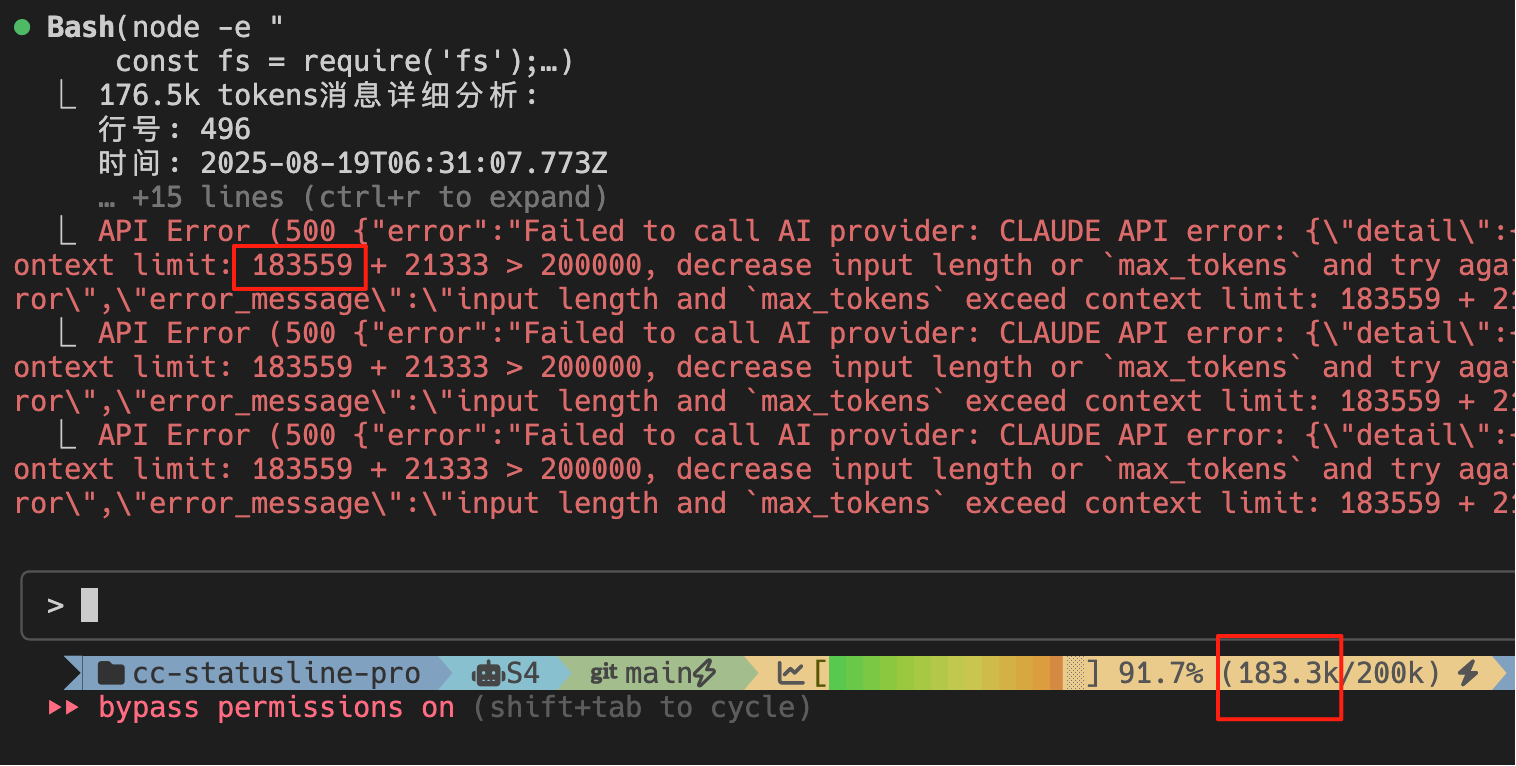
如图所示:
183.3k/200k (91.7%)183559 + 21333 > 200000183559 ≈ 183.3k ✅ 完全一致contextUsedTokens = usage.input_tokens +
usage.cache_creation_input_tokens +
usage.cache_read_input_tokens +
usage.output_tokens;
这确保了状态栏显示的token使用量与Claude官方统计完全一致。
状态栏提供两种成本计算模式,可在 config.toml 中配置:
/clear 命令或关闭应用为止/clear 命令或重启 Claude Code在 config.toml 中设置:
[components.usage]
mode = "conversation"  # 或 "session"
usage 组件默认使用 currency = "auto"。自动模式会先应用你配置的 endpoint/model 规则,再匹配 model_providers,随后读取 Claude Code 传入的 cost.currency,最后回退到内置规则或 USD。DeepSeek、MiniMax、Kimi、GLM、百炼、火山方舟、MiMo 等 provider 已有默认 profile;其中中国站/国际站会分开匹配币种和价格。用户可以在 model_providers 中集中覆盖 endpoint、模型窗口、币种和价格。
注意:conversation 模式读取的是历史聚合的 total_cost_usd 存储值。为避免只换符号、不换金额,currency = "auto" 在该模式下会显示 USD;如果你确认自己的聚合成本已经是其他币种,可用 currency = "CNY" 等固定值强制显示。
[components.usage]
currency = "auto" # auto | USD | CNY | EUR | GBP | JPY ...

[model_providers.deepseek]
endpoints = ["api.deepseek.com"]
models = ["deepseek-*", "deepseek-chat", "deepseek-reasoner"]
currency = "CNY"

[model_providers.deepseek.context_windows]
"deepseek-chat" = 1_000_000
"deepseek-r1*" = 65_536

[model_providers.deepseek.pricing.deepseek-chat]
unit_tokens = 1_000_000
input = 1.0
output = 2.0
cache_read = 0.02

[components.usage.currency_endpoint_rules]
"api.example.cn" = "CNY"
"api.example.com" = "USD"

[components.usage.currency_model_rules]
"my-cny-model" = "CNY"
默认情况下,状态栏直接显示 Claude Code 传入的 cost.total_cost_usd。如果命中 model_providers.<name>.pricing,并且输入里包含 input/output/cache token 明细,则会按该 profile 的价格本地重算;缺少 token 明细时自动回退到上游金额。若 endpoint 已匹配到某个 provider,只会使用该 endpoint 所属 provider 的价格,避免中国站套用国际站价格。
注意: 状态栏的成本计算与 /cost 命令采用不同逻辑和时间范围,确保各自场景的准确性。
状态栏采用两级配置系统,支持灵活的配置管理:
项目级配置 (优先级: 高)
~/.claude/projects/{project-hash}/statusline-pro/config.tomlnpx ccsp@latest config initnpx ccsp@latest config init -w用户级配置 (优先级: 低)
~/.claude/statusline-pro/config.tomlnpx ccsp@latest config init -gnpx ccsp@latest config init -w -g运行初始化命令时,系统会自动检测您的终端能力:
# 初始化项目级配置(推荐)
npx ccsp@latest config init

# 初始化项目级配置并复制组件模板
npx ccsp@latest config init -w

# 初始化全局配置
npx ccsp@latest config init -g

# 强制重新初始化(覆盖现有配置)
npx ccsp@latest config init --force
提示:
-w等同于--with-components,会把组件多行模板一并复制到配置目录,方便直接在本地调整。
智能检测功能:
系统初始化后会生成完整的 config.toml 配置文件:
# 默认预设和主题
preset = "PMBTURS"
theme = "powerline"

# 主题特性配置
[themes.powerline]
enable_gradient = true
ignore_separator = true
fine_progress = true

# 组件顺序配置
[components]
order = ["project", "model", "branch", "tokens", "usage", "rate_limit", "status"]

# Token组件详细配置
[components.tokens]
show_gradient = true         # 启用彩色渐变进度条
show_progress_bar = true     # 显示进度条
show_percentage = true       # 显示百分比
progress_width = 15          # 进度条宽度

# 模型上下文窗口覆盖(内置已包含常见国产/第三方模型)
# 精确 key 优先于通配前缀;命中模型专属窗口时会覆盖 Claude Code stdin 的通用 200K。
[components.tokens.context_windows]
"deepseek-v4-*" = 1_000_000
"qwen-long*" = 10_000_000
"my-provider/my-model" = 500_000

# Token阈值配置
[components.tokens.thresholds]
warning = 60    # 60%显示黄色警告
danger = 85     # 85%显示红色危险
backup = 85     # 后备区域开始
critical = 95   # 95%显示🔥临界

# 终端兼容配置
[terminal]
force_nerd_font = false     # 强制启用Nerd Font
force_emoji = false         # 强制启用Emoji
force_text = false          # 强制文本模式
智能检测并自动适配不同终端环境:
# 错误示例:status line command failed: npx ccsp@latest
# 解决方案:升级Claude Code到最新版本
npm install -g @anthropic-ai/claude-code@latest
# 错误示例:/bin/sh: npx: command not found
# 解决方案:安装或更新Node.js环境
# 访问官网下载最新版本:https://nodejs.org/
# 或使用包管理器安装:

# macOS (使用Homebrew)
brew install node

# Ubuntu/Debian
sudo apt update && sudo apt install nodejs npm

# Windows
# 请访问 https://nodejs.org/ 下载安装包
# 检查Claude Code版本
claude --version

# 如果版本低于1.0.71,请更新
npm install -g @anthropic-ai/claude-code@latest

# 更新后重启终端并重新打开Claude Code
libssl.so.3 找不到自 v3.0.2