Maintainer of this skill?

Automated security scan — not a certification.
by nadimtuhin
Cut the tokens Claude Code loads at session start. CLI that sets up a small CLAUDE.md with on-demand docs, measures startup tokens, and keeps them small.
# Add to your Claude Code skills
git clone https://github.com/nadimtuhin/claude-token-optimizerGuides for using ai agents skills like claude-token-optimizer.
Last scanned: 5/21/2026
{
  "issues": [],
  "status": "PASSED",
  "scannedAt": "2026-05-21T07:54:03.785Z",
  "semgrepRan": false,
  "npmAuditRan": true,
  "pipAuditRan": true
}See how claude-token-optimizer compares with popular alternatives.
claude-token-optimizer is an open-source ai agents skill for AI coding assistants such as Claude Code, Codex CLI, and ChatGPT, built by nadimtuhin. Cut the tokens Claude Code loads at session start. CLI that sets up a small CLAUDE.md with on-demand docs, measures startup tokens, and keeps them small. It has 621 GitHub stars.
Yes. claude-token-optimizer passed SkillsLLM's automated security scan — a dependency vulnerability audit plus prompt-injection heuristics — with no high-severity issues. You can read the full report in the Security Report section on this page.
Clone the repository with "git clone https://github.com/nadimtuhin/claude-token-optimizer" and add it to your Claude Code skills directory (see the Installation section above).
claude-token-optimizer is primarily written in JavaScript. It is open-source under nadimtuhin on GitHub, so you can review or fork the full source.
Yes. SkillsLLM lists many other AI Agents skills you can browse and compare side by side. Open the AI Agents category from the badge at the top of this page, or use the Related Skills and comparison links further down to weigh claude-token-optimizer against similar tools.
No comments yet. Be the first to share your thoughts!
30 days in the Featured rail · terms & refunds
⚠️ Third-Party Software Notice
This skill is third-party open-source software developed and hosted independently on GitHub. SkillsLLM is an informational directory and does not control or maintain the underlying repository.
Any security checks, ratings, or warnings displayed by SkillsLLM are automated and limited in scope. They do not constitute a security certification or guarantee that the software is safe, error-free, or free from malicious code, vulnerabilities, compromised dependencies, or prompt-injection risks.
Review the source code, permissions, dependencies, and configuration before installing or running any third-party skill. Use is at your own risk. To the maximum extent permitted by applicable law, SkillsLLM is not liable for losses arising from third-party software.
Automated security scan — not a certification.
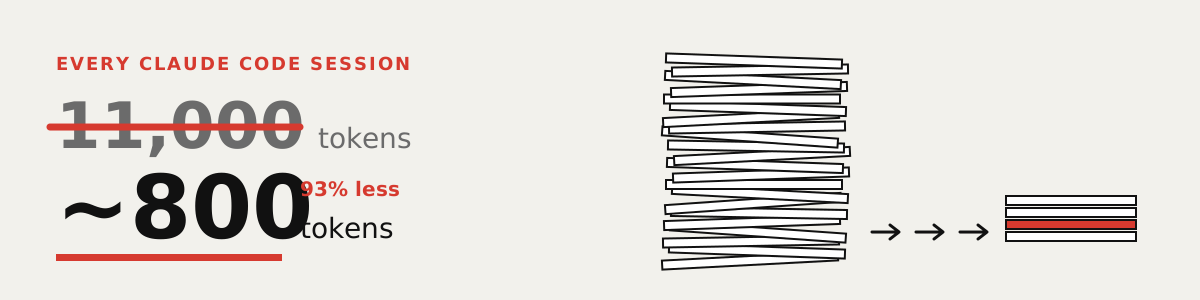
Claude rereads everything. Every session. You pay each time.
Mine was 11,000 tokens per session. Open 20 sessions a day and that is 220,000 tokens gone before you type a word. That is money, usage limits, and room Claude could have used for your code.

Open a terminal in your project folder and paste each line as is. Inside Claude Code, type ! first, then paste.
0. Keep a copy of your notes, just in case:
cp CLAUDE.md CLAUDE.md.mine
1. See what Claude rereads every session:
npx -y claude-token-optimizer measure
2. Shrink it:
npx -y claude-token-optimizer prune --yes
Old session notes and finished task lists move into side files Claude opens only when needed. You get a line like ✓ Saved ~3414 tokens. Run step 1 again to see your new total. Says "Nothing to prune"? Use the Claude Code prompt below instead.
Rather not type commands? Paste this into Claude Code:
Back up my CLAUDE.md, then set up github.com/nadimtuhin/claude-token-optimizer by following its AGENTS.md. Show me the token count before and after.

Claude reads in tokens. Small pieces of text. Before, every session reread all your project notes, piece by piece.
Now it gets a cheat sheet. A short file at the start. Everything else waits in files Claude opens only when it needs them.
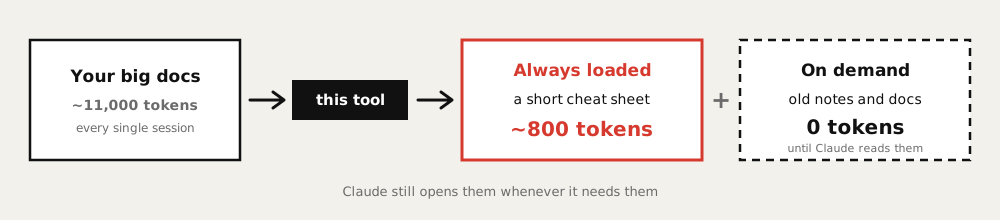
Nothing about how you use Claude changes. Each session just starts lighter.

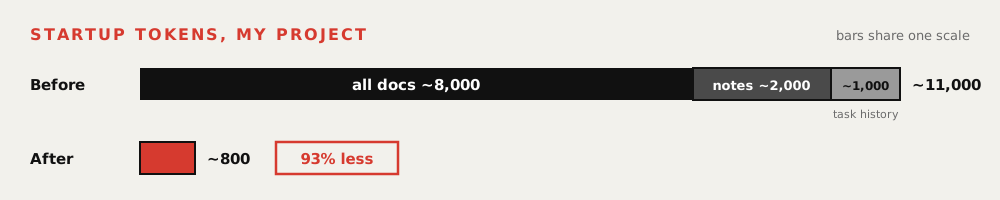
My project, before and after. Claude still finds the old notes when it needs them. It just stops rereading them every session.

You need Node 20 or newer. Run node -v to check, and install it from nodejs.org if the number is lower.
If it says cto: command not found, put npx -y claude-token-optimizer in front instead of cto.
It rewrites CLAUDE.md and saves the old one as CLAUDE.md.bak. A second run replaces that .bak, so keep your own copy from step 0. cto init (for developers, below) can replace .claudeignore and .claude/*.md in a project with no CLAUDE.md. The exact list of files it writes is in What cto init creates.
Put back the copy you made: cp CLAUDE.md.mine CLAUDE.md. Using git? Run git restore CLAUDE.md, then git clean -n to list the new files, and git clean -fd once you have checked that list.

Everything below is reference. You don't need it to get started.
Install · For AI agents · The numbers · Commands · Hooks · FAQ
The npx lines at the top need no install. Prefer a global cto command? Either of these works:
npm install -g claude-token-optimizer
# or
curl -fsSL https://raw.githubusercontent.com/nadimtuhin/claude-token-optimizer/main/install.sh | bash
Node 20 or newer. init detects your framework from package.json, requirements.txt, go.mod, composer.json, pom.xml, or Gemfile. Pass --framework nextjs, or any name in AGENTS.md, to override.
Hand your agent this repo link and one sentence:
Read https://raw.githubusercontent.com/nadimtuhin/claude-token-optimizer/main/AGENTS.md and set up cto in this project.
AGENTS.md lists the non-interactive commands and what each one writes. llms.txt indexes the docs for LLM tools. These run without a TTY and never wait for input:
npx -y claude-token-optimizer init --yes --framework express
npx -y claude-token-optimizer measure
npx -y claude-token-optimizer audit --json     # exits 1 on errors
npx -y claude-token-optimizer prune --yes
npx -y claude-token-optimizer compress --yes
On my RedwoodJS project, every session opened by loading about 8,000 tokens of docs, 2,000 of old session notes, and 1,000 of finished task history. cto reduces Claude Code token usage by keeping a short CLAUDE.md and four small reference files loaded, and moving the rest to files read on demand.
| Before | Tokens | After | Tokens |
|---|---|---|---|
| All docs | ~8,000 | CLAUDE.md |
~336 |
| Old session notes | ~2,000 | docs/INDEX.md |
~135 |
| Task history | ~1,000 | COMMON_MISTAKES.md |
~118 |
ARCHITECTURE_MAP.md |
~68 | ||
QUICK_START.md |
~49 | ||
| Startup total | ~11,000 | Fresh cto init |
~706 |
| Filled in with my project | ~800 |
The After rows are measured with cto measure right after cto init --yes on an empty project. Adding my own rules and mistakes brought it to about 800.
Measured on my RedwoodJS project. Counts come from the Claude 2 tokenizer, so treat them as estimates.
Everything that moved out is still in the repo. It costs 0 tokens until you ask Claude to read it.
You can do this split by hand. cto does it the same way every time, checks it in CI, and keeps a .bak so the last change can be undone.
cto init createsyour-project/
CLAUDE.md Claude reads this first
.claudeignore keeps old docs out of the session
.claude/
COMMON_MISTAKES.md your top 5 bugs that cost over an hour
QUICK_START.md daily commands
ARCHITECTURE_MAP.md where things live
completions/ finished tasks, never auto-loaded
sessions/ old session notes, never auto-loaded
docs/
INDEX.md
learnings/ one file per topic, loaded on demand
archive/ old docs, never auto-loaded
Abridged. init also creates .claude/templates/ and .claude/sessions/{active,archive}/.
[!WARNING] If you already have a
CLAUDE.md,cto initappends the missing sections and leaves the support files alone. Without one, it writes every file above fresh, replacing any.claudeignoreor.claude/*.mdalready there.--forcereplaces everything with no backup.
| Command | What it does |
|---|---|
cto init |
Create the structure above, framework detected |
cto measure |
Show how many tokens load at session start, file by file |
cto audit |
19 structural checks. --json for CI, --fix creates missing files. Exits 1 on errors |
cto compress |
Shrink a markdown file with deterministic rules: blank lines, verbose fences, long lists, HTML comments, inline SVGs. --yes for CI |
cto prune |
Move completed tasks and old session notes out of a file into .claude/. --days N keeps recent notes. --yes for CI |
cto diff |
Token delta between a file and its .bak after compress or prune |
cto watch |
Live token dashboard that refreshes when watched files change |
cto hooks |
Install and manage the hook templates below |
cto companions |
List other token-saving tools for Claude Code and whether each is installed |
cto update |
Update the CLI. --content refreshes project templates without touching your text |
compress, prune, and diff work on CLAUDE.md by default. Point them at any markdown file with --file docs/learnings/testing.md.
[!NOTE]
compressandprunesupport--dry-runand write a.bakof the file as it was before that run. A second run replaces the.bak, so copy the file first if you chain them.compressis lossy: it truncates long lists and strips HTML comments.prunearchives completed tasks and session notes under.claude/; empty sections are dropped and come back from the.bak.
Claude Code hooks run a script on an event. These templates turn cto from a one-time setup into ongoing enforcement.
cto hooks install --all    # copy templates into .claude/hooks/
cto hooks settings         # print the settings.json block to merge into ~/.claude/settings.json
| Template | Event | Effect |
|---|---|---|
pre-tool-token-guard |
PreToolUse | Warn once per session when auto-loaded files pass a token threshold |
pre-tool-read-guard |
PreToolUse | Block reads of lock files, binaries, and very large files |
pre-tool-bash-guard |
PreToolUse | Block find /, cat node_modules, bare grep -r |
user-prompt-inject-context |
UserPromptSubmit | Match prompt keywords to docs/learnings/*.md and inject only those files |
user-prompt-inject-snapshot |
UserPromptSubmit | Inject the previous session snapshot for |