cv-consultant-pro





A job description in, a tailored application kit out: scorecard, one-page CV, gap plan, interview questions.
It selects from a corpus of your own career evidence. It never writes a claim you did not write, and never invents a number.
Use it as a plugin — your assistant runs the conversation and the tools enforce the rules — or as a CLI.
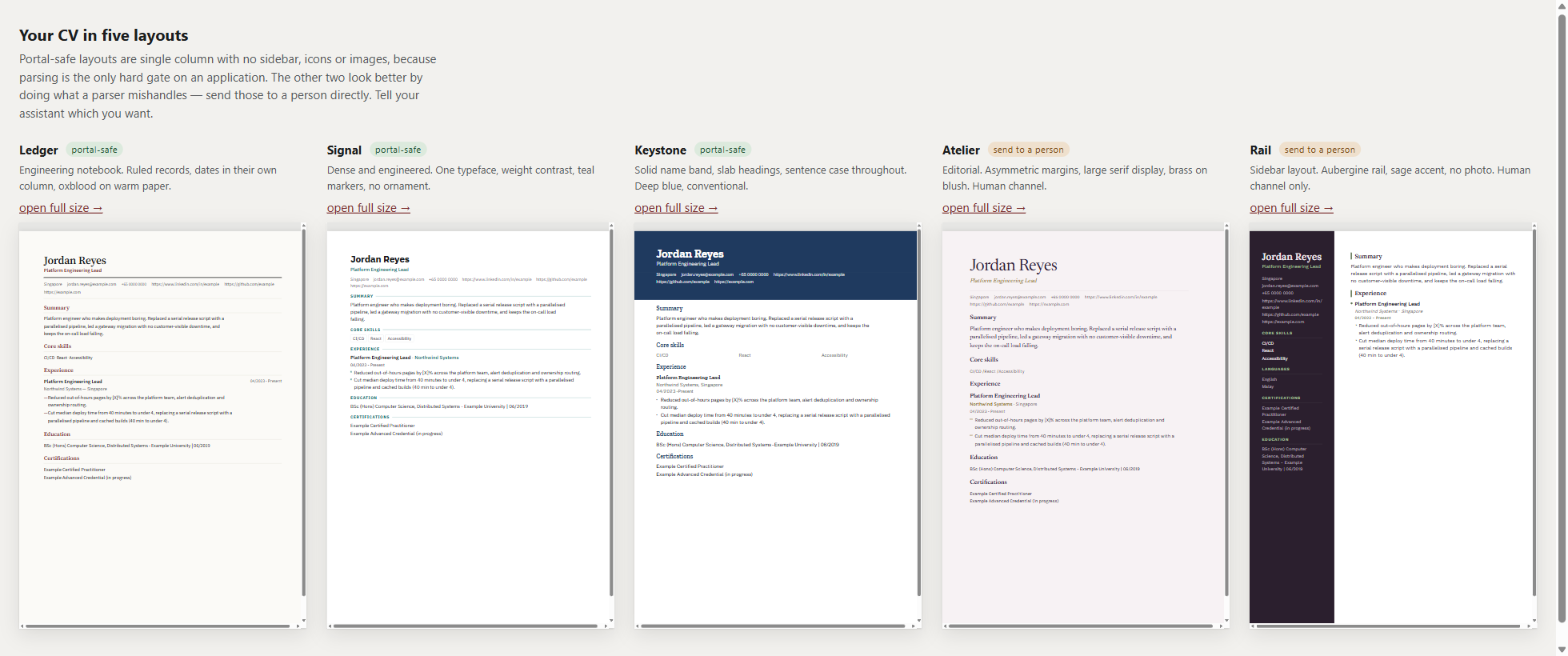
Choosing a layout
Choosing from five prose descriptions is guessing, so cv_preview renders all five with
your own CV in them and serves them on loopback only, on a random port behind a random
token, for as long as the session lasts.
Getting a PDF. The kit writes cv.md, cv.docx and cv.html; no PDF is
generated, because producing one needs a browser engine or a native toolchain and
this installs with uvx and four pure dependencies. The HTML is print-ready — A4
@page, zero margin, colour-adjust on — so open cv.html and print to PDF with
paper A4, margins None, and Background graphics ON. Without that last one a
name band or a coloured rail prints white.
cv.docx deliberately ignores the layout you chose. It is the submit format:
one column, no tables, a standard font, dull on purpose. Parsing is the only hard
gate on an application, and several of these layouts look good precisely by doing
what a parser mishandles. Send the HTML or its PDF to a person; send the .docx
to a portal.
The three marked portal-safe are single column with no sidebar, icons or images, because parsing is the only hard gate on an application. The other two look better by doing exactly what a parser mishandles — send those to a person directly.
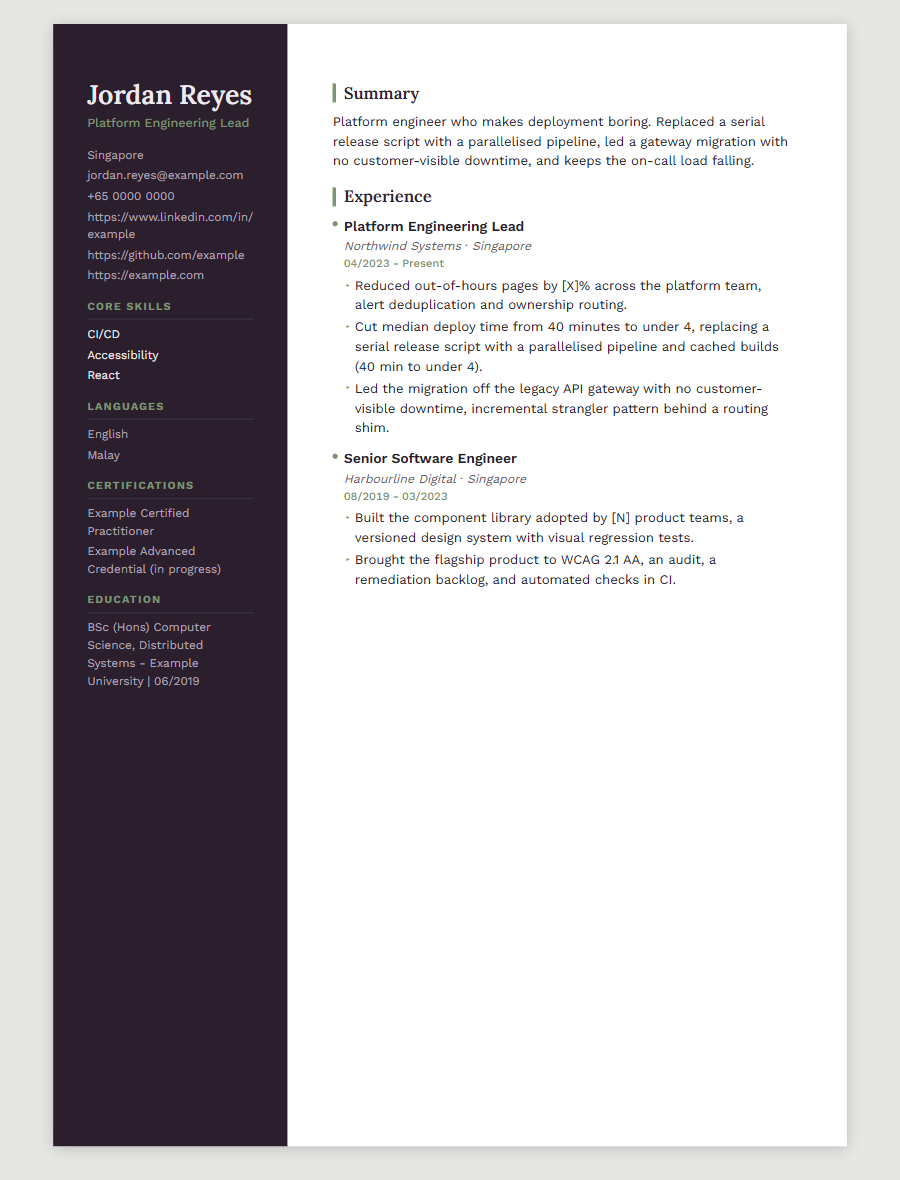
Every name, figure and contact detail in both screenshots is invented. They are generated from
career-corpus.example.yaml, never from a real corpus.
Your corpus never enters this repository
career-corpus.yaml is gitignored, and .gitignore is the first commit in this history so
there was no window without it. Generated kits are ignored too — a kit embeds corpus content
in a rendered CV. Neither is un-leaked by a later deletion; git keeps history.
Four guards: the ignore rules, a pre-push hook that inspects the tip being pushed, a CI job that fails if anything corpus-shaped is tracked, and a test.
Install as a plugin
cv-consultant-pro ships as an MCP server, which is the payload every plugin system wraps. One install, then talk to your assistant normally: "tailor my CV for this posting".
Claude Code
claude mcp add cv-consultant-pro -- uvx cv-consultant-pro-mcp
Or install the whole plugin — server plus the conversation skill — from the marketplace in this repository:
/plugin marketplace add alvintayzhenwei/cv-consultant-pro
/plugin install cv-consultant-pro@alvintayzhenwei
Codex
codex mcp add cv-consultant-pro -- uvx cv-consultant-pro-mcp
Codex's plugin marketplace is CLI-only — the IDE extension does not load plugins, so use the
mcp add form there.
Any other MCP client (Cursor, Claude Desktop, Gemini CLI, a hand-edited .mcp.json):
{
  "mcpServers": {
    "cv-consultant-pro": {
      "type": "stdio",
      "command": "uvx",
      "args": ["cv-consultant-pro-mcp"]
    }
  }
}
Then say what you want. The server returns the next question with every answer, so the conversation runs the same way on every host rather than depending on which model you happen to be talking to:
cv_seed— point it at your LinkedIn profile PDF (your profile → Save to PDF; there is no data export you can actually get at). It reads employers, titles, dates, certifications and education, and writes your profile's own prose to a notes file. It writes no bullets — see below.cv_corpus_add— work down the notes with your assistant, a line at a time. It asks the one thing a profile never says: how you did it.cv_preview— all five layouts in your browser with your own CV in them, served on loopback behind a random token.cv_ingest_jd→cv_score— the honest read, before any document exists.cv_render— the kit.cv_interview— ten questions, weighted toward what your corpus cannot answer, thencv_interview_summaryfor one table of every answer beside its advice.cv_explain— why the CV looks the way it does, and what is still a gap.
Why seeding writes no bullets
A bullet is a claim, the mechanism behind it, and its tags. A LinkedIn profile carries only the first. Splitting a sentence into claim and mechanism is authoring, and authoring is the one thing this does not do — so the prose goes to a notes file and you turn it into evidence yourself, with help. A seeded CV that looked finished but rested on text nobody had confirmed would be worse than no seed at all.
The pre-interview conversation
Ten questions, ordered so the scarce slots go to requirements your corpus cannot yet answer — a question about something you already evidence is a rehearsal; a question about a gap is where unrecorded experience actually surfaces.
Two things are gates rather than notices:
- Your answers must be your own experience. The server will not serve a question until you have said so. This is not ceremony: a corpus poisoned once is reused by every CV afterwards, and the interviewer asking about it will be reading from the page.
- Nothing reaches the CV unconfirmed. An answer is recorded verbatim and proposed back to you; you say whether a figure was measured or estimated. An estimate renders as a visible hole, never a number.
Coaching afterwards is the point — but AI guidance is often wrong on specifics, and confidently so. Every piece of it carries that disclaimer. Check anything you intend to say out loud; the person across the table will.
Use from the command line
uv sync --extra dev
cp career-corpus.example.yaml career-corpus.yaml   # then fill it in
uv run python -m cv_consultant_pro.cli validate            # says what is still missing
uv run python -m cv_consultant_pro.cli templates           # list layouts
uv run python -m cv_consultant_pro.cli tailor jd.txt --template rail --out kits/acme
Output: cv.md, cv.docx, cv.html, scorecard.md, gaps.md, traceability.md,
placeholders.md.
Layouts
| Direction | Channel | |
|---|---|---|
ledger |
Engineering notebook. Ruled records, dates in a column, oxblood | Portal |
signal |
Dense, engineered. One typeface, teal markers | Portal · default |
keystone |
Solid name band, slab headings, deep blue | Portal |
atelier |
Editorial. Asymmetric margins, brass on blush | Human |
rail |
Sidebar. Aubergine and sage | Human |
Portal layouts are single column with no sidebar, icons or images — submit those. Human layouts look better by doing what a parser mishandles, so send them to a person directly. No layout carries a photograph: it invites discrimination screening and is stripped by many employers. The CLI names the channel on every run.
The contract
The engine may select, compress, re-order and re-word corpus entries, and may adopt a posting's exact wording where the corpus declares it as an alias of a skill you hold.
It may not author a claim the corpus lacks, introduce a skill you do not have, or replace an
unverified metric with a guess. Unverified figures render as [X] and are listed for you to
fill in. Before writing, an audit checks every claim traces to a corpus entry id.
Enforced mechanically: every metric declares verified: true with a value, or
verified: false with a placeholder and no number. The validator exits non-zero otherwise,
so the rule is a build failure rather than a prompt.
The limit: the validator enforces a metric's shape, not its truth. Nothing stops you marking a fabricated figure verified. Traceability is the only real mitigation.
Why the rules live in a server and not a skill. A skill is markdown loaded into a
model's context, and a model may disregard it — quietly, in exactly the cases that matter
most. A running process returns an error. cv_record_answer has no parameter an agent could
use to submit its own wording in place of yours, and a test asserts the parameter list so
that the guarantee is the absence of an API rather than a warning in a docstring.
On ATS
The "75% auto-rej