Maintainer of this skill?

Automated security scan — not a certification.
by SkyChenSky
Self-hosted database performance diagnostics for SQL Server, MySQL & PostgreSQL: trends, AAS insight, Top SQL, plan-change tracking, blocking & deadlock analysis. Single-process deploy, built-in MCP server for AI agents.
# Add to your Claude Code skills
git clone https://github.com/SkyChenSky/DBPilotGuides for using ai agents skills like DBPilot.
Last scanned: 9/21/2026
{
  "issues": [],
  "status": "PASSED",
  "scannedAt": "2026-09-21T09:37:56.969Z",
  "npmAuditRan": true,
  "pipAuditRan": true,
  "promptInjectionRan": true
}DBPilot is an open-source ai agents skill for AI coding assistants such as Claude Code, Codex CLI, and ChatGPT, built by SkyChenSky. Self-hosted database performance diagnostics for SQL Server, MySQL & PostgreSQL: trends, AAS insight, Top SQL, plan-change tracking, blocking & deadlock analysis. Single-process deploy, built-in MCP server for AI agents. It has 84 GitHub stars.
Yes. DBPilot passed SkillsLLM's automated security scan — a dependency vulnerability audit plus prompt-injection heuristics — with no high-severity issues. You can read the full report in the Security Report section on this page.
Clone the repository with "git clone https://github.com/SkyChenSky/DBPilot" and add it to your Claude Code skills directory (see the Installation section above).
DBPilot is primarily written in C#. It is open-source under SkyChenSky on GitHub, so you can review or fork the full source.
Yes. SkillsLLM lists many other AI Agents skills you can browse and compare side by side. Open the AI Agents category from the badge at the top of this page, or use the Related Skills and comparison links further down to weigh DBPilot against similar tools.
No comments yet. Be the first to share your thoughts!
From $49 · 30 days · terms & refunds
⚠️ Third-Party Software Notice
This skill is third-party open-source software developed and hosted independently on GitHub. SkillsLLM is an informational directory and does not control or maintain the underlying repository.
Any security checks, ratings, or warnings displayed by SkillsLLM are automated and limited in scope. They do not constitute a security certification or guarantee that the software is safe, error-free, or free from malicious code, vulnerabilities, compromised dependencies, or prompt-injection risks.
Review the source code, permissions, dependencies, and configuration before installing or running any third-party skill. Use is at your own risk. To the maximum extent permitted by applicable law, SkillsLLM is not liable for losses arising from third-party software.
Automated security scan — not a certification.
Self-hosted database autonomous diagnostics platform.





DBPilot continuously samples your instances and serves the day-to-day DBA workflow in one web console: performance trends and insight (AAS load decomposition), Top SQL, query plan change tracking, missing-index advice, index usage & fragmentation, blocking analysis, deadlock analysis, and slow query logs.
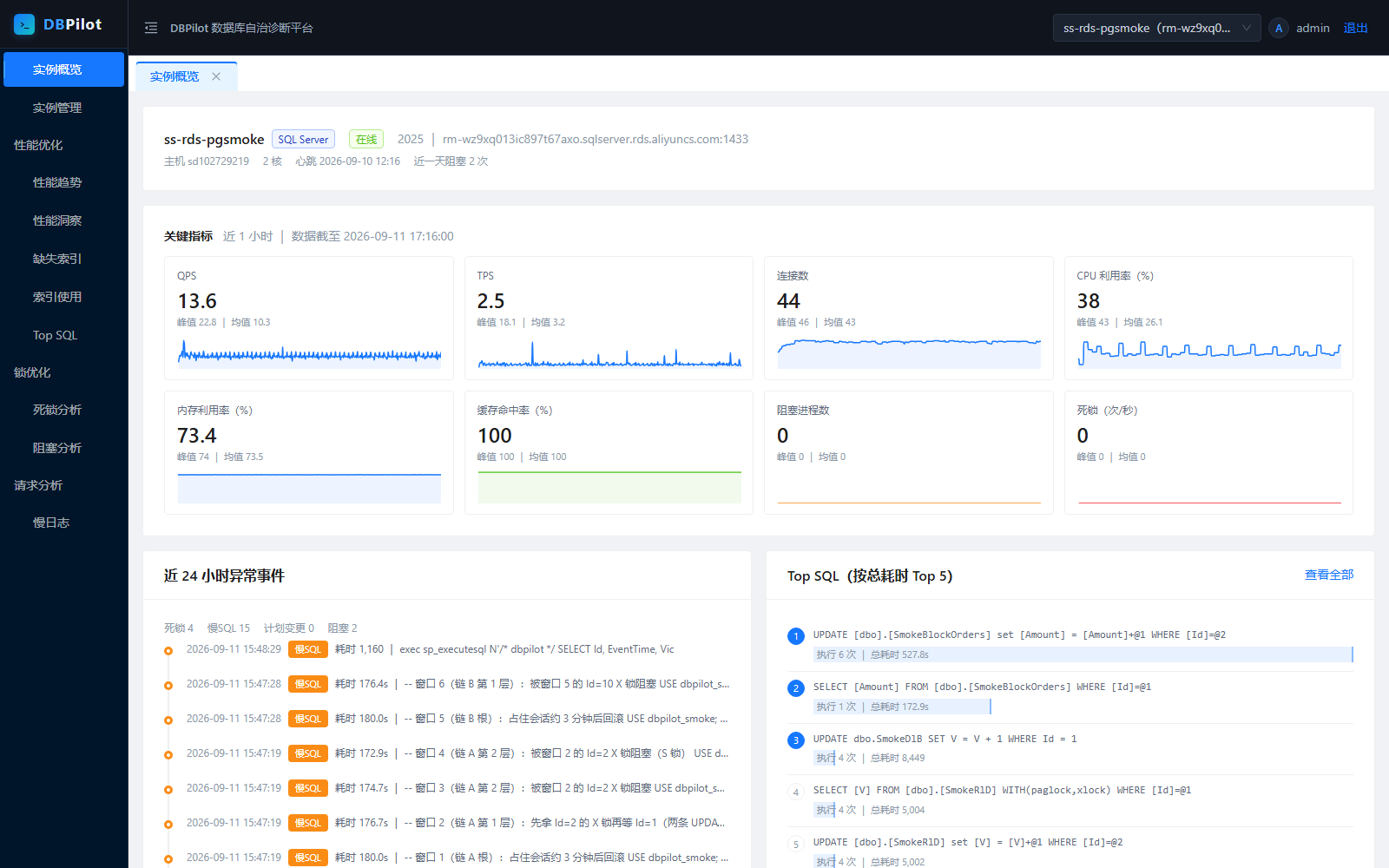
pg_stat_* / performance_schema); business tables are never scanned.| Performance insight (AAS) | Performance trends |
|---|---|
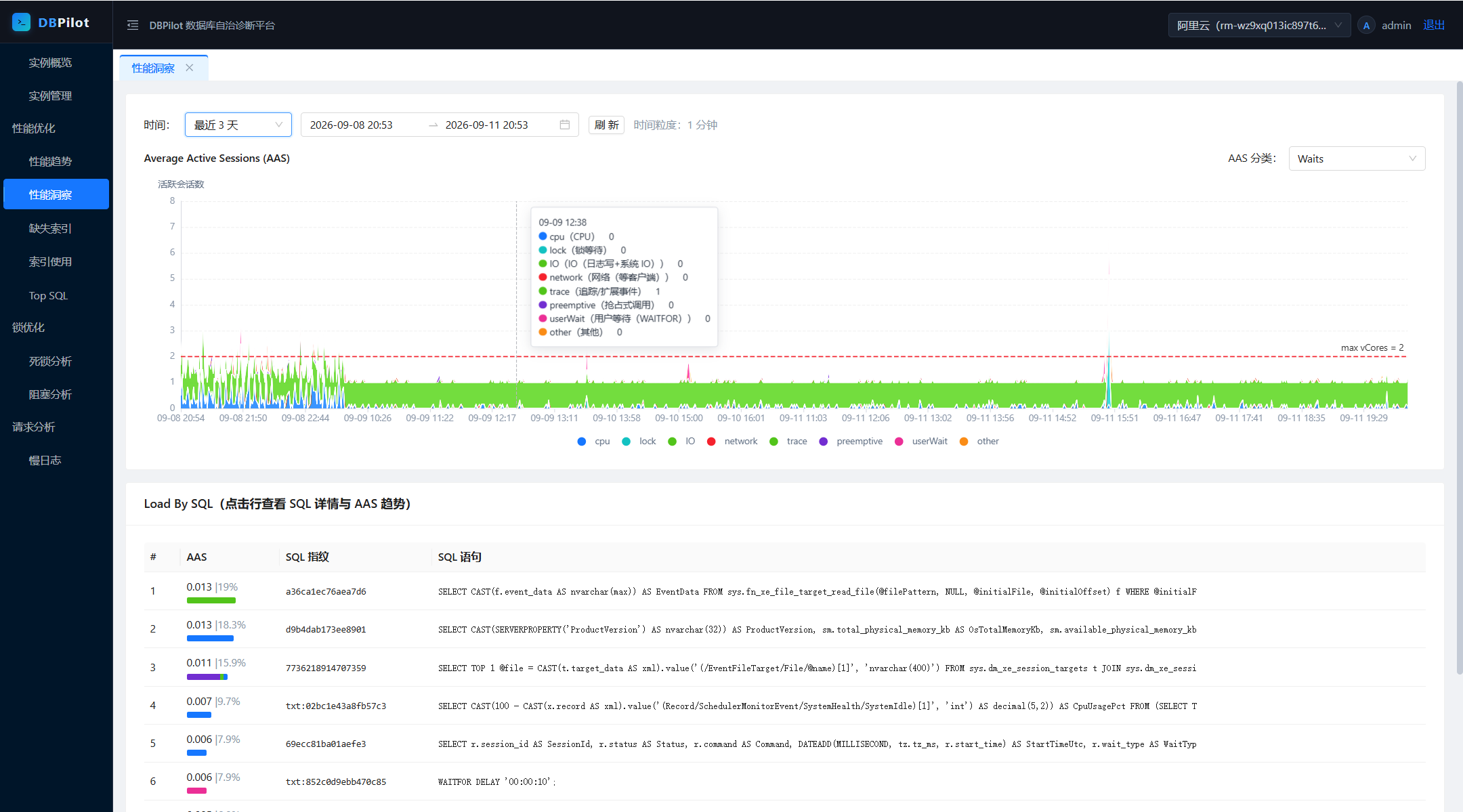 |
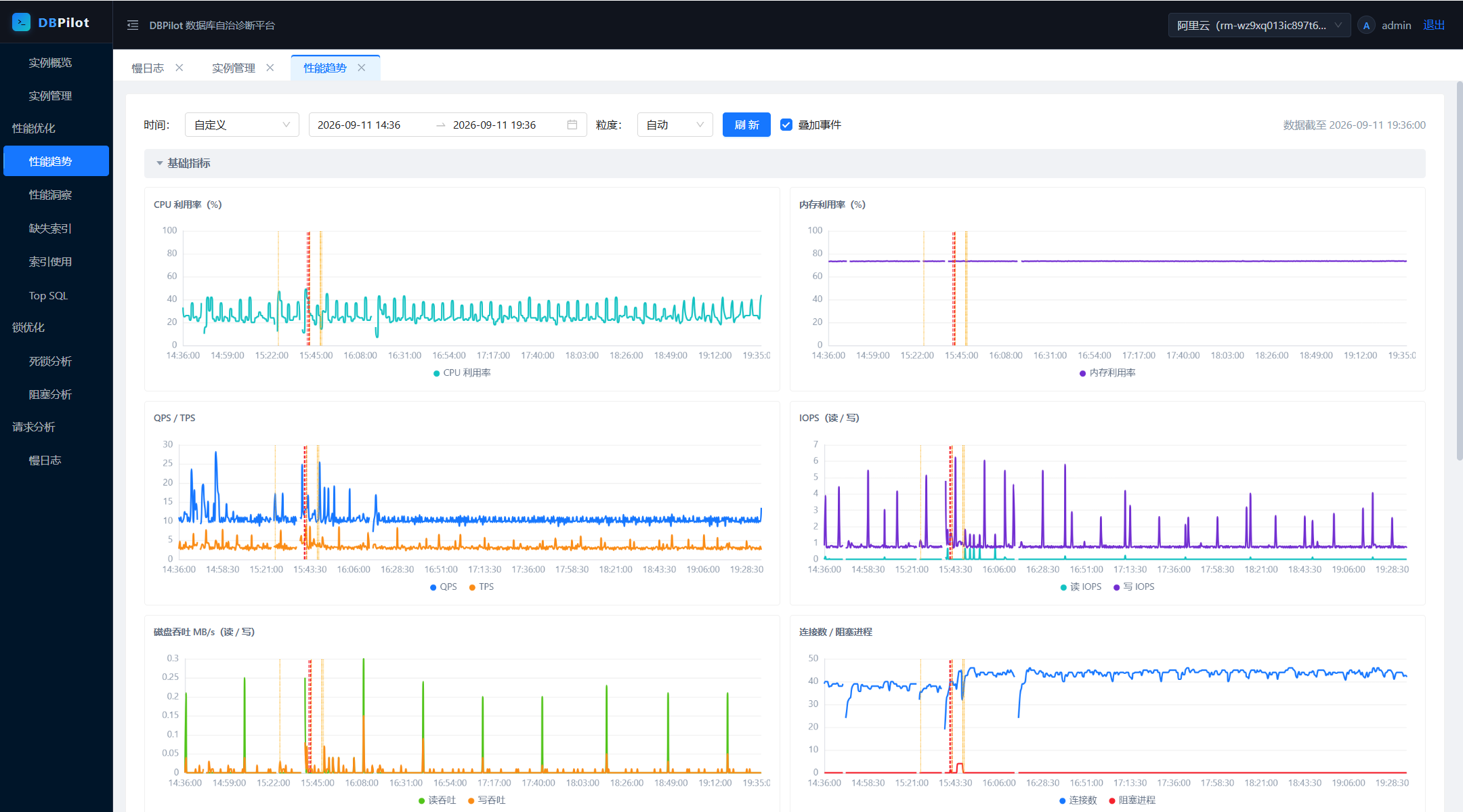 |
| Deadlock analysis | Deadlock event detail |
|---|---|
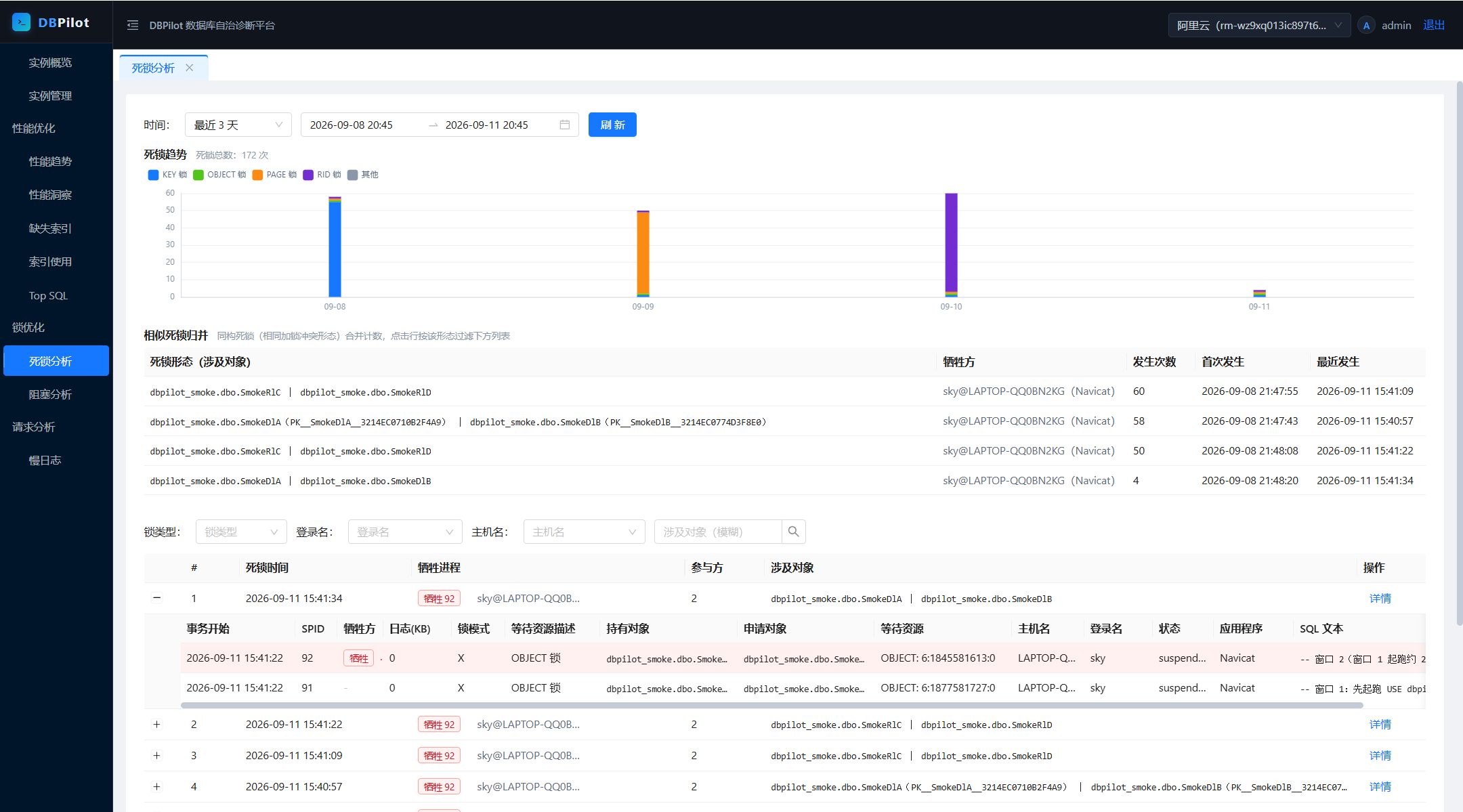 |
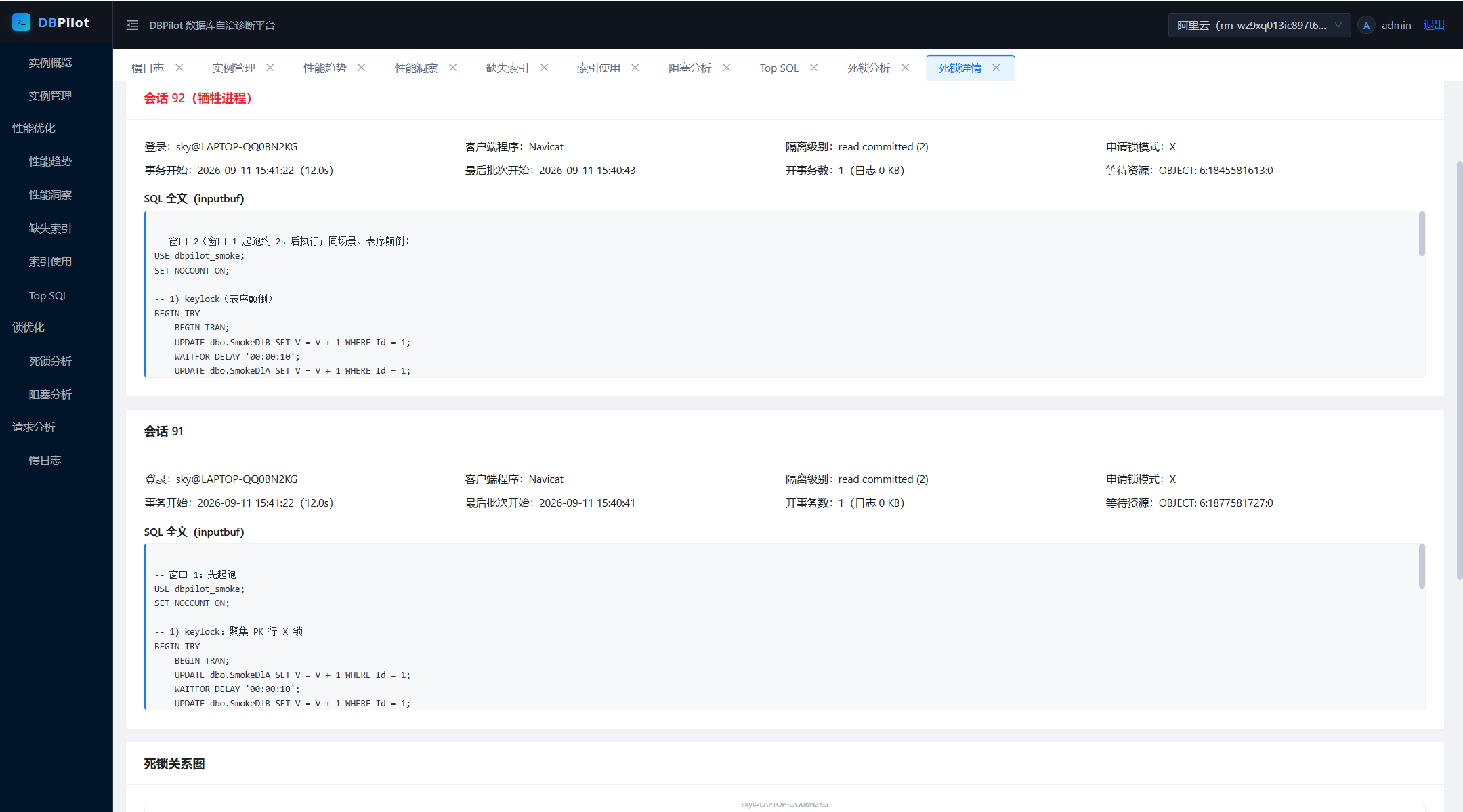 |
| Blocking analysis | Blocking chain detail |
|---|---|
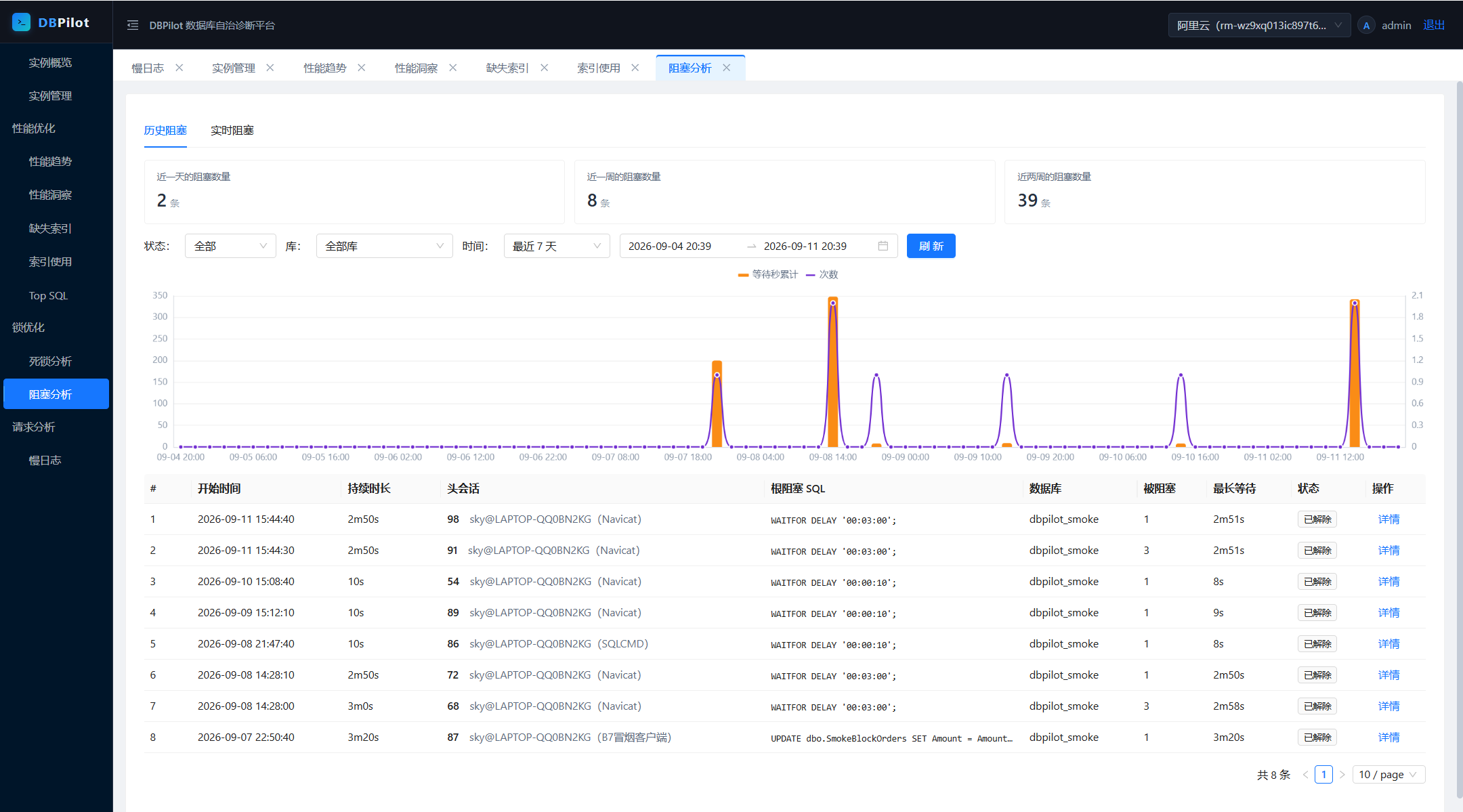 |
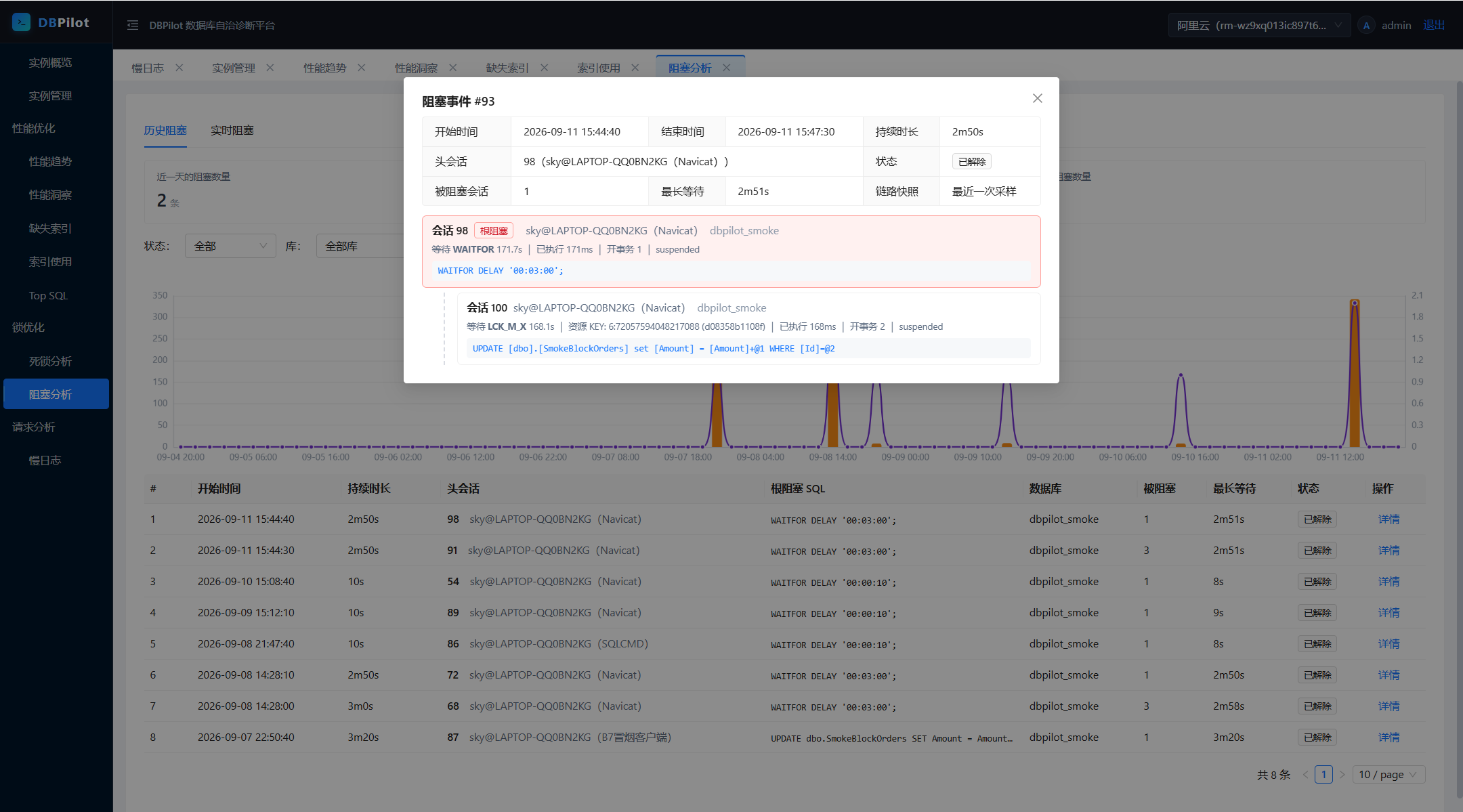 |
| Index usage | Slow query log |
|---|---|
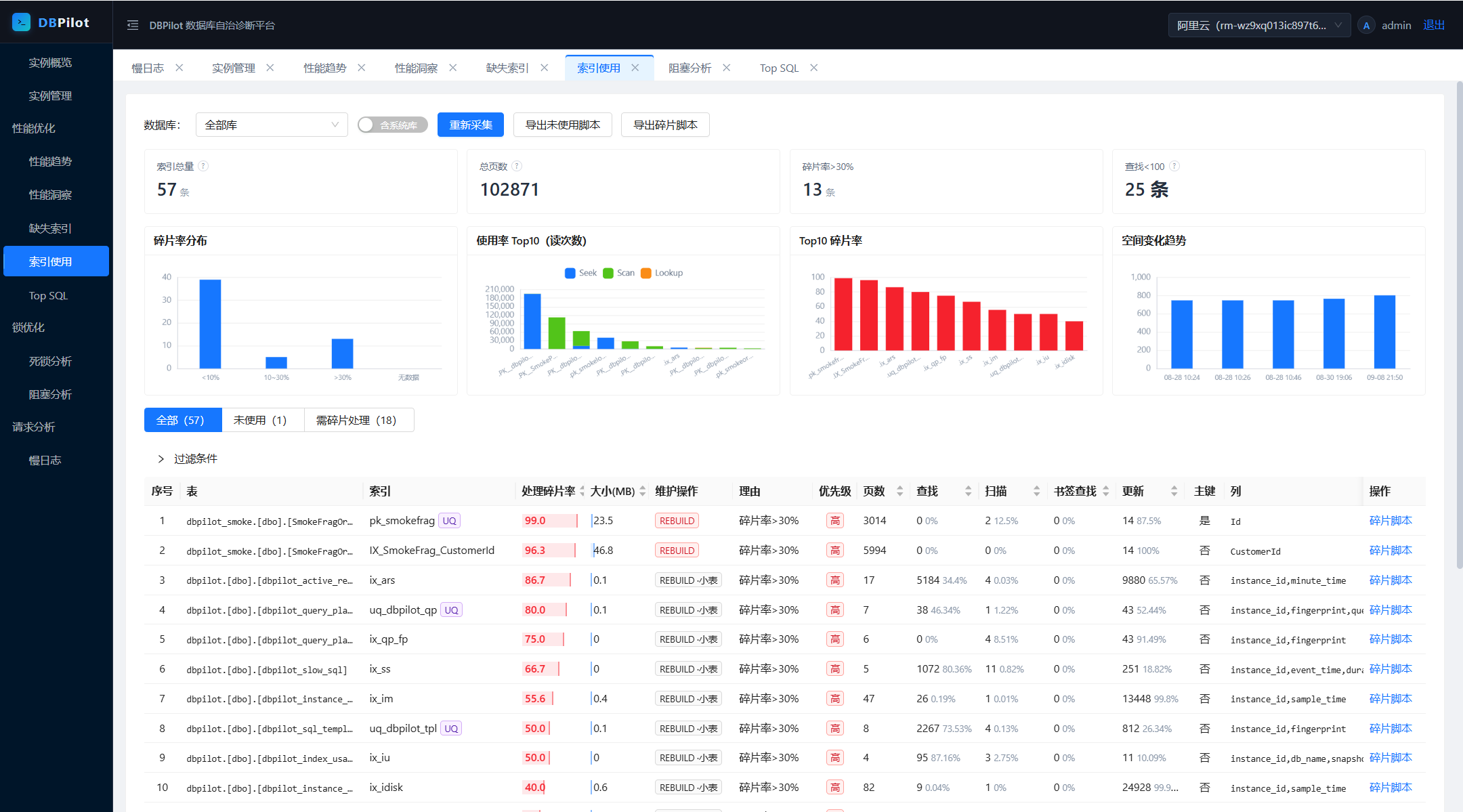 |
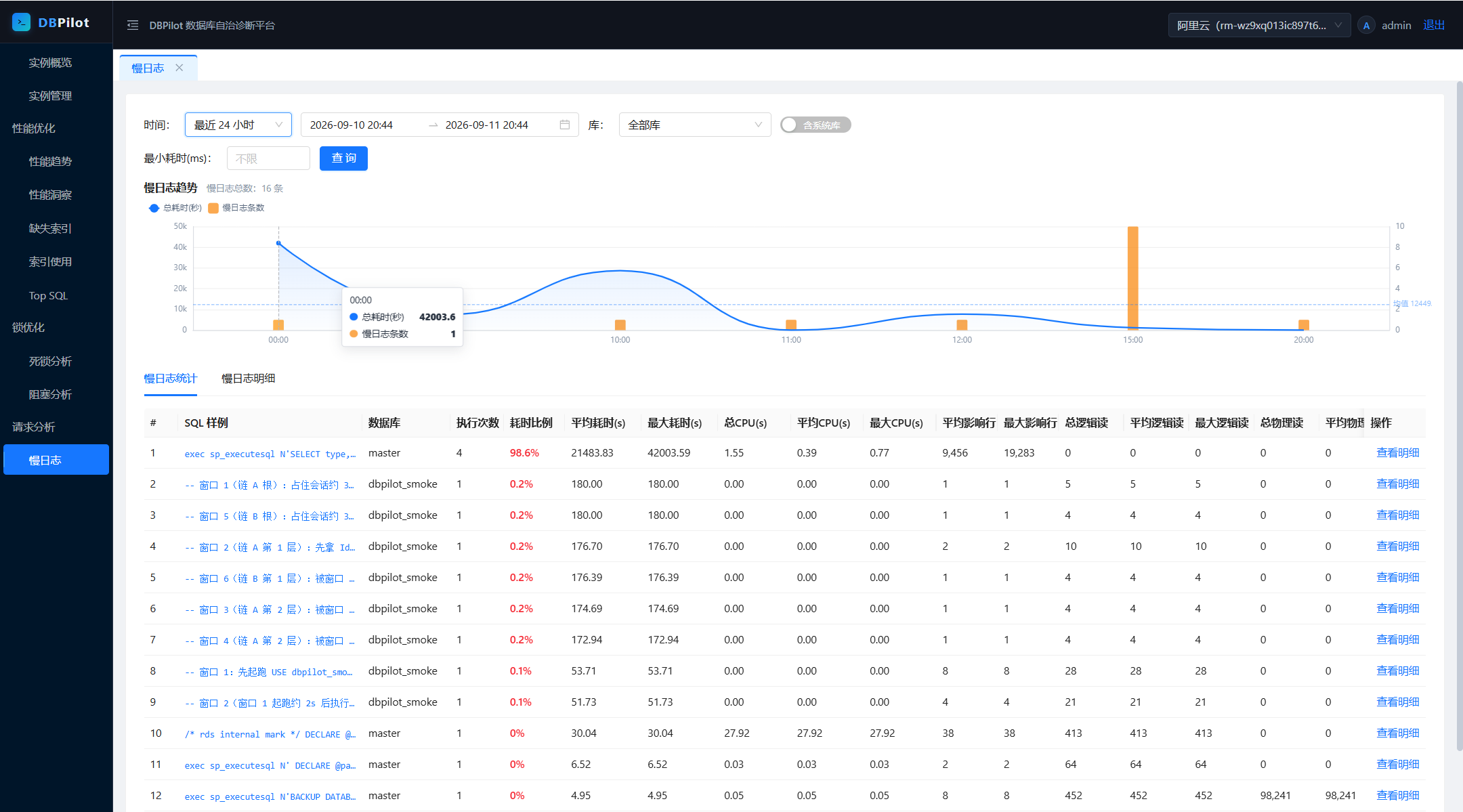 |
Fastest path: NuGet packages (frontend embedded — no Node.js). Requires .NET SDK 8.0+ — packages run on .NET 8 or later.
mkdir dbpilot-demo && cd dbpilot-demo
dotnet new web
dotnet add package DBPilot
Don't name the host project
dbpilotorDBPilot.*— it collides with the NuGet package and restore fails (NU1108).
Program.cs with:using DBPilot.AspNetCore.Extension;
using DBPilot.Core.Providers;
var builder = WebApplication.CreateBuilder(args);
builder.AddDBPilot(o => o.PlatformEngine = DbpilotEngine.Sqlite); // metadata store: SQLite, zero dependencies
var app = builder.Build();
app.UseDBPilot();
app.Run();
appsettings.json with (SQLite flavor):{
"Serilog": {
"MinimumLevel": {
"Default": "Information",
"Override": { "Microsoft": "Warning", "System": "Warning" }
}
},
"DBPilot": {
"ConnectionString": "Data Source=dbpilot_platform.db",
"Mcp": { "ApiKey": "<random key; non-empty enables MCP, empty = off>" },
"Auth": {
"Username": "admin",
"PasswordHash": "pbkdf2$100000$IOaBWezPYRnzEbBWYwLxZA==$xBWm8jjDfanDmyRttfnZoG4MIk8lcF0UnDbpjJuWaEU=",
"Secret": "<your master key (>= 32-char random string)>"
}
},
"AllowedHosts": "*"
}
ConnectionString and Auth:Secret are required — the SQLite file and schema are created on startup; the master key is generated as shown below.PasswordHash is the hash of the default password dbpilot@2026; keep it to log in with the default.dotnet run # → http://localhost:5000
admin / dbpilot@2026 (change it after deployment), then register your first instance: Instances → Add → Test connection → Enable. Real-time pages work immediately; history accumulates.Metadata store: for SQL Server / MySQL / PostgreSQL, switch PlatformEngine and the connection string — that's all; registered instances are unaffected. SQLite suits evaluation and single-machine use; prefer a server engine for production (and multi-process roles). Ready-made hosts: samples/ (SqlServer :5200 / MySql :5201 / Sqlite :5203 / PostgreSql :5204).
Change the login password: passwords are PBKDF2 hashes in DBPilot:Auth:PasswordHash — replace the hash to change the password.
hash.cs outside any project directory (your home dir works). Inside a project, dotnet run would treat it as an argument. File-based apps with #:package need .NET SDK 10; on SDK 8 use the repo-clone alternative below:#:package DBPilot.Core@0.5.5
Console.WriteLine(DBPilot.Core.Auth.PasswordHasher.Hash(args[0]));
dotnet run hash.cs <new-password>
DBPilot:Auth:PasswordHash, restart.Repo clones can skip the steps: dotnet run --project samples/DBPilot.Sample.SqlServer -- --hash <new-password>.
Master key (Auth:Secret, or env DBPILOT_MASTER_KEY) — required, exactly two uses:
| Purpose | What it does | If you change it |
|---|---|---|
| Login-cookie signing | issues/validates login tickets (HMAC-SHA256) | all sessions logged out; log in again |
| Instance-credential encryption | instance passwords stored AES-256-GCM-encrypted in the metadata DB | old ciphertext is undecryptable, no recovery — re-enter each instance's password in the UI |
Hence startup fails without it, and you should not change it once in use. Generate one:
openssl rand -base64 32      # Linux / macOS / Git Bash
# PowerShell: [guid]::NewGuid().ToString("N") + [guid]::NewGuid().ToString("N")
Two required keys + one required value — DBPilot:ConnectionString, DBPilot:PlatformEngine, and a master key (Auth:Secret or env DBPILOT_MASTER_KEY). Missing → startup error; everything else is optional with defaults.
| Key | Required | Notes |
|---|---|---|
DBPilot:ConnectionString |
yes | metadata DB connection string; schema auto-created on startup |
DBPilot:PlatformEngine |
yes | sqlserver / mysql / postgresql / sqlite; in code: o.PlatformEngine = DbpilotEngine.SqlServer. Independent of which engines you monitor |
DBPilot:Auth:Secret |
yes (or env) | master key — signs login cookies, encrypts instance credentials; ≥32-char random string |
DBPILOT_MASTER_KEY (env) |
yes (or Secret) | env form of the master key, container-friendly; config value takes precedence |
DBPilot:Auth:Username / PasswordHash |
no | login account (default admin) / password hash (default dbpilot@2026) |
DBPilot:Mcp:ApiKey |
no | MCP Server switch (non-empty = on) |
DBPilot:Roles |
no | process roles (Web / Collector, both by default); multi-process = 1 collector + N web fronts — two collectors on one metadata DB double-collect |
DBPilot:Jobs |
no | per-collector switch & cron; empty value = disable that collector |
DBPilot:Retention / DBPilot:Collect |
no | retention days (auto-clean) / parallelism & backoff |
DBPilot:AutoInitSchema |
no | auto-create schema on startup (default true; set false when DBAs own the schema); versioned incremental migrations (dbpilot_schema_version) run alongside on upgrade |
DBPilot:TopSqlExcludePatterns |
no | Top SQL noise filter (LIKE patterns); default set built in, explicit empty array clears it |
Monitored instances are never configured here — they live in the UI, credentials encrypted in the metadata DB.
Additionally requires Node.js 20+ (the embedded web UI comes from the frontend build; NuGet packages ship it prebuilt).
git clone https://github.com/SkyChenSky/DBPilot.git
cd DBPilot
scripts\run\setup.bat      # frontend build + compile + sample appsettings.json (default SqlServer host; pass MySql / Sqlite / PostgreSql to switch)
# edit samples/DBPilot.Sample.SqlServer/appsettings.json — fill in the connection string and Auth:Secret
dotnet run --project samples/DBPilot.Sample.SqlServer    # → http://localhost:5200
Non-Windows / manual equivalent:
cd web && npm install && npm run build
cd .. && dotnet build
cp samples/DBPilot.Sample.SqlServer/appsettings.template.json samples/DBPilot.Sample.SqlServer/appsettings.json
Da