dotnet-skills
by managedcode
Installable .NET skill catalog and CLI for Codex, Claude Code, GitHub Copilot, and Gemini.
484stars
36forks
C#
Added 3/27/2026
⚠️ Third-Party Software Notice
This skill is third-party open-source software developed and hosted independently on GitHub. SkillsLLM is an informational directory and does not control or maintain the underlying repository.
Any security checks, ratings, or warnings displayed by SkillsLLM are automated and limited in scope. They do not constitute a security certification or guarantee that the software is safe, error-free, or free from malicious code, vulnerabilities, compromised dependencies, or prompt-injection risks.
Review the source code, permissions, dependencies, and configuration before installing or running any third-party skill. Use is at your own risk. To the maximum extent permitted by applicable law, SkillsLLM is not liable for losses arising from third-party software.
Installation
# Add to your Claude Code skills
git clone https://github.com/managedcode/dotnet-skills
Getting Started
Guides for using cli tools skills like dotnet-skills.
- Getting Started with AI SkillsFirst-time install walkthrough for Claude Code, Codex CLI, and ChatGPT.
- SkillsLLM Features GuideVoting, bookmarks, comments, comparison pages, and security scanning explained.
- What is an AI Skills Marketplace?Definitions, how marketplaces work, and how to choose between them in 2026.
Security ReportVerified
Last scanned: 5/22/2026
{
  "issues": [],
  "status": "PASSED",
  "scannedAt": "2026-05-22T07:46:04.691Z",
  "semgrepRan": false,
  "npmAuditRan": true,
  "pipAuditRan": true
}
Compare with similar skills
See how dotnet-skills compares with popular alternatives.
dotnet-skills



Stop explaining .NET to your AI. Start building.
We've all been there: asking Claude to use Entity Framework, only to get EF6 patterns in a .NET 8 project. Explaining to Copilot that Blazor Server and Blazor WebAssembly aren't the same thing. Watching Codex generate Startup.cs for a Minimal API project.
This catalog fixes that. A growing catalog covering the entire .NET ecosystem—from ASP.NET Core to Orleans, from MAUI to Semantic Kernel. Install them once, and your AI agent actually knows modern .NET.
Browse the complete catalog on skills.managed-code.com →
Interactive Control Center
Run dotnet skills to open the full-screen control center for catalog browsing, project-aware recommendations, installation, updates, and agent management.
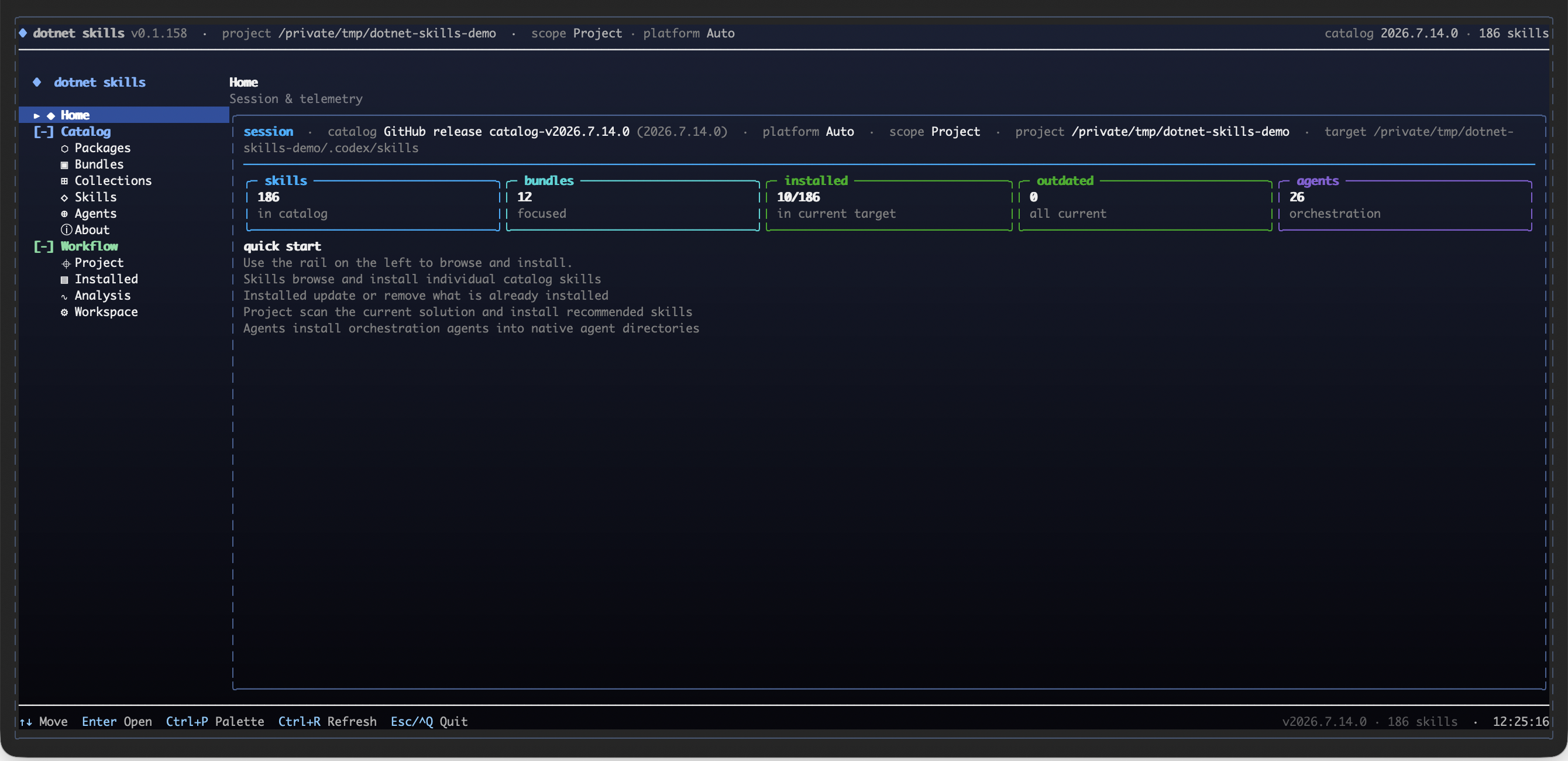
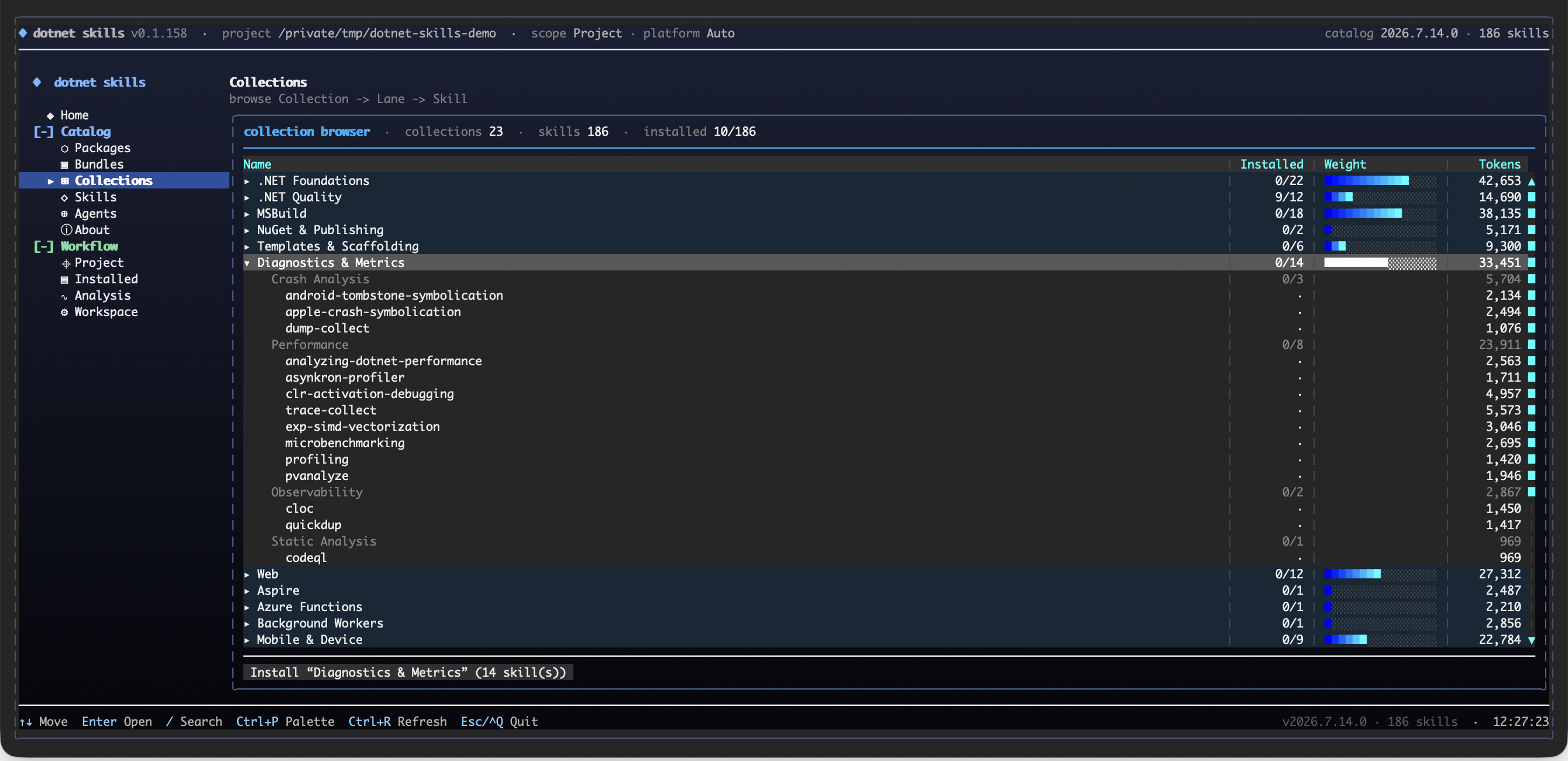
Explore the catalog as Collection -> Lane -> Skill, with installed coverage, token weight, and an install action kept visible while you browse.
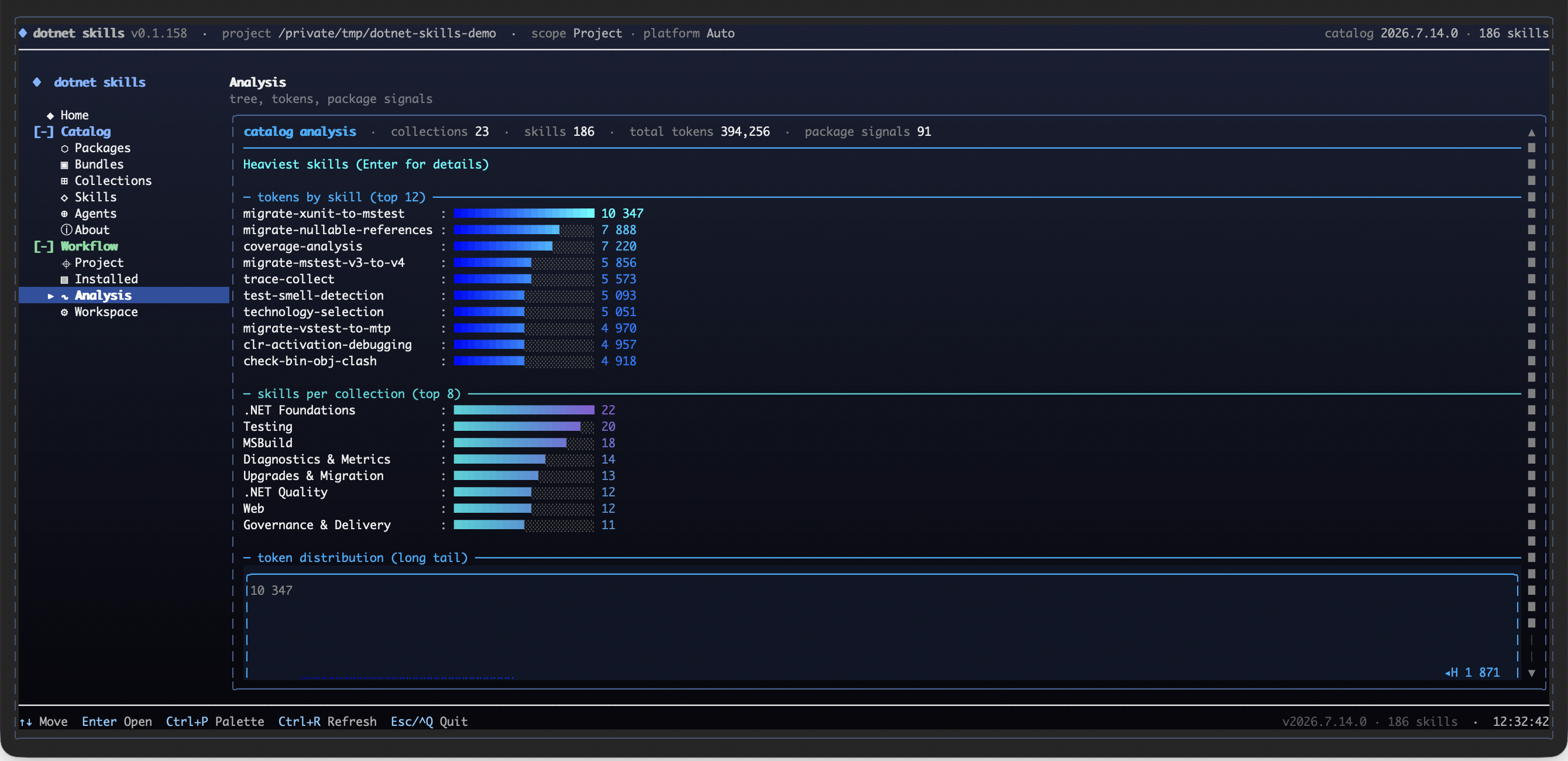
Use the analysis surface to compare the heaviest skills, collection sizes, package signals, and the catalog's token distribution before installing.
Why This Matters
- No more outdated patterns. Skills are maintained by the community and track official Microsoft documentation.
- Works everywhere. Same skills for Claude, Copilot, Gemini, Codex, and Junie.
- Community-driven. Missing a skill for your favorite library? Add it and help everyone.
Your favorite .NET library deserves a skill. If you maintain an open-source project or just love a framework that's missing, contribute it. Let's make AI agents actually useful for .NET developers.
Quick Start
dotnet tool install --global dotnet-skills

# choose one dedicated agent launcher
dotnet tool install --global dotnet-agents
dotnet tool install --global agents

dotnet skills                               # open the interactive control center
dotnet skills version                       # show current tool version and latest NuGet version
dotnet skills --version                     # alias for the same version view
dotnet skills list                          # show installed and available skills
dotnet skills bundle list                   # show focused bundles by collection and workflow
dotnet skills list --local                  # only installed skills in the current target
dotnet skills recommend                     # suggest skills from local .NET and browser UI signals
dotnet skills install --auto                # install skills from local .NET and browser UI project signals
dotnet skills install --auto --prune        # remove stale auto-managed skills that no longer match the project
dotnet skills install bundle quality        # install a focused .NET quality bundle
dotnet skills install mcaf                  # install the opt-in MCAF governance skill
dotnet skills install bundle orleans        # install the Orleans workflow bundle
dotnet skills install aspire orleans        # install skills
dotnet skills catalog tokens --catalog-root . # export per-skill token counts as JSON
dotnet skills remove aspire                 # remove one installed skill
dotnet skills remove bundle quality         # remove every skill from a focused bundle
dotnet skills remove collection distributed # remove every skill from a collection
dotnet skills remove --all                  # remove installed catalog skills from the target
dotnet skills update                        # refresh installed catalog skills
dotnet skills install blazor --agent claude # install for a specific agent
dotnet agents list                          # show bundled orchestration agents
dotnet agents install router --auto         # install agents to shared or detected agent folders
agents list                                 # same agent-only catalog via the plain standalone command
agents install router --auto                # same agent install flow without the dotnet-prefixed launcher
Commands
| Command | Description |
|---|---|
dotnet skills |
Open the interactive control center with direct skill browsing, collections, analysis, bundles, and install preview |
dotnet skills version |
Show the current installed tool version and check whether NuGet has a newer release |
dotnet skills list |
Show the current inventory, compare project/global scope when relevant, and keep the remaining catalog as a compact collection summary |
dotnet skills bundle list |
Show the focused bundles that expand into related skills by collection or workflow |
dotnet skills recommend |
Scan local *.csproj, package.json, and browser UI files, propose relevant skills, and let you decide what to install |
dotnet skills install --auto |
Inspect local *.csproj, package.json, and browser UI files, detect strong project signals, and install matching skills automatically |
dotnet skills install --auto --prune |
Remove stale auto-managed skills that no longer match the current project's NuGet packages or app-model signals |
dotnet skills install <skill...> |
Install one or more skills |
dotnet skills install bundle <bundle...> |
Install one or more focused bundles such as quality, frontend-quality, or orleans |
dotnet skills catalog tokens --catalog-root . |
Export the tokenizer model name plus per-skill token counts as JSON |
dotnet skills remove <skill...> |
Remove one or more installed catalog skills by skill id or alias |
dotnet skills remove bundle <bundle...> |
Remove every installed skill mapped to one or more focused bundles |
dotnet skills remove collection <collection...> |
Remove every installed skill in one or more collections |
dotnet skills remove --all |
Remove every installed catalog skill from the selected target |
dotnet skills update [skill...] |
Update installed catalog skills to the selected catalog version |
dotnet skills sync |
Download latest catalog |
dotnet skills where |
Show install paths |
dotnet agents list |
List available orchestration agents |
dotnet agents install <agent...> |
Install orchestration agents |
dotnet agents install router --auto |
Install agents to all detected platforms |
dotnet agents remove <agent...> |
Remove installed agents |
dotnet agents where |
Show resolved shared or platform agent install paths |
agents list |
List available orchestration agents through the standalone agents tool |
agents install <agent...> |
Install orchestration agents through the standalone agents tool |
agents where |
Show resolved agent install paths through the standalone agents tool |
Use --agent to target a specific agent platform, --scope to choose global or project install. Use dotnet skills list --installed-only or the shorter dotnet skills list --local when you only want the installed inventory, or --available-only when you want the detailed collection-by-collection breakdown of the remaining catalog. The default list view stays compact: it shows the current target inventory, compares project/global scope when that comparison is meaningful, and keeps the remaining catalog as a short collection summary instead of dumping one giant description table. The CLI renders rich terminal tables by default so you can quickly see installed versions, update candidates, install commands, and when a newer dotnet-skills, dotnet-agents, or agents package is available on NuGet. dotnet skills --version, dotnet agents --version, and agents --version are shortcuts for the version view.
dotnet-skills remains the skill-first CLI and still supports dotnet skills agent ... for compatibility. The dedicated agent-only surface is published in both forms: dotnet-agents for dotnet agents ... and agents for agents .... Both top-level list, install, remove, and where commands target orchestration agents directly.
The interactive shell behind bare dotnet skills is the main control center: its primary catalog row now mirrors the public site with Packages, Bundles, Collections, Skills, Agents, and About, then layers CLI-only lifecycle surfaces such as Project, Installed, Analysis, and Workspace underneath. Inside that control center you still get direct individual-skill picking, Collection -> Lane -> Skill browsing, package-entry analysis, token hotspots, a full tree view, and install preview before files are written.
The public catalog is the canonical browse surface for Packages, Bundles, Collections, Skills, Agents, and About. It uses the same shared navigation manifest and collection taxonomy as the CLI.
dotnet skills bundle list shows the ready-made focused bundles. Bundle installs are bulk shortcuts for related skill sets, so dotnet skills install bundle quality, dotnet skills install bundle frontend-quality, or dotnet skills install bundle orleans install every skill mapped to that focused bundle in one pass. MCAF is one opt-in governance skill and instal
Frequently Asked Questions
What is dotnet-skills?
dotnet-skills is an open-source cli tools skill for AI coding assistants such as Claude Code, Codex CLI, and ChatGPT, built by managedcode. Installable .NET skill catalog and CLI for Codex, Claude Code, GitHub Copilot, and Gemini. It has 484 GitHub stars.
Is dotnet-skills safe to use?
Yes. dotnet-skills passed SkillsLLM's automated security scan — a dependency vulnerability audit plus prompt-injection heuristics — with no high-severity issues. You can read the full report in the Security Report section on this page.
How do I install dotnet-skills?
Clone the repository with "git clone https://github.com/managedcode/dotnet-skills" and add it to your Claude Code skills directory (see the Installation section above).
What programming language is dotnet-skills written in?
dotnet-skills is primarily written in C#. It is open-source under managedcode on GitHub, so you can review or fork the full source.
Are there alternatives to dotnet-skills?
Yes. SkillsLLM lists many other CLI Tools skills you can browse and compare side by side. Open the CLI Tools category from the badge at the top of this page, or use the Related Skills and comparison links further down to weigh dotnet-skills against similar tools.
Comments (0)
to leave a comment.
No comments yet. Be the first to share your thoughts!
Related Skills
The agent harness performance optimization system. Skills, instincts, memory, security, and research-first development for Claude Code, Codex, Opencode, Cursor and beyond.
265,682
39,705
JavaScript
AI Agentsai-agentsanthropic
An agentic skills framework & software development methodology that works.
234,966
20,863
Shell
AI Agentsaibrainstorming
The agent harness performance optimization system. Skills, instincts, memory, security, and research-first development for Claude Code, Codex, Opencode, Cursor and beyond.
185,940
28,768
JavaScript
AI Agentsai-agentsanthropic
Makes your AI agent think like the laziest senior dev in the room. The best code is the code you never wrote.
144,618
7,744
JavaScript
AI Agentsagent-skillsai-agents
A cross-platform desktop All-in-One assistant for Claude Code, Codex, OpenCode, OpenClaw, Grok Build & Hermes Agent. Only official website: ccswitch.io
135,129
9,282
Rust
AI Agentsai-toolsclaude-code
Popular in CLI Tools
Top skills in this category by stars
An AI skill that provides design intelligence for building professional UI/UX across multiple platforms.
129,980
13,830
Python
CLI Toolsai-skillsantigravity
CLI tool for configuring and monitoring Claude Code
31,248
3,552
Python
CLI Toolsanthropicanthropic-claude
Mobile and Web client for Codex and Claude Code, with realtime voice, encryption and fully featured
23,876
2,038
TypeScript
CLI Toolsclaude-codeclaude-desktop