把 DeepSeek Harness 装进桌面(Windows / macOS)的开箱即用客户端
内置完整 dsh 运行时与全部官方插件,免装 Node.js,双击即用
[!IMPORTANT] 🎉 v0.5.0 —— 全架构迁移与重构:桌面壳从 Electron 全面迁移至 Tauri 2(Rust),更稳定、更好用—— 安装包更小、内存更低、启动更快;「守护瀑布」让坏插件 / 坏配置也永不白屏打不开。 用户数据与旧版完全兼容,覆盖安装即完成无痛升级(详见 迁移指南 与 架构)。 v0.5.0 之前的 Electron 版本仍可在 Releases 下载,此后仅维护 Tauri 架构。





[!TIP] 🧩 推介:dsh-hotplug-hub —— 我们推介的 dsh 启动管理器。
✨ 特性
开箱即用
- 零依赖 — 内置独立 Node 运行时与 npm CLI,目标机器无需安装任何环境
- 完整 dsh — 打包
@deepseek-ai/dsh及全部官方插件,离线可用 - 一键启动 — 双击即启
dsh web,优先复用上次端口,就绪后载入原生窗口 - 双形态 — 便携版(免安装、可放 U 盘)+ 安装版(桌面/开始菜单快捷方式)
体验增强
- 深色玻璃无边框窗口 — 自绘标题栏、Win11 圆角,关闭默认隐藏到系统托盘
- 桌面宠物 — 随行小鲸鱼常驻桌面,陪伴工作(设置 → 插件可一键开关)
- 侧边会话浮窗 — 随时唤起独立会话窗口,与主会话互不干扰
- 会话管理 — 归档 / 恢复 / 删除对话,历史不再堆积
- 余额小部件 — 对话底部实时显示「本轮费用 · 余额」,支持 OpenCode Go 订阅额度,点击直达充值
- 完成通知 — 任务跑完弹系统通知,一分钟内回到主窗口自动跳到对应会话(Windows 通知无点击回调,聚焦即跳转)
工程韧性
- 守护瀑布 — 内核 boot 链逐级自愈:坏插件自动修复、坏配置自动重建、内核崩溃环原地重启,任何不兼容形态都不退出(v0.5.0 Tauri 架构核心特性)
- 崩溃自愈 — 渲染层假死心跳检测自动重载;内核由 supervisor 探活 + 指数退避拉起
- 历史兼容 — 自动修补会话事件词汇表,第三方插件写入的事件不破坏会话历史
- 自动更新 — 右上角 ⋯ 菜单一键检查并安装客户端更新(双源 GitHub/Gitee Releases 自动切换,sha256 校验 fail-closed,离线静默);升级安装自动装回旧位置,零配置丢失;内核随客户端整体分发(无独立更新链)
- 快捷方式自愈 — 桌面与开始菜单快捷方式缺失即自动补建
📸 界面一览
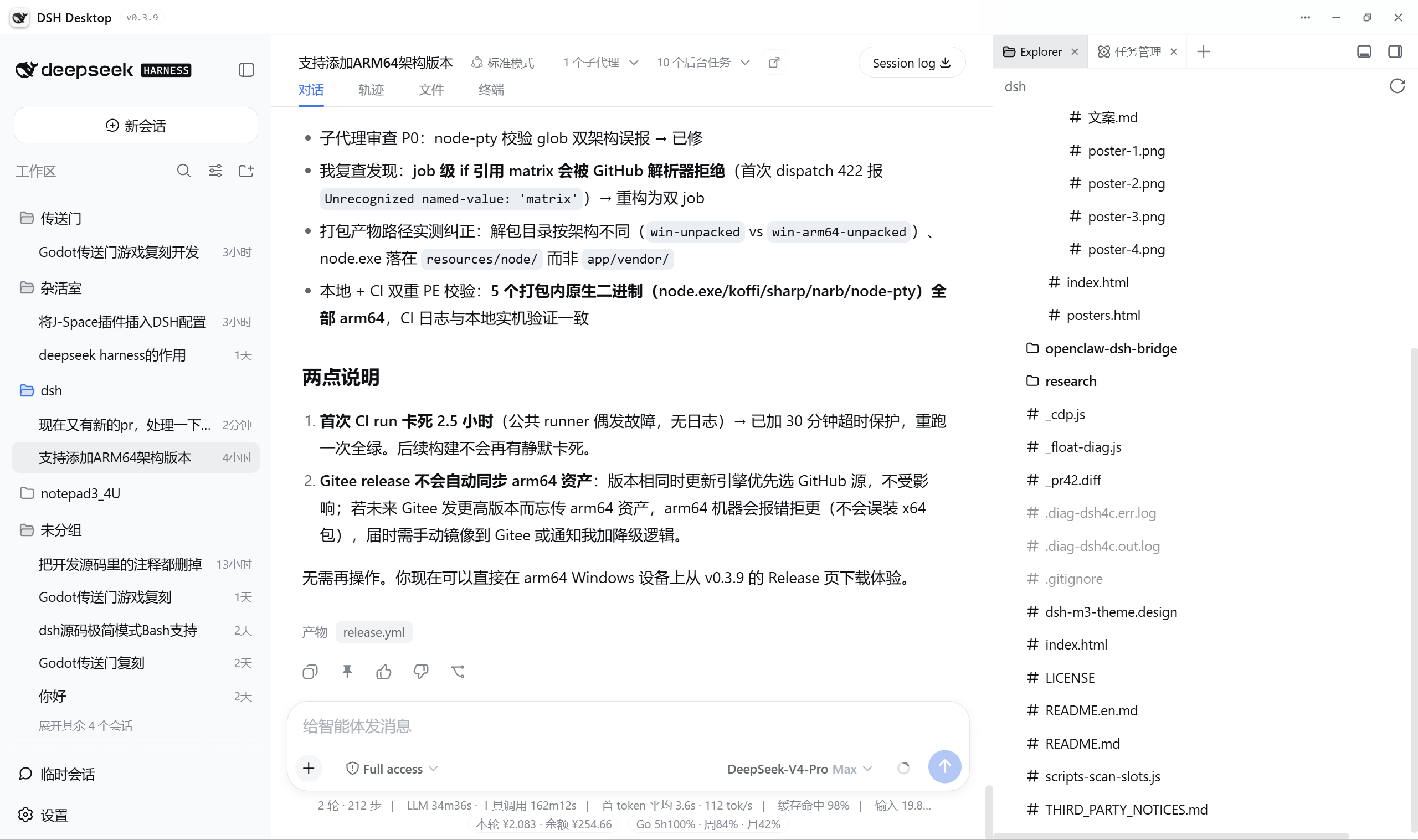
开箱即用(原生 dsh web)vs DSH Desktop:
| 能力 | 原生 dsh web |
DSH Desktop |
|---|---|---|
| 启动 | 手动安装 Node.js、敲命令 | 双击即用,内置独立运行时 |
| 界面 | 浏览器标签页 | 桌面原生窗口 · 深色玻璃无边框 |
| 会话管理 | 仅归档 | 归档 / 恢复 / 删除 |
| 余额 | 无 | 实时「本轮费用 · 余额」+ OpenCode Go |
| 桌面能力 | 无 | 托盘常驻 / 完成通知 / 桌面宠物 / 侧边浮窗 |
| 更新 | 手动 | 客户端双源更新链(GitHub/Gitee + sha256 校验 fail-closed) |
🚀 快速开始
系统要求:Windows 10 / 11(x64),无需预装 Node.js。
下载(Tauri 架构)
最新版到 GitHub Releases 页下载(v0.5.x 预览线)——v0.5.2(2026-08-22)修复 v0.5.1 用户实测的「频繁重启 + 白屏」等问题。下表保留 v0.5.0(首个对外测试版,2026-08-21 发布)直链:
| 平台 | 下载 |
|---|---|
| 💻 Windows x64 | DSH.Desktop_0.5.0_x64-setup.exe(NSIS 安装包,约 87 MB,currentUser 模式免管理员,内嵌 WebView2 引导器) |
- v0.5.0 由 Tauri 发布流水线 云端构建发布(本轮上线 Windows x64);v0.5.1 起三平台产物(Linux AppImage/deb、macOS dmg)与 Windows 便携版均由流水线产出(六资产校验,见发布)。
- 从任意旧版(Electron 0.1.x–0.4.x)覆盖安装:自动定位旧目录、静默卸载保数据、装回原位置,用户数据零迁移(详见迁移指南)。
国内用户(Gitee)
[!NOTE] Gitee 镜像当前最新为 Electron 版 v0.4.1——v0.5.0(Tauri)安装包暂未同步,请先从 GitHub Releases 下载。
Gitee 单文件限制 100 MB,Electron 安装包拆为分片(.part1/.part2/...),全部下载后双击该版本附件中的 merge.bat 自动合并,SHA256SUMS 校验。请到 Gitee Releases 页选择版本下载。
旧版下载(Electron 0.4.x 及更早)
GitHub Releases 保留全部历史版本。旧版命名规则:win- = Windows,macos- = macOS(.exe 一定是 Windows,.dmg / .zip 一定是 macOS);x64 = Intel/AMD,arm64 = ARM 芯片(Windows ARM 设备如 Surface Pro X、Apple Silicon Mac 选 arm64)。形态含 portable(免安装便携版)与 setup(安装版)。
macOS 版暂未签名,Apple Silicon 首次打开会提示「无法验证开发者」——请右键点击 App → 打开,或终端执行:
xattr -dr com.apple.quarantine "/Applications/DSH Desktop.app"
数据位置:Windows 便携版在 exe 旁 data\;安装版在 %APPDATA%\DSH Desktop\。macOS 在 ~/Library/Application Support/DSH Desktop/。设置环境变量 DSH_HOME 可强制指定 dsh 配置目录。
💬 社区交流
遇到问题、想反馈建议或与其他用户交流?欢迎加入 QQ 交流群(群号 926561802):

🛠 从源码构建
v0.5.0(Tauri 架构)——前置:Rust 工具链 + dsh-desktop/ 已 npm install(内核 payload 源):
# 测试(Rust 全量 + sidecar + 共享脚本)
cd dsh-tauri
cargo test --manifest-path src-tauri/Cargo.toml   # Rust 177 例(CI 跳集成例)
node --test sidecar/cli.test.js                    # sidecar 16 例
cd ../dsh-desktop && node --test scripts/test/unit-*.test.js  # 共享脚本回归

# 开发运行
cd src-tauri/src/app && cargo run

# 打包 win-x64 NSIS 安装包 + 安装态冒烟
bash dsh-tauri/scripts/stage-payload.sh
npx --yes @tauri-apps/cli build --config src-tauri/src/app/tauri.conf.json \
  --target x86_64-pc-windows-msvc
bash dsh-tauri/scripts/smoke-installed.sh
完整流程(含调试开关 DSH_TAURI_DIAG / DSH_TAURI_DEVTOOLS 等)见开发手册 §6。
🤖 发布
v0.5.0 起发布走 Tauri GitHub Actions 云端流水线(tauri-release.yml):推 v* tag → 三平台构建(统一 vendor node v24.15.0 + 完整 stage-payload.sh + compat 构建 fail-fast)→ 自动汇总产物发布 Release。v0.5.0 已由此流水线发布(2026-08-21,本轮上线 Windows x64 NSIS 安装包);v0.5.1 起三平台六资产(Windows 安装包/便携版、Linux AppImage/deb、macOS dmg)校验通过,0.5.x 以预览线(prerelease)标记发布;v0.5.2(2026-08-22)为 v0.5.1 用户实测问题的修复版。Electron 时代的 release.yml 流水线随架构退役。CI 之外的手动本地打包路径见上方从源码构建(stage-payload → tauri build → 安装态冒烟三步)。
📦 Tauri 架构可导出的安装包形式
由 tauri.conf.json 的 bundle.targets 决定,按需增删即可扩展产物形式:
| 平台 | 安装包形式 | 状态 |
|---|---|---|
| Windows x64 | NSIS 安装包(DSH.Desktop_<版本>_x64-setup.exe)——LZMA 压缩实测 ~87 MB;currentUser 模式免管理员安装;WebView2 引导器内嵌,离线机器也能装;升级链自动装回旧目录保数据 |
✅ v0.5.0 已发布(CI 产出,过安装态冒烟);另有便携版 zip(v0.5.1 起) |
| Windows arm64 | NSIS 安装包(--target aarch64-pc-windows-msvc 交叉构建) |
🔜 Tauri 原生支持,待实测(v0.5.1 起流水线实验线) |
| Windows | MSI(WiX 工具链,targets 加 "msi") |
🔜 Tauri 原生支持,待开启 |
| Linux x64 | .AppImage / .deb |
✅ CI 已产出(v0.5.1 起六资产校验,预览线) |
| macOS(Apple Silicon) | .app / .dmg 磁盘映像 |
✅ CI 已产出(v0.5.1 起,ad-hoc 签名校验,预览线) |
便携版(免安装、可放 U 盘)不是 Tauri 内置 target——Tauri 版以 NSIS
currentUser安装为默认形态,独立便携包规划中以后续版本提供。
🧩 内置插件生态
随安装包分发(完整第三方组件清单见 THIRD_PARTY_NOTICES.md):
| 插件 | 说明 | 来源 |
|---|---|---|
dsh-session-manager |
会话归档 / 恢复 / 删除管理 | 内置 |
dsh-better-sidebar |
侧边栏增强 | omdsh-dev/DSH-better-sidebar |
dsh-super-injector |
开发注入 / 热重载工具链 | @dsh-external 社区 |
dsh-vision |
OpenAI 兼容识图(OCR / 看图 / 读图表) | @dsh-external 社区 |
dsh-side-session |
侧边会话浮窗,三档上下文 | hzhz314159/dsh-side-session |
billion-context-dsh |
上下文压缩(compaction)增强 | Tyan66666/billion-context-dsh |
dsh-navbar |
导航栏替换 | vlln/dsh-navbar |
dsh-hub |
插件中枢:更新引擎 / 全局记忆 / 图谱与市场挂载 | ARFCON/dsh-hub-DSH |
harness-pet |
桌面宠物 | cakeni/harness-pet |
🧠 社区预设
除官方内核自带的 standard / ptc / minimal / cordis 外,随安装包共内置 8 个 Agent 预设——7 个来自下表社区仓库(新会话设置中直接可选),另加自研的 minimal-win;逐预设清单、上游同步与许可细节见 dsh-desktop/docs/agent-presets.md。按模型/接入方式的选型建议:
| 预设(内置 id) | 用途 | 上游仓库 | 上游作者 | 许可证 |
|---|---|---|---|---|
router-standard |
官方 API · flash 模型(任务感知路由) | dsh-routing-suite | @yjh051108 | MIT |
anchored-standard(含 zero-anchored-standard / whoami-standard 变体) |
官方 API · pro 模型(两段式:Minimal 引导 → 全量 Standard) | dsh-anchored-standard | @xiaobright | MIT |
v4-flash-godmode-opencode-go |
OpenCode Go · flash 模型(build/fix 内路由) | v4-flash-godmode-opencode-go | @SheberDavid | ⚠️ 上游无 LICENSE 文件(作者声明基于 MIT 的 dsh-routing-suite 改编,分发前建议与作者确认) |
warmupbetter / warmupbetter-replay |
OpenCode Go · pro 模型(首轮长 COT 热身 / 回放) | myDshPresets | @0liveiraaa | 上游 README 声明修改按 MIT(附 MIT 的 LICENSE.deepseek-harness) |
致谢以上社区作者;预设的改编与适配细节见各预设目录内
NOTICE/README。router-standard依赖的运行时注入器以 dsh-super-injector 插件形态随包内置(见上表插件生态)。
🏗 架构
v0.5.0 起为 Tauri 2(Rust)架构——Electron 壳已退役,其全部职责(窗口 / IPC / 更新 / 打包)由 Rust 侧逐 crate 复刻,契约先行(dsh-tauri/contracts/ 五份硬契约为接口唯一事实源):
┌──────────────────