Maintainer of this skill?

Automated security scan — not a certification.
by yan-mc
Normify · DSH 插件:把项目架构写成归一化的分形模块树,三层校验(写时 / 校验 / 冻结回执)、30 个 normify_* 工具 + normify-gen 技能,一键渲染单文件交互式架构图;支持伴随式开发(change_open → brief → check → 实施 → refresh → change_close)。
# Add to your Claude Code skills
git clone https://github.com/yan-mc/dsh-normifyGuides for using ai agents skills like dsh-normify.
Last scanned: 9/18/2026
{
  "issues": [],
  "status": "PASSED",
  "scannedAt": "2026-09-18T08:48:03.545Z",
  "npmAuditRan": true,
  "pipAuditRan": true,
  "promptInjectionRan": true
}See how dsh-normify compares with popular alternatives.
dsh-normify is an open-source ai agents skill for AI coding assistants such as Claude Code, Codex CLI, and ChatGPT, built by yan-mc. Normify · DSH 插件:把项目架构写成归一化的分形模块树,三层校验(写时 / 校验 / 冻结回执)、30 个 normify_* 工具 + normify-gen 技能,一键渲染单文件交互式架构图;支持伴随式开发(change_open → brief → check → 实施 → refresh → change_close)。. It has 100 GitHub stars.
Yes. dsh-normify passed SkillsLLM's automated security scan — a dependency vulnerability audit plus prompt-injection heuristics — with no high-severity issues. You can read the full report in the Security Report section on this page.
Clone the repository with "git clone https://github.com/yan-mc/dsh-normify" and add it to your Claude Code skills directory (see the Installation section above).
dsh-normify is primarily written in TypeScript. It is open-source under yan-mc on GitHub, so you can review or fork the full source.
Yes. SkillsLLM lists many other AI Agents skills you can browse and compare side by side. Open the AI Agents category from the badge at the top of this page, or use the Related Skills and comparison links further down to weigh dsh-normify against similar tools.
No comments yet. Be the first to share your thoughts!
From $49 · 30 days · terms & refunds
⚠️ Third-Party Software Notice
This skill is third-party open-source software developed and hosted independently on GitHub. SkillsLLM is an informational directory and does not control or maintain the underlying repository.
Any security checks, ratings, or warnings displayed by SkillsLLM are automated and limited in scope. They do not constitute a security certification or guarantee that the software is safe, error-free, or free from malicious code, vulnerabilities, compromised dependencies, or prompt-injection risks.
Review the source code, permissions, dependencies, and configuration before installing or running any third-party skill. Use is at your own risk. To the maximum extent permitted by applicable law, SkillsLLM is not liable for losses arising from third-party software.
Automated security scan — not a certification.
Normify 是 DeepSeek Harness(DSH)插件,也是一套写给 AI 用的开发流程:
normify-gen 技能 + 31 个 normify_* 工具 —— 让模型把仓库分析成模块树结构数据,
并在后续开发中先建图后编程、伴随编程改图(计划态建树 → 逐个实现 → 关单收尾)。tree.json 等四件产物,SHA-256 冻结)
renders/,决定"每一层怎么画")。normify.html)—— 逐层下钻、悬停看介绍、一键中英切换、深链接、
多树、API 直连箭头、跨层聚合、缩放与搜索。零依赖,双击即开。它不是"生成一张图就结束"的工具:结构数据与代码互为契约,每次改动都能被
normify_sync检出漂移, 并以normify_change_close(0 error 强制)收尾,让"代码 → 架构图"永远同步。
| 痛点 | Normify 的做法 |
|---|---|
| 架构图一画完就过期 | 结构数据是可校验的源数据:normify_sync 按 fingerprint 检出漂移,normify_change_close 强制 0 error 收尾 |
| 图太粗,看不出接口契约 | 粒度到单一功能单元,API 写在叶子上,箭头可锚定到具体 API(from_api/to_api) |
| AI 改代码时"看不见全局" | normify_brief 给出目标模块契约、影响面(谁依赖我)、规则约束与验收清单 |
| 设计先写代码后补文档,必然漂移 | 计划态先建树(state: planned)→ 实现后 normify_module_refresh(activate) 自动转 active |
| 结构规范靠人自觉 | policy.yml 架构规则(依赖方向 / 禁依赖 / 无环 / 深度 / 跨树 / 命名)由 validate 强制执行 |
| 大仓库一次生成太重 | 增量再生成:只重建受影响子树,layouts_to_review 点名要复核的层 |
parent:单方向引用,children 由索引导出 —— 不会出现"父子各说各话"。tree.json / api-index.json)。kind 着色)。uid 在改名/移动时保持不变,git diff 稳定。| 层 | 时机 | 内容 |
|---|---|---|
| L1 | 每次写入 | 必填字段、id 文法、uid、parent 一致性、双语长度、source/apis/deps 形状、state/replacement |
| L2 | normify_validate |
全项目:唯一性、文件↔id 映射、叶子/非叶子规则、API 键唯一、依赖目标、环、渲染数据交叉校验、架构规则、变更日志、(可选)仓库证据(source 存在性 + 指纹一致) |
| L3 | normify_build |
任何 error 都不产出产物;产出即 SHA-256 冻结进 receipt.json |
每条诊断都带 severity / code / message / subject / evidence / supportedFixes —— AI 可自行修复。
×N(默认隐藏,工具栏或 ?agg=1 开启,悬停看明细)。#module=<id>、#api=<rpc:key>、#view=outline、?lang=zh|en、?agg=1;缩放 / 悬停高亮 / 明暗主题。check-geometry.mjs,逐层断言"线不出界 / 不贴框 / 不穿框 / 不压线"。change_open → brief → check → module_batch(state=planned) → 【写代码】
→ module_refresh(activate) → change_close(0 error 强制) → verified + revision.after
fingerprint: pending),validate 放行;activate 直接被拒;change_close 会刷新指纹 → 校验(0 error 强制)→ 编译(可选渲染)→ 标记 verified,
任何一步失败都不关闭,变更保持原状态;normify_sync 用 git diff + 未跟踪文件定位受影响模块与指纹漂移,module_patch 跟随更新。| 规则 | 作用 |
|---|---|
dependency-direction |
层顺序即允许的依赖方向(如 plugin → tools → engine),可控制同层是否允许 |
forbid-dependency |
禁止某些 from → to 的依赖(可按 kind / state 过滤) |
acyclic |
依赖图禁止成环(可含跨树) |
max-depth |
id 段数上限(可选:不写就是不限,0.5.0 起默认不限) |
cross-tree |
跨树依赖策略:forbid / allow / require-to-api |
naming |
作用域内 id 段的命名正则 |
安装后 normify_validate / normify_build / normify_check 全部强制执行;违规先改设计,不能绕过。
第二轮 A/B 换了题目(表格公式引擎 + CLI,同一份规范、隐藏黑盒 88 项、外加差分模糊测试)。 两组最终 B 88/88、A 87/88(差异只有一条 §5.2 语义);这一版修的是工具侧新暴露的 4 个坑:
mode:"patch" 的静默 no-op 被拦下:原来 items:[{patch:{id, tags:[...]}}](少一层包装)会返回
ok:true, count:1 却一个字段都没改——最危险的"假成功"。现在直接报 args/invalid-patch,
evidence 里给出收到的键与正确形状 {patch:{id, patch:{...}}};单模块 normify_module_patch 传空补丁
同样报 args/empty-patch(只给 expect_updated_at 也不再静默通过)。normify_module_refresh 不再强依赖 git:repoRoot 不是 git 仓库时,以前直接
refresh/git-failed 失败(实测中 AI 只能 git init 才能激活模块)。现在改成降级:指纹照常重算、
state 照常激活,revision 保持模块原值,并给出 refresh/git-unavailable 警告与修法。change_open 的 acceptance 报错具体化:以前把 {zh,en} 写进 acceptance 只有一句笼统报错;
现在明确写出"第 N 条不是非空字符串(收到 …):验收标准只接受纯字符串",并提示双语描述写进 title/intent。normify_help 支持 topic:"tool:<工具名>":tools 主题现在每个工具都带必填/可选摘要,
新主题可按需打印完整参数树(类型 / 描述 / 必填,由注册表实时生成、与运行时校验同源)。
实测里 AI 为确认 mode=patch 的嵌套形状去读了插件源码——这条主题正是为了消灭这种绕路。这四个问题来自一次真实的 A/B 对照实验:两个 AI 用同一份规范写同一个后端,一个带插件走伴随流程、一个纯手写 (最终代码在隐藏黑盒验收上都是 42/42)。插件组多交付了 41 模块 / 110 API / 10 层的结构数据,但也踩到了下面 4 个坑:
normify_help 支持 topic:此前它完全忽略入参,只返回同一份字段速查 —— 实测里 AI 为了拿准
change_open / layout_upsert / change_close 的参数名,只能去读插件源码(多花约 4 分钟)。
现在按主题返回:fields(默认)/ deps(箭头与 API 直连)/ renders / flow(伴随流程)/ tools(工具清单)/
policy / errors(常见诊断码与修法)/ all;传错主题会直接报错并列出可用主题,不再静默忽略。normify_project_init —— 建 normify-<slug>/ + 默认架构规则,
可选 root 一步创建"计划态根模块"(幂等);同时 normify_change_open 现在也会自动建项目目录
(此前报 project/no-modules,AI 只能用 module_batch {items:[],dry_run:true} 绕过去);
normify_brief 遇到不存在的模块会给出"先 init / 先建树 / 改用 task"的可执行提示。label-too-long 曾连带出 3 条 dep/target-missing(因为 L1 失败的模块会被移出批次工作集),
AI 只能去读源码才能确认根因。现在连带错误改报 dep/target-dropped / structure/parent-dropped,
在 message 与 evidence 里点明根因诊断码,并在失败响应的 root_causes 里直接列出被丢弃的模块(附 hint)。from_api / to_api 的箭头,normify_validate 会给出聚合
warning dep/unanchored(条数 + 前 3 条示例)。这正是实验里被浪费的能力:110 条 API 声明,54 条箭头 0 条锚定 ——
不锚定,箭头就只能落在框边,钉不到 API 行上。引导≠放宽:锚错键仍然是 error。normify_module_upsert 的必填表不再丢失:parameters.required 恢复为 ["frontmatter"],
frontmatter 的 9 个必填字段(uid / id / parent / name / description / source / revision / updated_at / fingerprint)
也重新出现在 schema 里。此前嵌套 schema 被二次编译,必填表被整段丢掉 —— 模型看到的约束与运行时实际校验不一致。normify_module_move 迁移渲染数据时重写内容:id / order / groups.children / edge_hints 全部改写到新 id,
并同步维护旧父级(删掉已迁出子模块的引用)与新父级(把新 id 补进 order)。
修复前:move 完之后项目立刻被 L2 判为 layout/id-mismatch + layout/order-child 等(实测 8–9 个 error,0.5.2 后为 0)。normify_module_promote、写子模块自动晋升、move 到叶子底下)
时,容器上残留的 apis 会被摘除,并回报 structure/api-dropped-on-promote 警告(附丢失的 API 键清单)——
修复前项目会直接卡在 api/non-leaf。max_api_rows 缺省 0 = 全部展开,叶子上的 API 一行不折叠;需要收窄时显式写 1..48。tests/regression-0.5.2.mjs(34 项,全绿)。violations === 0 的候选;
② API 锚定端口没有端口分离(同一 API 行被多条边共用) → 行内 ±5.5px 扇形分离;
③ API 端口落在上下边时被放进框内部 → 上下边退回按边均匀分离;
④ segClear 整块跳过源/目标框 → 新增"进入自身框内部"检查(内缩 2px)。MAX_DEPTH = 12 硬限制:树可以一直下钻到"单一功能单元";需要限层时用 policy.yml 的
max-depth 规则显式声明(maxDepth 放宽到 1..64)。normify_sync 识别未跟踪的新文件(git ls-files --others)。state: planned/deprecated、replacement、tags)、架构规则 policy.yml、
变更日志 changes/ 与 normify_change_close(0 error 强制)、编辑算子 module_patch/batch/move/refresh、
normify_brief / normify_check、sync v2、提醒钩子;工具 15 → 30。renders/(order/groups/mode/reading/edge_hints)、id 段上限 8 → 12、下钻粒度放开。normify.x.y → normify_x_y;bundle 层 cordis.patch.yml;
工具 parameters 编译为标准 JSON Schema;只读工具标记 isConcurrencySafe。| 总览层(129 模块) | 工具层(31 个工具、五族) |
|---|---|
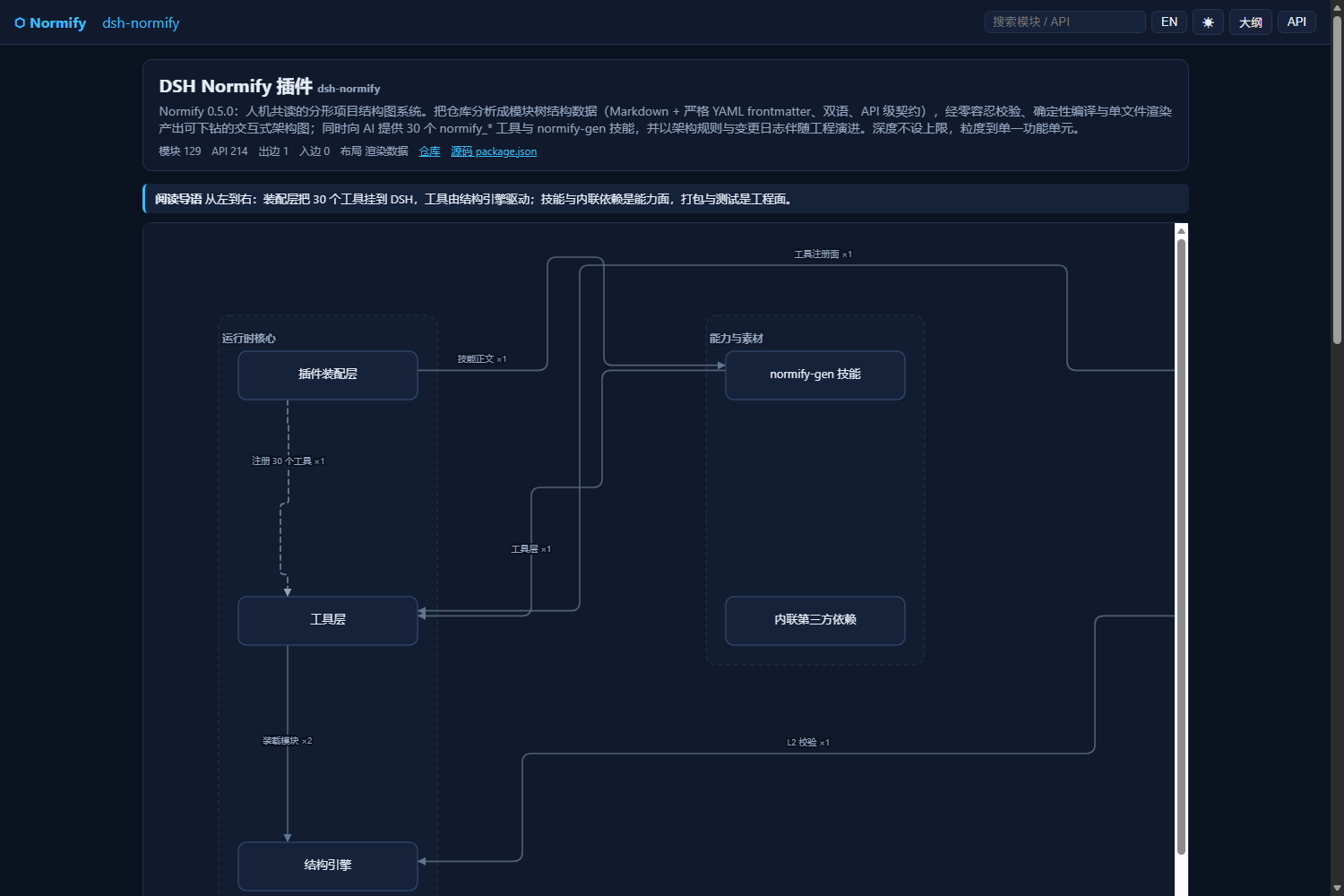 |
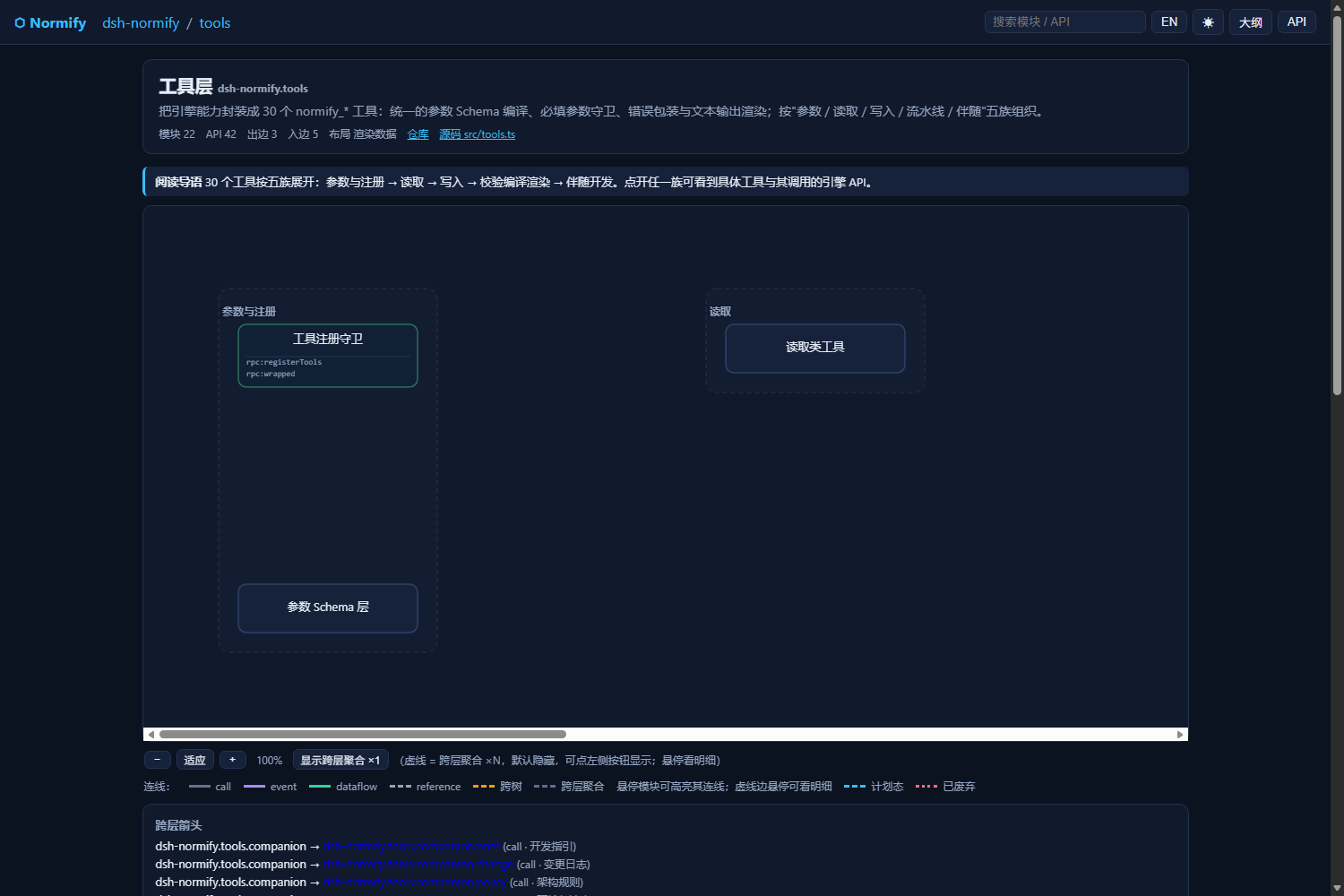 |
| 引擎层(API 直连箭头) | 模型层(修复后的干净走线) |
|---|---|
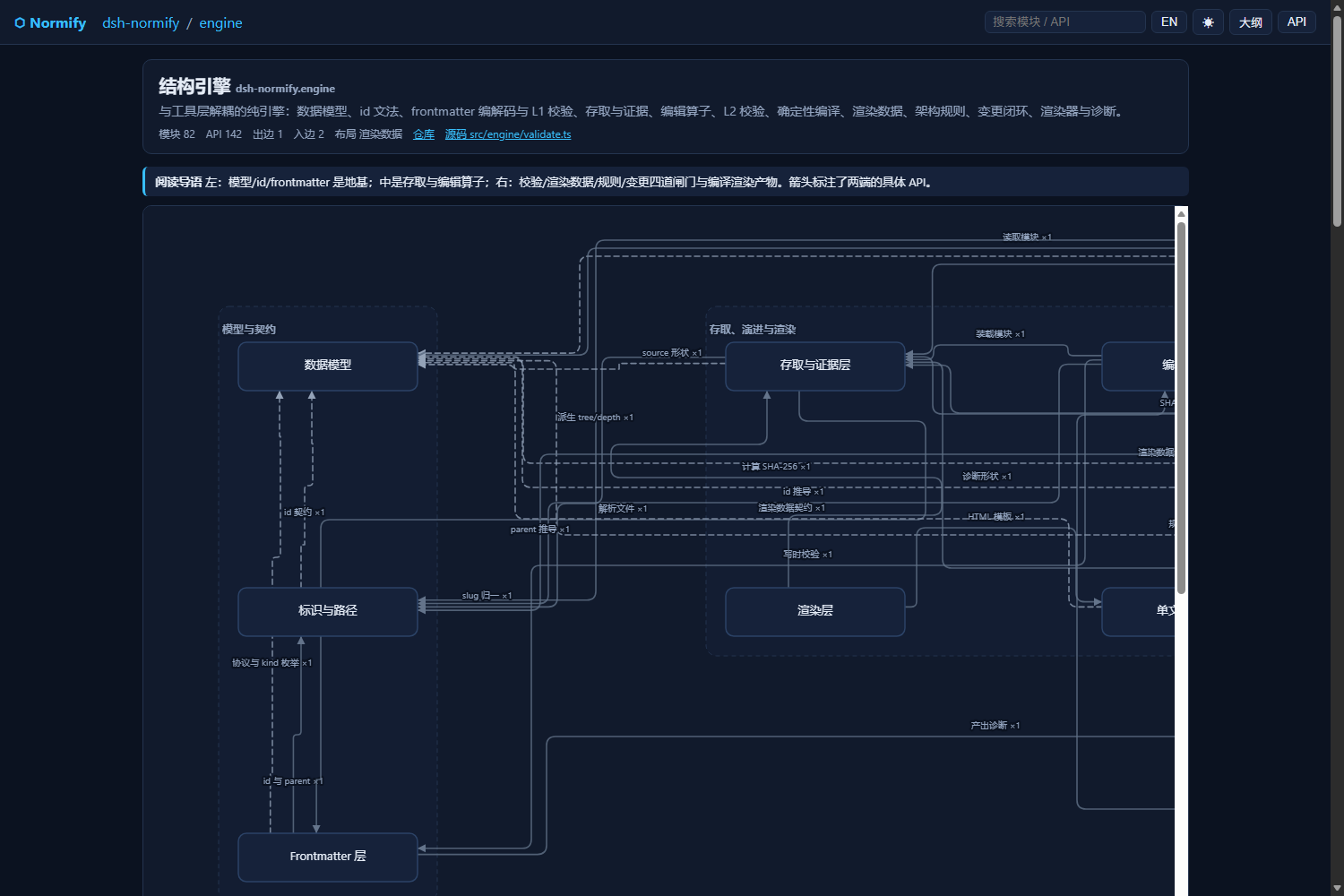 |
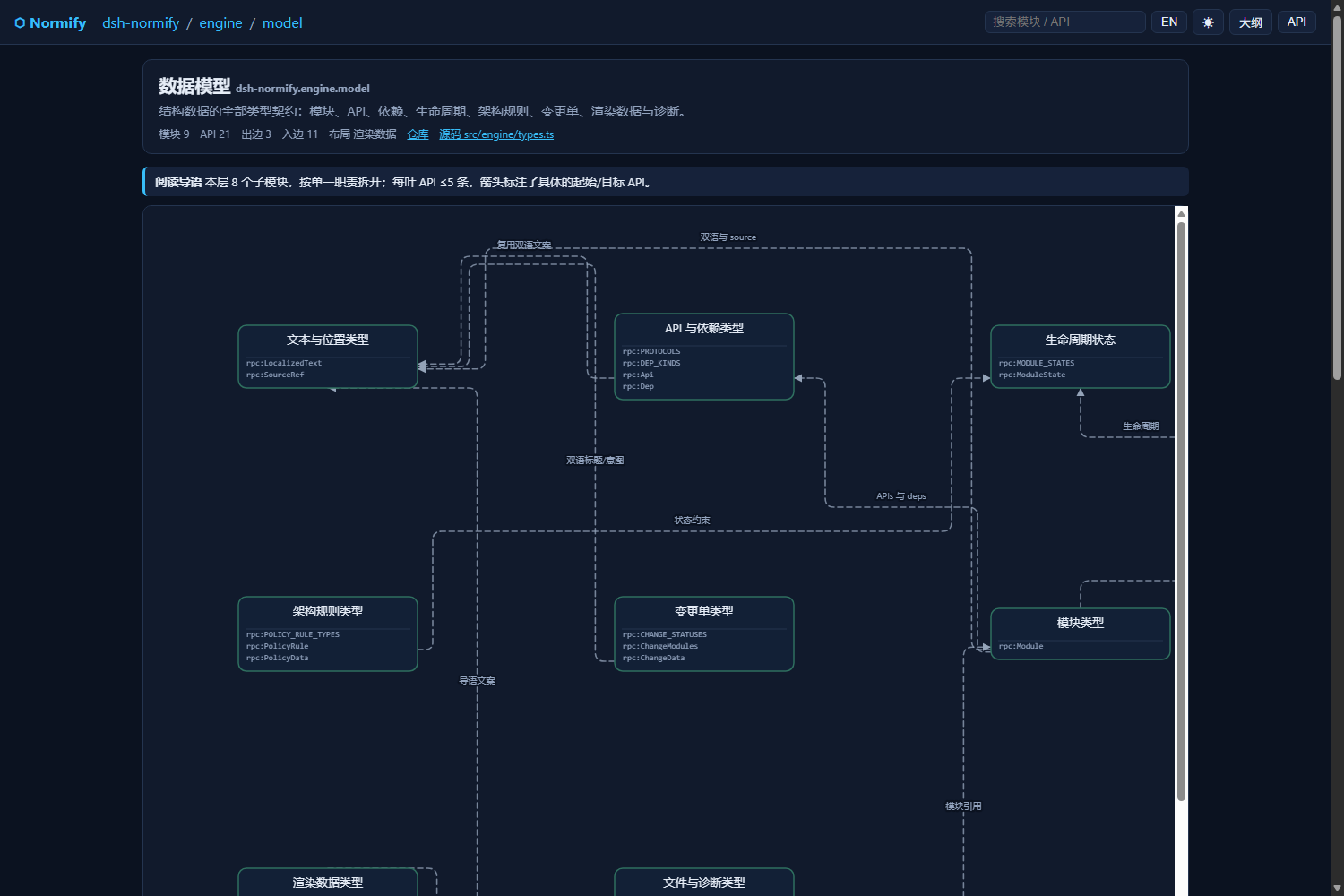 |
上面几张都是 Normify 对自身源码生成的架构图(129 模块 / 214 API / 257 箭头 / 28 层渲染数据,
validate0 error)。
# 1) 构建发行包(或直接使用仓库 Releases 里的 tgz)
cd dsh-normify && npm install && npm run build && npm pack

# 2) 把包解到目标 profile 的 node_modules(DSHEAC AIO 6.9.x 的 profile 是 web-desktop)
#    <profile>/node_modules/@dsh-external/dsh-normify/

# 3) 编辑 <profile>/package.json:
#    dependencies       增加  "@dsh-external/dsh-normify": "file:<tgz 绝对路径>"
#    dsh.profile.bundles 增加  "@dsh-external/dsh-normify"

# 4) 重启 DSH 桌面端(工具在会话启动时快照,需新会话)
插件行的注册由 bundle 自身完成:package.json > dsh.bundle.patch: ./cordis.patch.yml,
DSH 会把它插进 cordis 树,不需要手改 profile 的 cordis.patch.yml。
dsh plugin(自动登记 bundle)dsh plugin --pro