"Why does my PyTorch crash with CUDA errors when I just installed it?"
Because your driver supports CUDA 11.8, but
pip install torchgave you CUDA 12.4 wheels.
Env-Doctor diagnoses and fixes the #1 frustration in GPU computing: mismatched CUDA versions between your NVIDIA driver, system toolkit, cuDNN, and Python libraries.
It takes 5 seconds to find out if your environment is broken - and exactly how to fix it.
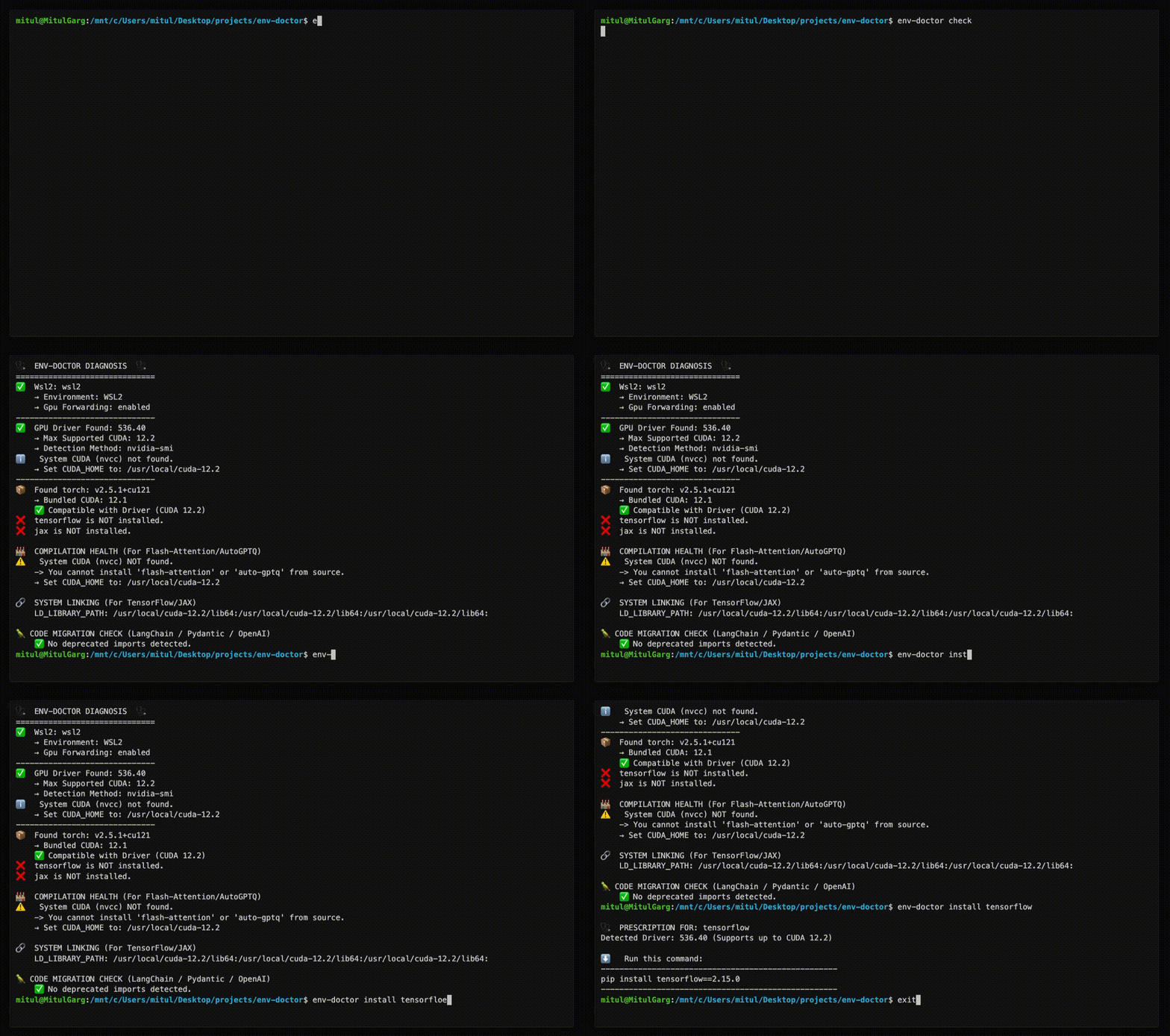
Doctor "Check" (Diagnosis)
Features
| Feature | What It Does |
|---|---|
| One-Command Diagnosis | Check compatibility: GPU Driver → CUDA Toolkit → cuDNN → PyTorch/TensorFlow/JAX |
| Compute Capability Check | Detect GPU architecture mismatches — catches why torch.cuda.is_available() returns False on new GPUs (e.g. Blackwell) even when driver and CUDA are healthy |
| Python Version Compatibility | Detect Python version conflicts with AI libraries and dependency cascade impacts |
| Jupyter / Notebook Output | from env_doctor import check; check() renders a rich HTML diagnosis inline in Jupyter, Colab, or VS Code notebooks — falls back to text in the terminal |
| CUDA Auto-Installer | Execute CUDA Toolkit installation directly with --run; CI-friendly with --yes; preview with --dry-run |
| Safe Install Commands | Get the exact pip install command that works with YOUR driver |
| Inference Engine Resolver | Resolve vLLM / SGLang → torch → CUDA build → kernel libs against your driver; get the install command that actually runs instead of a default CUDA 13 wheel on a CUDA 12 box |
| Extension Library Support | Install compilation packages (flash-attn, SageAttention, auto-gptq, apex, xformers) with CUDA version matching |
| AI Model Compatibility | Check if LLMs, Diffusion, or Audio models fit on your GPU before downloading |
| WSL2 GPU Support | Validate GPU forwarding, detect driver conflicts within WSL2 env for Windows users |
| Deep CUDA Analysis | Find multiple installations, PATH issues, environment misconfigurations |
| Container Validation | Catch GPU config errors in Dockerfiles before you build |
| MCP Server | Expose diagnostics to AI assistants (Claude Desktop, Zed) via Model Context Protocol |
| CI/CD Ready | JSON output, proper exit codes, and CI-aware env-var persistence (GitHub Actions, GitLab CI, CircleCI, Azure Pipelines, Jenkins) |
| Fleet Dashboard (optional) | Web UI for monitoring multiple GPU machines — aggregate status, drill-down diagnostics, history timeline. Install with pip install "env-doctor[dashboard]" |
Installation
Core CLI
The core CLI has no heavy dependencies — installs in seconds.
pip install env-doctor
# Or with uv (faster, isolated)
uv tool install env-doctor
uvx env-doctor check
With Fleet Dashboard
If you want to manage a distributed system of multiple GPU nodes, this dashboard can help you from a observability POV. It adds a web UI for monitoring multiple GPU machines and has no effect on the core CLI. You will be able to soon take action directly from the dashboard via distributed env-doctor cli instances on each VM!
pip install "env-doctor[dashboard]"
This adds: fastapi, uvicorn, sqlalchemy, aiosqlite
pip install env-doctor |
pip install "env-doctor[dashboard]" |
|
|---|---|---|
env-doctor check |
✅ | ✅ |
| All CLI commands | ✅ | ✅ |
| MCP server | ✅ | ✅ |
env-doctor check --report-to |
✅ | ✅ |
env-doctor report install/status |
✅ | ✅ |
env-doctor dashboard (web UI) |
✗ | ✅ |
MCP Server (AI Assistant Integration)
Env-Doctor includes a built-in Model Context Protocol (MCP) server that exposes 11 diagnostic tools to AI assistants like Claude Code and Claude Desktop.
Quick Setup
// Claude Desktop config (~/.config/Claude/claude_desktop_config.json)
{
  "mcpServers": {
    "env-doctor": {
      "command": "env-doctor-mcp"
    }
  }
}
Ask your AI assistant things like "Check my GPU environment", "Can I run Llama 3 70B on my GPU?", or "Validate this Dockerfile for GPU issues".
Learn more: MCP Integration Guide
Fleet Dashboard (optional)
The core CLI works standalone. The dashboard is an observability layer for teams running multiple GPU machines.
pip install "env-doctor[dashboard]" unlocks a web UI that aggregates diagnostic results from every machine in your fleet into a single view — no SSH required.
Quick Start
1. Start the dashboard (any machine — no GPU needed):
pip install "env-doctor[dashboard]"
env-doctor dashboard
# → Serving at http://localhost:8765
# → Generated API token at ~/.env-doctor/api-token
2. Report from each GPU machine:
pip install env-doctor

# One-time report
env-doctor check --report-to http://<dashboard-host>:8765 --token <token>

# Automatic reporting every 2 minutes (cron on Linux, Task Scheduler on Windows)
env-doctor report install --url http://<dashboard-host>:8765 --token <token> --interval 2m
What You Get
- Fleet overview — sortable table with status, GPU, driver, CUDA, torch, and group filtering
- Topology view — force-directed graph of all machines, colour-coded by health, grouped into clusters
- Activity log — cross-fleet command log with status, output, and filtering
- Machine detail — full diagnostics + snapshot history timeline
- Remote remediation — queue
env-doctorcommands from the UI, executed on next check-in (no SSH needed)
Smart change detection means stable machines only POST ~1 heartbeat every 30 minutes, not on every poll.
Learn more: Fleet Monitoring Guide
Usage
Diagnose Your Environment
env-doctor check
Example output:
🩺 ENV-DOCTOR DIAGNOSIS
============================================================

🖥️  Environment: Native Linux

🎮 GPU Driver
   ✅ NVIDIA Driver: 535.146.02
   └─ Max CUDA: 12.2

🔧 CUDA Toolkit
   ✅ System CUDA: 12.1.1

📦 Python Libraries
   ✅ torch 2.1.0+cu121

✅ All checks passed!
On new-generation GPUs (e.g. RTX 5070 / Blackwell), env-doctor catches compute capability mismatches — the reason torch.cuda.is_available() returns False even when your driver and CUDA are healthy:
🎯  COMPUTE CAPABILITY CHECK
    GPU: NVIDIA GeForce RTX 5070 (Compute 12.0, Blackwell, sm_120)
    PyTorch compiled for: sm_50, sm_60, sm_70, sm_80, sm_90, compute_90
    ❌ ARCHITECTURE MISMATCH: Your GPU needs sm_120 but PyTorch 2.5.1 doesn't include it.

    FIX: Install PyTorch nightly with sm_120 support:
       pip install --pre torch torchvision torchaudio --index-url https://download.pytorch.org/whl/nightly/cu126
Notebook / Jupyter Output
Inside a Jupyter, Colab, or VS Code notebook, the Python API renders a rich, self-contained HTML report inline:
from env_doctor import check
check()   # auto-renders HTML in notebooks, prints text in terminals
Install the optional extra for notebook support: pip install "env-doctor[notebook]".
You can also force HTML from the CLI with env-doctor check --format html > report.html.
Check Python Version Compatibility
env-doctor python-compat
🐍  PYTHON VERSION COMPATIBILITY CHECK
============================================================
Python Version: 3.13 (3.13.0)

❌  2 compatibility issue(s) found:

    tensorflow: supports Python <=3.12, but you have Python 3.13
    torch: supports Python <=3.12, but you have Python 3.13

⚠️   Dependency Cascades:
    tensorflow [high]: propagates to keras, tensorboard
    torch [high]: propagates to torchvision, torchaudio, triton

💡  Consider using Python 3.12 or lower for full compatibility
============================================================
Get Safe Install Command
env-doctor install torch
⬇️ Run this command to install