Figma MCP Bridge

[!NOTE]
Requires the Figma desktop app (macOS/Windows). The browser version of Figma does not support importing development plugins.
While other amazing Figma MCP servers like Figma-Context-MCP exist, one issues is the API limiting for free users.
The limit for free accounts is 6 requests per month, yes per month.
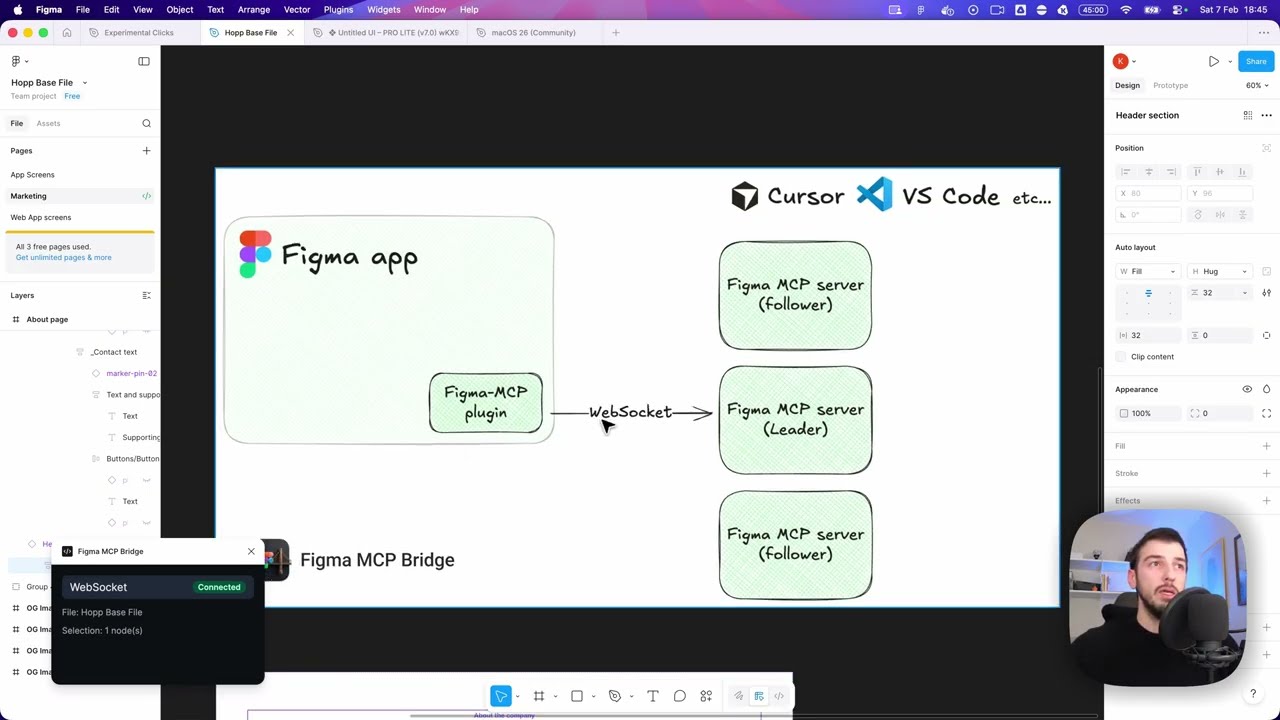
Figma MCP Bridge is a solution to this problem. It is a plugin + MCP server that streams live Figma document data to AI tools without hitting Figma API rate limits, so its Figma MCP for the rest of us ✊
It supports multiple Figma files connected simultaneously; open the plugin in each file and your AI agent can query any of them by fileKey. Single-file setups work exactly as before with no changes required.
It also includes a small, opt-in set of write tools for safe agent-driven edits — see Editing Notes below.
Demo
Watch a demo of building a UI in Cursor with Figma MCP Bridge
Quick Start
1. Add the MCP server to your favourite AI tool
Add the following to your AI tool's MCP configuration (e.g. Cursor, Windsurf, Claude Desktop):
{
  "figma-bridge": {
    "command": "npx",
    "args": ["-y", "@gethopp/figma-mcp-bridge"]
  }
}
That's it — no binaries to download or install.
2. Add the Figma plugin
Download the plugin from the latest release page, then in Figma go to Plugins > Development > Import plugin from manifest and select the manifest.json file from the plugin/ folder.
3. Start using it 🎉
Open a Figma file, run the plugin, and start prompting your AI tool. The MCP server will automatically connect to the plugin.
To work across multiple files, just open the plugin in each Figma file. The bridge keeps all connections active and your AI agent can target any of them by fileKey.
If you want to know more about how it works, read the How it works section.
Available Tools
| Tool | Description |
|---|---|
list_files |
List all connected Figma files (supports multi-file workflows) |
get_document |
Get the current Figma page document tree |
get_selection |
Get the currently selected nodes in Figma |
get_node |
Get a specific Figma node by ID (colon format, e.g. 4029:12345) |
get_styles |
Get all local paint, text, effect, and grid styles |
get_metadata |
Get file name, pages, and current page info |
get_design_context |
Get a depth-limited tree optimized for understanding design context |
get_variable_defs |
Get all variable collections, modes, and values (design tokens) |
get_screenshot |
Export nodes as PNG/SVG/JPG/PDF (base64-encoded) |
save_screenshots |
Export and save screenshots directly to the local filesystem |
get_motion_styles |
List all available animation presets (beta) |
get_node_motion |
Read a node's current animation styles and properties (beta) |
apply_animation_style |
Apply a preset animation style to a node (beta) |
remove_animation_style |
Remove an applied animation style from a node (beta) |
apply_manual_keyframe_track |
Apply a manual keyframe track to a node property (beta) |
remove_manual_keyframe_track |
Remove a manual keyframe track from a node property (beta) |
set_timeline_duration |
Set the duration of a timeline in seconds (beta) |
set_node_visibility |
Show or hide specific nodes |
set_text_content |
Replace the contents of a text node |
set_text_properties |
Patch font, size, alignment, auto-resize, color, and bounds on a text node |
set_node_properties |
Patch common node properties: name, position, size, visibility, opacity, corner radius |
set_solid_fill |
Replace a node's fill or stroke with a single solid paint |
set_gradient_fill |
Replace a node's fill or stroke with a linear/radial/angular/diamond gradient |
set_effects |
Replace a node's effects list (drop/inner shadows, layer/background blurs) |
set_stroke_properties |
Patch stroke weight, align, dash pattern, cap, and join |
set_auto_layout |
Configure auto-layout direction, padding, gap, alignment, sizing, and wrap |
create_page |
Create a new page in the document, optionally switching to it |
create_frame |
Create a new frame, optionally under a parent |
create_text |
Create a new text node |
create_shape |
Create a rectangle, ellipse, or line |
create_image |
Create an image-backed rectangle from a local path, URL, or data URI |
import_html_layers |
Bulk-import an html-figma layer tree (JSON) as frames, text, rectangles, and vectors |
duplicate_nodes |
Duplicate nodes in place |
reparent_nodes |
Move nodes into another parent |
group_nodes |
Wrap a list of nodes (sharing a parent) in a new group |
ungroup_node |
Ungroup a group or frame — children move up to its parent |
set_selection |
Set the page selection to a list of node IDs (works in Dev Mode) |
scroll_and_zoom_into_view |
Frame the viewport around the given nodes (works in Dev Mode) |
delete_nodes |
Delete nodes with explicit confirmation |
All tools accept an optional fileKey parameter when multiple Figma files are connected. Use list_files to discover connected files and their keys.
Editing Notes
- Edit tools work only when the plugin is opened in Figma's design editor (Dev Mode is read-only — they will return a clear error there).
- The current user must have permission to edit the target file.
delete_nodesis intentionally gated behindconfirm: true.- Text edits automatically load the fonts currently used by the target text node before applying the new content.
- New text nodes default to
Inter Regularunless a font is provided. create_imagereads local paths relative to the MCP server working directory unless you pass an absolute path.import_html_layerstakes a JSON file produced by html-figma's browserhtmlToFigma(). The path resolves relative to the MCP server working directory and must stay inside it, even when absolute. Everything lands inside one wrapper frame, and the response reportslayerCountagainstexpectedLayerCountso partial imports are visible.create_pagereturns the new page's ID — pass it asparentIdtocreate_frame/create_text/create_shape/create_imageto author content on that page without switching the editor.
What You Can Build
With the current write surface, an agent can build a basic slide deck in a new empty Figma file: create slide frames, style titles and body copy, lay out rectangles/ellipses/lines for cards and dividers, duplicate slide templates, reparent content into the right frame, and adjust common geometry/visual properties — including solid/gradient paints, shadows and blurs, stroke geometry, and auto-layout configuration.
The current version is intentionally limited — no components/instances, no variables/styles authoring, no per-segment text styling, and no vector boolean operations yet.
Local development
This repo uses Bun as its package manager and script runner throughout. Install it first if you don't have it.
1. Clone this repository locally
git clone git@github.com:gethopp/figma-mcp-bridge.git
2. Install root tooling
Install the root depen