🎥 Demo
Try it live at flompt.dev, free, no account needed.
Paste any prompt. The AI breaks it into typed blocks. Drag, reorder, compile to Claude-optimized XML.
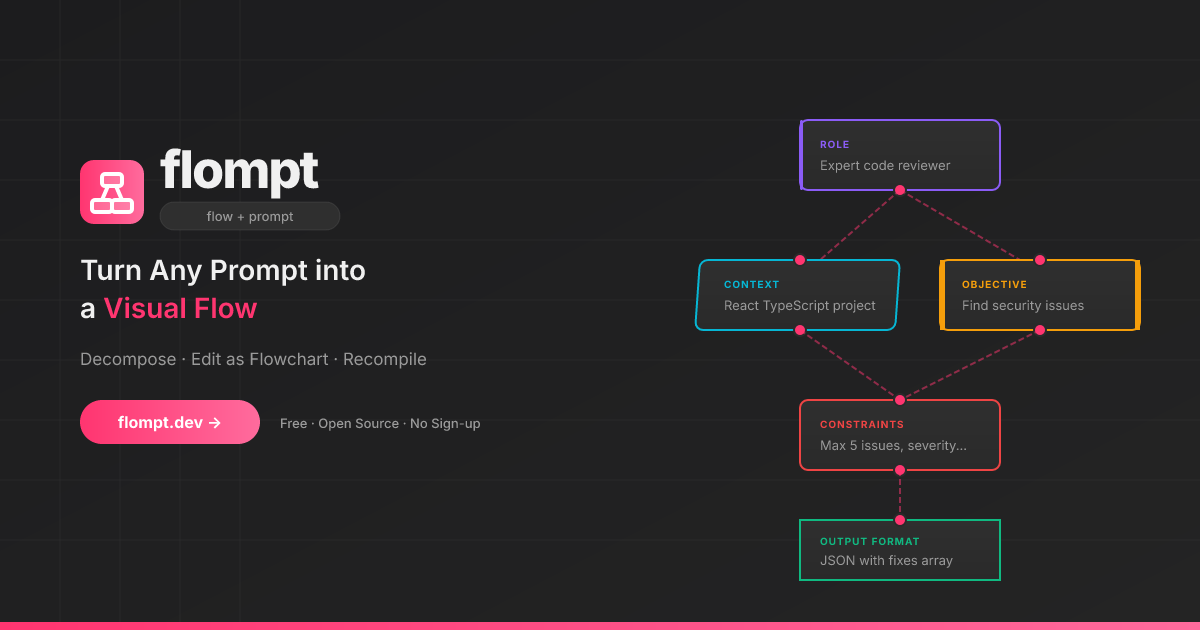
✨ What is flompt?
flompt is a visual prompt engineering tool.
Instead of writing one long block of text, flompt lets you:
- Paste any prompt and let the AI break it into structured blocks
- Drag, connect, and reorder blocks in a flowchart editor
- Compile to a Claude-optimized, machine-ready XML prompt
🧩 Block Types
16 specialized blocks that map directly to Claude's prompt engineering best practices:
| Block | Purpose | Claude XML |
|---|---|---|
| Document | External content grounding | <documents><document> |
| Role | AI persona & expertise | <role> |
| Tools | Callable functions the agent can use | <tools> |
| Audience | Who the output is written for | <audience> |
| Context | Background information | <context> |
| Environment | System context: OS, paths, date, runtime | <environment> |
| Objective | What to DO | <objective> |
| Goal | End goal & success criteria | <goal> |
| Input | Data you're providing | <input> |
| Constraints | Rules & limitations | <constraints> |
| Guardrails | Hard limits and safety refusals | <guardrails> |
| Examples | Few-shot demonstrations | <examples><example> |
| Chain of Thought | Step-by-step reasoning | <thinking> |
| Output Format | Expected output structure | <output_format> |
| Response Style | Verbosity, tone, prose, markdown (structured UI) | <format_instructions> |
| Language | Response language | <language> |
Blocks are automatically ordered following Anthropic's recommended prompt structure.
🚀 Try It Now
flompt.dev, free and open-source, no account needed.
🧩 Browser Extension
Use flompt directly inside ChatGPT, Claude, and Gemini without leaving your tab.
- Injects an Enhance button into the AI chat input
- Bidirectional sync between the sidebar and the chat
- Works on ChatGPT, Claude, and Gemini
🤖 Claude Code Integration (MCP)
flompt exposes its core capabilities as native tools inside Claude Code via the Model Context Protocol (MCP).
Once configured, you can call decompose_prompt, compile_prompt, and list_block_types directly from any Claude Code conversation, no browser, no copy-paste.
Installation
Option 1: CLI (recommended)
claude mcp add --transport http --scope user flompt https://flompt.dev/mcp/
The --scope user flag makes flompt available in all your Claude Code projects.
Option 2: ~/.claude.json
{
  "mcpServers": {
    "flompt": {
      "type": "http",
      "url": "https://flompt.dev/mcp/"
    }
  }
}
Available Tools
Once connected, 3 tools are available in Claude Code:
decompose_prompt(prompt: str)
Breaks down a raw prompt into structured blocks (role, objective, context, constraints, etc.).
- Uses Claude or GPT on the server if an API key is configured
- Falls back to keyword-based heuristic analysis otherwise
- Returns a list of typed blocks + full JSON to pass to
compile_prompt
Input:  "You are a Python expert. Write a function that parses JSON and handles errors."
Output: ✅ 3 blocks extracted:
          [ROLE] You are a Python expert.
          [OBJECTIVE] Write a function that parses JSON…
          [CONSTRAINTS] handles errors
        📋 Full blocks JSON: [{"id": "...", "type": "role", ...}, ...]
compile_prompt(blocks_json: str)
Compiles a list of blocks into a Claude-optimized XML prompt.
- Takes the JSON from
decompose_prompt(or manually crafted blocks) - Reorders blocks following Anthropic's recommended structure
- Returns the final XML prompt with an estimated token count
Input:  [{"type": "role", "content": "You are a Python expert", ...}, ...]
Output: ✅ Prompt compiled (142 estimated tokens):

        <role>You are a Python expert.</role>
        <objective>Write a function that parses JSON and handles errors.</objective>
list_block_types()
Lists all 16 available block types with descriptions and the recommended canonical ordering. Useful when manually crafting blocks.
Typical Workflow
1. decompose_prompt("your raw prompt here")
   → get structured blocks as JSON

2. (optionally edit the JSON to add/remove/modify blocks)

3. compile_prompt("<json from step 1>")
   → get Claude-optimized XML prompt, ready to use
Technical Details
| Property | Value |
|---|---|
| Transport | Streamable HTTP (POST) |
| Endpoint | https://flompt.dev/mcp/ |
| Session | Stateless (each call is independent) |
| Auth | None required |
| DNS rebinding protection | Enabled (flompt.dev explicitly allowed) |
🛠️ Self-Hosting (Local Dev)
Requirements
- Python 3.12+
- Node.js 18+
- An Anthropic or OpenAI API key (optional, heuristic fallback works without one)
Setup
Backend:
cd backend
python -m venv .venv && source .venv/bin/activate
pip install -r requirements.txt
cp .env.example .env   # add your API key
uvicorn app.main:app --reload --port 8000
App (Frontend):
cd app
cp .env.example .env   # optional: add PostHog key
npm install
npm run dev
Blog:
cd blog
npm install
npm run dev   # available at http://localhost:3000/blog
| Service | URL |
|---|---|
| App | http://localhost:5173 |
| Backend API | http://localhost:8000 |
| API Docs (Swagger) | http://localhost:8000/docs |
| MCP endpoint | http://localhost:8000/mcp/ |
⚙️ AI Configuration
flompt supports multiple AI providers. Copy backend/.env.example to backend/.env:
# Anthropic (recommended)
ANTHROPIC_API_KEY=sk-ant-...
AI_PROVIDER=anthropic
AI_MODEL=claude-3-5-haiku-20241022

# or OpenAI
OPENAI_API_KEY=sk-...
AI_PROVIDER=openai
AI_MODEL=gpt-4o-mini
Without an API key, flompt uses a keyword-based heuristic decomposer and still compiles structured XML.
🚢 Production Deployment
This section documents the exact production setup running at flompt.dev. Everything lives in /projects/flompt.