Fusion-360-MCP-Server
by AuraFriday
Control Fusion 360 with any AI through Model Context Protocol (MCP)
126stars
25forks
Python
Added 6/16/2026
⚠️ Third-Party Software Notice
This skill is third-party open-source software developed and hosted independently on GitHub. SkillsLLM is an informational directory and does not control or maintain the underlying repository.
Any security checks, ratings, or warnings displayed by SkillsLLM are automated and limited in scope. They do not constitute a security certification or guarantee that the software is safe, error-free, or free from malicious code, vulnerabilities, compromised dependencies, or prompt-injection risks.
Review the source code, permissions, dependencies, and configuration before installing or running any third-party skill. Use is at your own risk. To the maximum extent permitted by applicable law, SkillsLLM is not liable for losses arising from third-party software.
Installation
# Add to your Claude Code skills
git clone https://github.com/AuraFriday/Fusion-360-MCP-Server
Getting Started
Guides for using mcp servers skills like Fusion-360-MCP-Server.
- Best MCP Servers in 2026Category-by-category picks: databases, dev tools, productivity, browser automation.
- What is an AI Skills Marketplace?Definitions, how marketplaces work, and how to choose between them in 2026.
- Getting Started with AI SkillsFirst-time install walkthrough for Claude Code, Codex CLI, and ChatGPT.
Security ReportVerified
Last scanned: 6/16/2026
{
  "issues": [],
  "status": "PASSED",
  "scannedAt": "2026-06-16T09:27:07.472Z",
  "npmAuditRan": true,
  "pipAuditRan": true,
  "promptInjectionRan": true
}
Compare with similar skills
See how Fusion-360-MCP-Server compares with popular alternatives.
Autodesk Fusion MCP Server Add-in
Control Fusion with AI !
This add-in for Autodesk Fusion connects to the Aura Friday MCP-Link server, making Fusion available as a remote tool that AI agents can control. Official Store Link
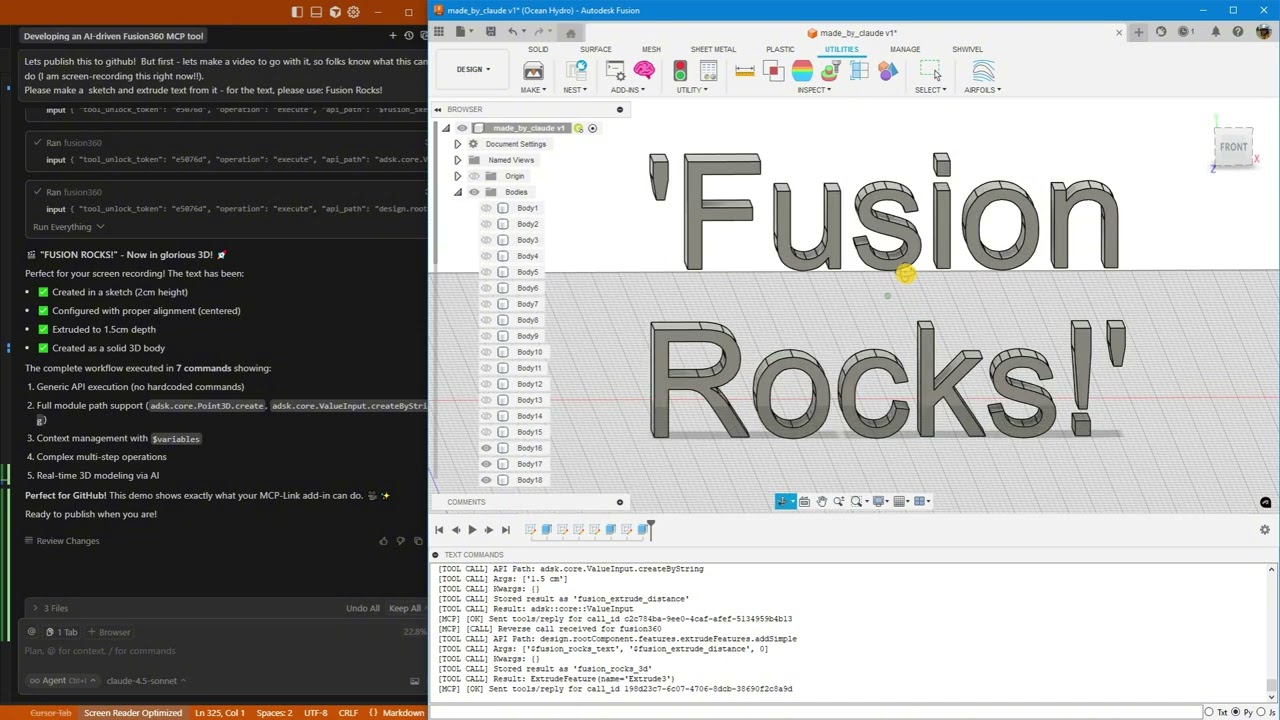
Click above to watch AI create "Fusion Rocks!" in 3D
🚀 What's New
Latest: Enhanced Python Integration (January 2026)
- 🔥 Pre-injected shortcuts -
app,ui,design,rootComponentavailable immediately in Python - 🔥 Cross-operation context - Access objects stored via
store_asfrom Python usingfusion_context - 🔥 ValueInput support - Generic API now constructs ValueInput objects automatically
- 🔥 Triple documentation sources - Introspection + Online docs + Best practices
- 🔥 Rich API docs with samples - Fetch from Autodesk's cloudhelp with code examples
- 🔥 Automatic updates - Secure, signature-verified updates without reinstalling
Thread-Safe Architecture (November 2025)
- ✅ Rock-solid stability - All Fusion API calls now execute on main thread
- ✅ Zero crashes - Work queue system prevents threading issues
- ✅ Centralized logging - Thread-safe diagnostics from all components
- ✅ Production ready - Handles heavy loads without instability
Python Execution + MCP Tool Integration
AI can now run arbitrary Python code directly inside Fusion with full access to:
- ✅ Entire Fusion API (
adsk.core,adsk.fusion,adsk.cam) - ✅ All loaded add-ins (access your custom add-ins automatically!)
- ✅ SQLite databases (store and query design data)
- ✅ Browser automation (open documentation, extract data)
- ✅ User popups (show results, get input)
- ✅ 500+ AI models via OpenRouter
- ✅ Local AI models (offline inference)
- ✅ Desktop automation (Windows control)
Example: AI analyzes your AirfoilTools add-in, finds the best airfoil from 1,538 profiles, stores results in SQLite, and shows a popup—all in one command!
What This Is
A Fusion add-in that gives AI unlimited access to Fusion through three powerful capabilities:
1. 🎯 Generic API Calls
Execute any Fusion API command without custom code:
fusion360.execute({
  "api_path": "design.rootComponent.sketches.add",
  "args": ["design.rootComponent.xYConstructionPlane"]
})
2. 🐍 Python Execution (NEW!)
Run arbitrary Python with full Fusion access:
fusion360.execute({
  "operation": "execute_python",
  "code": """
import adsk.core, adsk.fusion

# Create sketch
sketch = design.rootComponent.sketches.add(design.rootComponent.xYConstructionPlane)

# Store in database
mcp.call('sqlite', {
    'input': {'sql': 'INSERT INTO designs (name) VALUES (?)',
              'params': [sketch.name]}
})

# Show popup
mcp.call('user', {
    'input': {'operation': 'show_popup',
              'html': f'<h1>Created {sketch.name}!</h1>'}
})
"""
})
3. 🔗 MCP Tool Integration (NEW!)
Access 10+ built-in tools from Fusion:
- SQLite databases
- Browser automation
- User popups
- Python execution
- AI models (local & cloud)
- Desktop automation
- And more!
4. 📚 Multi-Source Documentation (NEW!)
AI has access to three complementary documentation sources:
Quick Search (Introspection):
fusion360.execute({
  "operation": "get_api_documentation",
  "search_term": "ExtrudeFeature",
  "category": "class_name"
})
Rich Docs with Samples (Online):
fusion360.execute({
  "operation": "get_online_documentation",
  "class_name": "ExtrudeFeatures",
  "member_name": "createInput"
})
# Returns: parameter tables, return types, and 8+ working code samples!
Best Practices Guide:
fusion360.execute({
  "operation": "get_best_practices"
})
# Returns: coordinate systems, body naming, PTransaction patterns, etc.
🎯 What AI Can Do
Basic Operations
- ✅ Create parametric sketches with precise dimensions
- ✅ Add text and extrude it to 3D
- ✅ Generate mounting holes, brackets, mechanical parts
- ✅ Execute any Fusion API command
Advanced Workflows (NEW!)
- 🔥 Access your custom add-ins - AI discovers and uses ANY loaded add-in
- 🔥 Store design data - Save analysis results to SQLite
- 🔥 Query databases - Find optimal designs from your data
- 🔥 Show results - Display popups with charts, tables, forms
- 🔥 Automate workflows - Combine Fusion + database + browser + AI
- 🔥 Call AI models - Get design suggestions from 500+ models
- 🔥 Rich documentation - Access Autodesk's official docs with code samples
- 🔥 Auto-updates - Get new features without reinstalling
Real-World Example
# AI analyzes AirfoilTools add-in (15,000+ users!)
# Finds best airfoil from 1,538 profiles
# Stores in SQLite
# Shows results in popup
# All in one Python command!
🛠️ Built-in MCP Tools
Everything you need. Nothing you don't.
These tools ship with MCP-Link and work immediately. No configuration, no API keys, no setup.
| Tool | Description |
|---|---|
| 🌐 Browser | Automate Chrome: read, click, type, navigate, extract data |
| 🧠 SQLite | Database with semantic search and embeddings |
| 🐍 Python | Execute code locally with full MCP tool access |
| 🤖 OpenRouter | Access 500+ AI models (free and paid) |
| 🤗 HuggingFace | Run AI models offline (no internet needed) |
| 📚 Context7 | Pull live documentation for any library |
| 🖥️ Desktop | Control Windows apps (click, type, read) |
| 💬 User | Show HTML popups for forms, confirmations |
| 🔗 Remote | Let external systems offer tools (like Fusion!) |
| 🔌 Connector | Add any 3rd party MCP tools |
Want more? Add any third-party MCP tools or build your own!
📦 Installation
Prerequisites
-
Download MCP-Link Server
Get the latest release: https://github.com/AuraFriday/mcp-link-server/releases/tag/latest -
Install the Add-In Official link: https://apps.autodesk.com/FUSION/en/Detail/Index?id=7269770001970905100
Optional manual install
2b. Clone This Repository
git clone https://github.com/AuraFriday/Fusion-360-MCP-Server.git
2c. Load as Fusion Add-in
- Open Fusion
- Press
Shift+Sto open Scripts and Add-Ins - Click the Add-Ins tab
- Click the green + button next to "My Add-Ins"
- Navigate to the cloned repository folder
- Select the folder and click OK
- Click Run to start the add-in
Configuration
The add-in auto-connects to the MCP server on startup. Check the TEXT COMMANDS window in Fusion to see connection logs.
🎬 Quick Start Examples
Example 1: Get API Documentation (NEW!)
# Quick search by class name
fusion360.execute({
  "operation": "get_api_documentation",
  "search_term": "Sketch",
  "category": "class_name",
  "max_results": 3
})

# Get rich docs with code samples
fusion360.execute({
  "operation": "get_online_documentation",
  "class_name": "ExtrudeFeatures",
  "member_name": "createInput"
})
# Returns: Full parameter descriptions, return types, and 8 working examples!

# Get best practices guide
fusion360.execute({
  "operation": "get_best_practices"
})
# Returns: Coordinate systems, body naming, construction planes, PTransaction patterns
Example 2: Simple Sketch (Generic API)
# Create a sketch
fusion360.execute({
  "api_path": "design.rootComponent.sketches.add",
  "args": ["design.rootComponent.xYConstructionPlane"],
  "store_as": "my_sketch"
})

# Add a rectangle
fusion360.execute({
  "api_path": "$my_sketch.sketchCurves.sketchLines.addTwoPointRectangle",
  "args": [
    {"type": "Point3D", "x": 0, "y": 0, "z": 0},
    {"type": "Point3D", "x": 10, "y": 5, "z": 0}
  ]
})
Example 3: Python with Database (NEW!)
fusion360.execute({
  "operation": "execute_python",
  "code": """
import adsk.core, adsk.fusion

# Create mounting plate
sketch = design.rootComponent.sketches.add(design.rootComponent.xYConstructionPlane)
lines = sketch.sketchCurves.sketchLines
lines.addTwoPointRectangle(
    adsk.core.Point3D.create(0, 0, 0),
    adsk.core.Point3D.create(10, 8, 0)
)

# Add mounting holes
circles = sketch.sketchCurves.sketchCircles
for x, y in [(1, 1), (9, 1), (1, 7), (9, 7)]:
    circles.addByCenterRadius(adsk.core.Point3D.create(x, y, 0), 0.25)

# Store in database
mcp.call('sqlite', {
    'input': {
        'sql': 'INSERT INTO parts (name, holes) VALUES (?, ?)',
        'params': [sketch.name, 4],
        'database': 'designs.db',
        'tool_unlock_token': '29e63eb5'
    }
})

print(f'Created {sketch.name} with 4 mounting holes')
"""
})
Example 4: Access Custom Add-ins (NEW!)
fusion360.execute({
  "operation": "execute_python",
  "code": """
import sys

# Find loaded add-ins
addins = [name for name in sys.modules.keys() if 'addin' in name.lower()]
print(f'Found {len(addins)} add-ins')

# Access AirfoilTools (if loaded)
if 'AirfoilTools' in str(addins):
    airfoil_main = sys.modules['...AirfoilTools_py']
    foildb = airfoil_main.foildb2020.Foildb2020()

    # Find best airfoil
    best = max(foildb, key=lambda x: x['clcd'])
    print(f'Best L/D ratio: {best["clcd"]:.2f}')

    # Store in database
    mcp.call('sqlite', {
        'input': {
            'sql': 'INSERT INTO airfoils (name, ld_ratio) VALUES (?, ?)',
            'params': [best['Foil_fn'], best['clcd']],
            'database': 'airfoils.db',
            'tool_unlock_token': '29e63eb5'
        }
    })
"""
})
🏗️ Architecture
How It Works
- Add-in loads and connects to local MCP-Link server
- Registers itself as a
fusion360tool via reverse connection - AI sends commands with three operation types:
- Generic API calls (simple oper
Frequently Asked Questions
What is Fusion-360-MCP-Server?
Fusion-360-MCP-Server is an open-source mcp servers skill for AI coding assistants such as Claude Code, Codex CLI, and ChatGPT, built by AuraFriday. Control Fusion 360 with any AI through Model Context Protocol (MCP). It has 126 GitHub stars.
Is Fusion-360-MCP-Server safe to use?
Yes. Fusion-360-MCP-Server passed SkillsLLM's automated security scan — a dependency vulnerability audit plus prompt-injection heuristics — with no high-severity issues. You can read the full report in the Security Report section on this page.
How do I install Fusion-360-MCP-Server?
Clone the repository with "git clone https://github.com/AuraFriday/Fusion-360-MCP-Server" and add it to your Claude Code skills directory (see the Installation section above).
What programming language is Fusion-360-MCP-Server written in?
Fusion-360-MCP-Server is primarily written in Python. It is open-source under AuraFriday on GitHub, so you can review or fork the full source.
Are there alternatives to Fusion-360-MCP-Server?
Yes. SkillsLLM lists many other MCP Servers skills you can browse and compare side by side. Open the MCP Servers category from the badge at the top of this page, or use the Related Skills and comparison links further down to weigh Fusion-360-MCP-Server against similar tools.
Comments (0)
to leave a comment.
No comments yet. Be the first to share your thoughts!
Related Skills
The agent harness performance optimization system. Skills, instincts, memory, security, and research-first development for Claude Code, Codex, Opencode, Cursor and beyond.
257,961
38,579
JavaScript
AI Agentsai-agentsanthropic
An agentic skills framework & software development methodology that works.
234,966
20,863
Shell
AI Agentsaibrainstorming
Fair-code workflow automation platform with native AI capabilities. Combine visual building with custom code, self-host or cloud, 400+ integrations.
204,231
60,657
TypeScript
MCP Serversaiapis
The agent harness performance optimization system. Skills, instincts, memory, security, and research-first development for Claude Code, Codex, Opencode, Cursor and beyond.
185,940
28,768
JavaScript
AI Agentsai-agentsanthropic
A cross-platform desktop All-in-One assistant for Claude Code, Codex, OpenCode, OpenClaw, Grok Build & Hermes Agent. Only official website: ccswitch.io
132,746
9,153
Rust
AI Agentsai-toolsclaude-code
Popular in MCP Servers
Top skills in this category by stars
🕷️ An adaptive Web Scraping framework that handles everything from a single request to a full-scale crawl!
80,825
8,161
Python
MCP Serversaiai-scraping
⭐AI-driven public opinion & trend monitor with multi-platform aggregation, RSS, and smart alerts.🎯 告别信息过载,你的 AI 舆情监控助手与热点筛选工具!聚合多平台热点 + RSS 订阅,支持关键词精准筛选。AI 智能筛选新闻 + AI 翻译 + AI 分析简报直推手机,也支持接入 MCP 架构,赋能 AI 自然语言对话分析、情感洞察与趋势预测等。支持 Docker ,数据本地/云端自持。集成微信/飞书/钉钉/Telegram/邮件/ntfy/bark/slack 等渠道智能推送。
62,233
24,884
Python
MCP Serversaibark