GeoAgent












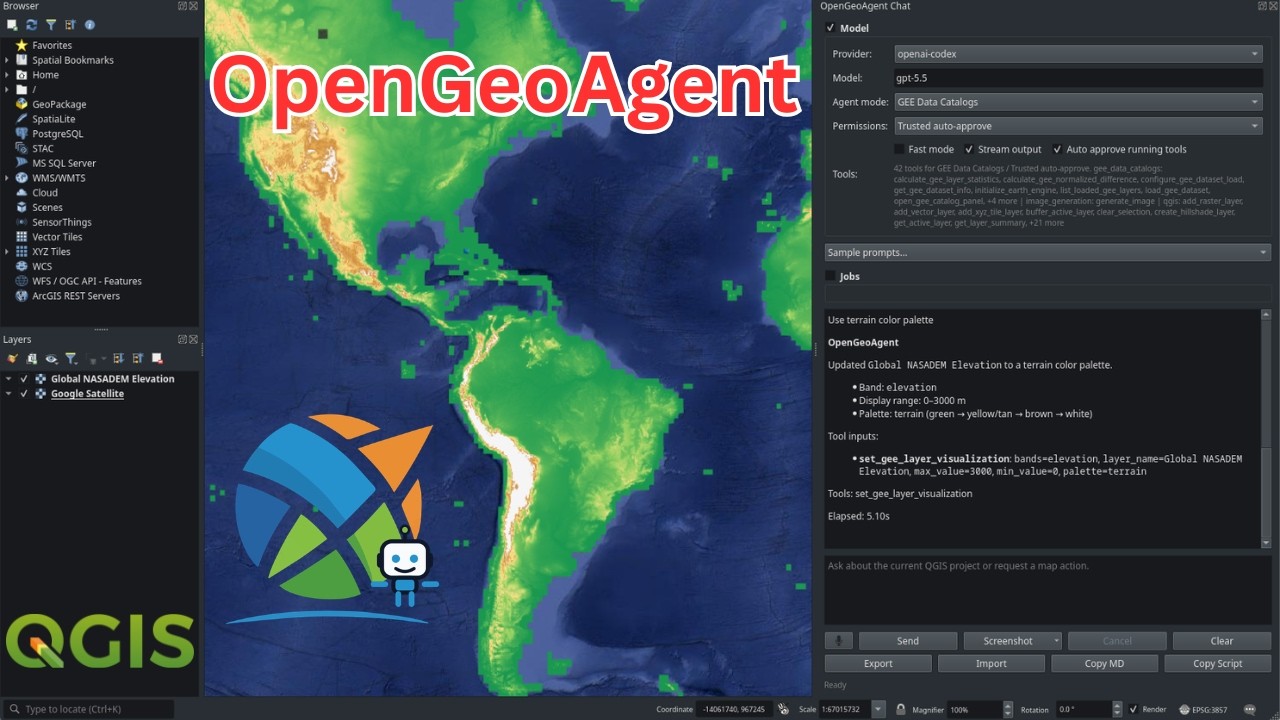
GeoAgent is a shared AI agent layer for geospatial Python packages, live map widgets, and QGIS plugins. With one consistent interface, projects such as leafmap, anymap, geoai, geemap, STAC, and NASA Earthdata can expose their tools to large language models, so each library no longer needs to build and maintain its own agent stack.
Built on Strands Agents, GeoAgent adds geospatial context, structured tool metadata, optional package adapters, provider configuration, and confirmation hooks that pause the agent before destructive, expensive, or otherwise irreversible operations.
See it in action:
- Short demo: QGIS OpenGeoAgent Plugin Demo
- Full tutorial: OpenGeoAgent: A Multimodal AI Agent for Automated Geospatial Analysis and Visualization
Why GeoAgent?
Many geospatial libraries need the same agent features:
- bind an agent to a live map, QGIS session, dataset, or workflow object;
- expose package functions as structured tools with docstrings and metadata;
- support OpenAI, ChatGPT/Codex OAuth, Anthropic, Google Gemini, Bedrock, OpenRouter, LiteLLM, any OpenAI-compatible server, vLLM, and local Ollama models;
- keep optional geospatial stacks optional;
- ask for confirmation before deleting layers, saving files, or running expensive processing jobs;
- support multimodal plugin workflows such as pasted images and screenshots when the selected model provider supports vision;
- provide a stable integration point for downstream packages and plugins.
GeoAgent centralizes that layer so each package does not need to maintain its own agent framework.
Core Concepts
| Concept | Purpose |
|---|---|
GeoAgent |
High-level facade around a Strands Agent. |
GeoAgentConfig |
Provider, model, temperature, token, and client settings. |
GeoAgentContext |
Runtime objects bound to the agent, such as a map or QGIS iface. |
@geo_tool |
Decorator that turns a Python function into a Strands tool with GeoAgent metadata. |
GeoToolRegistry |
Registry for tool metadata, safety flags, categories, and fast-mode filtering. |
for_leafmap |
Factory that binds tools to a leafmap.Map-compatible object. |
for_anymap |
Factory that binds tools to an anymap.Map-compatible object. |
for_qgis |
Factory that binds tools to qgis.utils.iface and an optional QgsProject. |
for_nasa_opera |
Factory that binds NASA OPERA search/display tools plus QGIS tools. |
for_stac |
Factory that binds STAC catalog search/asset tools plus optional QGIS loading. |
create_agent |
Factory for custom tools or package-specific integrations. |
Installation
Install the core package:
pip install GeoAgent
Core installs only the agent framework dependencies, mainly strands-agents
and pydantic. Geospatial packages and provider clients are optional extras:
| Extra | Purpose |
|---|---|
GeoAgent[openai] |
OpenAI model support through Strands. |
GeoAgent[anthropic] |
Anthropic Claude model support through Strands. |
GeoAgent[gemini] |
Google Gemini model support through Strands. |
GeoAgent[ollama] |
Local Ollama model support. |
GeoAgent[litellm] |
LiteLLM model support for many hosted and proxy providers. |
GeoAgent[openrouter] |
OpenRouter support for DeepSeek, Qwen, and other hosted models. |
GeoAgent[openai-compatible] |
Any OpenAI-compatible server, e.g. llama.cpp, LM Studio, vLLM. |
GeoAgent[vllm] |
vLLM through the Strands community provider. Not in providers/all; see note below. |
GeoAgent[leafmap] |
leafmap live map integration. |
GeoAgent[anymap] |
anymap live map integration. |
GeoAgent[stac] |
STAC client dependencies. |
GeoAgent[earthdata] |
NASA Earthdata dependencies. |
GeoAgent[nasa-opera] |
NASA OPERA search dependencies. |
GeoAgent[geoai] |
geoai integration dependencies. |
GeoAgent[earthengine] |
Google Earth Engine dependencies. |
GeoAgent[ui] |
Solara UI dependencies. |
GeoAgent[browser] |
FastAPI WebSocket backend for browser MapLibre apps. |
GeoAgent[providers] |
OpenAI, Anthropic, Gemini, Ollama, LiteLLM, OpenRouter, and OpenAI-compatible clients. |
GeoAgent[all] |
Most optional integrations. QGIS itself remains system-installed. |
Examples:
pip install "GeoAgent[leafmap,openai]"
pip install "GeoAgent[anymap,anthropic]"
pip install "GeoAgent[stac,earthdata,openai]"
For QGIS, install GeoAgent in the Python environment used by QGIS. The
GeoAgent[qgis] extra is a marker extra; QGIS is provided by the desktop
application or system package manager.
Provider Configuration
GeoAgent selects a provider from environment variables when no provider is specified:
| Provider | Environment |
|---|---|
| OpenAI | OPENAI_API_KEY, optional OPENAI_MODEL |
| ChatGPT/Codex OAuth | OPENAI_CODEX_ACCESS_TOKEN, optional OPENAI_CODEX_MODEL |
| Anthropic | ANTHROPIC_API_KEY, optional ANTHROPIC_MODEL |
| Google Gemini | GEMINI_API_KEY or GOOGLE_API_KEY, optional GEMINI_MODEL |
| LiteLLM | LITELLM_API_KEY, optional LITELLM_MODEL and LITELLM_BASE_URL |
| OpenRouter | OPENROUTER_API_KEY, optional OPENROUTER_MODEL and OPENROUTER_BASE_URL |
| OpenAI-compatible | OPENAI_COMPATIBLE_BASE_URL, OPENAI_COMPATIBLE_MODEL, optional OPENAI_COMPATIBLE_API_KEY |
| vLLM | VLLM_BASE_URL, VLLM_MODEL_ID, optional VLLM_API_KEY |
| Ollama | OLLAMA_HOST or USE_OLLAMA=1, optional OLLAMA_MODEL |
Bedrock is not auto-detected. Pass provider="bedrock" explicitly; it then
uses the AWS credential chain, configured region, and Bedrock model access,
with optional BEDROCK_MODEL.
ChatGPT/Codex OAuth uses the Codex browser login flow and the Codex Responses backend.
The openai-compatible provider talks to any server that exposes the OpenAI
Chat Completions API, including llama.cpp, LM Studio, Text Generation WebUI,
and vLLM. Point it at the server's /v1 URL. A model id is required because a
generic endpoint has no default, and the API key is optional since most local
servers ignore it:
from geoagent import GeoAgent

agent = GeoAgent(
    provider="openai-compatible",
    model="qwen3-8b",
    openai_compatible_base_url="http://localhost:8000/v1",
)
vLLM support expects a running vLLM server. When using GeoAgent tools, start the server with vLLM tool-calling support enabled for the selected model and chat template.
The dedicated vllm provider depends on strands-vllm, which pins
openai<2.0 and therefore cannot be installed alongside the openai>=2.0 that
the default openai-codex provider requires. GeoAgent[vllm] is consequently
excluded from GeoAgent[providers] and GeoAgent[all]. Prefer the
openai-compatible provider pointed at your vLLM server's /v1 URL, which
needs no extra dependency.
For notebooks and Python scripts, log in once with the CLI:
geoagent codex login
or from Python/Jupyter:
from geoagent import login_openai_codex

login_openai_codex()
GeoAgen