Hevy MCP Server
Talk to your Hevy workout data from Claude, Cursor, Codex, and other MCP clients.







Connect to the hosted MCP · Use the Hevy CLI · Watch the 18-second demo · Explore all 23 tools
Hevy CLI
Prefer the terminal? The separate
@chrisdoc/hevy-cli
package reads workouts, routines, exercises, and body measurements directly
from the Hevy API, and can create or update those resources with explicit
confirmation. Deletion is not supported.
npm install -g @chrisdoc/hevy-cli
export HEVY_API_KEY=your-hevy-api-key

hevy workouts list --page-size 10
hevy summary --weeks 4
Add --json to any command for scripts and pipelines. The CLI is a standalone
Hevy API client, not an MCP wrapper. See
packages/cli/README.md for the full command
reference, pagination behavior, and exit codes.
hevy-mcp is an open-source Model Context Protocol (MCP)
server for the Hevy fitness and workout tracking
app. It lets AI assistants read, analyze, create, and update your Hevy workouts,
routines, exercise templates, and body measurements through authenticated Hevy
API requests.
The repository is organized as a private workspace with explicit runtime
boundaries: @hevy-mcp/hevy-client owns the web-safe Hevy client,
@hevy-mcp/operations owns reusable Hevy domain operations,
@hevy-mcp/core owns MCP tools and server construction, hevy-mcp is the
published Node.js stdio adapter, @hevy-mcp/worker is the private Cloudflare
HTTP/OAuth adapter, and @chrisdoc/hevy-cli is the standalone CLI. Node and
CLI are the public packages.
The public HevyClient remains Promise-based, while
@hevy-mcp/operations provides Effect-first domain programs for reads,
mutations, and composite workflows. Effect is also the control structure for
the request runtime: @hevy-mcp/hevy-client owns retry schedules, per-attempt
timeouts, and interruption, rather than using Effect only as a delay
calculator. MCP tools and CLI commands collapse each invocation once at their
Promise adapter boundary. The MCP catalog contains 23 tools.
The runtime has three nested scopes:
- Process Scope: the Node lifecycle owns telemetry, signal handlers, and transport shutdown.
- Server Scope: core owns the MCP runtime and the exercise-template cache, including finalization when the server closes.
- Request Scope: each tool or resource invocation carries its deadline and MCP request signal, so fiber interruption reaches the Hevy request.
These scopes do not change the supported Promise façades. Public
HevyClient methods, createHevyMcpServer, createNodeMcpServer,
runStdioServer / runServer, operation .execute(), and CLI
execute / runCli remain usable without requiring callers to construct
Effect programs.
The Worker adapter is not Effect-wide: its OAuth, bindings, and request
handling remain platform-specific Promise code; only the validation-cache
retry is Effect-controlled. Tool input and response contracts remain Zod
contracts, environment and CLI parsing remain throwing parsers, and generated
Kubb API functions and .kubb internals are not public API.
A Hevy API key, available with Hevy PRO, is required.
See it in action
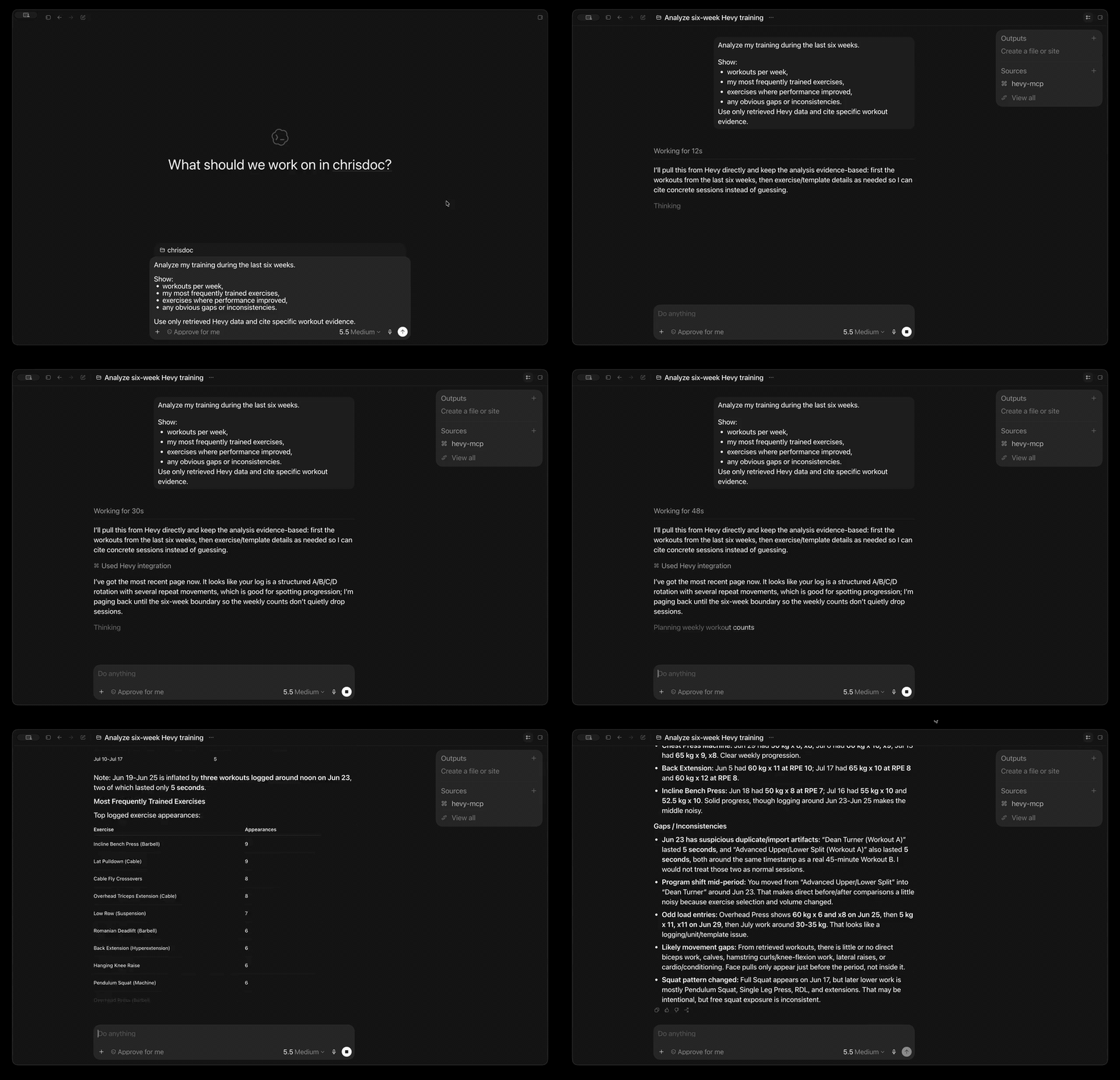
In the demo, the assistant retrieves real Hevy data and answers a multi-part training question with evidence from the user's workout history.
What can you do with it?
- Analyze training progress: summarize 1-12 weeks of workouts and body measurements in one tool call.
- Ask questions in plain language: find recent sessions, frequently trained exercises, consistency gaps, routine details, or exercise history.
- Plan and log training: create or update workouts, routines, routine folders, custom exercises, and body measurements.
- Search without huge responses: discover routines and exercise templates with compact, AI-friendly results.
- Connect from your preferred MCP client: use the hosted Streamable HTTP endpoint or run locally with Codex, Claude Desktop, Cursor, and other clients.
- Start without installing anything: connect directly to the production Cloudflare Worker—no Node.js, package download, or Docker container required.
- Keep local control when you want it: run the same server with
npx,bunx, or the official Docker image.
Try asking:
Analyze my training over the last six weeks. Show workouts per week, my most frequently trained exercises, any obvious gaps or inconsistencies, and cite the workout evidence you used.
Find my push-day routine and show its exercises and sets.
Compare my recent body measurements with my training consistency.
Create a completed workout from my saved routine. Ask me for any missing set results before writing it to Hevy.
Claude integration
The repository includes a Claude plugin that connects to the hosted OAuth-enabled MCP endpoint without embedding a user's Hevy API key.
Claude.ai and Claude Desktop
In Claude, open Settings → Connectors → Add custom connector and enter:
https://mcp.hevy-mcp.dev/mcp
Complete the OAuth flow and enter the Hevy API key when prompted. The same remote endpoint can be used by Claude Desktop and other clients that support remote MCP connectors.
Claude Code and Cowork
The Claude plugin is defined by .claude-plugin/plugin.json
and .mcp.json. Install it from this public repository or from
the Claude Plugin Directory after publication. It adds the hosted Hevy MCP
connector and the Hevy workout skill.
See the privacy policy for the hosted service's data handling details.
Quick start
1. Get your Hevy API key
Create an API key in Hevy's API settings, then keep it somewhere secure. API access currently requires a Hevy PRO subscription.
2. Connect hevy-mcp to your client
The hosted Cloudflare endpoint is the fastest way to start. It runs remotely, so your client does not need Node.js, Bun, Docker, or a local server process.
Connect to the hosted endpoint
Production URL:
https://mcp.hevy-mcp.dev/mcp
The endpoint uses Streamable HTTP. Send your Hevy API key as a bearer token on every request.
Codex
Codex CLI, the Codex desktop app, and the IDE extension share the same MCP configuration. Make your Hevy API key available in the environment that starts Codex, then add the hosted server:
export HEVY_API_KEY=your-hevy-api-key
codex mcp add hevy \
  --url https://mcp.hevy-mcp.dev/mcp \
  --bearer-token-env-var HEVY_API_KEY
Codex stores the environment variable name, not the key itself, in its MCP
configuration. Restart Codex or begin a new session, then run codex mcp list
to verify the server is configured.
Other Streamable HTTP clients
Clients that accept a remote MCP URL and fixed headers commonly use this shape:
{
	"mcpServers": {
		"hevy": {
			"url": "https://mcp.hevy-mcp.dev/mcp",
			"headers": {
				"Authorization": "Bearer your-hevy-api-key"
			}
		}
	}
}
Exact configuration keys vary by client. The hosted server requires support for
Streamable HTTP and a fixed Authorization header.
[!IMPORTANT] Treat the bearer value like a password. The Worker validates it with Hevy for each request, does not store it, and forwards it to Hevy only as the required
api-keyheader.
Run locally instead
Choose local stdio if you prefer to run the server on your own machine or your client cannot attach a fixed authorization header to remote MCP requests.
Codex
codex mcp add hevy \
  --env HEVY_API_KEY=your-hevy-api-key \
  -- npx -y hevy-mcp
Claude Desktop or Cursor
Add this mcpServers entry to your client configuration:
{
	"mcpServers": {
		"hevy": {
			"command": "npx",
			"args": ["-y", "hevy-mcp"],
			"env": {
				"HEVY_API_KEY": "your-hevy-api-key"
			}
		}
	}
}
Google Antigravity
There are two ways to configure the Hevy MCP server for Google Antigravity (agy):
Option A: Automatic Plugin Installation (Recommended)
This utilizes the built-in plugin system:
The plugin reads the repository-root mcp_config.json to start the local
stdio server. That configuration inte