Maintainer of this skill?
by HeyPCB
HeyPCB for AI agents: an MCP server that gives Claude Code, Codex, Cursor and claude.ai a PCB engineer. npx -y @heypcb/mcp
# Add to your Claude Code skills
git clone https://github.com/HeyPCB/heypcb-mcpGuides for using ai agents skills like heypcb-mcp.
See how heypcb-mcp compares with popular alternatives.
heypcb-mcp is an open-source ai agents skill for AI coding assistants such as Claude Code, Codex CLI, and ChatGPT, built by HeyPCB. HeyPCB for AI agents: an MCP server that gives Claude Code, Codex, Cursor and claude.ai a PCB engineer. npx -y @heypcb/mcp. It has 52 GitHub stars.
heypcb-mcp's catalog security scan is still queued. You can run an instant dependency and prompt-injection check now with the "Scan for vulnerabilities" button above.
Clone the repository with "git clone https://github.com/HeyPCB/heypcb-mcp" and add it to your Claude Code skills directory (see the Installation section above).
heypcb-mcp is primarily written in TypeScript. It is open-source under HeyPCB on GitHub, so you can review or fork the full source.
Yes. SkillsLLM lists many other AI Agents skills you can browse and compare side by side. Open the AI Agents category from the badge at the top of this page, or use the Related Skills and comparison links further down to weigh heypcb-mcp against similar tools.
No comments yet. Be the first to share your thoughts!
Available after the catalog security scan passes.
⚠️ Third-Party Software Notice
This skill is third-party open-source software developed and hosted independently on GitHub. SkillsLLM is an informational directory and does not control or maintain the underlying repository.
Any security checks, ratings, or warnings displayed by SkillsLLM are automated and limited in scope. They do not constitute a security certification or guarantee that the software is safe, error-free, or free from malicious code, vulnerabilities, compromised dependencies, or prompt-injection risks.
Review the source code, permissions, dependencies, and configuration before installing or running any third-party skill. Use is at your own risk. To the maximum extent permitted by applicable law, SkillsLLM is not liable for losses arising from third-party software.
The deep catalog scan for this skill is still queued. Run an instant dependency check now instead.
HeyPCB for AI agents. Add HeyPCB to Claude Code, Codex, Cursor or Claude
Desktop and design real KiCad boards from your agent: HeyPCB's server does
the engineering (Inky's design agent, parts, placement, routing, DRC/ERC,
fab checks), and your agent calls a few high-level tools such as
build_board, get_board, check_board and export. Or your agent
designs the board itself with HeyPCB's parts library, proven circuit blocks
and checks: search_parts, get_part, add_parts, add_block, connect,
get_netlist and the rest of the parts and circuit tools, then lays it out
with set_board_outline, set_board_rules, move_part, lock_parts,
add_ground_pour and get_board_layout, and takes it to fab-ready by
following check_board: every finding names the call that fixes it
(fixWith). It sees what it built with preview_board (chosen layers,
highlighted nets and parts, open connections), measures it with
inspect_net, inspect_part and check_placement, says where parts go with
set_placement_rules, controls copper with rip_up_net, add_pour,
add_keepout and stitch_vias, goes back through the board's history with
list_history, restore_board and redo, and reads the playbook with
get_guide.
| You say | Your agent calls | |
|---|---|---|
| Let HeyPCB design it | "Build a USB-C powered board for …" | build_board, get_board, check_board, export. HeyPCB's server does the engineering: Inky's design agent, parts, placement, routing, DRC/ERC and fab checks. |
| Let your agent design it | "Add an LDO and wire it to the MCU" | Parts and blocks: search_parts, get_part, add_parts, add_block, connect, get_netlist. Layout: set_board_outline, set_board_rules, move_part, lock_parts, add_ground_pour, get_board_layout. Then check_board until the board is fab-ready. Each finding names the call that fixes it (fixWith). |
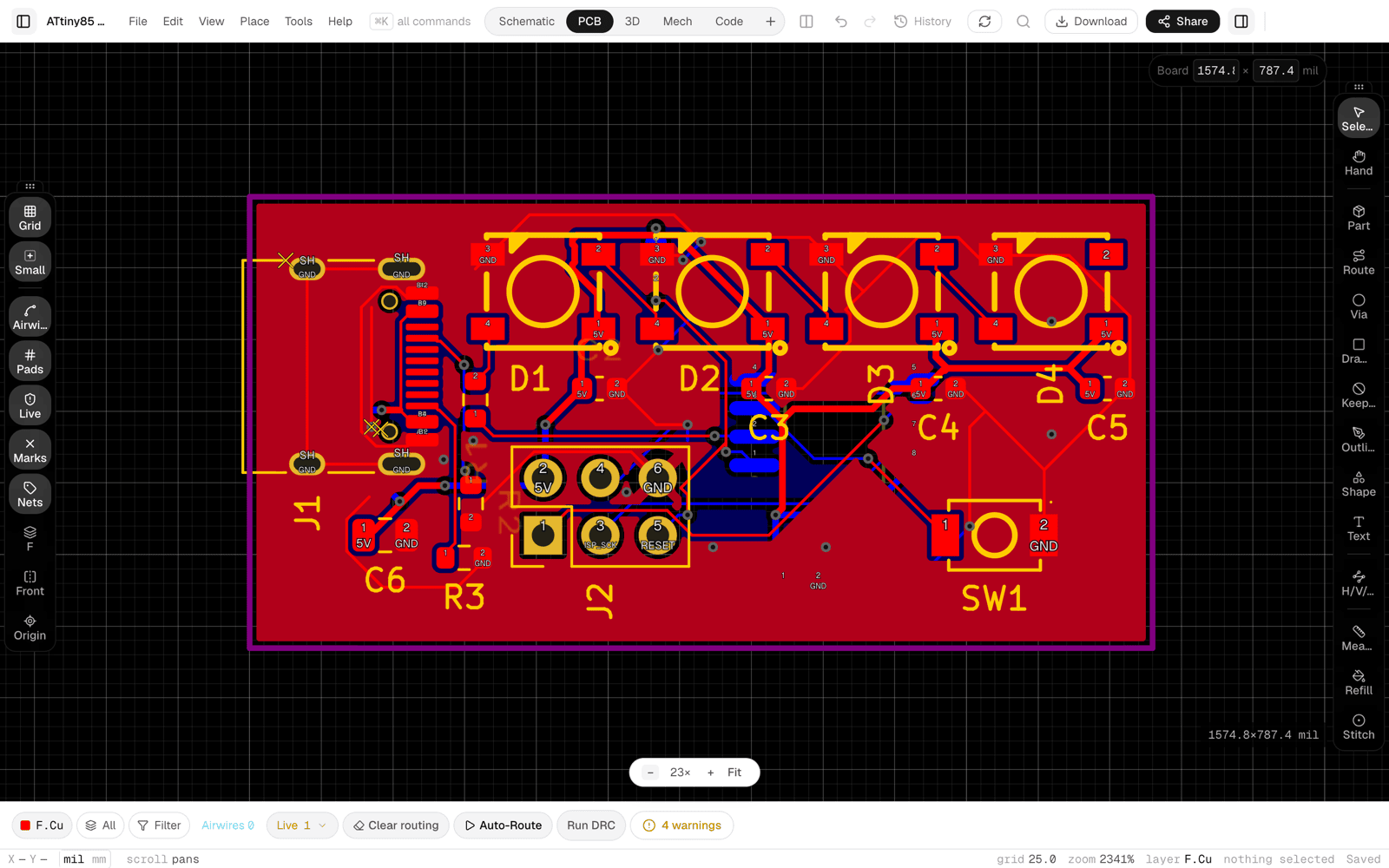
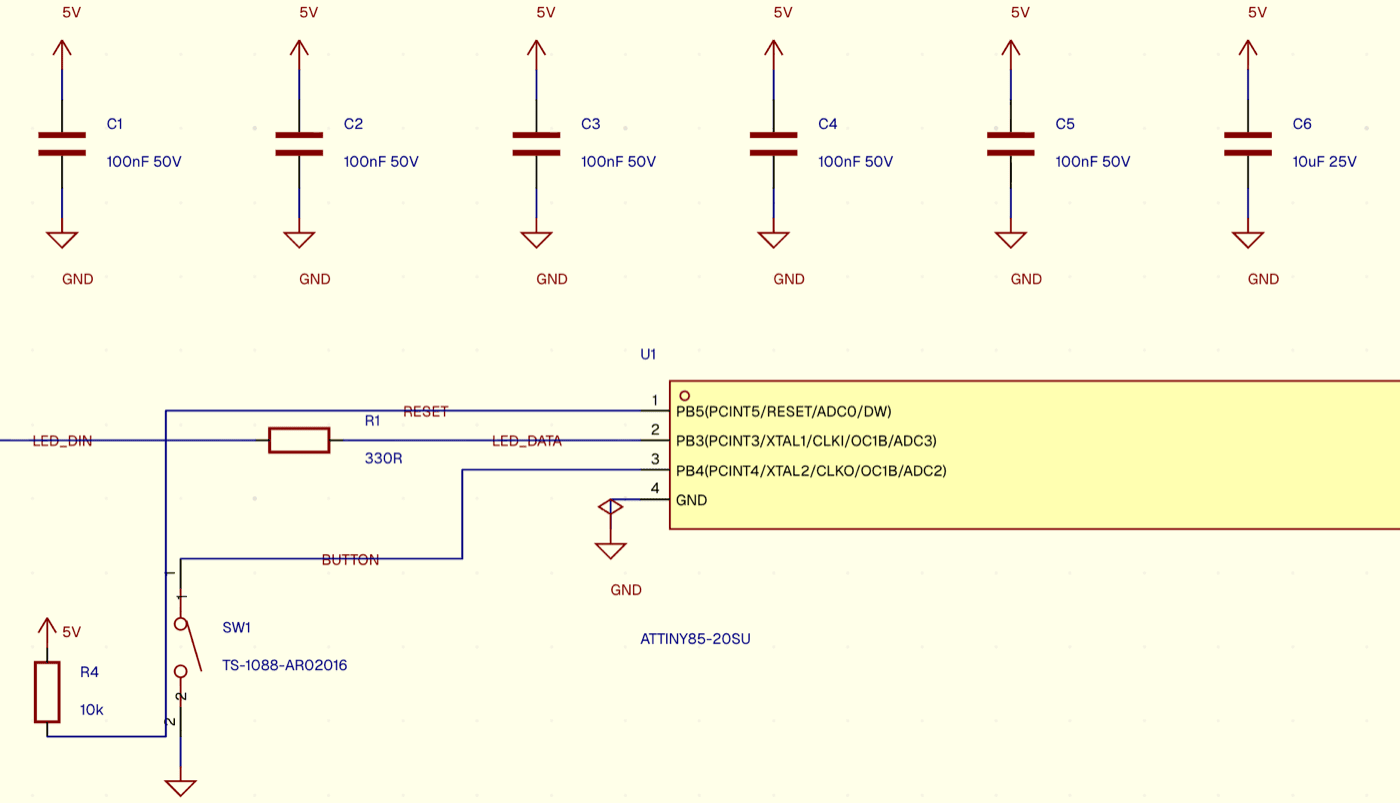
The same board in the heypcb.ai editor: the PCB, and the schematic around the ATtiny85:
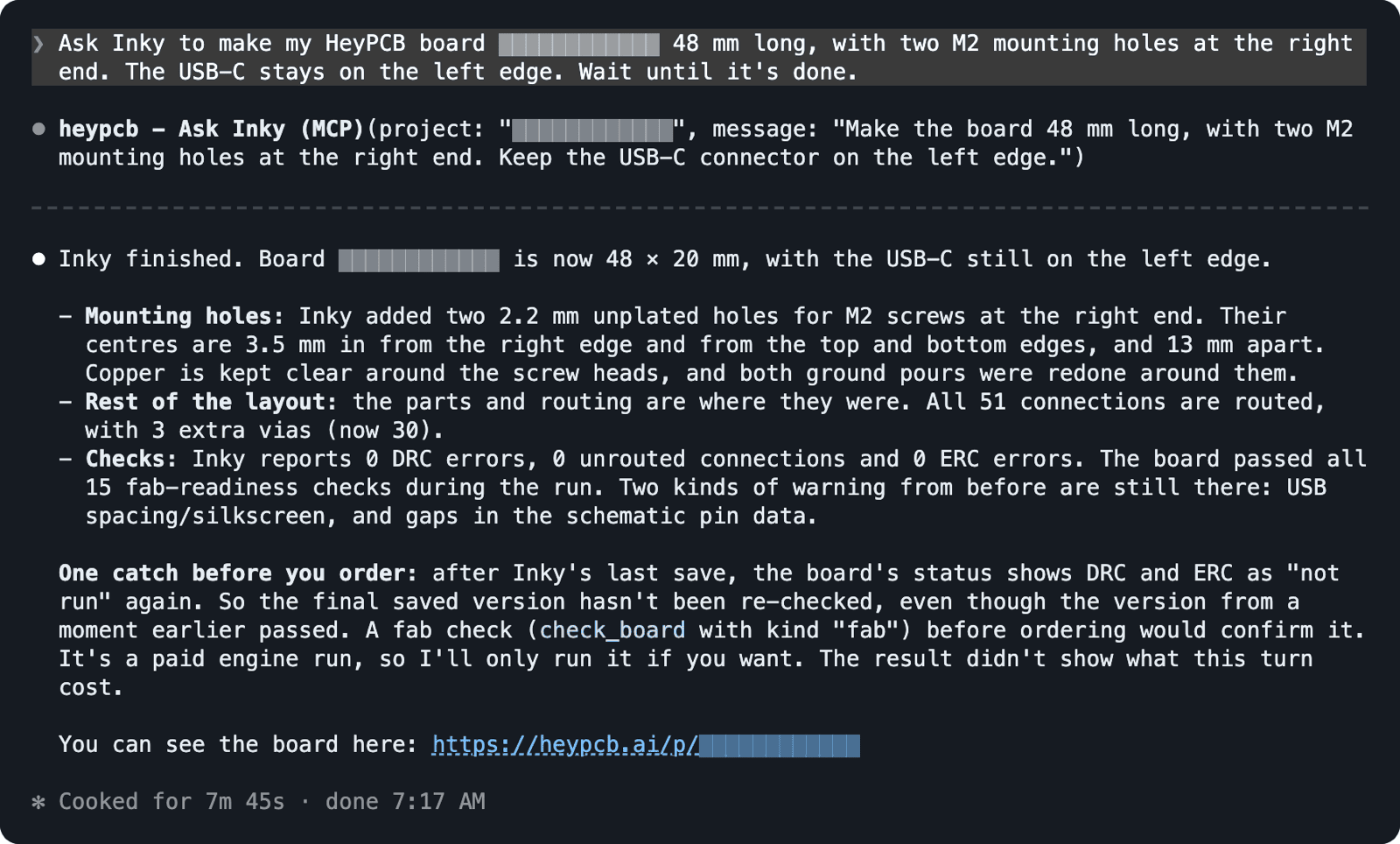
From Claude Code: the request and Claude's ask_inky call, then its
answer once Inky finished. ask_inky returns while Inky is still working;
the 7 minutes of wait_for_turn calls in between are cut at the dashed
line:
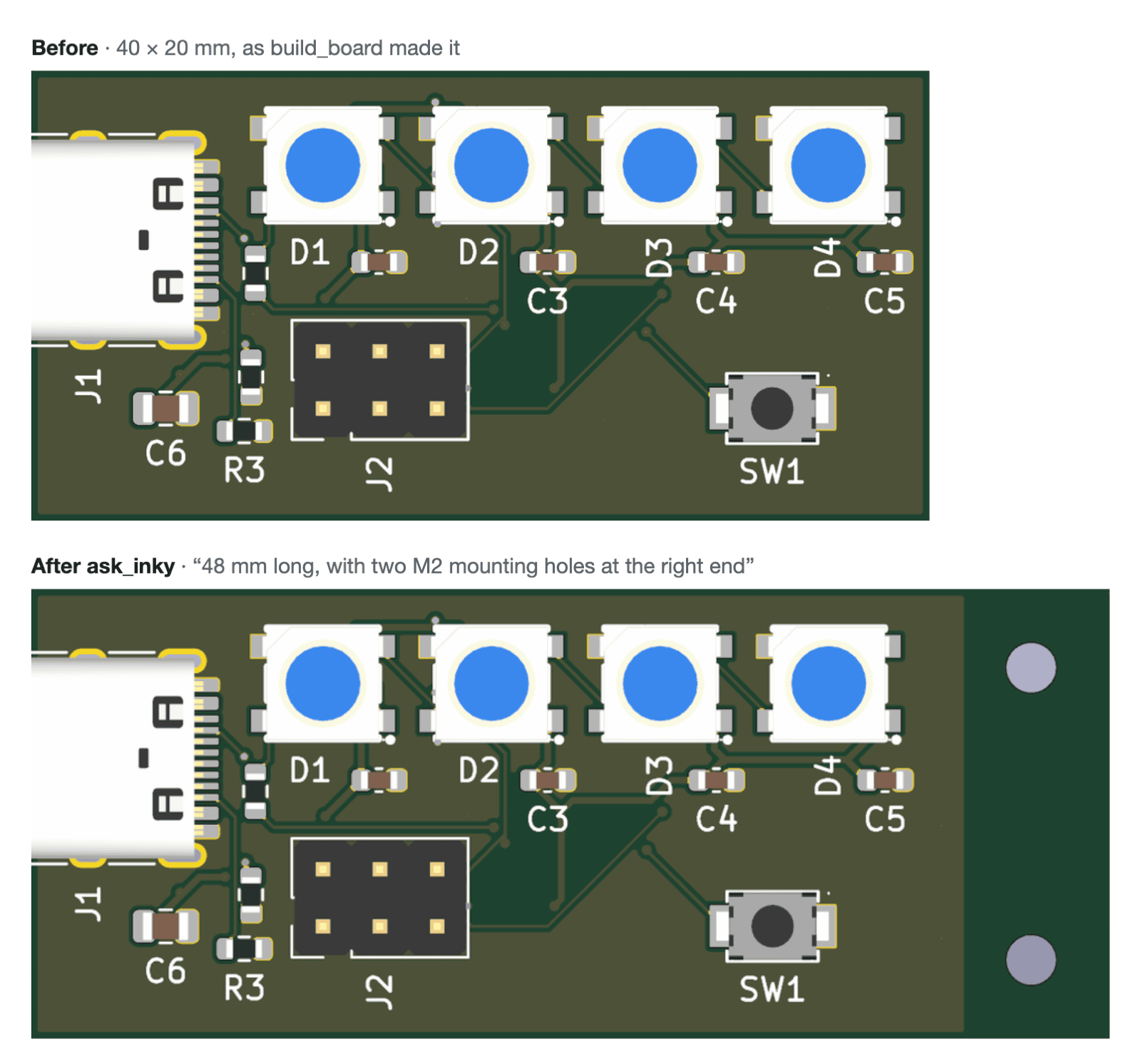
The board before and after, at the same scale:
HeyPCB runs the MCP server for you at https://api.heypcb.ai/mcp (Streamable
HTTP, OAuth sign-in in your browser). Nothing to install:
claude mcp add --transport http heypcb https://api.heypcb.ai/mcp

claude.ai (as a custom connector) takes the same URL. Codex cannot sign in to the remote server (since codex-cli 0.165 it refuses an approve page on another origin than the issuer), so give Codex the local server below. One paste adds it and signs it in with a code:
codex mcp add heypcb -- npx -y @heypcb/mcp && npx -y @heypcb/mcp login
| Remote server | Local server (this package) | |
|---|---|---|
| Install | nothing | Node.js 18+ |
| All HeyPCB tools | ✅ | ✅ |
| Work on a KiCad project in its own folder, edits synced back | ❌ | ✅ open_kicad_project |
| Upload a copy of a KiCad project from your disk | ❌ | ✅ upload_kicad_project |
| Save Gerbers, BOM, CPL, STEP to a folder | ❌ | ✅ save_export |
| HeyPCB parts in the project's own libraries | ❌ | Awaiting the parts-assets API |
| KiCad's own DRC/ERC and exports, free and offline | ❌ | ✅ check_local, export_local |
Use the remote server unless you use Codex or need one of the local tools.
Both servers offer every tool below, with the same names; the local server adds its own. Each tool's full description and input schema come from the server itself, so your agent always reads the current ones.
Seven tools run paid engine work, at what the same work costs on heypcb.ai:
build_board, ask_inky, answer_decision, check_board, route_board,
place_parts and preview_placement (estimate prices them first). Every
other tool says it is free in its own description; the design and layout
tools are rate-limited.
| Tool | What it does |
|---|---|
whoami |
Your HeyPCB account, plan, balance and what can run. |
list_projects |
Your HeyPCB boards: id, name, last update, web link. |
create_project |
Create an empty HeyPCB board project. |
build_board |
Design a whole PCB from a plain-language brief: schematic, parts, placement, routing and checks. |
ask_inky |
One turn of Inky, HeyPCB's design agent, on a project: a question or an edit. |
wait_for_turn |
Wait for a running Inky turn and return its result. |
stop_turn |
Stop a running Inky turn at its next step. |
answer_decision |
Answer a decision Inky asked for (for example approve the layout). |
get_board |
Board facts: layers, size, parts, nets, routed %, DRC/ERC counts, fab readiness, web link. |
get_board_image |
A picture of the PCB (top or bottom), a schematic page or the 3D view. |
check_board |
Run DRC, ERC and the placement check, the full verification, or the fab check, with findings. |
route_board |
Autoroute the board, or only the nets you name, and return the result. |
place_parts |
Re-place the board's parts. |
preview_placement |
Plan a re-place on a copy and show it before anything moves. |
apply_placement |
Land a previewed placement plan exactly, as one undoable change. |
export |
Gerbers, KiCad project, BOM, pick-and-place or STEP as a short-lived download link. |
read_design |
Read the design or a schematic/board file's text for inspection. |
estimate |
The price of an operation before running it. |
| Tool | What it does |
|---|---|
search_parts |
Find real, orderable parts: LCSC stock and price, verified footprints, KiCad symbols. |
get_part |
A part's pins and facts: an LCSC part card, a KiCad symbol's pins, or a part on the board. |
add_parts |
Add parts to the board's design; the board places them. |
remove_parts |
Delete parts from the design and the board. |
set_part_value |
Change one part's value in place. |
rename_part |
Rename a designator everywhere: design, nets, schematic and board. |
source_parts |
Give every unsourced part an orderable LCSC part. |
connect |
Connect pins (REF.PIN) into named nets. |
disconnect |
Remove pins from every net they are on. |
list_blocks |
HeyPCB's proven circuit blocks (USB-C power, regulators, MCU modules…). |
add_block |
Add a proven circuit block to the design. |
set_net_class |
Set a net class: width, clearance, current, impedance, differential pairs. |
rename_net |
Rename a net. |
set_no_connect |
Toggle a no-connect flag on a pin. |
get_netlist |
Every net with its pins, class, drivers and current grade. |
get_design_summary |
The design in one compact read: parts, nets, counts, unsourced parts. |
get_schematic |
One schematic page as text, with the page list. |
tidy_schematic |
Re-lay the schematic's hand-placed symbols with HeyPCB's own layout. |
get_capable_pins |
Which MCU pins can carry a function (UART, I2C, SPI, PWM…) and are free. |
| Tool | What it does |
|---|---|
set_board_outline |
Set the board's outline in mm (rect, rounded, circle, polygon…), with corner mounting holes. |
set_board_rules |
Set the copper layers, HDI, metal |