Jev Social — browser-grounded social research
Jev is cool. Giving it access to your social media is cooler.


Jev chooses each next operation: search, open a particular post or profile, read comments, explicitly requested TikTok media download, or finish. socai executes the selected CLI command in your real Chrome. Each result goes back to Jev before the next decision.
Live site · Real 64-second Jev report · Recorded TikTok video evidence · Product story · socai · Discord · Jev
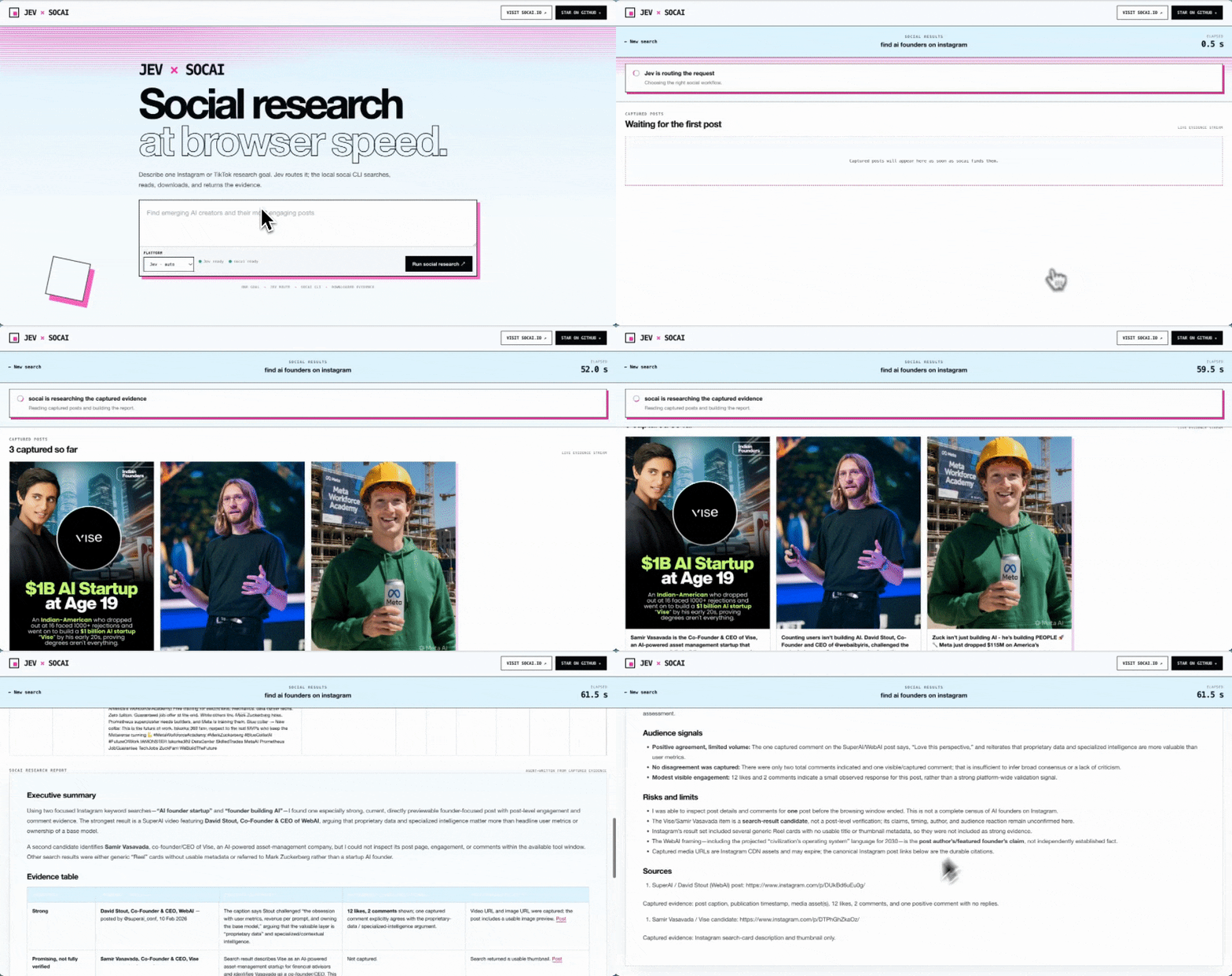
The recording above shows the earlier routing-only prototype. Current runs include a history of every operation chosen by Jev.
Why this pairing
Jev chooses from a changing list of concrete, read-only operations. The list includes exact targets discovered in previous results, so Jev decides which post to open and which socai command to run. socai handles the underlying navigation, clicks, scrolling, and extraction; Jev does not choose arbitrary DOM coordinates or generate shell commands.
"find handmade art on Instagram"
        │
        ▼
   Jev chooses the platform
        │
        ▼
   Jev chooses an operation ◄──── observed results
        │                              ▲
        ├─ search                      │
        ├─ open a selected profile     │
        ├─ open a selected post        │
        ├─ read comments / download    │
        │         └──── socai CLI ─────┘
        └─ finish → cards · table · evidence report
https://github.com/user-attachments/assets/4849e0f3-87d5-4a0d-8e0b-2a58e3d0267a
This video also predates the per-operation Jev loop.
Available operations
| Platform | Jev can select |
|---|---|
| Search, open a profile and its post cards, open a specific post/reel and read comments, inspect page state | |
| TikTok | Search, open an author, read a selected video and its comments, download that video's media only when the goal explicitly requests it, inspect page state |
| Search people/content/companies, read a selected profile/company/post, read experience or education, inspect page state |
Only commands exposed by the installed socai CLI are offered. Targets come from captured results or explicit URLs in the user's request. Unsupported, malformed, and low-confidence decisions do not execute. Previously attempted operations are removed from the next choice set.
The run stores each choice, confidence, command, observed result summary, and elapsed time. Login/access gates, decision failures, and step limits produce partial results rather than a success claim. Reports are compiled from captured text, comments, and source links; they do not hand browsing off to another agent or depend on socai research. Speed varies with the number of chosen operations and the live site.
Recorded evidence
| Recorded run | Captured result | Elapsed time | Verification boundary |
|---|---|---|---|
| Instagram Jev research loop | Four source-linked records after two searches and one post-detail read | 63.969 s | Complete dated run; claims remain limited to captured evidence |
| TikTok CLI search | Five public TikTok result URLs | 7.570 s | socai CLI timing, not Jev decision-loop timing |
| TikTok video detail | Metadata, a 7,988,959-byte MP4, and a 95,592-byte poster | 38.263 s | Partial run: media succeeded, comments were unavailable |
These are individual local observations, not a benchmark or guaranteed latency. Live-site behavior, network conditions, login state, and the operations Jev selects can change the total time.
Run it
Node 20+, an OpenRouter key with Jev access, and a current socai CLI.
Fastest path — no repository clone required. Onboarding prompts for the key and offers to install the official socai CLI when it is missing:
npx github:socai-io/jev-social#v0.1.5 onboard
npx github:socai-io/jev-social#v0.1.5
To let Codex invoke the same browser-grounded workflow through GitHub CLI 2.101 or newer:
gh skill install socai-io/jev-social jev-social@v0.1.5 --agent codex --scope user
Or install it with the cross-agent Skills CLI:
npx skills add socai-io/jev-social --skill jev-social
The skill pins the documented Jev Social CLI release, preserves its read-only and login-gate boundaries, and returns source-linked evidence instead of raw run JSON. Platform availability is checked against the installed socai CLI before a run.
To work from a source checkout instead:
curl -fsSL https://github.com/socai-io/socai/releases/latest/download/install.sh | sh
git clone https://github.com/socai-io/jev-social.git
cd jev-social
npm install
cp .env.example .env   # OPENROUTER_API_KEY=…
npm start
Opens http://127.0.0.1:8766. Loopback only. Leave the platform on Jev · auto, type a goal, watch the timer.
npm start -- search "find emerging design creators on Instagram" --platform auto --limit 4
npm start -- search "find AI wearable trends on TikTok" --platform auto --limit 4
npm start -- search "find AI product managers in San Francisco on LinkedIn" --platform auto --limit 4
npm start -- search "find handmade art on Instagram and read the comments" --limit 4 --max-steps 12
--limit is the target result count and per-search/profile collection size (1–100). All captured records are retained, including intermediate profile cards. --max-steps bounds the decision loop (1–30, default 12); each selected operation or finish decision consumes one step. The HTTP search endpoints also accept maxSteps.
For browser connection checks, platform login barriers, and safe status diagnostics, see Troubleshooting.
Or call socai directly:
socai instagram search "AI wearables" --num 10 --pretty
socai tiktok search "AI wearables" --num 10 --pretty
socai tiktok get-videos --video <url> --download-media --pretty
socai linkedin search "AI product managers" --num 10 --pretty
socai linkedin search "AI agents" --type content --num 10 --pretty
If this is useful, star Jev Social. The browser runtime lives in socai; you can star it too or join the Discord.