Maintainer of this skill?
by joexk1
The Mac workspace for your agents: Claude Code, Codex and OpenCode, plus your own Ollama, LM Studio or API models. Shared memory, Night Shift, iPhone companion. Local-first, no account. GPLv3.
# Add to your Claude Code skills
git clone https://github.com/joexk1/JoeBroGuides for using ai agents skills like JoeBro.
See how JoeBro compares with popular alternatives.
JoeBro is an open-source ai agents skill for AI coding assistants such as Claude Code, Codex CLI, and ChatGPT, built by joexk1. The Mac workspace for your agents: Claude Code, Codex and OpenCode, plus your own Ollama, LM Studio or API models. Shared memory, Night Shift, iPhone companion. Local-first, no account. GPLv3. It has 101 GitHub stars.
JoeBro's catalog security scan is still queued. You can run an instant dependency and prompt-injection check now with the "Scan for vulnerabilities" button above.
Clone the repository with "git clone https://github.com/joexk1/JoeBro" and add it to your Claude Code skills directory (see the Installation section above).
JoeBro is primarily written in Python. It is open-source under joexk1 on GitHub, so you can review or fork the full source.
Yes. SkillsLLM lists many other AI Agents skills you can browse and compare side by side. Open the AI Agents category from the badge at the top of this page, or use the Related Skills and comparison links further down to weigh JoeBro against similar tools.
No comments yet. Be the first to share your thoughts!
Available after the catalog security scan passes.
⚠️ Third-Party Software Notice
This skill is third-party open-source software developed and hosted independently on GitHub. SkillsLLM lists this project for discovery and does not control or maintain the underlying repository.
Any security checks, ratings, or warnings displayed by SkillsLLM are automated and limited in scope. They do not constitute a security certification or guarantee that the software is safe, error-free, or free from malicious code, vulnerabilities, compromised dependencies, or prompt-injection risks.
Review the source code, permissions, dependencies, and configuration before installing or running any third-party skill. Use is at your own risk. To the maximum extent permitted by applicable law, SkillsLLM is not liable for losses arising from third-party software.
The deep catalog scan for this skill is still queued. Run an instant dependency check now instead.

JoeBro is a free, open-source, local-first Mac workspace for your AI agents. Your files, your chats, your memory and your keys stay on your own Mac. There is no account, no JoeBro server and no telemetry, and nothing leaves your machine unless you choose a cloud model. Run a local model and nothing leaves at all.
Inside it: Claude Code, Codex and OpenCode sessions, your own API keys and local models (Ollama, LM Studio) as agents, your files and editor, one memory they all share, and an iPhone companion that talks only to your Mac. It is for people who use more than one AI tool and don't want to rent their workflow from any of them.
AI is becoming where people think, write and build. That shouldn't depend on someone else's server, account or terms. JoeBro is built on a simple rule: your AI works for you, on your machine.
Website: joebro.pages.dev · Windows and Linux: JoeBro Desktop · iPhone app: JoeBro Mobile · Plugins: joebro-plugins · Comparing tools? How JoeBro compares
curl -fsSL https://joebro.pages.dev/install.sh | bash
This is the all-in-one install from joebro.pages.dev. It downloads the signed Mac app and checks it, plugs JoeBro into Claude Code, Codex and OpenCode (hooks and the MCP server), links them up, and then offers to set up the iPhone app. You can read the script first. It needs macOS 26 or later.

| Feature | What it does |
|---|---|
| Chats | Any local model or API key, with a model picker grouped by provider |
| Coding agents | Claude Code, Codex and OpenCode on any of your computers, shown as live chats in the sidebar |
| Night Shift | Coding tasks that run overnight on your machines, with diffs to review in the morning |
| Memory | One memory shared across every agent and device |
| Skills, tools, plugins, MCP servers | One pool that every chat can use |
| Deep research | Many sources in, a cited report out |
| Calendar, email, tasks, notes | Your day, next to your chats |
| Notifications | Approvals, finished work and notes from your agents, in one list |
| Workspace editor | Markdown with a live outline, beside the conversation |
| iPhone | The same chats and coding agents, a personal agent, and approvals on the lock screen |
Claude Code, Codex and OpenCode appear in the sidebar as live chats, whichever of your computers they are running on. Send a message and it lands in the agent's terminal, even mid-turn. When an agent asks you something (a question, a permission prompt, a choice between options), the options appear right in the chat: click one, or type your own answer. Queue messages for when the agent is ready, and watch subagents appear nested under their parent. You can start a session in any folder, or resume an earlier one.

Chat with any model from any provider, and switch model mid-conversation without losing the thread. The picker is grouped by provider, so a long list of models stays easy to scan. Chats stream live, support extended thinking and have an agent mode that can use your tools. Type / for slash commands and skills, or press ⌘K for the command palette to jump to any panel, chat, document or action.

Queue coding tasks from your Mac or your iPhone: a repo, a prompt and, optionally, a test command. When the night window opens, JoeBro runs each task in its own git branch and worktree, on whichever of your machines has the repo. In the morning every task is a review card with the diff, the test result and a summary. Approve or reject it, or ask for a follow-up. Night Shift never pushes to a remote.

Agents learn things as they work: decisions, gotchas, what was tried. Shared memory keeps one store per project that Claude Code, Codex and OpenCode all read and write over MCP, so what one learns the others know. Every fact shows which agent wrote it, with which model, on which machine. Facts that get used grow stronger, those that don't fade, and nothing is deleted. Your personal facts never reach a repo or a coding agent.

Skills, API tools, MCP servers and plugins live in one pool, and the model can call any of them in the same conversation. JoeBro learns skills from the things you do often, and you can review, edit or remove them by hand. MCP servers run over stdio with a hard timeout on every call, so a broken server never hangs a turn. Plugins are folders on disk that add their own tools and logic.

Documents open beside the conversation, so you and the model can work on the same text. The editor handles Markdown with a live outline for jumping around long documents, and also opens Word .doc and .docx files and spreadsheets.

The Agents panel lists what is running across your machines, what is waiting on you and what has finished, with subagents nested under the agent that started them.

JoeBro uses Geist for type and has nine accent palettes, one of which takes its colour from your wallpaper. Behind the interface you can have one of 34 animated ASCII-art scenes, your own photo, or a video loop. An opacity slider controls how solid the panels are, and light or dark follows your system.


The iPhone app has the same look and the same pool of chats, with your coding agents as chats too. Running agents appear in a Live Activity and the Dynamic Island, and a personal agent on your phone handles background work and pings you when something needs you. It pairs with the Mac app by QR code, with no cloud in between. Details are in the JoeBro Mobile repo.

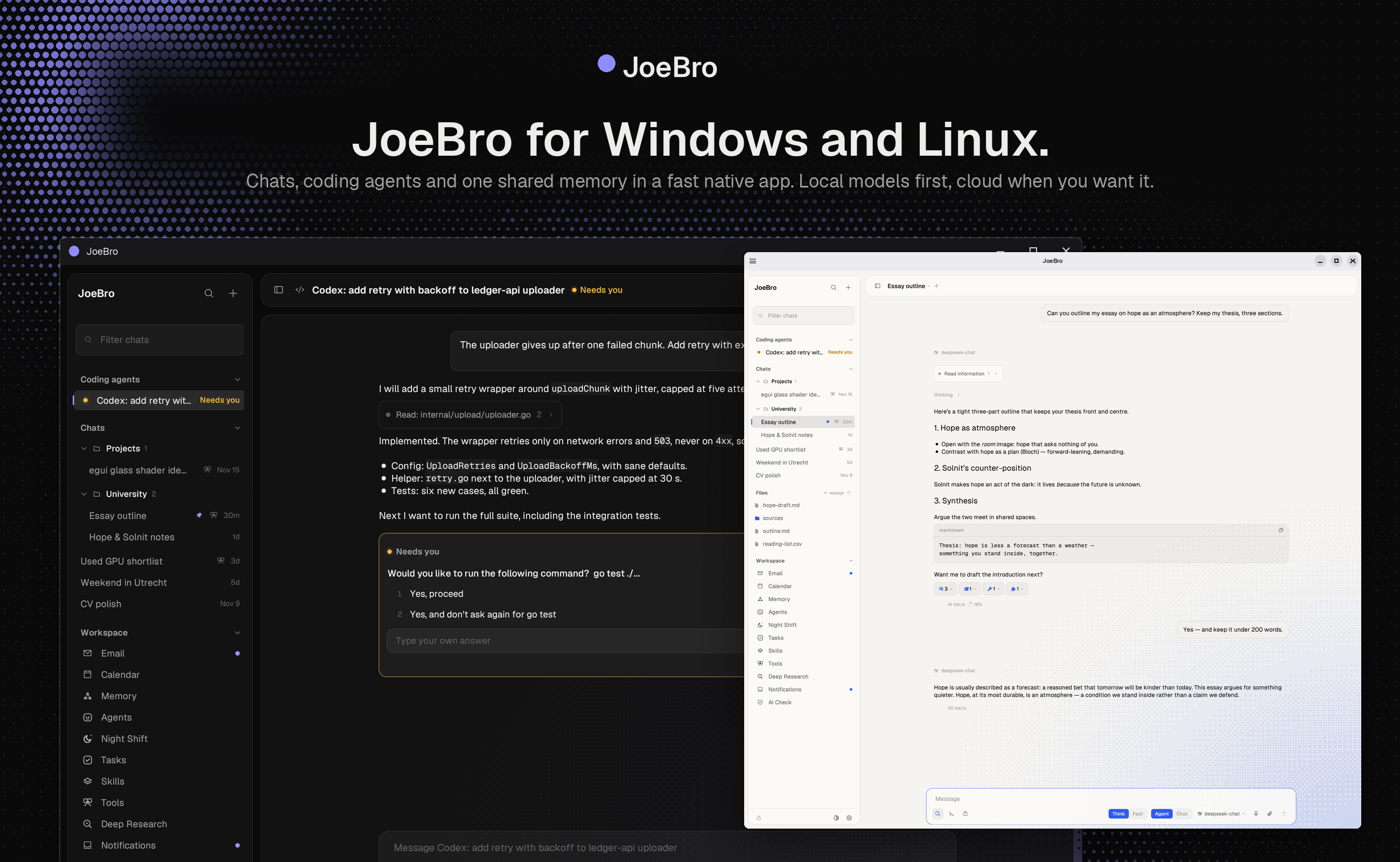
JoeBro also runs on Windows and Linux as JoeBro Desktop, a native Rust app with the same look, panels and coding-agent support. It runs the same backend on your own computer, or connects to the one in your JoeBro Mac app. The one command on joebro.pages.dev picks the right download for your system.
Requirements: macOS 26 (Tahoe) or later on Apple Silicon. Python 3 is used by the bundled backend. The system python3 is fine, and there is nothing to pip install.
The quickest way is the one-command install from joebro.pages.dev, which sets up the app, your coding agents and, if you want it, the iPhone app:
curl -