Maintainer of this skill?

Automated security scan — not a certification.
by kbterm
Graphical management tool for Kubernetes on desktop and mobile.
# Add to your Claude Code skills
git clone https://github.com/kbterm/kubetermGuides for using ai agents skills like kubeterm.
Last scanned: 8/8/2026
{
  "issues": [],
  "status": "PASSED",
  "scannedAt": "2026-08-08T04:55:39.911Z",
  "npmAuditRan": true,
  "pipAuditRan": true,
  "promptInjectionRan": true
}See how kubeterm compares with popular alternatives.
kubeterm is an open-source ai agents skill for AI coding assistants such as Claude Code, Codex CLI, and ChatGPT, built by kbterm. Graphical management tool for Kubernetes on desktop and mobile. It has 231 GitHub stars.
Yes. kubeterm passed SkillsLLM's automated security scan — a dependency vulnerability audit plus prompt-injection heuristics — with no high-severity issues. You can read the full report in the Security Report section on this page.
Clone the repository with "git clone https://github.com/kbterm/kubeterm" and add it to your Claude Code skills directory (see the Installation section above).
Yes. SkillsLLM lists many other AI Agents skills you can browse and compare side by side. Open the AI Agents category from the badge at the top of this page, or use the Related Skills and comparison links further down to weigh kubeterm against similar tools.
No comments yet. Be the first to share your thoughts!
From $49 · 30 days · terms & refunds
⚠️ Third-Party Software Notice
This skill is third-party open-source software developed and hosted independently on GitHub. SkillsLLM is an informational directory and does not control or maintain the underlying repository.
Any security checks, ratings, or warnings displayed by SkillsLLM are automated and limited in scope. They do not constitute a security certification or guarantee that the software is safe, error-free, or free from malicious code, vulnerabilities, compromised dependencies, or prompt-injection risks.
Review the source code, permissions, dependencies, and configuration before installing or running any third-party skill. Use is at your own risk. To the maximum extent permitted by applicable law, SkillsLLM is not liable for losses arising from third-party software.
Automated security scan — not a certification.
English | 简体中文


Kubeterm is a graphical management tool for Kubernetes clusters. It provides clear visibility into your clusters, enables users to manage cluster resources and applications easily, as well as perform troubleshooting actions.
As a locally running application, Kubeterm doesn't require anything installed into the cluster. It supports multiple platforms, including desktop and mobile devices.

auth-provider field from the user section of the kubeconfig. ExampleDownload on your mobile devices:
Download from GitHub Releases:
Install macOS version by Homebrew:
brew install --cask kubeterm
Download macOS version from App Store:
ℹ️ Note: This build runs inside Apple's App Sandbox and therefore cannot execute credential plugins (
execblocks) referenced in your kubeconfig. If you rely on these, use one of the two options above instead — the build from GitHub Releases or Homebrew is not sandboxed.
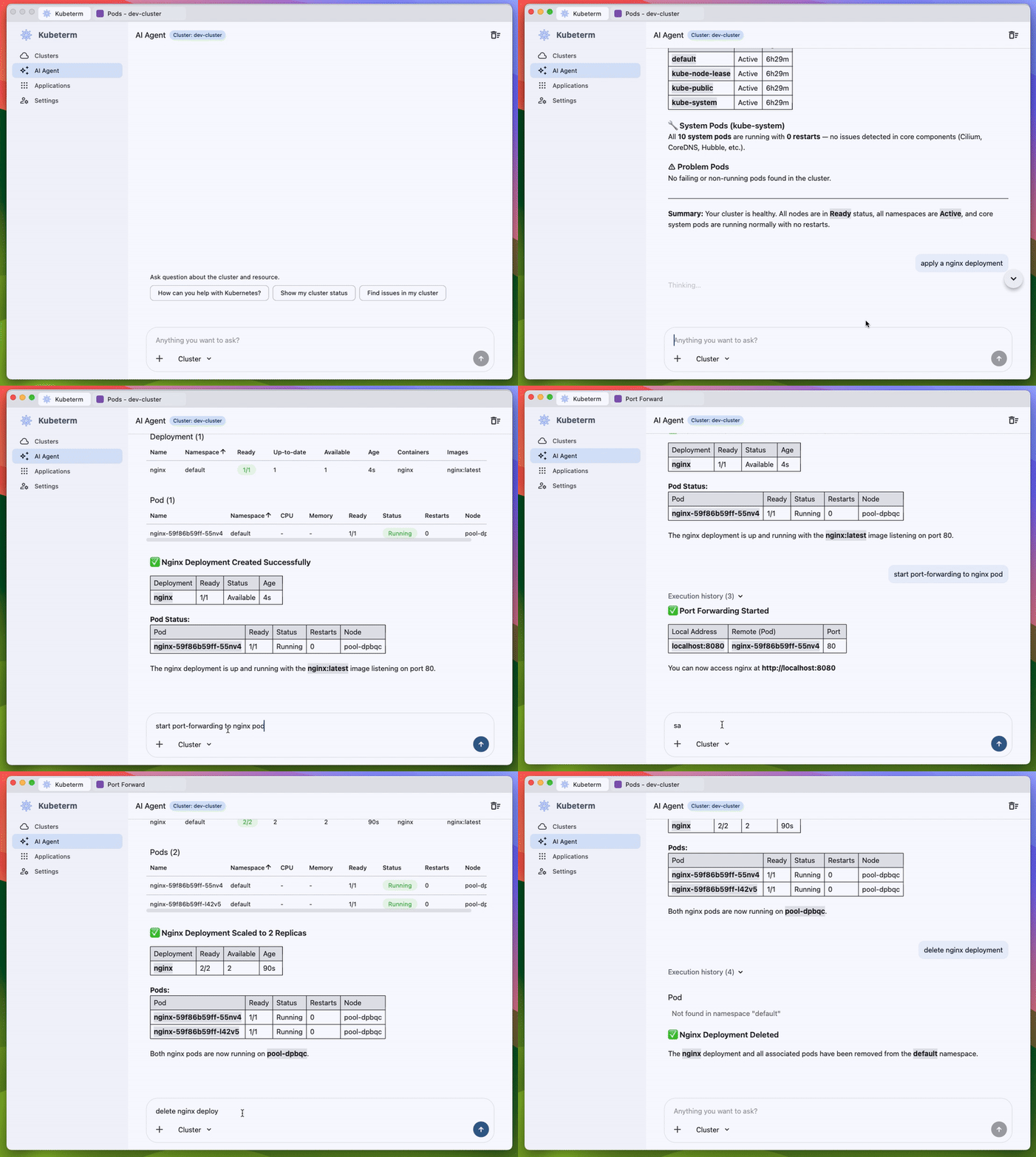
Kubeterm includes a built-in AI Agent for Kubernetes operations and troubleshooting. The agent runs inside Kubeterm, can work with the currently selected cluster or resource context, and helps investigate issues directly from the UI.
Kubeterm handles cluster credentials, so it's worth being explicit about where your data goes.
Common questions — FAQ.
Using Kubeterm at work? Add your team to ADOPTERS.md — it helps us prioritize platforms and features, and helps others evaluating Kubeterm.
This repository hosts Kubeterm's issue tracker, release downloads, and documentation. The Kubeterm application is not open source.
Copyright (c) 2025-2026 Kubeterm. All rights reserved.
