Maintainer of this skill?

Automated security scan — not a certification.
by polterguy
Instant SECURE Full Stack Apps and AI Agents
# Add to your Claude Code skills
git clone https://github.com/polterguy/magicLast scanned: 6/16/2026
{
  "issues": [],
  "status": "PASSED",
  "scannedAt": "2026-06-16T09:26:13.242Z",
  "npmAuditRan": true,
  "pipAuditRan": true,
  "promptInjectionRan": true
}See how magic compares with popular alternatives.
magic is an open-source ai agents skill for AI coding assistants such as Claude Code, Codex CLI, and ChatGPT, built by polterguy. Instant SECURE Full Stack Apps and AI Agents. It has 1,205 GitHub stars.
Yes. magic passed SkillsLLM's automated security scan — a dependency vulnerability audit plus prompt-injection heuristics — with no high-severity issues. You can read the full report in the Security Report section on this page.
Clone the repository with "git clone https://github.com/polterguy/magic" and add it to your Claude Code skills directory (see the Installation section above).
magic is primarily written in C#. It is open-source under polterguy on GitHub, so you can review or fork the full source.
Yes. SkillsLLM lists many other AI Agents skills you can browse and compare side by side. Open the AI Agents category from the badge at the top of this page, or use the Related Skills and comparison links further down to weigh magic against similar tools.
No comments yet. Be the first to share your thoughts!
From $49 · 30 days · terms & refunds
⚠️ Third-Party Software Notice
This skill is third-party open-source software developed and hosted independently on GitHub. SkillsLLM is an informational directory and does not control or maintain the underlying repository.
Any security checks, ratings, or warnings displayed by SkillsLLM are automated and limited in scope. They do not constitute a security certification or guarantee that the software is safe, error-free, or free from malicious code, vulnerabilities, compromised dependencies, or prompt-injection risks.
Review the source code, permissions, dependencies, and configuration before installing or running any third-party skill. Use is at your own risk. To the maximum extent permitted by applicable law, SkillsLLM is not liable for losses arising from third-party software.
Automated security scan — not a certification.
Turn plain English into a working full-stack app — database, secure API, business logic, and frontend — running on your own hardware, with zero lock-in. An open-source alternative to Lovable, Bolt44, and Replit that gives you the whole backend, plus an MCP server that turns every endpoint into a tool for Claude, Cursor, or Codex. Read more about Hyperlambda.




 [
[ ]
Actually
]
Actually
curl -fsSL https://hyperlambda.dev/docker-compose.yaml | docker compose -f - up
Then open localhost:5555, point it at localhost:4444, and log in with root / root.

Point the API Wizard at your database, and it generates a complete, secured REST API — then extend it in plain English, without a build or deploy step.
⭐ If this saves you time, star the repo — it's the main way other developers find it.
| Magic Cloud | Lovable / Bolt | n8n / Zapier / Make | |
|---|---|---|---|
| License | MIT, fully open source | Proprietary | Mixed |
| Self-hostable | Yes — your hardware, your data | No | Partly |
| Backend included | Database, API, auth, RBAC, jobs | Frontend + third-party BaaS | Workflows only |
| Deploy step before you can test | None — save and run | Deploy to third parties first | Publish step |
| Execution model | Compiled .NET runtime | — | Interprets JSON/YAML workflows |
| MCP server | Built in | No | No |
| Vendor lock-in | None | Yes | Yes |
Magic runs Hyperlambda, which can be generated by our own proprietary LLM. Because we generate an AST rather than text, the output is analysed and rejected if it contains functions that don't exist. The Hyperlambda Generator cannot return hallucinated function invocations — like any LLM it can still write logically wrong code, but every function it invokes is guaranteed to exist.
Combined with the ability to restrict the vocabulary, this lets you ship AI agents that grow their own tool space on demand, without widening your attack surface.
Hyperlambda runs sandboxed, with no file system access outside its sandbox, and can whitelist individual functions through its RBAC system — so your server can accept code as input and execute it safely without knowing where it came from. Restricting invocations at the execution level makes Hyperlambda, as far as we know, the only language that currently does this.
I'm so confident in the codebase quality, I'll give you $100 if you can find a severe security-related bug in its backend code — and another $100 if you can exploit the natural language API, which has accepted arbitrary public input for 3 months with nobody succeeding.
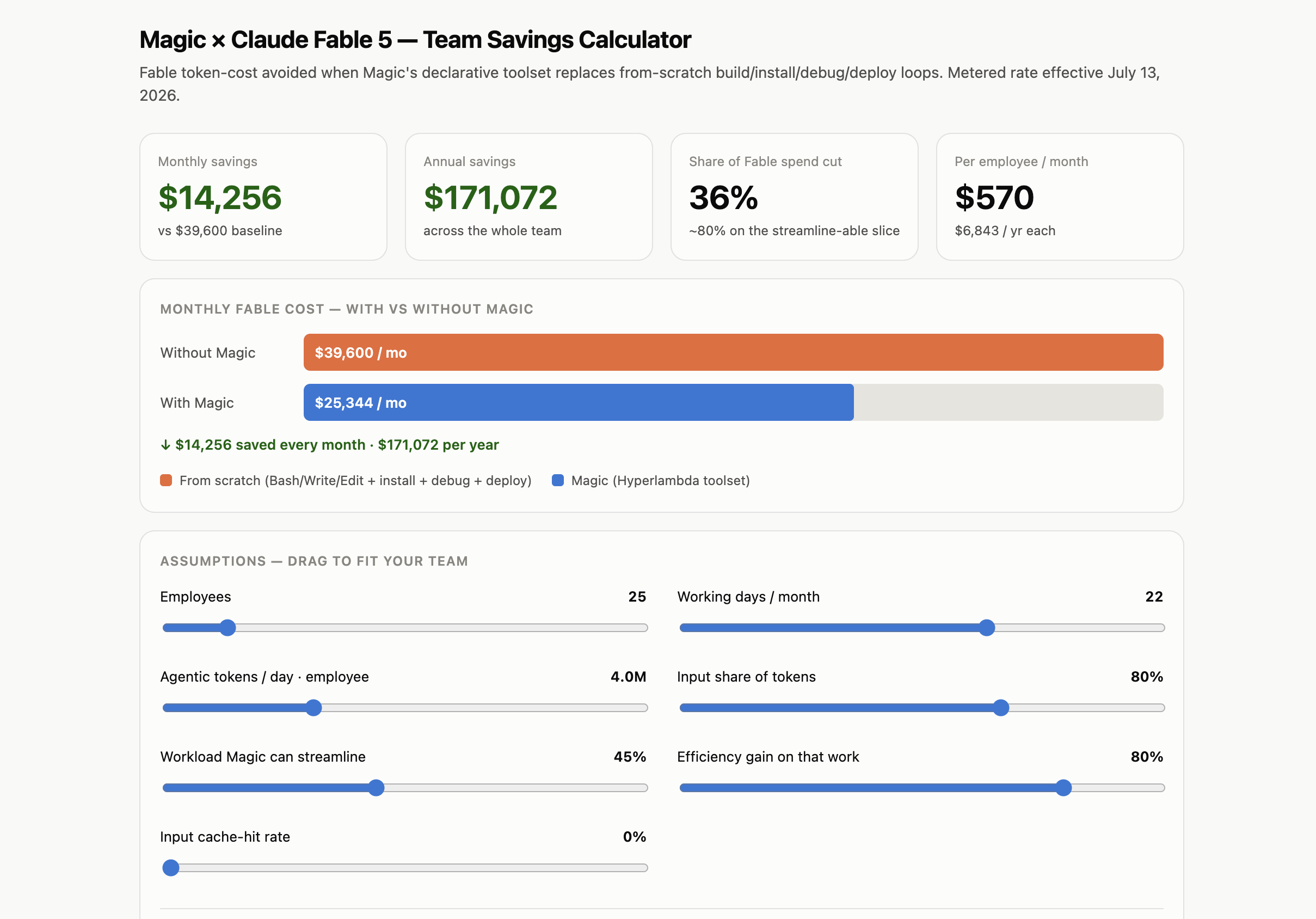
Install the mcp plugin, point Claude Code, Cowork, or OpenAI's Codex at your cloudlet, and every HTTP endpoint in your modules folder becomes a tool the agent can invoke. In our measurements this also cuts token consumption by roughly 80%. Calculate your own savings here.
On a Chinook read endpoint (10 rows per request, pooled SQLite connections, 128 concurrent connections, measured with wrk), Hyperlambda served 64,664 requests per second, 3.7× the throughput of FastAPI with 4 workers (17,686) and 14× that of FastAPI with 1 worker (4,564). The 99th percentile latency was 5.6 ms, against 77.4 ms and 83.9 ms for FastAPI. Hyperlambda used about 9 cores and FastAPI with 4 workers about 4.6, so this is a measurement of throughput on one machine, not of efficiency per core.

Our earlier measurements put Hyperlambda around 50× faster than LangChain, and 100–1,000× faster than graphical workflow tools such as n8n, Zapier and Make, because it runs a real compiled runtime instead of interpreting logic out of JSON, XML or YAML. Hyperlambda solutions are broadly on par with C# and Entity Framework on both performance and scalability.

The sidebar is the whole platform: Hyper IDE for editing, running and replaying any file on the server, Playground for executing Hyperlambda without saving it first, SQL Studio for querying and designing databases, Endpoint Generator for turning tables into secured CRUD endpoints, wrapping caller-supplied code in a role-scoped sandbox, and importing third-party APIs from their OpenAPI specifications, plus users and roles, scheduled tasks, machine learning, and the plugin store.
Your cloudlet is also an AI agent. With the MCP plugin installed, the URL at the top hands any MCP-capable agent your endpoints as tools. The Chatbot Wizard goes the other way: give it a website, and it crawls the site, turns what it finds into training data, and hands you an embeddable chatbot grounded in your own content.
Once you save the code, you can test it — no deployment or publish step required.

Notice the prompt bar below the editor, where "the Machine Creates the Code". Describe what you want in plain English and the built-in generator writes it straight into the file you're editing. The same bar follows you into the Playground and SQL Studio, generating Hyperlambda, SQL, HTML, or whatever fits the file you have open.

Design your frontend in the browser, on the real file. Web Designer opens any HTML page your cloudlet serves and lets you edit it the way you would edit a document — click an element to select it, double-click a run of text to rewrite it, drag a block in from the palette, drag it somewhere else to move it.
There is no project format and no build step. The page in the middle is the file on disk: scripts are disabled inside the canvas, so what the browser has parsed is exactly what will be saved back. That is also why selection can reach a bare #text node — every run of text is its own thing in the tree, not a property of the tag around it.
The palette carries 60+ blocks, and each one arrives wearing the classes that page already puts on that kind of element — drop a button into the navbar and it lands looking like the other nav items. Style changes go into the page's own stylesheet, inside a fenced block, so your hand-written CSS above and below it is returned to disk untouched.
Code view puts the same file in an editor — HTML, or any stylesheet the page links, picked from a dropdown — with the "the Machine Creates the Code" prompt bar underneath. Live view runs the page for real, scripts and all.

Ctrl+. anywhere in the dashboard opens Chat Ops: a conversation with your cloudlet that slides in over whatever screen you are on, and stays there while you navigate. Ask it to generate an endpoint from Hyper IDE and the file lands in the tree behind you — the conversation is still open when you turn round to look at it.
It talks to the default model, the developer-tools model, and it does not merely answer. It executes AI functions on your behalf: crawl a site, query a database, generate a CRUD API, scrape a URL, run a Hyperlambda snippet. Each invocation appears as a pill — amber while it runs,