Install 1,000 skills and 1,000 MCP tools locally — and don't worry about the token context. mcptoon manages it all.
Its own compact format saves 99.2% of tokens; no line of config to write for any desktop or command-line agent.
Connects to a 17,000+ MCP tool registry and searches skills on demand — nothing pre-installed, you pick what goes in.
It's just a 227KB native CLI — delete it anytime; keep it, and you never have to configure tools or skills for any agent again.









👉 See it first: landing page · 30-second token calculator · 中文
👉 Or run it: pip install mcptoon && mcptoon bench — it measures what your own tools and skills cost, on your machine.
👉 Developer docs · Contributing · Issues
Why mcptoon
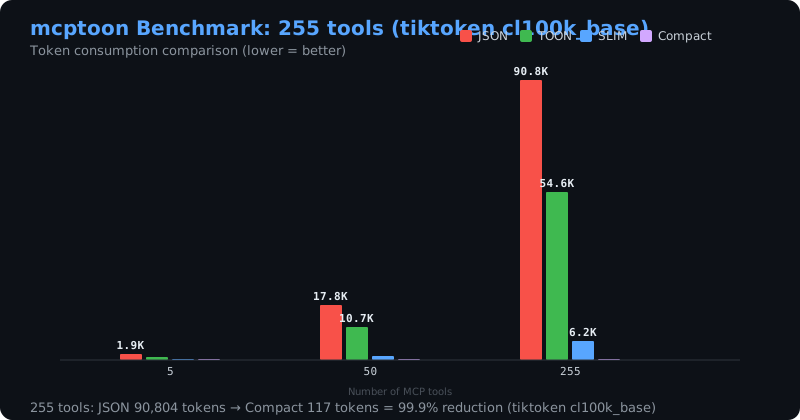
Every MCP agent (Claude Code, Cursor, Codex, …) loads the full description of every tool and every skill into its context window before it does any work — and re-sends it every turn. On 255 tools that is 71,929 tokens: more than half of a 128K window spent on descriptions, before the first question.
How the token saving works
mcptoon keeps those descriptions on disk, not in context, and hands the agent a compact view instead:
- A name index, not full schemas. Picking a tool only needs its name — 255 tools become 581 tokens (−99.2%). The full schema is fetched on demand with
mcptoon inspect, only when a tool is actually called. - Skills the same way. One resident pointer (39 tokens) plus one lookup (501 tokens) replaces loading every
SKILL.mdin full — 926,232 → 39 + 501 (−99.9%). - Results too.
--toonencodes a tool's result ~34% smaller than JSON.
Nothing is lost: the full schema and the full skill text stay one command away. Only the context window is spared.
mcptoon is a 227KB, zero-dependency native CLI that manages every MCP tool and agent skill on your computer — and shares them across all your agents with no config written by you.
This isn't just us talking
Those numbers are ours — but "loading every tool schema into context is expensive" is not a claim only we make:
- Anthropic's engineering write-up — tool schemas flooding the context window is a real cost; one example drops from 150,000 tokens to 2,000
- Firecrawl's benchmark — the same task cost 1,365 tokens via CLI vs 44,026 via MCP (32×)
- Scalekit's benchmark — CLI 10–32× cheaper, 100% reliable vs MCP's 72%
- MCP-Zero (arXiv:2506.01056) — on-demand tool retrieval, near-constant cost regardless of tool count
mcptoon is the one you can use today, covering every agent at once.
Two ways in
Install once, and every desktop AI you have — Claude Desktop, Claude Code, Codex, Cursor, Windsurf, Cline, VS Code Copilot and any other agent — shares all the tools and skills you already have. You write nothing in any agent's config.
Script it. mcptoon is a plain CLI with stable JSON output and an mcptoon serve MCP endpoint — wire it into your own agent, CI, or app.
Reproduce the numbers yourself: pip install mcptoon && mcptoon bench
| Without mcptoon | With mcptoon | |
|---|---|---|
| Descriptions in context | full description of every tool + skill, re-sent every turn | a compact view — 581 tokens for 255 tools (−99.2%, lossless) |
| Adding a tool or skill | hand-write JSON in every agent | one command — no agent config touched |
| Which agents get it | only the ones you configured | every agent on the machine — they just run mcptoon |
| Finding tools & skills | hunt GitHub by hand | install --search (17,000+ MCP servers) + skills search |
| Starting from scratch | wire tools one by one | 4 built-in starter packs — one command to a working set |
Skills work the same way: 926,232 tokens of SKILL.md text → 39 resident + 501 per lookup (−99.9%). Call results shrink another ~34% with --toon.
Path 1 · I just use AI tools
You have a desktop AI — Claude, Codex, Cursor, Windsurf, Cline, VS Code Copilot. Today, adding a tool or a skill means hand-editing that agent's JSON. mcptoon removes that step:
-
Install once.
pip install mcptoon && mcptoon quickstartquickstartfinds your MCP servers, writes your config, and registers mcptoon in every agent it detects. (Skipquickstartand the first command you run still self-heals: it installs mcptoon's own skill into each agent and builds the skill index, once per machine.) -
Add tools and skills in one place — here, not in each agent.
mcptoon install --search github # find and install any MCP server mcptoon skills search "make a PDF" # find a skill by what it does -
Use them from any agent. Your agent runs
mcptoonlike any other command — no config, no restart. See Works with every AI agent.
Want a head start? Four built-in starter packs — essentials, web-research, code-review, docs — stand up a working toolset in one command:
mcptoon install --pack essentials
Path 2 · I build with MCP / agents
mcptoon is a plain CLI with scriptable output, plus an MCP endpoint when you want one.
mcptoon manifest --format json      # machine-readable tool index
mcptoon call <server> <tool> '{}'   # call any tool, JSON or --toon output
mcptoon serve                       # expose every configured server behind one MCP endpoint
- Stable output — JSON by default,
--toonfor ~34% smaller results,--format mcpto export standard MCP JSON. mcptoon serve— stdio or HTTP, connection pooling, per-agent keys, for clients that insist on a proxy.- Zero dependencies — pure Python standard library, so it drops into any environment (CI, containers, air-gapped).
Full reference: DEVELOPERS.md and All commands.
Contents
- Why mcptoon
- How the token saving works
- This isn't just us talking
- Two ways in
- 30 seconds up and running
- What it does
- Where the tools come from
- The three bills
- Install
- Works with every AI agent
- Why a CLI, not a proxy
- All commands
- Trust and safety
- Credits and references
- Contributing
- License
30 seconds up and running
pip install mcptoon                          # pure stdlib, 227KB, zero dependencies

# One command: find your MCP servers, write your config, register the gateway
# in every agent you have, and show you what it found:
mcptoon quickstart

# See every tool available (names-only by default; 255 tools cost 581 tokens):
mcptoon manifest

# Call a tool (JSON output by default; add --toon to save more):
mcptoon call everything echo '{"message":"hi"}'
quickstart is also what makes mcptoon visible: it writes mcptoon serve int