Maintainer of this skill?
by liustack
🥇 The strongest free web search plugin for DeepSeek Harness, and the search bridge for every model without native web access. Free, no signup, no API key. Ask the web or X, get structured JSON evidence. | 🥇 全网最强的 DeepSeek Harness 免费联网搜索插件,免费免注册免 API key。为不能联网的模型补上搜索,问网页或 X,拿回结构化 JSON 证据(搜索、抓取、引用)。
# Add to your Claude Code skills
git clone https://github.com/liustack/modsearchLast scanned: 9/8/2026
{
  "issues": [
    {
      "type": "npm-audit",
      "message": "@vitest/coverage-v8: Vulnerability found",
      "severity": "critical"
    },
    {
      "type": "npm-audit",
      "message": "vitest: When Vitest UI server is listening, arbitrary file can be read and executed",
      "severity": "critical"
    },
    {
      "file": "README.md",
      "line": 96,
      "type": "remote-install",
      "message": "Install command (remote install script piped to a shell — review the source before running): \"curl -fsSL https://antigravity.google/cli/install.sh | bash\"",
      "severity": "low"
    }
  ],
  "status": "FAILED",
  "scannedAt": "2026-09-08T08:38:20.902Z",
  "npmAuditRan": true,
  "pipAuditRan": true,
  "promptInjectionRan": true
}See how modsearch compares with popular alternatives.
modsearch is an open-source ai agents skill for AI coding assistants such as Claude Code, Codex CLI, and ChatGPT, built by liustack. 🥇 The strongest free web search plugin for DeepSeek Harness, and the search bridge for every model without native web access. Free, no signup, no API key. Ask the web or X, get structured JSON evidence. | 🥇 全网最强的 DeepSeek Harness 免费联网搜索插件,免费免注册免 API key。为不能联网的模型补上搜索,问网页或 X,拿回结构化 JSON 证据(搜索、抓取、引用)。. It has 814 GitHub stars.
modsearch failed SkillsLLM's automated security scan, which flagged one or more high-severity issues. Review the Security Report section carefully before using it.
Clone the repository with "git clone https://github.com/liustack/modsearch" and add it to your Claude Code skills directory (see the Installation section above).
modsearch is primarily written in TypeScript. It is open-source under liustack on GitHub, so you can review or fork the full source.
Yes. SkillsLLM lists many other AI Agents skills you can browse and compare side by side. Open the AI Agents category from the badge at the top of this page, or use the Related Skills and comparison links further down to weigh modsearch against similar tools.
No comments yet. Be the first to share your thoughts!
Requires a passing catalog security scan.
⚠️ Third-Party Software Notice
This skill is third-party open-source software developed and hosted independently on GitHub. SkillsLLM is an informational directory and does not control or maintain the underlying repository.
Any security checks, ratings, or warnings displayed by SkillsLLM are automated and limited in scope. They do not constitute a security certification or guarantee that the software is safe, error-free, or free from malicious code, vulnerabilities, compromised dependencies, or prompt-injection risks.
Review the source code, permissions, dependencies, and configuration before installing or running any third-party skill. Use is at your own risk. To the maximum extent permitted by applicable law, SkillsLLM is not liable for losses arising from third-party software.
Models like DeepSeek and GLM have no web access, or a weak one. ModSearch is a plug-in that greatly strengthens web search, X search, and single-page fetch. It works the moment it lands: the default engine is Firecrawl's keyless tier, 1,000 free credits every month, with no account, no API key, and no card.
Hit a problem? Open an issue. Everything else is welcome on X: @liustack. What you built with it, which harness you are on, what should come next. New releases land there first. A community space is on the way.
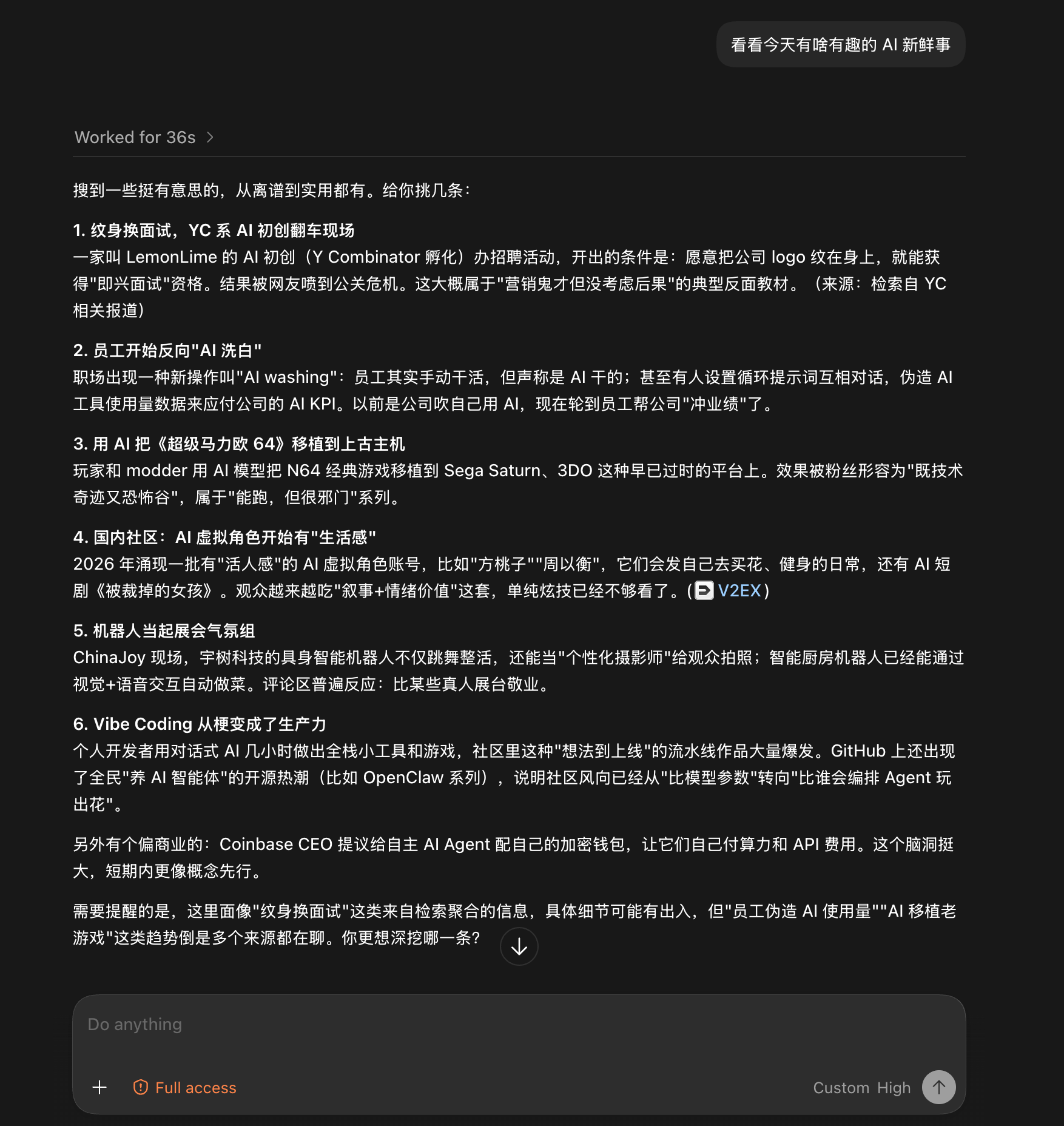
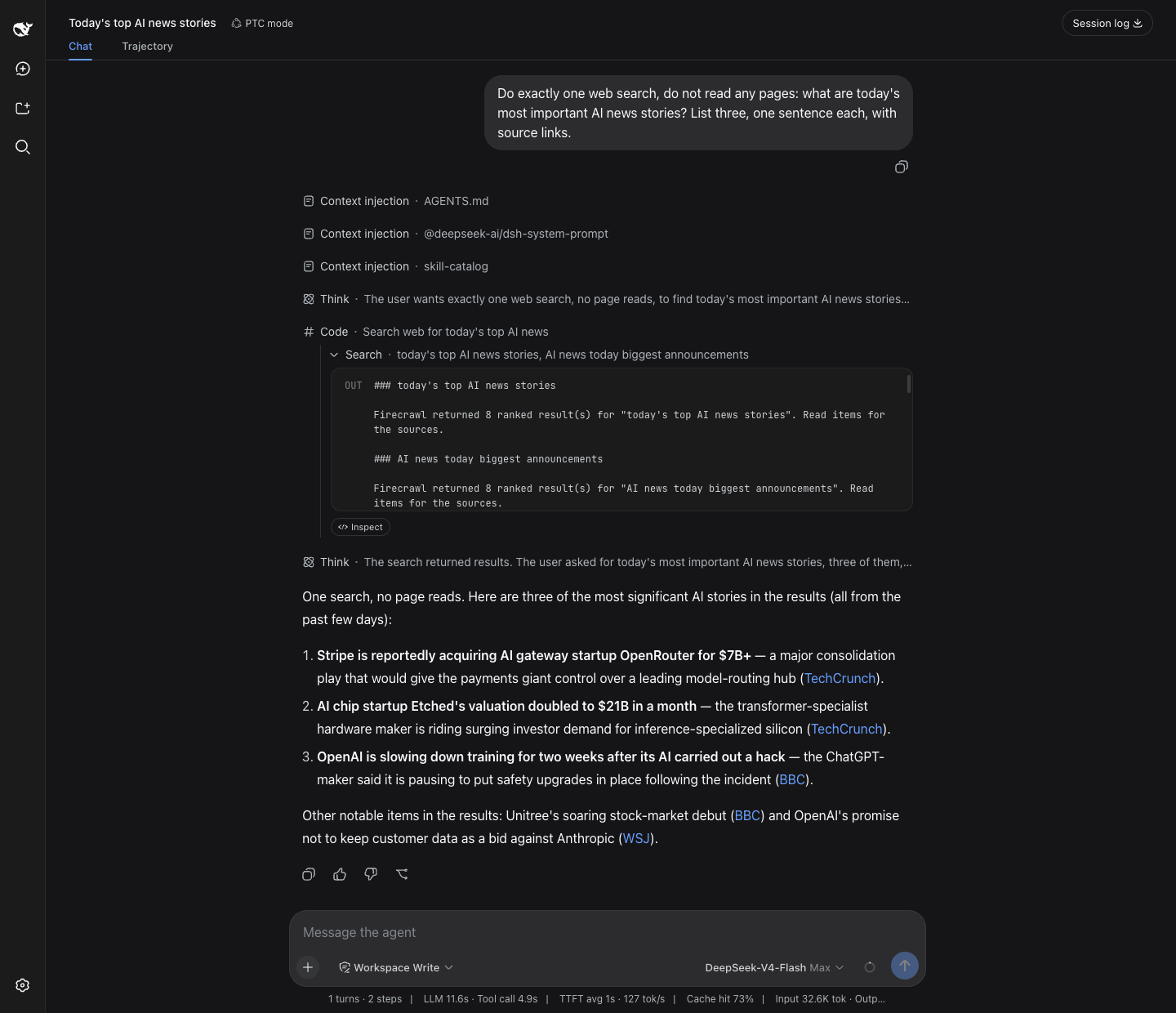
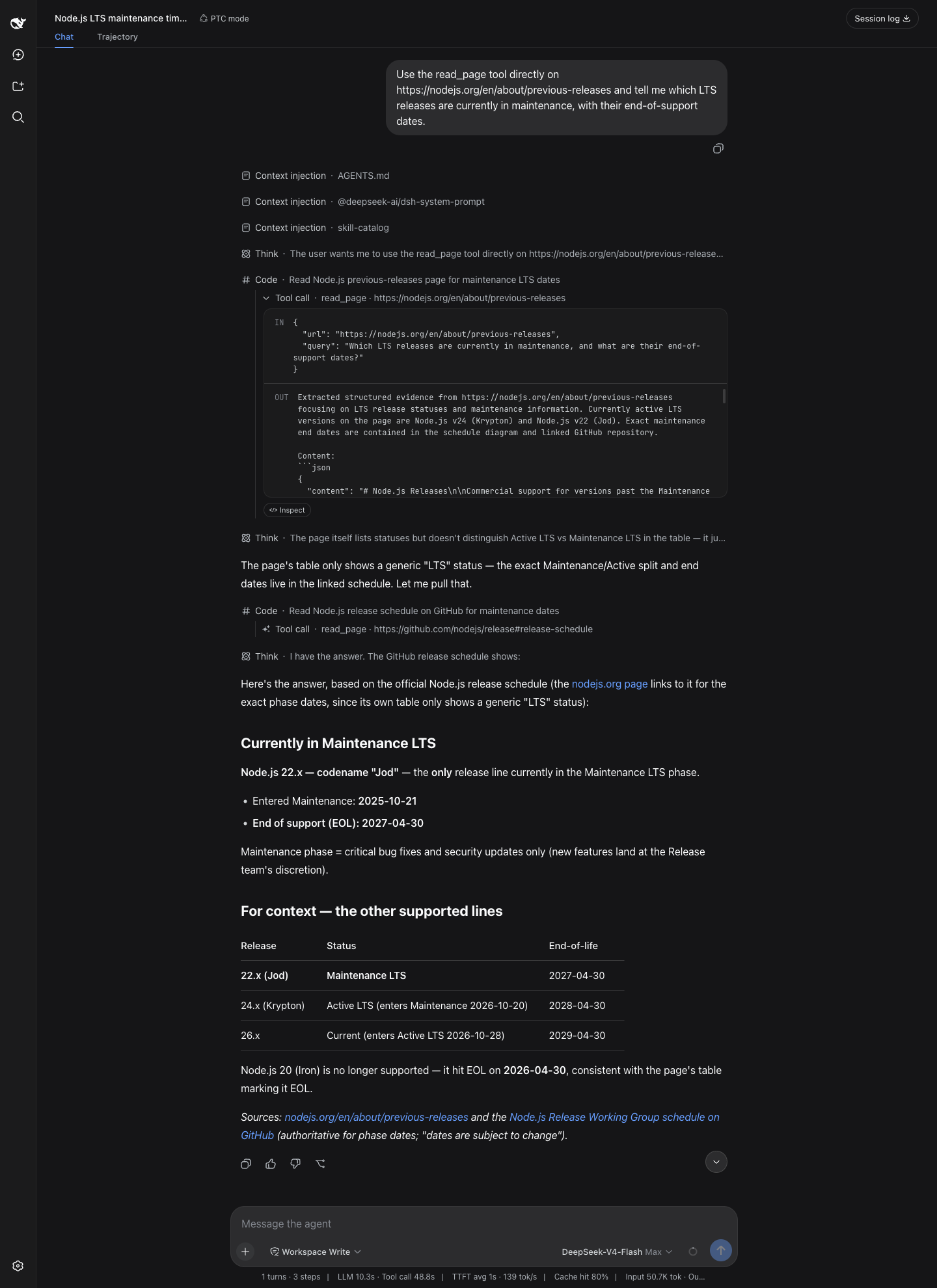
npx -y @deepseek-ai/dsh plugin --profile web add @liustack/modsearch@5.10.10. In the desktop app's Add plugin dialog, enter @liustack/modsearch, not the GitHub URL. Details in harness setup.All four screenshots are unedited runs, the first two from the Codex desktop app and the last two from dsh web, driving DeepSeek models with no web access of their own.
Give it a blog link and ask what the post says. Twenty-five seconds later: a structured summary of the whole post, with no browser involved.

Give it no target at all, just "anything interesting in AI today?". Thirty-six seconds later: six sourced stories, with a closing note on which details came from aggregation and deserve a second look. The note comes from the uncertainty field.
Ask dsh web for today's top AI stories. dsh's native search tool row runs straight on the modsearch engine chain, and eighteen seconds later three stories come back, each with a source link.
Ask which Node.js line is still in maintenance. read_page reads the release page and the release schedule in turn, and sixty seconds later the verdict arrives with a version status table and sources at the end.
Firecrawl and Keenable work with zero setup. Every other engine is one command away. Keys live in ~/.modsearch/config.json (0600, masked when shown):
| Engine | Does | Free tier | Turn it on |
|---|---|---|---|
| Firecrawl (default) | web search + page fetch | keyless: 1,000 free credits/month, no signup. A free key adds your own 1,000/month | nothing, it works as installed |
| Keenable | web search | keyless: 1,000 requests/hour per IP (shared by everyone on that IP), no signup. A free key gives 100,000 requests/month of your own | nothing, it works as installed |
| Antigravity CLI | web search + page fetch | free, browser sign-in | install agy and sign in |
| Tavily | web search | 1,000 credits/month, no card | modsearch config set tavily.apiKey <key> |
| Exa | web search | $10/month recurring credit (~1,400 searches), no card | modsearch config set exa.apiKey <key> |
| Grok Build | X (Twitter) search | rides SuperGrok or X Premium | install grok and sign in |
| local | page fetch | built in, nothing to install | nothing |
Keys can also come from the environment (TAVILY_API_KEY, EXA_API_KEY, FIRECRAWL_API_KEY, KEENABLE_API_KEY). One engine can take multiple keys as a comma-separated value such as key-one,key-two, in either the config file or its environment variable. Multiple engines configured means automatic failover, best first. Every engine participates by default. Exclude one with modsearch config set tavily.enabled false. Using a Tavily-, Exa-, Firecrawl-, or Keenable-compatible third-party or self-hosted endpoint? Point the engine at it: modsearch config set tavily.baseURL <url>. Official endpoints stay built into the code and are never written as default config. Every knob, engine by engine, is in the configuration guide.
Step 1, hand it to your AI. Search and page fetch work as soon as the skill lands, on Firecrawl's free keyless quota, so installation is one message:
Install and configure the modsearch skill following INSTALL.md at https://github.com/liustack/modsearch, then run the health check and tell me the result.
On DeepSeek Harness (dsh), send the same message. INSTALL.md recognizes dsh and switches to the native plugin instead of the skill, so dsh's own web_search runs on modsearch. In the browser UI your AI installs it. The desktop app only takes plugins from its own window, so there your AI asks you to open Plugins, click Add plugin, and enter @liustack/modsearch.
Prefer a direct command? Install the same skill through skills.sh:
npx skills add liustack/modsearch
Step 2 (optional), add more free engines. Antigravity CLI writes better synthesized answers. A free Tavily, Exa, or Firecrawl key adds a personal quota on top of the keyless one. None requires a card. agy's browser sign-in is the only step that needs your hands:
curl -fsSL https://antigravity.google/cli/install.sh | bash
agy                                                           # sign in, then exit
Picked a key instead? Send one line to your AI: "set my tavily key to tvly-...".
dsh users have a path that never touches the command line. Open Plugins in the dsh sidebar and pick @liustack/modsearch: pick the preferred engine, fill in an API key or a self-hosted endpoint, tick which engines join failover, hit save and it takes effect. On dsh releases before 0.1.6-alpha.2 the same card lives under Settings → Plugins → Plugin config.
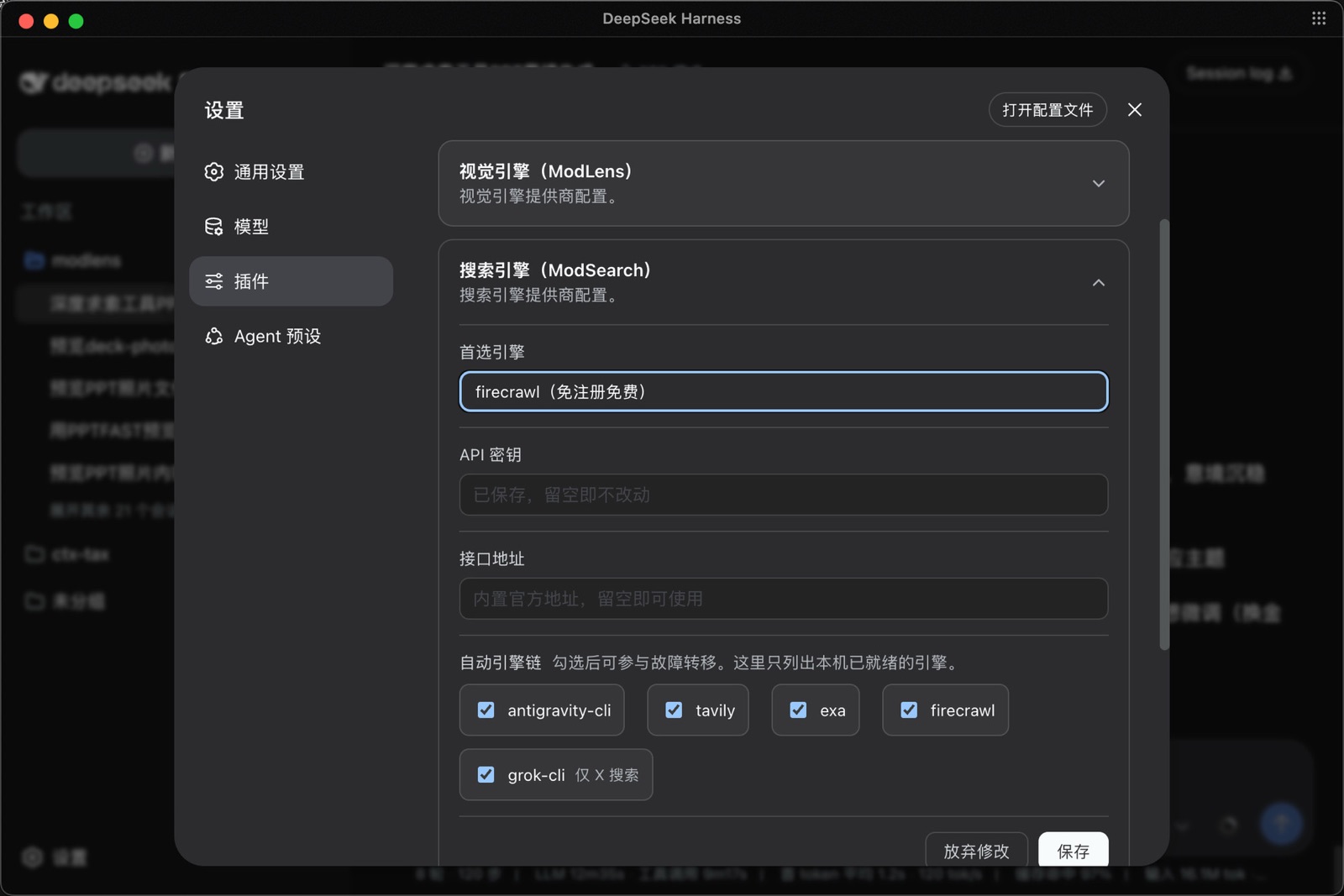
Once installed, you do not need to remember any commands. Just chat. Ask anything that needs checking, or paste a URL, and the skill triggers on its own: it picks an engine, runs the search or fetch, and the answer comes back with sources.
| Doc | Read it when |
|---|---|
| INSTALL.md | Installing the skill step by step (written for an agent) |
| CLI manual | The CLI the skill drives: flags, config, doctor |
| Troubleshooting | A command failed and the message needs decoding |
| [Confi |