Maintainer of this skill?

Automated security scan — not a certification.
by OpenOSINT
Open-source OSINT agent: 21 public-source tools behind natural-language chat, an MCP server and a Claude Code plugin. Passive by default, no keys to start.
# Add to your Claude Code skills
git clone https://github.com/OpenOSINT/OpenOSINTGuides for using ai agents skills like OpenOSINT.
Last scanned: 5/30/2026
{
  "issues": [],
  "status": "PASSED",
  "scannedAt": "2026-05-30T15:31:15.837Z",
  "npmAuditRan": true,
  "pipAuditRan": true
}See how OpenOSINT compares with popular alternatives.
OpenOSINT is an open-source ai agents skill for AI coding assistants such as Claude Code, Codex CLI, and ChatGPT, built by OpenOSINT. Open-source OSINT agent: 21 public-source tools behind natural-language chat, an MCP server and a Claude Code plugin. Passive by default, no keys to start. It has 1,941 GitHub stars.
Yes. OpenOSINT passed SkillsLLM's automated security scan — a dependency vulnerability audit plus prompt-injection heuristics — with no high-severity issues. You can read the full report in the Security Report section on this page.
Clone the repository with "git clone https://github.com/OpenOSINT/OpenOSINT" and add it to your Claude Code skills directory (see the Installation section above).
OpenOSINT is primarily written in Python. It is open-source under OpenOSINT on GitHub, so you can review or fork the full source.
Yes. SkillsLLM lists many other AI Agents skills you can browse and compare side by side. Open the AI Agents category from the badge at the top of this page, or use the Related Skills and comparison links further down to weigh OpenOSINT against similar tools.
No comments yet. Be the first to share your thoughts!
Based on votes and bookmarks from developers who liked this skill
From $49 · 30 days · terms & refunds
⚠️ Third-Party Software Notice
This skill is third-party open-source software developed and hosted independently on GitHub. SkillsLLM is an informational directory and does not control or maintain the underlying repository.
Any security checks, ratings, or warnings displayed by SkillsLLM are automated and limited in scope. They do not constitute a security certification or guarantee that the software is safe, error-free, or free from malicious code, vulnerabilities, compromised dependencies, or prompt-injection risks.
Review the source code, permissions, dependencies, and configuration before installing or running any third-party skill. Use is at your own risk. To the maximum extent permitted by applicable law, SkillsLLM is not liable for losses arising from third-party software.
Automated security scan — not a certification.





Run it yourself: uvx openosint web (one command, no keys)
No terminal? Use OpenOSINT Cloud in your browser, first check free
Docs · Claude Code plugin · MCP server
Needs uv. No API keys for these commands.
# Local web app with chat, graph and globe
uvx openosint web

# Or one direct check, no AI involved
uvx openosint exposure example.com
Grade: B  Score: 88/100
Checks: email OK, registration OK (passive)
        tls OK, http_headers OK (these touch the target)
  [LOW] DMARC has no aggregate report address (dmarc_no_rua)
  [LOW] Strict-Transport-Security header missing (hsts_missing)
Real output, trimmed and re-wrapped. More commands: CLI reference · install guide.
Moved to Quickstart above and the CLI reference.
What it can look up. Per-tool docs: openosint.tech/tools. Only passive tools are on by default.
| Tool | What it finds | Key needed |
|---|---|---|
search_dns |
DNS records, SPF, DMARC | No |
search_rdap |
Registrar, dates, name servers (RDAP) | No |
search_whois |
WHOIS registration data | No |
search_ip |
Hostname, ASN, city for an IP | Optional |
search_ip2location |
Geolocation, ISP, proxy/VPN/Tor flags (sponsored) | Yes |
search_gdelt_geo |
Geolocated news mentions (GDELT) | No |
generate_dorks |
Search-dork URLs for a target | No |
search_paste |
Paste-site mentions | No |
search_github |
Repos, code and users | Optional |
search_breach |
Breaches for an email (HaveIBeenPwned) | Yes |
search_shodan |
Open ports and banners | Yes |
search_censys |
Hosts and certificates | Yes |
search_virustotal |
URL, domain and IP reputation | Yes |
search_abuseipdb |
IP abuse reports | Yes |
search_dorks_live |
Live dork results via Bright Data SERP API¹ | Yes |
search_footprint |
Web footprint via Bright Data SERP API¹ | Yes |
scrape_url |
Page content via Bright Data Web Unlocker¹ (touches target) | Yes |
search_username |
Username across platforms (sherlock; noisy) | No |
search_email |
Accounts tied to an email (holehe; noisy) | No |
search_domain |
Subdomains (sublist3r; noisy) | No |
search_phone |
Carrier and country (phoneinfoga; unverified) | No |
Sherlock, holehe, sublist3r and phoneinfoga run as local binaries you install yourself. Setting up the Bright Data tools: Using OpenOSINT with Bright Data.
Tools run as real Python code and every finding cites the call that produced it. Compared with SpiderFoot, OpenOSINT has far fewer modules and is built to be driven by an agent. See the comparison.
Agents and MCP clients are only offered tools that query third-party sources or compute locally. Anything that touches the target or sends many requests from your IP is off until you opt in (--allow-active) and is not listed in an MCP client's tools/list. Passive is not private: every service you query sees the query. Details: Safety.
/plugin marketplace add OpenOSINT/OpenOSINT
/plugin install openosint@openosint
/openosint:osint example.com
claude mcp add openosint -- uvx --from openosint openosint-mcp
# Codex, Gemini CLI, Cursor and other Agent Skills clients
npx skills add OpenOSINT/OpenOSINT
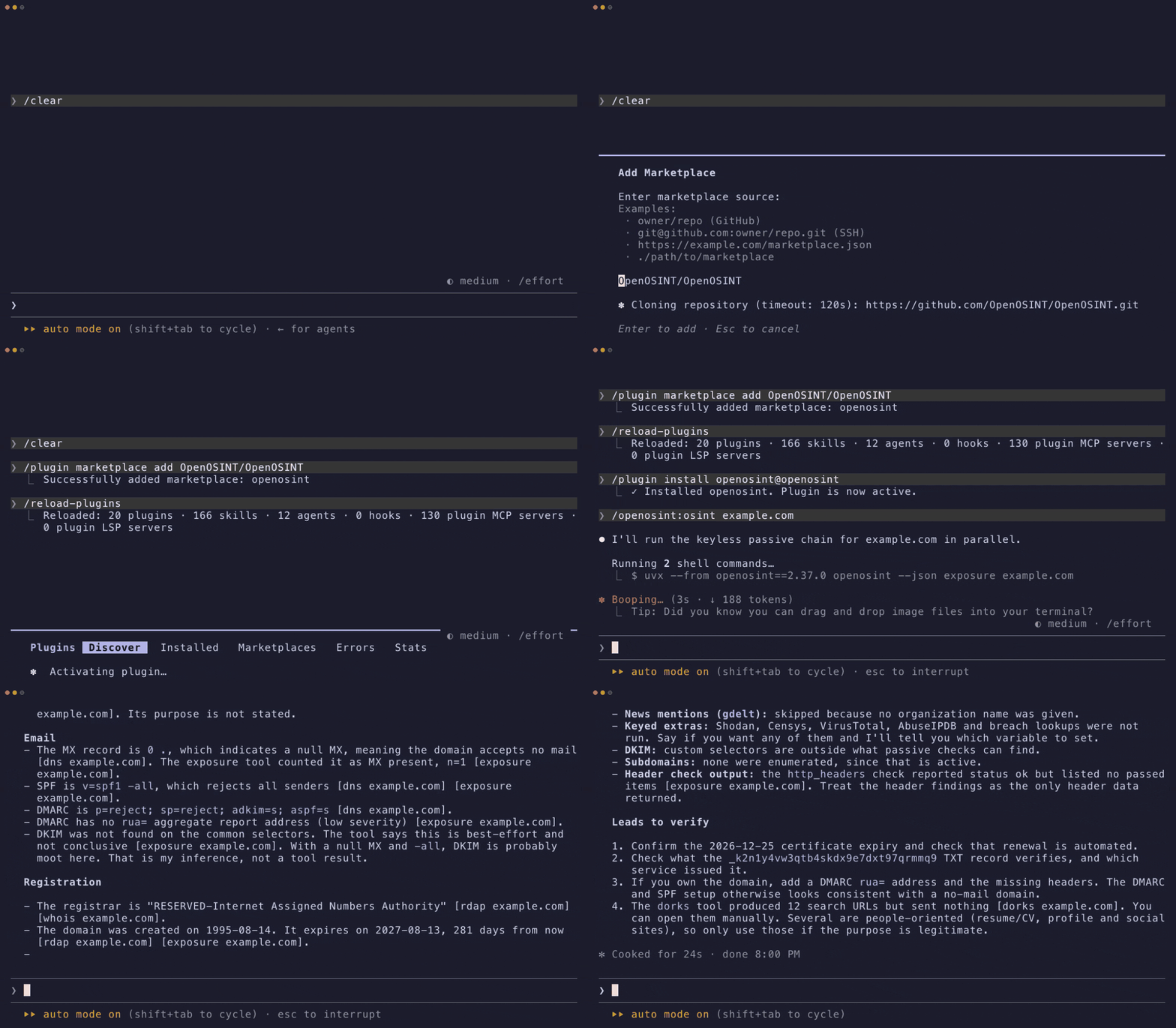
Other clients: MCP docs · Agent Skill.
openosint web, streaming chat, a news globe and a graph view. Docsopenosint with no arguments. CLI referenceuvx --from openosint openosint-mcp. Client configsAn agent investigation lands as a point on a 3D globe; click it to pivot. Docs
A FollowTheMoney graph with statement-level provenance and a review queue for same_as candidates. Docs
openosint exposure example.com grades email authentication, TLS, registration and security headers A to F. Docs
pip install openosint or uvx openosint web. Python 3.10+. Install guide
Works in Claude Desktop, Claude Code, Cursor and any MCP client. Client configs
Keys go in the web UI Settings, ~/.openosint/config.env or the environment. All variables · CLI reference
docker compose up --build, then open http://localhost:8080. Docker notes
The same engine as a hosted chat for a domain, an IP address or a company, with a source on every claim. First check free, no account. Hosted REST and MCP API by request: commercial@openosint.tech.
IP2Location.io — powers search_ip2location · Integration guide
Enhanced IP geolocation, ISP, VPN/Proxy/Tor, and datacenter detection
<source media="(prefers-color-scheme: dark)" srcset="https://raw.githubusercontent.com/OpenOSINT/OpenOSI
