OpenVort




>>> 在线 Demo 演示 <<< — 无需安装,立即体验
开源 AI 员工平台 — 创建 AI 员工,让他们与真人一起在企业微信、钉钉、飞书里协作,就像多招了几个同事。
Open-source AI Employee Platform — Create AI employees that work alongside your real team in WeCom, DingTalk, and Feishu — taking requirements, writing code, reviewing PRs, running builds, and generating reports, just like hiring a few more colleagues.
特性
- AI 驱动 — 基于 Claude tool use 的 agentic loop,Agent 自主决策调用工具,支持多模型 Failover
- AI 员工 — 虚拟成员绑定岗位与 Skill,通过定时任务自动执行日报/代码审查/测试等工作;支持一键创建 Docker 工作电脑,在自己的环境里写代码、跑脚本、装工具
- 异步任务执行 — Agent 执行与 SSE 解耦,用户离开页面 AI 继续工作;任务完成后自动通知;支持从任意页面查看进度、中断或追加指令
- 消息通知系统 — Chat 为消息归宿,IM 为门铃:实时 WebSocket 推送未读红点、声音/Toast/桌面通知、Tab 标题计数;延迟检测已读后按用户偏好 IM 通道优先级发送简短提醒;通知聚合 + 免打扰时段
- MCP Server — 所有已注册 Tool 自动通过 Streamable HTTP 暴露,支持 Cursor / Claude Desktop 等客户端直接调用
- 多 IM 支持 — 企业微信、钉钉、飞书、OpenClaw 多平台网关,支持语音消息收发(ASR/TTS)
- Web 管理面板 — Vue 3 + FastAPI,支持 AI 聊天(SSE 流式)、概览仪表盘、AI 配置中心、项目管理、代码仓库、知识库、汇报、定时任务、通知中心等
- 插件化架构 — Plugin 是 OpenVort 的核心扩展单元,Channel(IM 通道)和 Plugin(Tool + Prompt)均可插拔,
pip install即可扩展 - 内置 10 个插件 — VortFlow 敏捷流程、VortGit 代码仓库、VortSketch AI 原型生成、Jenkins CI/CD、知识库(RAG)、汇报管理、定时任务、浏览器自动化、系统管理
- Skill 知识注入 — 四级 Skill 体系(内置/公共/个人/市场),按岗位自动映射
- 扩展市场 — 统一的 Skill + Plugin 市场,支持 Bundle(zip)上传、PyPI 包、CLI 一键发布,SHA-256 内容 Hash 自动检测更新
- 安全 — RBAC 四级权限、DM 配对、Docker 沙箱、Token 加密、首次登录强制改密
截图
| AI 聊天 | AI 员工 |
|---|---|
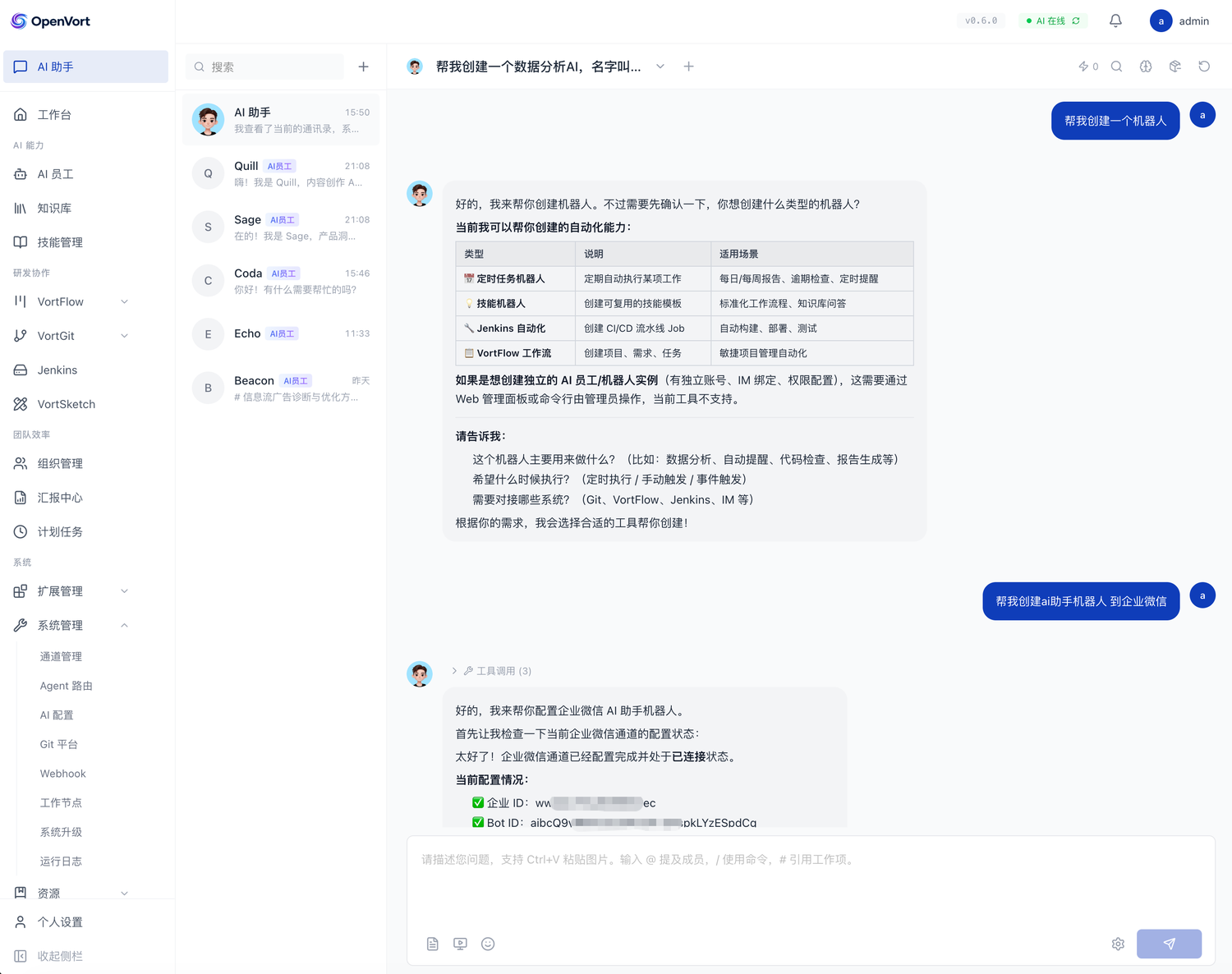 |
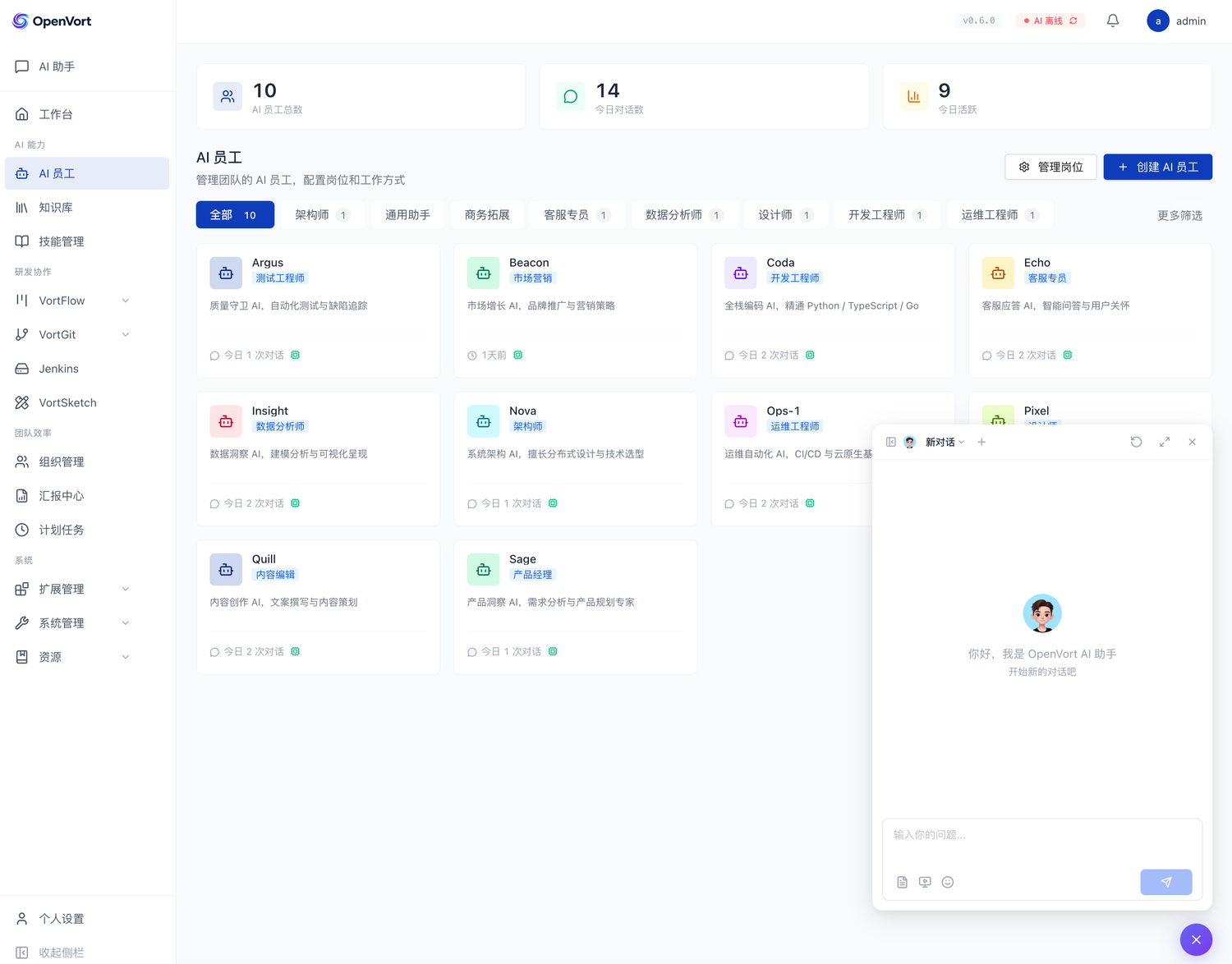 |
| VortFlow 缺陷跟踪 | 缺陷详情 + AI 补全 |
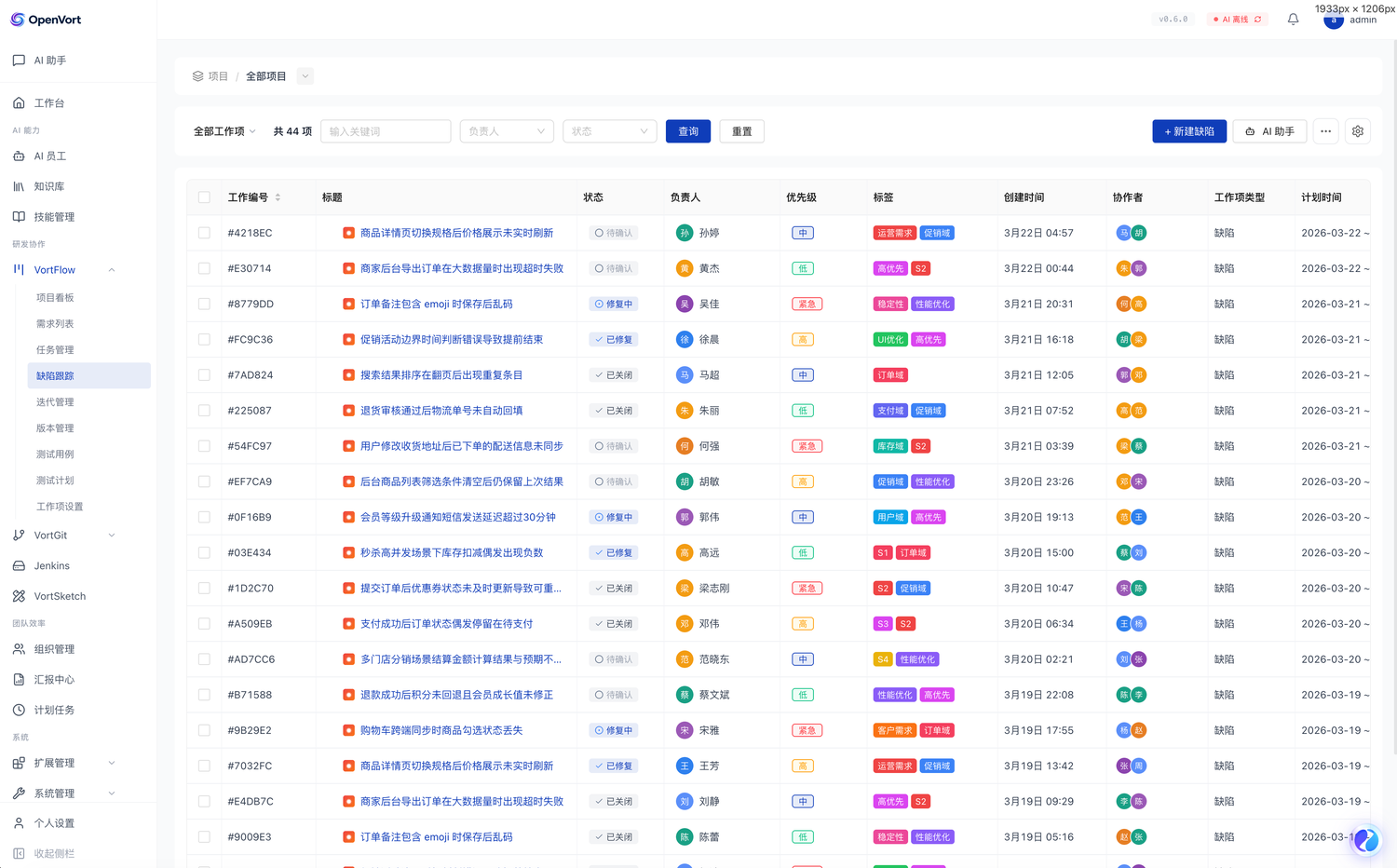 |
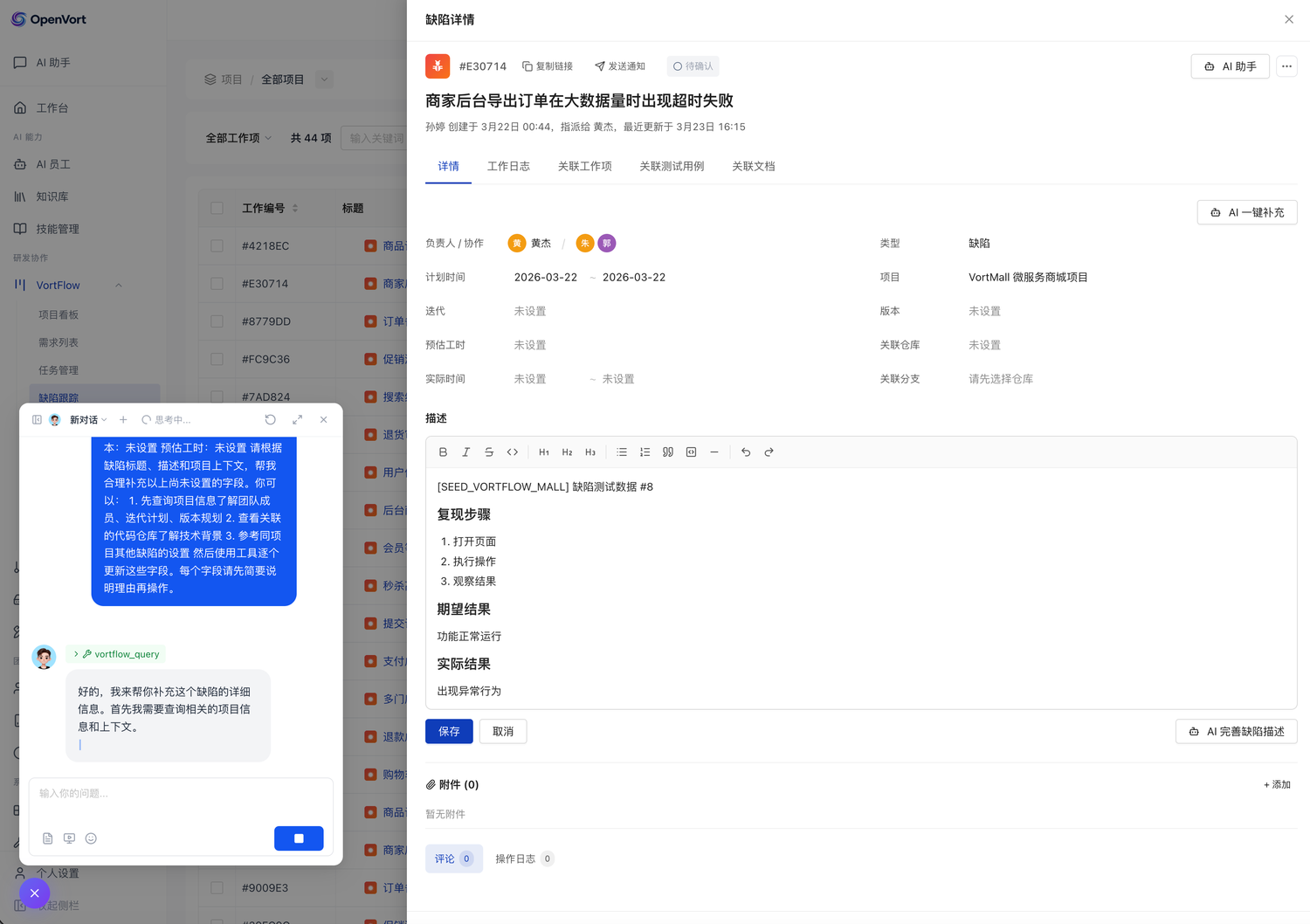 |
架构
用户 ──→ IM 平台 ──→ Channel 适配器 ──→ Dispatcher ──→ Agent Runtime ──→ Plugin Tools ──→ 外部系统
     (企微/钉钉/飞书)   │                  (防抖/去重)     ↕    ↕              (Gitee/Jenkins/...)
                        │                            LLM(Claude)  │
          Web 面板 ─────┤                                         │
         (Vue 3 SPA)    └─────────────────────────────────────────┘
快速开始
Docker 部署(推荐,只需安装 Docker)
curl -fsSL https://raw.githubusercontent.com/openvort/openvort/master/docker-compose.yml -o docker-compose.yml
docker compose up -d
访问 **http://localhost:10899**,使用 admin / admin 登录。
没有 Docker?macOS / Windows / Linux:
curl -fsSL https://get.docker.com | sudo sh
pip 安装
需要 Python 3.11+ 和 Docker。
pip install openvort
openvort start
首次启动自动创建数据库容器、下载前端、初始化管理员账号。访问 http://localhost:8090 登录。
macOS:brew install python@3.11
Ubuntu / Debian:sudo apt update && sudo apt install -y python3.11 python3.11-venv python3-pip
Windows:下载安装(勾选 "Add to PATH")
从源码构建 Docker 镜像
国内网络环境可使用 MIRROR=cn 参数,自动切换 apt / Node.js / pip 为国内镜像源:
docker build --build-arg MIRROR=cn -t openvort .
从源码运行
git clone https://github.com/openvort/openvort.git
cd openvort
pip install -e ".[dev]"
openvort start
开发模式(推荐开发者使用):
openvort start --dev # 跳过 IM 通道/ASR/TTS 等重量级初始化,启动更快
前端 HMR 开发(在另一个终端):
cd web
npm install
npm run dev   # Vite dev server on :9090,/api 代理到后端 :8090
启动后
首次登录使用 admin / admin,登录后会要求修改密码。
AI 功能需要在 AI 配置 页面设置 LLM API Key(支持 Anthropic Claude / OpenAI 兼容协议),其他功能开箱即用。
故障排查
openvort doctor                 # 诊断系统配置和连接状态(pip 安装)
docker compose logs             # 查看所有容器日志(Docker 部署)
docker logs openvort-postgres   # 查看数据库容器日志(pip 安装)
环境变量
所有配置均为可选。不创建 .env 文件也能正常启动(数据库自动创建,AI 功能通过 Web 面板配置)。
高级用户可通过环境变量或 .env 文件自定义配置:
| 变量 | 说明 | 默认值 |
|---|---|---|
OPENVORT_DATABASE_URL |
数据库连接(asyncpg 格式) | postgresql+asyncpg://openvort:openvort@localhost:5432/openvort |
OPENVORT_LOG_LEVEL |
日志级别 | INFO |
OPENVORT_WEB_PORT |
Web 面板端口 | 8090 |
OPENVORT_WEB_DEFAULT_PASSWORD |
管理员初始密码(仅首次启动,登录后强制修改) | admin |
LLM 配置推荐通过 Web 面板的 AI 配置 页面管理(保存在数据库中),也可通过环境变量设置:
| 变量 | 说明 | 默认值 |
|---|---|---|
OPENVORT_LLM_API_KEY |
LLM API Key | — |
OPENVORT_LLM_PROVIDER |
提供商(anthropic / openai_compatible) | anthropic |
OPENVORT_LLM_API_BASE |
API 地址 | https://api.anthropic.com |
OPENVORT_LLM_MODEL |
模型名称 | claude-sonnet-4-20250514 |
完整配置参考 .env.example。
IM 通道配置
企业微信:支持智能机器人长连接(推荐)/ Webhook。配置 OPENVORT_WECOM_* 系列变量。
钉钉:推荐 Stream 长连接模式,配置 OPENVORT_DINGTALK_APP_KEY、OPENVORT_DINGTALK_APP_SECRET、OPENVORT_DINGTALK_ROBOT_CODE。流式输出额外配置 OPENVORT_DINGTALK_MESSAGE_TYPE=card + 卡片模板。
飞书:推荐 WebSocket 长连接模式,配置 OPENVORT_FEISHU_APP_ID、OPENVORT_FEISHU_APP_SECRET。
OpenClaw:多平台网关(WhatsApp/Telegram/Slack/Discord),配置 OPENVORT_OPENCLAW_GATEWAY_URL、OPENVORT_OPENCLAW_HOOK_TOKEN。
项目结构
src/openvort/
├── cli/            # CLI 入口(start / stop / restart / doctor / marketplace / coding 等子命令)
├── core/           # 引擎核心
│   ├── engine/     #   Agent Runtime / LLM Client / Session / Router
│   ├── messaging/  #   Dispatcher / Commands / Pairing / Group / Inbox
│   ├── execution/  #   远程节点 / Docker 执行器 / 沙箱 / 编码环境
│   └── services/   #   Scheduler / NotificationCenter / ChatMessage / Updater
├── config/         # 配置(Pydantic Settings + DB 配置服务)
├── plugin/         # 插件框架(BasePlugin / BaseTool / Registry / Loader)
├── plugins/        # 内置插件(VortFlow / VortGit / VortSketch / Jenkins / 知识库 / 汇报 / 浏览器 / 定时任务 / 系统)
├── channels/       # IM 通道(企微 / 钉钉 / 飞书 / OpenClaw,含语音工具)
├── contacts/       # 通讯录(多平台身份映射 + Service + Resolver)
├── services/       # 外部服务集成(ASR 语音识别 / TTS 语音合成 / Embedding 向量嵌入)
├── skill/          # Skill 加载器(DB 驱动四级体系)
├── marketplace/    # 扩展市场(Client + Installer,Bundle 下载/解压/安装)
├── auth/           # RBAC 权限
├── web/            # Web 面板后端(FastAPI + JWT + WebSocket + SSE + MCP Server,35 个路由模块)
└── db/             # 数据库(SQLAlchemy 2.0 async + Alembic 迁移)

web/                # 前端(Vue 3.5 + TypeScript 5.9 + Vite 7 + Tailwind CSS 4)
详细架构设计参见官方文档。
扩展市场
从扩展市场安装和发布 Skill/Plugin。浏览社区发布的 Skill 和插件,或将你的作品分享给其他用户。
安装扩展
# 安装 Skill
openvort marketplace install skill author/my-skill

# 安装 Plugin(支持 Bundle 和 PyPI 两种方式)
openvort marketplace install plugin author/my-plugin
发布扩展
# 发布本地文件夹(自动检测类型、打包上传)
openvort marketplace publish ./my-extension

# 指定类型
openvort marketplace publish ./my-plugin --type plugin
Skill Bundle 应包含 SKILL.md(核心内容),Plugin Bundle 应包含完整的插件代码。可选的 manifest.json 用于定义元数据。
管理扩展
openvort marketplace search "keyword"    # 搜索
openvort marketplace list                # 列出已安装
openvort marketplace sync --all          # 同步更新(对比版本+Hash)
openvort marketplace uninstall slug      # 卸载
开发命令
make install   # pip install -e ".[dev]"
make dev       # openvort start
make test      # pytest -v
make lint      # ruff check
make format    # ruff format

# 开发模式
openvort start --dev       # 轻量启动(跳过 IM/ASR/TTS),后端 :8090
openvort restart --dev     # 轻量重启
cd web && npm run dev      # 前端 HMR :9090,/api 代理到 :8090
文档
完整的使用指南、部署教程、插件开发文档和 API 参考,请访问官方文档。
- 快速开始 — 安装、配置、首次运行
- AI 员工 — 创建和管理 AI 员工
- 插件开发 — 开发自定义插件
- 部署指南 — Docker 部署、Nginx 配置、生产环境
- API 参考 — REST / WebSocket / SSE 接口
社区
遇到问题或有好的想法?欢迎参与社区讨论。
- 提问求助、分享使用经验
- 提交功能建议
- 发布教程和最佳实践
Bug 反馈和功能请求也可以通过 GitHub Issues 提交。