Maintainer of this skill?

Automated security scan — not a certification.
by Ciao1019
A self-hosted knowledge platform for humans and AI agents — publish wikis, blogs, and portable Agent Skills.
# Add to your Claude Code skills
git clone https://github.com/Ciao1019/PetrichorLast scanned: 9/2/2026
{
  "issues": [],
  "status": "PASSED",
  "scannedAt": "2026-09-02T08:27:51.010Z",
  "npmAuditRan": true,
  "pipAuditRan": true,
  "promptInjectionRan": true
}See how Petrichor compares with popular alternatives.
Petrichor is an open-source ai agents skill for AI coding assistants such as Claude Code, Codex CLI, and ChatGPT, built by Ciao1019. A self-hosted knowledge platform for humans and AI agents — publish wikis, blogs, and portable Agent Skills. It has 149 GitHub stars.
Yes. Petrichor passed SkillsLLM's automated security scan — a dependency vulnerability audit plus prompt-injection heuristics — with no high-severity issues. You can read the full report in the Security Report section on this page.
Clone the repository with "git clone https://github.com/Ciao1019/Petrichor" and add it to your Claude Code skills directory (see the Installation section above).
Petrichor is primarily written in TypeScript. It is open-source under Ciao1019 on GitHub, so you can review or fork the full source.
Yes. SkillsLLM lists many other AI Agents skills you can browse and compare side by side. Open the AI Agents category from the badge at the top of this page, or use the Related Skills and comparison links further down to weigh Petrichor against similar tools.
No comments yet. Be the first to share your thoughts!
30 days in the Featured rail · terms & refunds
⚠️ Third-Party Software Notice
This skill is third-party open-source software developed and hosted independently on GitHub. SkillsLLM is an informational directory and does not control or maintain the underlying repository.
Any security checks, ratings, or warnings displayed by SkillsLLM are automated and limited in scope. They do not constitute a security certification or guarantee that the software is safe, error-free, or free from malicious code, vulnerabilities, compromised dependencies, or prompt-injection risks.
Review the source code, permissions, dependencies, and configuration before installing or running any third-party skill. Use is at your own risk. To the maximum extent permitted by applicable law, SkillsLLM is not liable for losses arising from third-party software.
Automated security scan — not a certification.
开源、自托管的知识平台:用 Markdown 写作,把内容编译成语义 Wiki,
再通过 Agentic RAG 生成可追溯的回答。
A self-hosted knowledge platform that turns Markdown into wikis, evidence and agent-ready knowledge.




产品介绍 · 在线体验 · 快速开始 · 文档中心 · GitHub Wiki
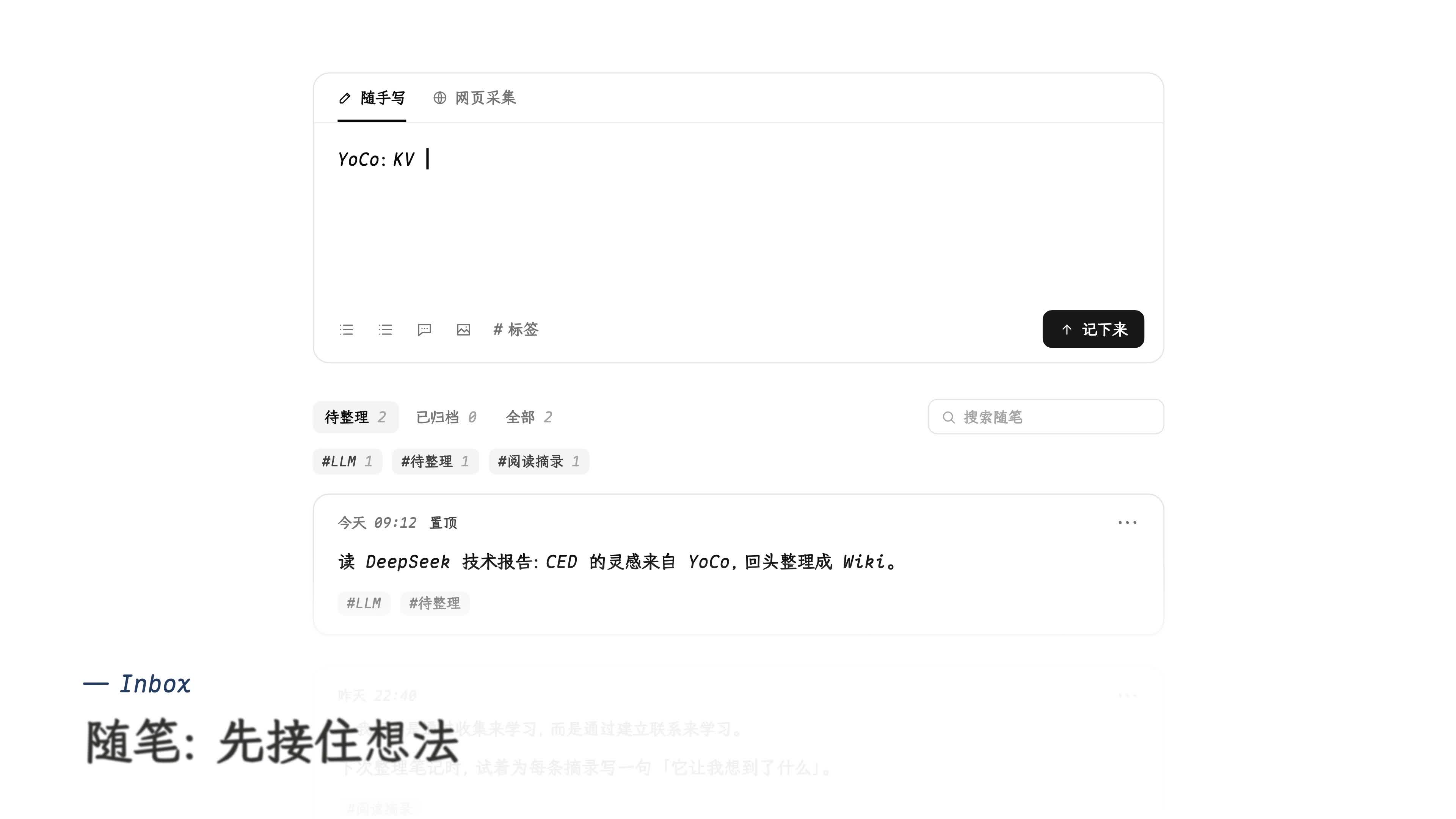
写作 → 编译语义 Wiki → 可追溯问答 → 划词问 AI → 交给你的 Agent。画面取自 wl.do 的真实公开页面。
/rss.xml / /atom.xml 订阅。SKILL.md、Jina 兼容模型重排、隔离代码沙箱与 Playwright 浏览器执行,凭据和白名单只保存在 Go。只需要展示产品、暂时不接后端时,可直接部署仓库内置的静态 Demo:
bun install --cwd apps/web
bun run build:demo
bunx vercel --prod
它覆盖前台文章与问答、后台随笔、知识库与编辑器、Wiki 知识空间和图谱;已保存的数据在浏览器内生成,刷新即重置,未保存的随笔草稿会保留在当前浏览器。不需要数据库、Redis、S3 或模型密钥。详细说明见 docs/vercel-static-demo.md。
准备 Docker Engine、Compose v2,以及一套可从容器访问、已启用 pg_trgm 与 vector(pgvector)扩展的 PostgreSQL 16+ 数据库:
git clone https://github.com/Ciao1019/Petrichor.git
cd Petrichor

cp .env.example .env
cp apps/api/config.example.toml apps/api/config.toml
启动前至少完成以下配置:
.env 中设置 PETRICHOR_DOMAIN;本机 HTTP 可保持 :80。apps/api/config.toml 中填写 [database].url。[encryption] 生成稳定的随机 key 和 salt。[storage] 中选择 /data/uploads,或配置 [storage.s3]。# 拉取公开的 GHCR 多架构镜像(linux/amd64、linux/arm64)
docker compose pull
docker compose up -d --no-build
docker compose ps
docker compose logs -f api worker
Compose 默认使用以下公开镜像;API 镜像同时包含 Server、Asynq Worker 与迁移命令:
| 服务 | 镜像 |
|---|---|
| API / Worker / Migrate | ghcr.io/ciao1019/petrichor-api:latest |
| Web / Caddy | ghcr.io/ciao1019/petrichor-web:latest |
镜像同时发布 latest、master 与不可变的 sha-<12 位提交哈希> 标签。生产环境建议在 .env
中通过 PETRICHOR_API_IMAGE 和 PETRICHOR_WEB_IMAGE 固定同一提交的 sha-* 标签。需要从当前源码
重新构建时,仍可执行 docker compose up -d --build。
打开配置的域名,首次访问会进入管理员初始化页。官方 Asynq 可视化管理器 asynqmon 默认同时启动,
仅监听宿主机 http://127.0.0.1:8081,可查看、重试、归档或删除两个队列中的任务。Petrichor 不写入默认账号,初始化只能成功执行一次。
[!IMPORTANT]
compose.yaml不内置 PostgreSQL,请连接本地、自建或托管的 PostgreSQL 实例,并确认可以创建pg_trgm与vector扩展。不要把数据库连接串、Cookie、Token、API Key 或真实config.toml提交到仓库。
前置要求:Bun 1.3.14+、Go(版本以 apps/api/go.mod 为准)、Docker,以及启用 pgvector 的 PostgreSQL 16+。
bun install --cwd apps/web
bun run install:agent
cp apps/web/.env.example apps/web/.env.local
cp apps/api/config.example.toml apps/api/config.toml

docker compose up -d redis
将 config.toml 的 cache.redis.url 改为 redis://127.0.0.1:6379/0,然后分别启动:
# 终端 1:Go API,默认 http://127.0.0.1:8080
cd apps/api && go run ./cmd/server

# 终端 2:Asynq Worker(知识构建 + 视觉导入)
cd apps/api && go run ./cmd/worker

# 终端 3:Bun / Vite Web,默认 http://127.0.0.1:3000
bun dev
flowchart LR
  source["Markdown / PDF"] --> chunk["结构切片"]
  source --> wiki["语义 Wiki"]
  chunk --> question["推荐问题"]
  chunk --> recall["BM25 + Vector"]
  question --> recall
  wiki --> recall
  query["用户问题"] --> agent["Search · Outline"]
  recall --> agent
  agent --> read["Read / Read Many"]
  read --> evidence["Evidence + Trace"]
  evidence --> answer["可追溯回答"]
knowledge.search 只返回轻量定位信息。Agent 必须通过 knowledge.read / read_many 深读,正文才会成为 Evidence;推荐问题命中后也必须回到原始分片。结构性问题则通过 knowledge.outline 浏览 PageIndex 或标题目录,不让相似度检索打乱章节顺序。
完整的切片参数、Wiki 构建、索引结构、召回算法与降级策略见 《Petrichor Agentic RAG:从 Markdown 到可追溯回答》。
flowchart TB
  clients["Browser · MCP · REST"] --> caddy["Caddy<br/>HTTPS · 静态资源 · API 反代"]
  caddy --> web["React + Vite SPA"]
  caddy --> api["Go + Gin API"]
  api --> postgres["PostgreSQL<br/>业务数据 · Wiki · 索引"]
  api --> redis["Redis + Asynq<br/>热点缓存 · 持久任务 · 导入页状态"]
  api --> storage["S3 / 本地卷<br/>上传文件"]
  worker["Asynq Worker<br/>知识构建 · 视觉导入"] --> redis
  worker --> postgres
  worker --> storage
  api -. "stdio JSONL" .-> pi["Pi Agent Core 运行器<br/>每个推理段一个子进程"]
  worker -. "stdio JSONL" .-> pi
apps/web 是 React + Vite + TypeScript SPA;Bun 负责依赖、测试和构建,生产静态资源由 Caddy 提供。apps/api 是 Go + Gin 服务,负责认证、数据库、对象存储和 Agent Runtime;监听前自动执行 Goose 迁移,并把后台任务写入 Asynq。apps/api/cmd/worker 分别以 8 路和 2 路并发消费知识构建、视觉导入队列;视觉导入任务、页面进度、重试和业务死信也统一保存在 Redis。noeviction,不得把任务 Redis 当作可随时清空的缓存。[!NOTE] API 与 Worker 已通过 Redis 解耦,API 重启不会丢失已排队任务。Asynq 采用至少一次执行语义;知识构建和视觉导入都使用稳定 TaskID 去重,视觉导入通过 Redis 页状态和文章 ID 预留实现幂等恢复。
仓库内 docs/ 是可评审、可版本化的文档事实来源;GitHub Wiki 提供精选阅读入口。
Go 后端只读取 apps/api/config.toml;Web 公开变量只写入 apps/web/.env.local:
apps/api/config.toml — PostgreSQL、Session、加密、存储、LinuxDo、Redis、Agent 与模型凭证;Pi 运行器位于 [agent.pi],外部 MCP、重排与沙箱位于 [agent.integrations.*]。apps/web/.env.local — 浏览器公开变量与本地 Go API 代理地址,只用于 Web 开发和构建。.env — Compose 域名、公开端口、Redis 本机端口与 Go 模块代理。生产镜像由 Caddy 直接提供 Vite 构建产物,不运行 Bun Server。config.toml 通过 Compose secret 挂载,不会进入镜像。
bun dev                 # 启动 Bun / Vite Web
bun run typecheck       # TypeScript 类型检查
bun run lint            # ESLint
bun run test            # Vitest
bun run test:coverage   # 覆盖率棘轮
bun run build           # Vite 生产构建 + Brotli / Gzip 预压缩
bun run check:bundle    # 首屏与 chunk 传输体积预算
bun run test:api        # Go 测试
bun run build:api       # Go 构建
bun run install:agent   # 安装独立 Pi 运行器依赖
bun run typecheck:agent # Pi 运行器类型检查
bun run test:agent      # Pi 消息协议测试
bun run build:agent     # 打包 Pi 运行器和第三方许可证
bun run check:size      # 单文件行数约束

docker compose up -d --build
docker compose run --rm api migrate status
完整 Go 检查:
cd apps/api
go test ./...
go test -race ./...
go vet ./...
go run golang.org/x/vuln/cmd/govulncheck@latest ./...
.
├── apps/
│   ├── api/
│   │   ├── cmd/server/             # Go API 入口
│   │   ├── cmd/worker/             # Asynq 知识构建与视觉导入 Worker
│   │   ├── cmd/migrate/            # Goose 迁移命令
│   │   ├── cmd/sandbox/            # 独立代码沙箱执行服务
│   │   ├── internal/               # 鉴权、业务、存储、检索与 Agent
│   │   ├── agent-skills/           # 文件化 Agent Skill 示例
│   │   ├── tools/pi-agent/         # Pi Agent Core 运行器与独立 Bun 锁文件
│   │   ├── tools/sandbox/          # 沙箱执行镜像
│   │   ├── migrations/             # 数据库迁移
│   │   └── config.example.toml     # 后端配置模板
│   └── web/
│       ├── src/                     # React SPA
│       ├── public/                  # 静态资源
│       ├── server.ts                # 本地静态服务与 Go API 代理
│       ├── Caddyfile                # 生产静态资源与 API 反代
│       ├── patches/                 # Bun 依
