Turn one request into a JavaScript orchestration script that fans work out across isolated subagents, routes each task to the right model, cross-checks the results, and returns one synthesized answer. Intermediate work stays in script variables instead of filling your chat context.
Built for codebase-wide audits, multi-perspective review, large refactors, and source-checked research—the jobs that are too broad for one agent and one context window.
Start in 30 seconds
pi install npm:@quintinshaw/pi-dynamic-workflows
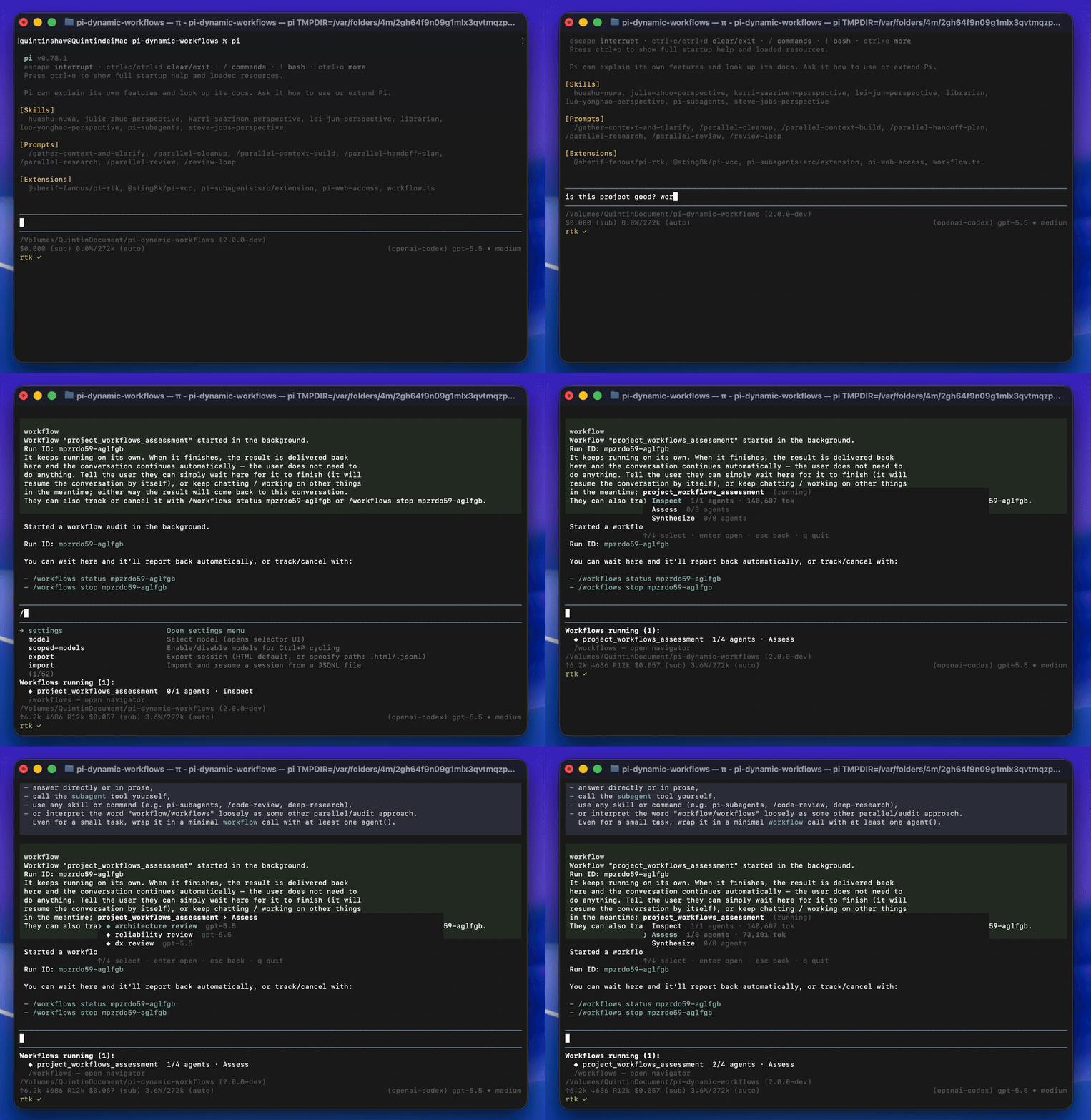
Run /reload in Pi, then ask naturally:
Run a workflow to audit every route under src/routes/ for missing auth checks.
Pi writes and starts the workflow in the background. A live panel tracks progress while you keep working, and the final result is delivered back into the conversation automatically.
Keyword triggering is on by default: use the bounded word workflow or workflows in a message to arm workflow mode — the assistant then handles a request by fanning it out across agents, but still answers plainly if you're only asking about workflows (the trigger authorizes the tool, it doesn't force it). Or run /workflows run <prompt> explicitly. Identifier-like text and paths such as myworkflow, workflow_name, and src/workflow-editor.ts do not trigger. You can change the keyword with /workflows-trigger set pi-workflow or disable it with /workflows-trigger off.
How it works
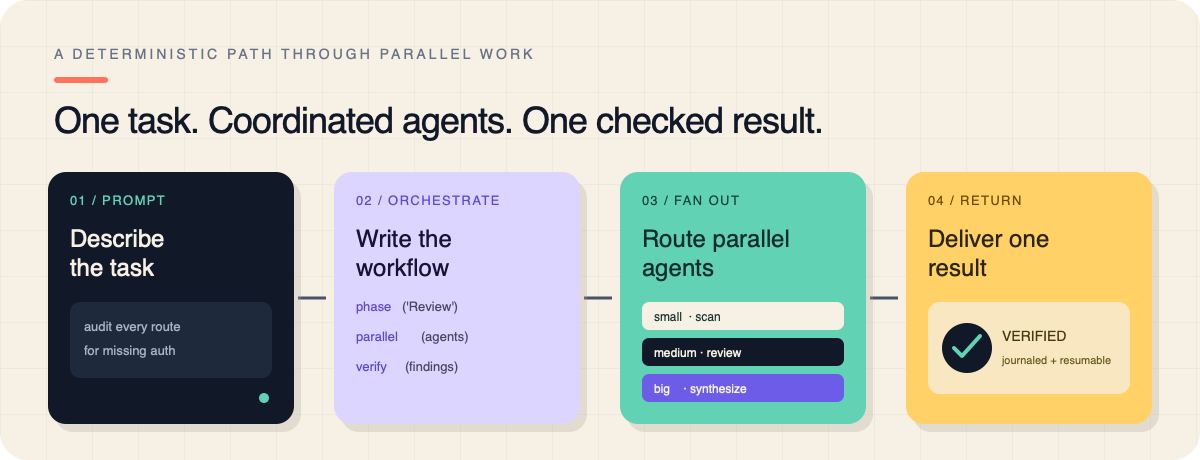
- Orchestrate — Pi writes a deterministic JavaScript workflow with
agent(),parallel(),pipeline(), andphase(). - Fan out — fresh subagent sessions run concurrently, optionally on different models or isolated git worktrees.
- Verify and return — the workflow cross-checks findings, journals completed work for resume, and delivers one result.
The orchestration itself is plain JavaScript:
export const meta = {
  name: 'auth_audit',
  description: 'Find routes missing auth checks and verify the findings',
  phases: [{ title: 'Scan' }, { title: 'Review' }, { title: 'Verify' }],
}

phase('Scan')
const files = await agent('List every route file under src/routes/.', { tier: 'small' })

phase('Review')
const findings = await parallel(
  files.split('\n').filter(Boolean).map((file) =>
    () => agent(`Audit ${file} for missing auth checks.`, {
      tier: 'medium',
      isolation: 'worktree',
    }),
  ),
)

phase('Verify')
return await agent(
  'Synthesize and double-check these findings:\n' + findings.join('\n\n'),
  { tier: 'big' },
)
Why use it
- Real parallel orchestration — fan out up to 16 concurrent and 1000 total subagents from one orchestration script.
- Per-agent model routing — use
small,medium, orbigtiers, or choose an exact provider/model and thinking level. - Journaled resume — replay completed agents after interruption without rerunning them or spending their tokens again. The orchestrator can also resume with an edited script (
resumeFromRunId): unchangedagent()calls replay from cache and only edited/new ones re-run — so a single bad prompt no longer means paying to re-run the whole workflow. - Git worktree isolation — parallel agents edit on separate branches with
isolation: "worktree". Kept by default for merge; passkeepWorktree: falseto delete (tests). - Measured usage — report real tokens and cost from each subagent session; add run, phase, or agent budgets only when you want them.
- Visible background runs — track phases, agents, models, fresh/cache tokens, cost, and live tok/s from the progress panel or
/workflowsnavigator. - Quality patterns — compose
verify(),judgePanel(),loopUntilDry(), andcompletenessCheck()instead of rebuilding review loops. - Reusable workflows — save any run as a command and call saved workflows from other workflows.
Supported workflow capabilities
The installed extension generates this compact index from its executable capability contract. Read the workflow authoring guide or use the packaged workflow-authoring skill for constraints, lifecycle guidance, and adaptable examples; configured route and agent-type values remain environment-specific.
| Name | Classification | Signature | Options and defaults |
|---|---|---|---|
| agent | runtime-global | agent(prompt, options?) => Promise<string | structured value | null> |
label: string (optional; default: derived from phase and call count)phase: string (optional; default: current phase)schema: plain JSON Schema (optional)model: string (optional)thinking: "off" | "minimal" | "low" | "medium" | "high" | "xhigh" | "max" (optional)tier: string (optional)isolation: "worktree" | false (optional)keepWorktree: boolean (optional; default: true)cwd: string (optional)thread: string (optional)agentType: string (optional)timeoutMs: number | null (optional; default: run timeout; null disables)retries: number (optional; default: run retry count) |
| parallel | runtime-global | parallel(thunks) => Promise<Array<unknown | null>> |
— |
| pipeline | runtime-global | pipeline(items, ...stages) => Promise<Array<unknown | null>> |
— |
| workflow | runtime-global | workflow(savedName, childArgs?) => Promise<unknown> |
— |
| verify | runtime-global | verify(item: unknown, options?: { reviewers?: number; threshold?: number; lens?: string | string[] }) => Promise<{ real: boolean; realCount: number; total: number; votes: Array<{ real: boolean; reason?: string }> }> |
reviewers: number (optional; default: 2)threshold: number (optional; default: 0.5)lens: string | string[] (optional) |
| judgePanel | runtime-global | judgePanel(attempts: unknown[], options?: { judges?: number; rubric?: string }) => Promise<{ index: number; attempt: unknown; score: number; judgments: Array<{ score: number; reason?: string }> } | undefined> |
judges: number (optional; default: 3)rubric: string (optional; default: "overall quality and correctness") |
| loopUntilDry | runtime-global | loopUntilDry(options: { round: (roundIndex: number) => unknown[] | Promise<unknown[]>; key?: (item: unknown) => string; consecutiveEmpty?: number; maxRounds?: number }) => Promise<unknown[]> |
round: (roundIndex: number) => unknown[] | Promise<unknown[]> (required)key: (item: unknown) => string (optional; default: JSON.stringify)consecutiveEmpty: number (optional; default: 2)maxRounds: number (optional; default: 50) |
| completenessCheck | runtime-global | completenessCheck(taskArgs: unknown, results: unknown) => Promise<{ complete: boolean; missing?: string[] } | null> |
— |
| retry | runtime-global | retry(thunk: (attempt: number) => unknown | Promise<unknown>, options?: { attempts?: number; until?: (result: unknown) => boolean }) => Promise<unknown> |
attempts: number (optional; default: 3)until: (result: unknown) => boolean (optional; default: accept first result when omitted) |
| gate | runtime-global | gate(thunk: (feedback: string | undefined, attempt: number) => unknown | Promise<unknown>, validator: (value: unknown) => { ok: boolean; feedback?: string } | Promise<{ ok: boolean; feedback?: string }>, options?: { attempts?: number }) => Promise<{ ok: boolean; value: unknown; attempts: number }> |
attempts: number (optional; default: 3) |
| checkpoint | runtime-global | checkpoint(prompt, options?) | checkpoint({ kind, checkpointId, payload }) => Promise<unknown> |
default: unknown (optional; default: true when no UI and omitted)headless: "default" | "abort" (optional; default: "default")kind: "confirm" | "input" | "select" (optional; default: "confirm")choices: string[] (optional)timeoutMs: number (optional) |
| log | runtime-global | log(message) => void |
— |
| phase | runtime-global | phase(title, options?) => void |
budget: number (optional) |
| args | runtime-global | args: unknown |
— |
| cwd | runtime-global | cwd: string |
— |
| process | runtime-global | process: { cwd(): string } |
— |
| budget | runtime-global | budget: { total, spent(), remaining() } |
— |
| script | workflow-tool-input | script?: string |
— |
| name | workflow-tool-input | name?: string |
— |
| args | workflow-tool-input | args?: unknown |
— |
| background | workflow-tool-input | background?: boolean = true |
— |
| maxAgents | workflow-tool-input | maxAgents?: number = 1000 |
— |
| concurrency | workflow-tool-input | `concurrency? |