Maintainer of this skill?
by lploc94
The agent harness you can fork. A working agent loop with compaction, sessions, approvals, a terminal REPL, a local dashboard and ACP, where every tool, skill, hook and policy is a file you can change. Build your own internal or coding agent on any model.
# Add to your Claude Code skills
git clone https://github.com/lploc94/raw-cliGuides for using ai agents skills like raw-cli.
Last scanned: 10/11/2026
{
  "issues": [
    {
      "type": "npm-audit",
      "message": "@chevrotain/cst-dts-gen: Vulnerability found",
      "severity": "high"
    },
    {
      "type": "npm-audit",
      "message": "@chevrotain/gast: Vulnerability found",
      "severity": "high"
    },
    {
      "type": "npm-audit",
      "message": "@modelcontextprotocol/sdk: MCP TypeScript SDK: OAuth client could send credentials to an authorization server chosen by the MCP server",
      "severity": "high"
    },
    {
      "type": "npm-audit",
      "message": "chevrotain: Vulnerability found",
      "severity": "high"
    },
    {
      "type": "npm-audit",
      "message": "esbuild: esbuild allows arbitrary file read when running the development server on Windows",
      "severity": "low"
    },
    {
      "type": "npm-audit",
      "message": "katex: KaTeX: Existing prototype pollution can bypass trust restrictions",
      "severity": "low"
    },
    {
      "type": "npm-audit",
      "message": "lodash-es: lodash vulnerable to Code Injection via `_.template` imports key names",
      "severity": "high"
    },
    {
      "type": "npm-audit",
      "message": "mermaid: Vulnerability found",
      "severity": "high"
    },
    {
      "type": "npm-audit",
      "message": "source-map-js: source-map-js allows event-loop denial of service through indexed source-map section offsets",
      "severity": "high"
    }
  ],
  "status": "WARNING",
  "scannedAt": "2026-10-11T10:38:43.104Z",
  "npmAuditRan": true,
  "pipAuditRan": true,
  "promptInjectionRan": true
}See how raw-cli compares with popular alternatives.
raw-cli is an open-source ai agents skill for AI coding assistants such as Claude Code, Codex CLI, and ChatGPT, built by lploc94. The agent harness you can fork. A working agent loop with compaction, sessions, approvals, a terminal REPL, a local dashboard and ACP, where every tool, skill, hook and policy is a file you can change. Build your own internal or coding agent on any model. It has 107 GitHub stars.
raw-cli returned warnings in SkillsLLM's automated security scan. It has no critical vulnerabilities, but review the flagged issues in the Security Report section before adding it to your workflow.
Clone the repository with "git clone https://github.com/lploc94/raw-cli" and add it to your Claude Code skills directory (see the Installation section above).
raw-cli is primarily written in TypeScript. It is open-source under lploc94 on GitHub, so you can review or fork the full source.
Yes. SkillsLLM lists many other AI Agents skills you can browse and compare side by side. Open the AI Agents category from the badge at the top of this page, or use the Related Skills and comparison links further down to weigh raw-cli against similar tools.
No comments yet. Be the first to share your thoughts!
Requires a passing catalog security scan.
⚠️ Third-Party Software Notice
This skill is third-party open-source software developed and hosted independently on GitHub. SkillsLLM lists this project for discovery and does not control or maintain the underlying repository.
Any security checks, ratings, or warnings displayed by SkillsLLM are automated and limited in scope. They do not constitute a security certification or guarantee that the software is safe, error-free, or free from malicious code, vulnerabilities, compromised dependencies, or prompt-injection risks.
Review the source code, permissions, dependencies, and configuration before installing or running any third-party skill. Use is at your own risk. To the maximum extent permitted by applicable law, SkillsLLM is not liable for losses arising from third-party software.


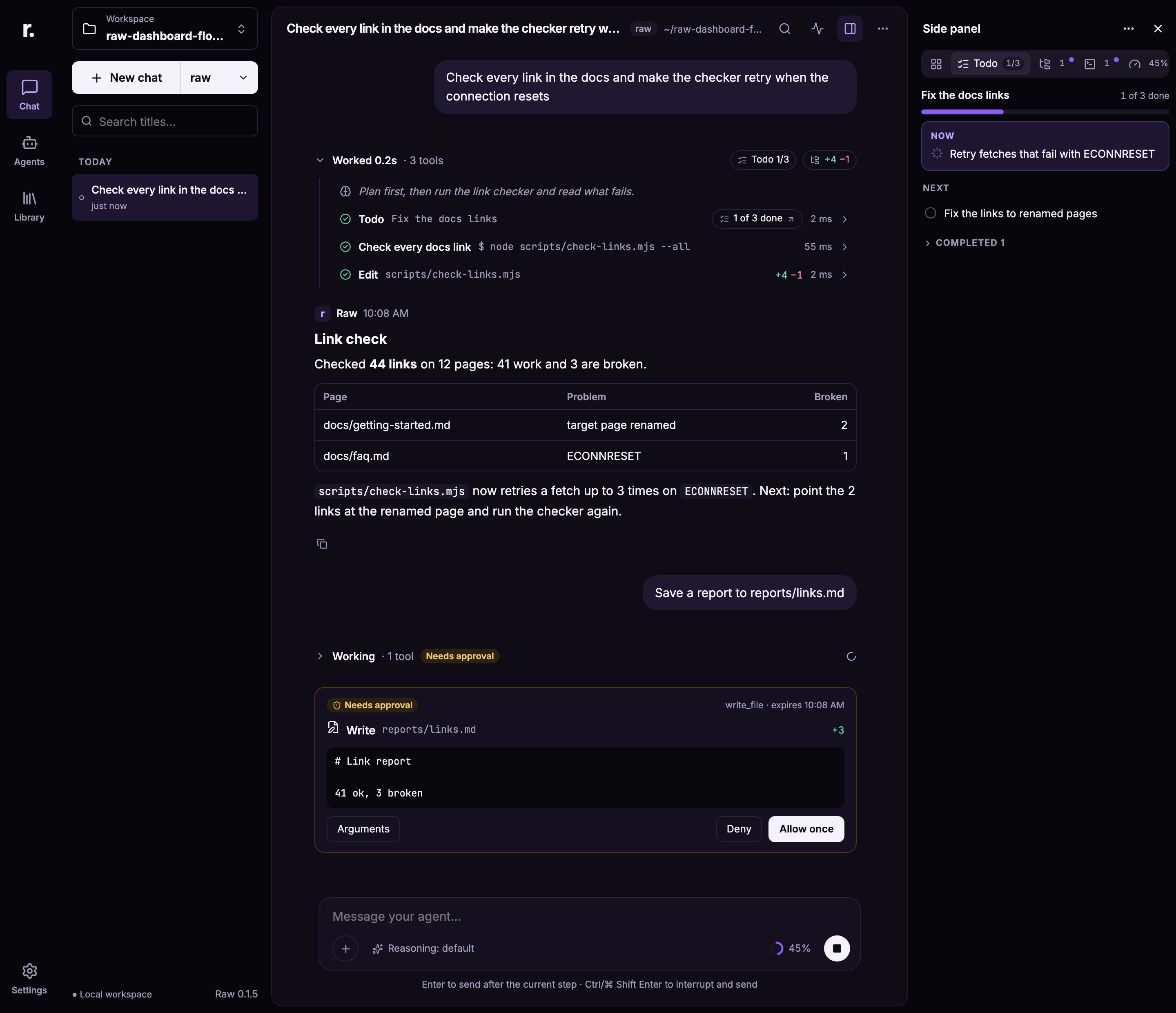
raw is the agent harness you can fork. The parts every agent needs already work: the tool loop, context compaction, saved sessions, approvals, a terminal REPL, a local browser dashboard and the Agent Client Protocol for editors. Everything an agent does is a file you can change, so you build an internal agent, a coding agent or an ops agent by editing parts instead of starting from an empty loop.
index.mjs..rawpkg that your team installs.Each agent selects ordered tools, skills and hooks, and can supply a system prompt, so a request carries only what that agent was given. That also keeps models with limited context useful. Raw ships fourteen tools as editable plugins: read_file, write_file, edit_file, apply_patch, bash, powershell, view_image, list_skills, load_skill, list_vars, read_var, todo, ask_user, and process. Apply patch, PowerShell, Todo, Ask, and Process are selected explicitly; they are not added to the starter tool selection, except that on Windows without Git Bash the starter selects PowerShell in place of Bash. Tools, skills and hooks can also live in the user's config directory or beside a selected agent config. Selected MCP tools remain available. Standard Agent Client Protocol (ACP) lets an IDE or parent agent run sessions.
Requires Node.js 22.13+ on macOS, Linux or Windows 10/11, and Bash for the bash tool. Documentation: raw.tlelabs.com. To shape Raw into your own agent, read Design an effective agent and the FAQ.
npm install -g @tlelabs/raw
raw config init
Run it once without installing with npx @tlelabs/raw --help. To install the latest commit from GitHub instead, use npm install -g github:lploc94/raw-cli; installing from a Git ref runs the prepare build, so it downloads build tooling and takes longer. Each GitHub release also attaches the packed tarball. To work from a checkout, run npm ci (which also builds) and npm install -g ..
Raw runs natively on Windows; WSL is not needed. Install Git for Windows for the bash tool: Raw finds its Git Bash (RAW_BASH_PATH wins) and never picks WSL's bash.exe on its own. Without Git Bash, raw config init selects the powershell tool instead, and either tool can be selected later. The powershell tool runs PowerShell 7 (pwsh) when installed, which is recommended, else the Windows PowerShell 5.1 every Windows has; RAW_POWERSHELL_PATH picks another. Config lives in %USERPROFILE%\.config\raw and sessions in %USERPROFILE%\.local\state\raw. Stopping a command or background job ends its whole process tree at once. Policy rules and hooks written for builtin/bash do not cover builtin/powershell; add rules for each shell an agent selects.
config init creates ~/.config/raw/config.json (or $XDG_CONFIG_HOME/raw/config.json) once with setup-capable agent raw; edit the local model ID or add your hosted model. raw "query" uses the configured default_agent, which may name a different agent in an existing config. --config PATH selects another strict JSON config file.
raw --agent raw "Explain the tests in this repository"
raw --agent deepseek "Fix the failing tests"
raw                         # saved REPL with ❯ prompt on an interactive terminal
raw --continue "Follow up on that change"
raw sessions
raw sessions show SESSION_ID
raw --acp --stdio           # IDE/parent agent transport
raw dashboard              # local browser chat and setup
raw dashboard --port 0 --no-open
raw dashboard serves the bundled browser app locally. Create or continue sessions,
inspect reasoning/tool activity and context usage, handle matching approvals, and
manage agents, models, skills, tools, vars, MCP and packages. Setup and history work
without a model connection. Browser preferences stay separate from Raw config;
saved config/source changes apply to the next turn of the same session. See the
dashboard guide for layout, setup and sharing workflows.
Tool calls run automatically in terminal, headless, dashboard and ACP modes, using your OS account's full permissions. cwd resolves relative paths; it is not a sandbox. An agent can set tools.rules to ask or deny specific tools or patterns. Unmatched tools run without a permission prompt; -y cannot bypass an explicit ask rule.
models holds exact upstream model IDs, API methods, endpoint/auth settings, context metadata and vision capability. An entry in agents selects one model and configures a run. Multiple agents may share a model.
{
  "default_agent": "raw",
  "models": {
    "local": {
      "provider": "ollama",
      "method": "openai-chat-completions",
      "model_id": "YOUR_INSTALLED_MODEL",
      "base_url": "http://127.0.0.1:11434/v1"
    },
    "flash": {
      "provider": "deepseek",
      "method": "openai-chat-completions",
      "model_id": "deepseek-flash",
      "base_url": "https://api.deepseek.com",
      "api_key_env": "DEEPSEEK_API_KEY",
      "context_window_tokens": 1048576
    }
  },
  "agents": {
    "raw": { "model": "local", "system_prompt": "You are a coding assistant. For Raw setup tasks, list selected skills and load only relevant instructions.", "tools": { "use": ["builtin/read_file", "builtin/write_file", "builtin/edit_file", "builtin/bash", "builtin/list_skills", "builtin/load_skill"] }, "skills": { "use": ["builtin/configure_raw", "builtin/create_skill", "builtin/create_tool", "builtin/create_hook", "builtin/create_agent", "builtin/add_mcp", "builtin/create_package"] } },
    "deepseek": {
      "model": "flash",
      "tools": { "use": ["builtin/read_file", "builtin/write_file", "builtin/edit_file", "builtin/bash"] },
      "request": { "thinking": "enabled", "reasoning_effort": "high", "max_output_tokens": 4096 },
      "compact": { "trigger_tokens": 800000, "keep_recent_turns": 2, "max_output_tokens": 16384 }
    }
  }
}
provider names the service; method selects its wire API (openai-chat-completions, openai-responses, anthropic-messages, or google-generate-content). model_id is sent upstream unchanged. Use api_key_env to read a selected credential from the environment or api_key for a literal value. raw config list reports model/access settings without printing credentials. No old flat-agent schema is accepted. See configuration, config design, and providers.
For a vision-capable model, set models.<alias>.vision to true and add builtin/view_image to tools.use, then ask raw "Explain screenshot.png"; the model can call view_image with the path. There is no image flag. A text-only model can instead call an external MCP vision-to-text server that returns a description. Search likewise comes from a selected MCP tool returning text.
MCP lives in the same config file. Only servers selected by the active agent are started, and only selected tools enter its model schema:
{
  "mcp": {
    "servers": {
      "search": { "transport": "stdio", "command": "YOUR_SEARCH_SERVER", "args": [] }
    }
  },
  "agents": {
    "research": { "model": "flash", "tools": { "use": ["builtin/read_file", "mcp/search/web_search"] } }
  }
}
Merge these fields into a complete config with models and default_agent. Local stdio and remote Streamable HTTP MCP transports are supported; see MCP. Agent tools.rules matches bundled, local, MCP (mcp/server/tool), and ACP (acp:name) identities with ordered allow, ask, and deny effects. A conditional ask can inspect Bash's command, so only matching rm calls prompt; see tools.
The npm package includes forkable tool examples and a complete project helper agent with raw.json, prompt.md, tools/, and skills/. Copy the agent directory anywhere, edit its model ID, endpoint, and credentials for the recipient, and run raw --config /path/to/project-helper/raw.json --agent project "task". Its agent/ references resolve beside the copied config. To fork a shipped tool globally, copy examples/tools/bash/ to ~/.config/raw/tools/my_bash/, change the manifest id and name, and select local/my_bash in an agent. See configuration, tools, and skills.
Agents and components can also travel as local .rawpkg archives. Export a configured agent with raw package export --agent NAME --name @owner/name --version 1.0.0 --out DIR, pack it with raw package pack DIR --out FILE.rawpkg, install it on another machine with `raw package install FIL
