Maintainer of this skill?

Automated security scan — not a certification.
Text-to-SQL access control: schema selection that gives the LLM only the tables the caller is allowed to read. Row-level-security-aware table pruning for LangChain, MCP and any SQL agent. Postgres, Oracle, MySQL, SQL Server. 75% fewer prompt tokens.
# Add to your Claude Code skills
git clone https://github.com/ashishsinha1602/schemagateLast scanned: 10/25/2026
{
  "issues": [],
  "status": "PASSED",
  "scannedAt": "2026-10-25T08:58:55.435Z",
  "npmAuditRan": true,
  "pipAuditRan": true,
  "promptInjectionRan": true
}See how schemagate compares with popular alternatives.
schemagate is an open-source ai agents skill for AI coding assistants such as Claude Code, Codex CLI, and ChatGPT, built by ashishsinha1602. Text-to-SQL access control: schema selection that gives the LLM only the tables the caller is allowed to read. Row-level-security-aware table pruning for LangChain, MCP and any SQL agent. Postgres, Oracle, MySQL, SQL Server. 75% fewer prompt tokens. It has 162 GitHub stars.
Yes. schemagate passed SkillsLLM's automated security scan — a dependency vulnerability audit plus prompt-injection heuristics — with no high-severity issues. You can read the full report in the Security Report section on this page.
Clone the repository with "git clone https://github.com/ashishsinha1602/schemagate" and add it to your Claude Code skills directory (see the Installation section above).
schemagate is primarily written in Python. It is open-source under ashishsinha1602 on GitHub, so you can review or fork the full source.
Yes. SkillsLLM lists many other AI Agents skills you can browse and compare side by side. Open the AI Agents category from the badge at the top of this page, or use the Related Skills and comparison links further down to weigh schemagate against similar tools.
No comments yet. Be the first to share your thoughts!
30 days in the Featured rail · terms & refunds
⚠️ Third-Party Software Notice
This skill is third-party open-source software developed and hosted independently on GitHub. SkillsLLM is an informational directory and does not control or maintain the underlying repository.
Any security checks, ratings, or warnings displayed by SkillsLLM are automated and limited in scope. They do not constitute a security certification or guarantee that the software is safe, error-free, or free from malicious code, vulnerabilities, compromised dependencies, or prompt-injection risks.
Review the source code, permissions, dependencies, and configuration before installing or running any third-party skill. Use is at your own risk. To the maximum extent permitted by applicable law, SkillsLLM is not liable for losses arising from third-party software.
Automated security scan — not a certification.








Your text-to-SQL agent picks which tables to show the model before anyone checks what the caller is allowed to read. schemagate does the check first: it filters the schema by the caller's grants, so restricted tables are absent from the prompt rather than ranked low. Works with LangChain, MCP, or any SQL agent, on Postgres, Oracle, MySQL, SQL Server and SQLite.
If it keeps a table out of a prompt it should never have reached, a ⭐ helps other people building SQL agents find it.
With row-level security alone the failure is quiet: the model writes valid SQL against a table the caller cannot read, RLS strips every row, and the user is told "no records found" — indistinguishable from "this data does not exist."
Demo · Install · Benchmarks · Local models · What it costs · Coming from Vanna
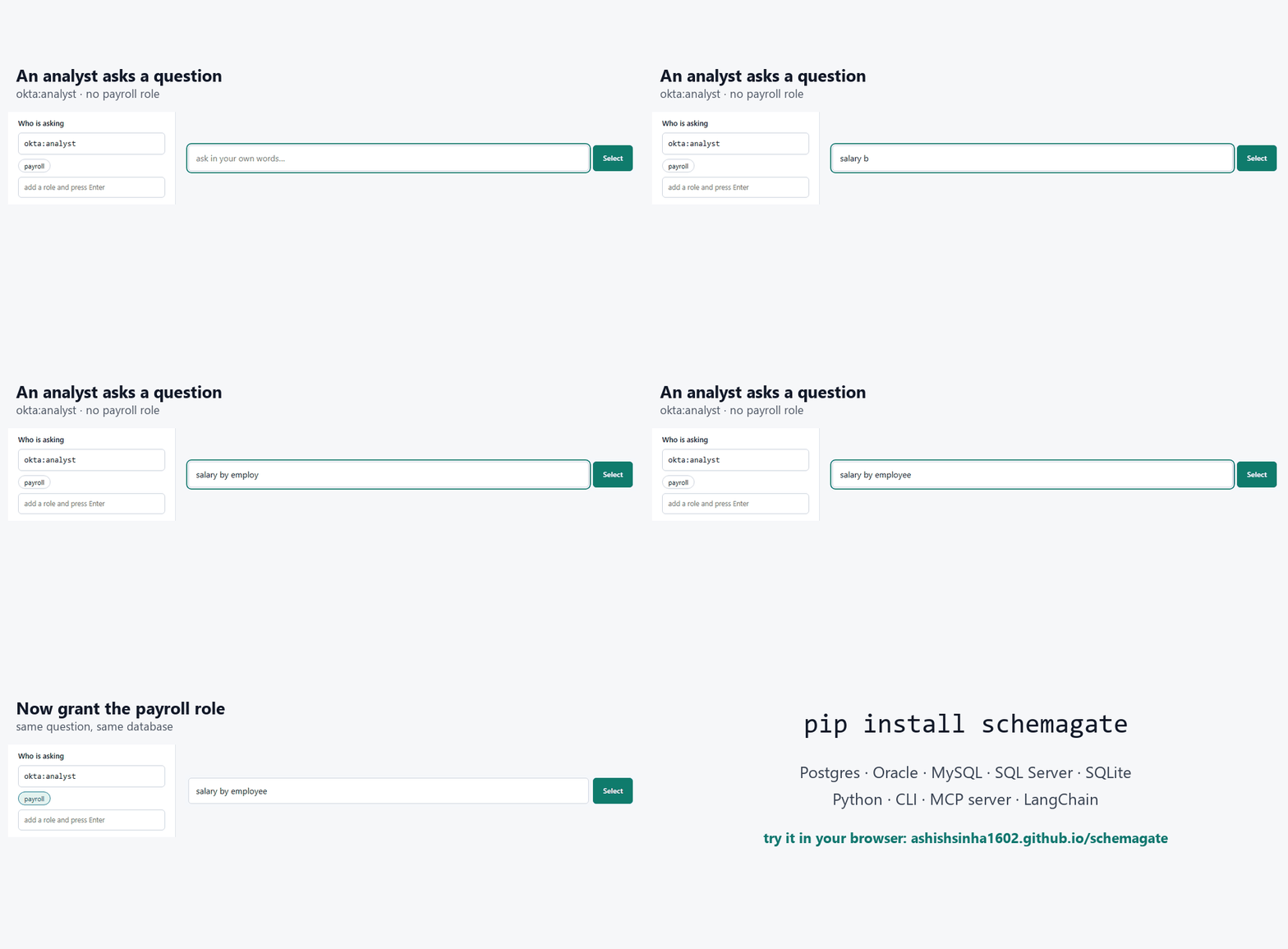
Same question, two callers, no database and no key:
schemagate demo "salary by employee"                                     # hr_compensation absent
schemagate demo "salary by employee" --principal okta:hr --role payroll  # now it is first
Absent, not ranked low. A table the caller may not read never enters the prompt, so no rewording of the question reaches it and there is nothing to filter out of the answer afterwards.
Try it in the browser — no install, no database, no model call.
The selection is a prompt, so the rest follows:
pip install schemagate
schemagate demo "which customers owe us money" --answer --provider <provider> --model <model-id>
main.crm_customer   main.crm_contact   main.v_customer_balance   (+5)
8 of 42 objects  ·  ~383 prompt tokens instead of ~2,036

-- SQL written by <provider> / <model-id>, from 8 tables
SELECT c.id, p.display_name, v.account_number, v.invoiced, v.paid,
       (v.invoiced - v.paid) AS balance_due
FROM v_customer_balance v
JOIN crm_customer c ON c.id = v.id_customer
JOIN core_party  p ON p.id = c.id_party
WHERE v.invoiced > v.paid

id  display_name       account_number  invoiced  paid     balance_due
--  -----------------  --------------  --------  -------  -----------
1   Northwind Trading  ACC-1001        33960.0   22080.0  11880.0
2   Kellner GmbH       ACC-1002        8760.0    3000.0   5760.0
Rows, from a question, with no database to set up — that runs against a
bundled 42-object schema. <provider> is the model service you choose:
openai, anthropic, gemini, oci, local (no key at all), or auto
(whichever key is set). Point it at your own database with --url:
schemagate select "which customers owe us money" \
  --url "postgresql+psycopg://user:pw@host/db" --answer --provider <provider> --model <model-id>
No key? Drop --provider and it prints a prompt to paste into any chat, then
run the SQL it gives you back with --sql "SELECT ...".
More of the bundled schema, with the questions people actually type:
schemagate demo "which customers owe us money"
schemagate demo "late shipments by carrier" --prompt   # the DDL the model gets
Against your own database it's the same shape:
schemagate select "revenue by month" --url postgresql://localhost/app --principal okta:jdoe --role finance
schemagate studio --url postgresql://localhost/app        # the same thing, as a page
schemagate studio opens a local page where you type questions, switch the caller's
roles, edit hints, and watch what reaches the prompt and what doesn't. The same
page runs publicly at https://ashishsinha1602.github.io/schemagate/ on the six
bundled schemas, in your browser, with no server behind it. The selector on that page is a JavaScript
port of this library, and a test runs both against 1,789 cases and requires
identical rankings.
If you're coming from Vanna (archived March 2026), docs/migrating-from-vanna.md
is the short version: Vanna applied identity when the SQL ran; schemagate applies
it before the model sees the schema. Your User maps to a Principal in one
line.
Every text-to-SQL call pays for the schema in the prompt. Dump the whole thing
and you pay for every table on every question; hand the model six tables and
you pay for six. Measured on the test schemas, average over their golden
questions, same built-in estimator as tests/bench.py:
| schema | objects | full schema, every call | schemagate, average | reduction |
|---|---|---|---|---|
| Commerce | 42 | 2,483 tokens | 604 | 76% |
| Clinical claims | 27 | 1,568 | 543 | 65% |
| Claims warehouse (star) | 51 | 3,312 | 880 | 73% |
| Bank ledger and trading | 39 | 2,255 | 637 | 72% |
| IoT telemetry | 40 | 2,125 | 448 | 79% |
| Hostile (4 schemas, copies of everything) | 260 | 16,095 | 444 | 97% |
The last row is the one that matters: the selection stays around six tables no matter how big the schema is, so the saving grows with the schema. Real databases are the last row, not the first.
Worked example, with a price you should replace with your own: a 260-object schema, 5,000 questions a day, an input price of $3 per million tokens. Full schema: 16,095 × 5,000 × 30 = 2.4 billion tokens a month, about $7,200. With schemagate: 444 × 5,000 × 30 = 67 million, about $200. The browser demo has these two numbers as editable fields under the stats, so you can put in your own volume and price and watch it recompute against whatever question you ask.
Two more things that cost nothing here and money elsewhere: the selector itself never calls a model (BM25 plus a hashed embedder, offline, milliseconds), and the optional descriptions can be written by any chat window you already pay for instead of an API key — see Without an API key.
Two things go wrong when you point an LLM at a database schema.
The first is cost. Most systems paste the whole schema into the prompt on every question. That's fine for twenty tables and ruinous for two thousand.
The second is worse, and it's the reason I wrote this. Schema selection happens before the query runs, so it happens before row-level security can do anything. If your selection step isn't identity-aware, the model gets handed a table the caller can't read. It writes perfectly good SQL. RLS or VPD filters every row out. The user sees "no records found" and believes it.
That's not an access-denied message. It's a wrong answer with a confident tone, and the user has no way to tell the difference. Filtering the catalog by identity first is the only way I know to avoid it.
from schemagate import Catalog, Principal

cat = Catalog().bootstrap("postgresql://localhost/app")   # or: from schemagate.demo_schema import demo_catalog; cat = demo_catalog()
cat.hint("invoice_draft", "pre-issue drafts only, not real revenue")
cat.restrict("hr_compensation", ["payroll"])

sel = cat.select("revenue by month", top_k=6,
                 principal=Principal("okta:jdoe", roles={"finance"}))

sel.prompt_fragment()   # compact DDL, ready for the system prompt
sel.object_list         # [{'owner': ..., 'name': ...}]
sel.explain()           # why each object was picked
hr_compensation is not in that result and its name does not appear anywhere
in the prompt text.
pip install schemagate
That's the whole thing. One dependency (SQLAlchemy), no API key, no model download. The default embedder is a hashed n-gram vectoriser that runs offline and gives byte-identical results on every machine.
Extras, all optional:
pip install 'schemagate[postgres]'     'schemagate[oracle]'
pip install 'schemagate[mssql]'        'schemagate[mysql]'
pip install 'schemag
