Maintainer of this skill?

Automated security scan — not a certification.
by mgechev
"Unit tests" for your agent skills
# Add to your Claude Code skills
git clone https://github.com/mgechev/skillgradeLast scanned: 5/17/2026
{
  "issues": [],
  "status": "PASSED",
  "scannedAt": "2026-05-17T06:46:51.142Z",
  "semgrepRan": false,
  "npmAuditRan": true,
  "pipAuditRan": true
}See how skillgrade compares with popular alternatives.
skillgrade is an open-source ai agents skill for AI coding assistants such as Claude Code, Codex CLI, and ChatGPT, built by mgechev. "Unit tests" for your agent skills. It has 730 GitHub stars.
Yes. skillgrade passed SkillsLLM's automated security scan — a dependency vulnerability audit plus prompt-injection heuristics — with no high-severity issues. You can read the full report in the Security Report section on this page.
Clone the repository with "git clone https://github.com/mgechev/skillgrade" and add it to your Claude Code skills directory (see the Installation section above).
skillgrade is primarily written in TypeScript. It is open-source under mgechev on GitHub, so you can review or fork the full source.
Yes. SkillsLLM lists many other AI Agents skills you can browse and compare side by side. Open the AI Agents category from the badge at the top of this page, or use the Related Skills and comparison links further down to weigh skillgrade against similar tools.
No comments yet. Be the first to share your thoughts!
30 days in the Featured rail · terms & refunds
⚠️ Third-Party Software Notice
This skill is third-party open-source software developed and hosted independently on GitHub. SkillsLLM is an informational directory and does not control or maintain the underlying repository.
Any security checks, ratings, or warnings displayed by SkillsLLM are automated and limited in scope. They do not constitute a security certification or guarantee that the software is safe, error-free, or free from malicious code, vulnerabilities, compromised dependencies, or prompt-injection risks.
Review the source code, permissions, dependencies, and configuration before installing or running any third-party skill. Use is at your own risk. To the maximum extent permitted by applicable law, SkillsLLM is not liable for losses arising from third-party software.
Automated security scan — not a certification.
An eval harness for AI coding agents. Define tasks, run any agent, score with deterministic scripts, LLM judges, or human reviewers.
Works with Gemini CLI, Claude Code, Codex CLI, OpenCode, any ACP-compatible agent, or any command-line tool — with or without Agent Skills.
See examples/ — superlint (simple) and angular-modern (TypeScript grader).
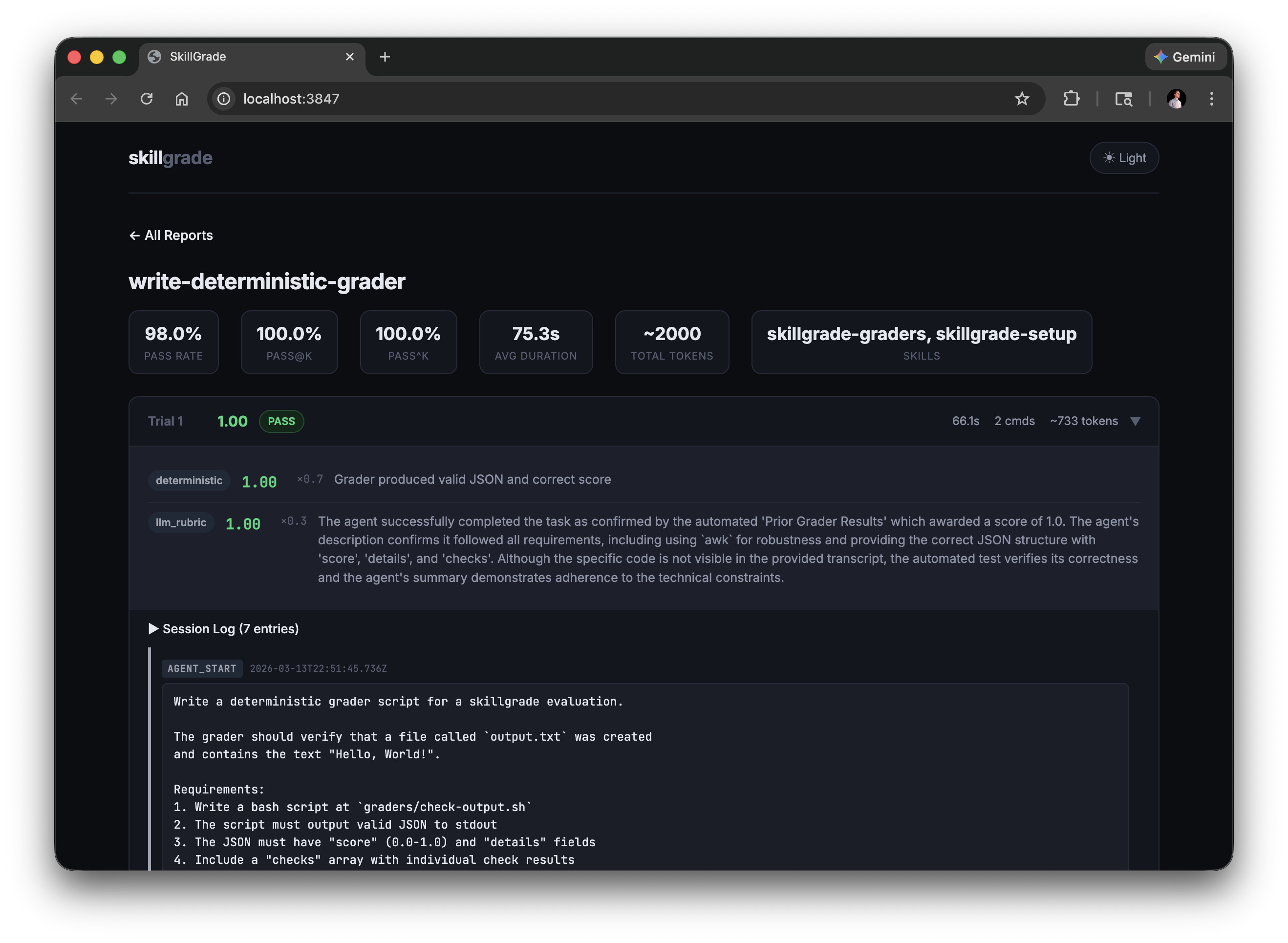
Prerequisites: Node.js 20+, Docker
npm i -g skillgrade
1. Initialize — scaffold an eval.yaml in any directory:
cd my-evals/
skillgrade init
If a SKILL.md is present and an API key is set, init generates AI-powered tasks tailored to the skill. Otherwise, it creates a ready-to-edit template.
2. Edit — define your tasks in eval.yaml (see eval.yaml Reference).
3. Run:
GEMINI_API_KEY=your-key skillgrade --smoke
The agent is auto-detected from your API key: GEMINI_API_KEY → Gemini, ANTHROPIC_API_KEY → Claude, OPENAI_API_KEY → Codex. Override with --agent=claude.
4. Review:
skillgrade preview          # CLI report
skillgrade preview browser  # web UI → http://localhost:3847
Reports are saved to $TMPDIR/skillgrade/<eval-name>/results/. Override with --output=DIR.
| Flag | Trials | Use Case |
|---|---|---|
--smoke |
5 | Quick capability check |
--reliable |
15 | Reliable pass rate estimate |
--regression |
30 | High-confidence regression detection |
| Flag | Description |
|---|---|
--eval=NAME[,NAME] |
Run specific evals by name (comma-separated) |
--grader=TYPE |
Run only graders of a type (deterministic, llm_rubric, or human) |
--trials=N |
Override trial count |
--parallel=N |
Run trials concurrently |
--agent=gemini|claude|codex|acp|opencode|command |
Override agent (default: auto-detect from API key) |
--model=NAME |
Model the agent answers with (gemini, claude, codex, opencode). Default: whatever the agent CLI is configured to use |
--provider=docker|local |
Override provider |
--acp-command=CMD |
ACP agent command (e.g., gemini --acp) |
--command=CMD |
Command to run for the command agent (e.g., node mycli.js) |
--opencode-agent=NAME |
OpenCode agent (build|plan|explore) |
--opencode-model=MODEL |
OpenCode model (provider/model format) |
--output=DIR |
Output directory (default: $TMPDIR/skillgrade) |
--format=FORMAT |
Export results (json, junit, csv, markdown — comma-separate for multiple) |
--validate |
Verify graders using reference solutions |
--ci |
CI mode: exit non-zero if below threshold |
--threshold=0.8 |
Pass rate threshold for CI mode |
--preview |
Show CLI results after running |
version: "1"

# Optional: path to a skill directory. Omit for non-skill evals.
# skill: path/to/my-skill

defaults:
  agent: gemini          # gemini | claude | codex | acp | opencode | command
  model: claude-opus-5   # model the agent answers with (gemini, claude, codex, opencode)
  provider: docker       # docker | local
  trials: 5
  timeout: 300           # seconds
  threshold: 0.8         # for --ci mode
  grader_model: gemini-3-flash-preview  # default LLM grader model
  grader_provider: gemini               # default LLM grader provider: gemini | anthropic | openai
  command: node mycli.js # command to run when agent is 'command' (see Custom Command Agent)
  acp:                   # ACP agent configuration (optional)
    command: gemini --acp  # command to start ACP-compatible agent
    env:                  # optional environment variables
      DEBUG: "1"
  docker:
    base: node:20-slim
    setup: |             # extra commands run during image build
      apt-get update && apt-get install -y jq
  environment:           # container resource limits
    cpus: 2
    memory_mb: 2048

tasks:
  - name: fix-linting-errors
    instruction: |
      Use the superlint tool to fix coding standard violations in app.js.

    workspace:                           # files copied into the container
      - src: fixtures/broken-app.js
        dest: app.js
      - src: bin/superlint
        dest: /usr/local/bin/superlint
        chmod: "+x"

    context:                             # reference material for the agent
      - src: specs/api-schema.yaml       # (not scored — just gives the agent context)
        dest: api-schema.yaml

    graders:
      - type: deterministic
        setup: npm install typescript    # grader-specific deps (optional)
        run: npx ts-node graders/check.ts
        weight: 0.7
      - type: llm_rubric
        rubric: |
          Did the agent follow the check → fix → verify workflow?
        provider: gemini                 # optional: gemini (default) | anthropic | openai
        model: gemini-3.5-flash          # optional model override
        weight: 0.3

    # Per-task overrides (optional)
    agent: claude
    model: claude-sonnet-5       # override the model for this task only
    grader_provider: anthropic   # override default LLM grader provider
    trials: 10
    timeout: 600
String values (instruction, rubric, run) support file references — if the value is a valid file path, its contents are read automatically:
instruction: instructions/fix-linting.md
rubric: rubrics/workflow-quality.md
Both workspace and context copy files into the agent's working directory, but they serve different roles:
workspace — evaluation fixtures. These are the files the agent works on and graders check against (source code, configs, test inputs).context — reference material. Docs, specs, or schemas that shape how the agent approaches the task but aren't directly graded.tasks:
- name: implement-api
workspace:
- src: fixtures/app.js # the file the agent edits
dest: app.js
context:
- src: specs/openapi.yaml # reference the agent can read
dest: openapi.yaml
A task can define turns instead of a single instruction. Each turn has its own instruction and optional graders. The agent's workspace persists across turns — turn 2 sees everything turn 1 produced.
tasks:
  - name: plan-then-implement
    turns:
      - instruction: |
          Read the codebase and propose a refactoring plan. Write it to plan.md.
        graders:
          - type: llm_rubric
            rubric: Is the plan well-structured and comprehensive?
            weight: 0.3
      - instruction: |
          Implement the refactoring plan you wrote in plan.md.
        graders:
          - type: deterministic
            run: bash graders/check-refactor.sh
            weight: 0.7
    workspace:
      - src: fixtures/legacy-app/
        dest: .
A task must have either instruction or turns — never both. Grader results from all turns are aggregated into the trial's final reward.
Agents that implement the optional runTurn() method receive the turn index and all previous outputs for context. Agents without it fall back to the standard run() on each turn.
Expand a single task template into many tasks by loading rows from a JSONL or CSV file:
tasks:
  - name: code-review
    dataset: datasets/review-cases.jsonl
    instruction: |
      Review this code and identify bugs:
      ```
      {{code}}
      ```
    graders:
      - type: deterministic
        run: node graders/check-review.mjs
        weight: 1.0
datasets/review-cases.jsonl:
{"code": "if (x = 5) { ... }", "expected_issues": "assignment in condition"}
{"code": "arr[arr.length]", "expected_issues": "off-by-one"}
This expands to code-review/0, code-review/1, etc. Template variables use {{key}} syntax — each key in the row is interpolated into the instruction. Each row's full data becomes the task's expected field, so graders can access it via SKILLGRADE_INPUT.
CSV files are also supported — the first row is treated as headers.
A task can carry the row's answer key and a set of labels:
- name: easy--tooltip-token
  instruction: |
    Report the background colour token of the Tooltip's default variant.
    Write {"token": "..."} to answer.json.
  expected:                 # the answer key — graders only, never the agent
    token: Brand/100
    variants: [default, hover]
  metadata:                 # labels for --filter, recorded with the results
    tier: easy
    form: open
    tags: [smoke]
  graders:
    - type: deterministic
      run: node graders/check-token.mjs
Both are optional: a task without expected is scored purely on what its
graders measure, so golden-truth and metric-style tasks live in the same suite.
skillgrade delivers expected, it never interprets it — comparison is the
grader's job. A deterministic grader receives the task context as one JSON
document in SKILLGRADE_INPUT, so expected keeps its structure:
// graders/check-token.mjs — one script for every token task
const { task, trial, expected, metadata } = JSON.parse(process.env.SKILLGRADE_INPUT);
const answer = JSON.parse(fs.readFileSync('answer.json', 'utf8'));   // cwd is the workspace

console.log(JSON.stringify({
  score: answer.token === expected.token ? 1 : 0,
  details: `${task}: want ${expected.token}, got ${answer.token ?? '(none)'}`,
}));
# or from a shell grader
want=$(jq -r .expected.token <<< "$SKILLGRADE_INPUT")
An llm_rubric grader gets expected as an ## Expected Output section in its
prompt. Both channels are built after the agent process has ex