TAKT
Stop babysitting AI coding agents.
TAKT is an open-source CLI that turns AI coding agents into repeatable development workflows. Define planning, implementation, review, fix loops, human checkpoints, permissions, and output contracts in YAML, then run tasks with isolated worktrees and traceable logs.
Instead of asking one agent to remember the whole process, TAKT gives each step its own role, context, and transition rules. Agents can code, but the workflow decides what happens next.

- Run plan → implement → review → fix loops as explicit workflow steps
- Keep context focused with step-specific personas, policies, knowledge, instructions, and output contracts
- Execute queued tasks in isolated worktrees and inspect logs and reports afterward
- Use Claude Code, Claude SDK, Codex SDK, OpenCode SDK, Pi SDK, the official DeepSeek Harness SDK, Cursor, GitHub Copilot CLI, or Kiro as providers
TAKT Agent Koordination Topology orchestrates multiple AI agents with review loops, managed prompts, and per-step permissions.
Talk to AI to define what you want, queue it as a task, and run it with takt run. Planning, implementation, review, and fix loops are defined in YAML workflow files, so the process is not left to the agent's discretion. TAKT coordinates Claude Code, Codex, OpenCode, Pi, the official DeepSeek Harness SDK, Cursor, GitHub Copilot CLI, and Kiro CLI as agents with different roles, permissions, and context.
TAKT is built primarily for AI coding workflows, but the same model applies beyond coding: any task where multiple AI agents need to coordinate, or where review, judgment, and feedback loops can improve task quality.
TAKT is built with TAKT itself (dogfooding).
Why TAKT
AI coding agents do not automatically create a stable development process. In long-running work, they forget instructions, accumulate polluted context, blur implementation and review responsibilities, and often force humans to repeat the same feedback again and again.
Adding more rules to prompts, CLAUDE.md, or skills can help, but it cannot enforce the process. Whether the rules are followed is still left to the agent's behavior.
TAKT treats AI agents as something to be controlled from the outside, not simply trusted.
Workflows define the phases, and each step receives its own persona, policy, knowledge, instruction, and output contract. TAKT manages implementation, review, fix, and re-review flows declaratively. By separating responsibilities, knowledge, and constraints, then giving each agent only what it needs for the current step, TAKT improves task quality without bloating context.
Reviews cannot be silently skipped. Findings route work back to fix steps, and human judgment can be requested when needed. Tasks run in isolated worktrees, and each step leaves logs and reports so the path from task to PR remains traceable.
TAKT runs all of this as a reusable agent process built from roles, phases, judgments, and feedback loops, so the development process stays reviewable and reproducible without constant human intervention.
Try It in 5 Minutes
From a Git repository with at least one commit:
npm install -g takt

# Talk to AI, describe a task, use /go, then choose "Queue as task"
takt

# Execute queued tasks in isolated worktrees
takt run

# Review diffs, merge, retry, requeue, or delete task branches
takt list
If this is your first run, configure a provider in ~/.takt/config.yaml or use the API key environment variables listed in Configuration. SDK-based providers such as claude-sdk, codex, pi, and deepseek-harness run with Node.js. Run takt install deepseek-harness before using DeepSeek Harness. CLI-based providers require their external CLIs.
CodeRabbit Review Loop
On GitHub, run takt caccia <PR-number> to wait for CodeRabbit reviews, handle unresolved bot threads in isolated clones, and keep a decision report for each iteration. The same loop can run after TAKT creates or updates a PR when caccia.enabled is enabled; linked execution is disabled by default. See the CLI reference and configuration guide.
Video Tutorial
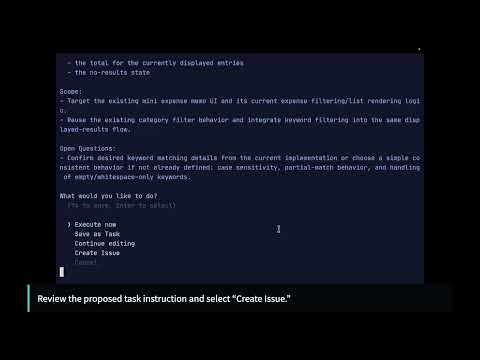
Follow the written tutorial with these hands-on walkthroughs:
| Chapter 1 | Chapter 2 |
|---|---|
 |
 |
TAKT vs Plain AI Coding Agents
| Plain AI coding agents | TAKT |
|---|---|
| The prompt asks the agent to follow a process | The YAML workflow owns the process |
| Review steps can be forgotten or skipped | Review and fix loops are explicit transitions |
| One long context keeps growing | Each step receives only the context it needs |
| Implementation and review responsibilities blur | Personas, permissions, and output contracts separate responsibilities |
| Work often lands directly in the current tree | Queued tasks run in isolated worktrees by default |
| The path from task to result is hard to audit | Logs and reports preserve the path from task to PR |
| The same process must be recreated by memory | Workflows are reusable, reviewable, and versionable |
Requirements
TAKT requires Node.js >=22.22.0.
The provider you choose determines whether you need to install an external CLI or can run on Node.js alone via a TypeScript SDK.
The default provider is claude-sdk (Claude Agent SDK). claude is an alias for claude-sdk.
To keep using the previous headless Claude Code CLI provider, change provider: claude to provider: claude-headless in runtime.yaml profiles or legacy config.yaml settings, and use --provider claude-headless for CLI overrides. Move provider-specific permission settings to provider_profiles.claude-headless. To use the new SDK default or explicit claude-sdk, move those settings to provider_profiles.claude-sdk; an explicit claude alias still uses the provider_profiles.claude key. For example, with the provider omitted, an old provider_profiles.claude.default_permission_mode: readonly no longer applies and the new default can fall back to builtin edit unless the profile is moved. The shared provider_options.claude key stays the same. Existing sessions labeled claude start fresh after this change. claude-terminal is unchanged.
These providers run via SDK (no CLI required, Node.js only):
claude-sdk—@anthropic-ai/claude-agent-sdkcodex—@openai/codex-sdkpi—@earendil-works/pi-coding-agent
The deepseek-harness provider runs on Node.js through the official TypeScript SDK and the matching DeepSeek Harness runtime. Run takt install deepseek-harness once before using it; the pinned SDK and runtime are installed in TAKT's managed directory, separate from TAKT's npm dependencies. Repeat the command to repair damage detected by TAKT. If the provider still malfunctions, run takt install deepseek-harness --force to reinstall it even when integrity checks pass. The supported platforms are Linux x64/arm64 with glibc >= 2.28 and macOS arm64 >= 14.0. No Python or uv setup is required.
A session supports multiple FIFO-serialized turns while its runtime stays alive with the same supported configuration. The SDK cannot restore persisted history after runtime restart/teardown or replace runtime settings while keeping that history. In those cases TAKT refuses the old session with a fixed diagnostic; start a new TAKT session or run with a new session identity to use new settings. This is a deliberate breaking reduction, and cross-runtime history preservation is deferred. TAKT does not automatically remove files from an earlier Python/uv installation; review and remove that old managed environment manually if desired. Existing credential files remain user-owned and are not migrated or deleted.
TAKT disables the runtime's JSONL session-persistence plugin so newly written session logs cannot retain provider errors that echo credentials. Multiple turns still work in the live runtime; TAKT leaves existing DeepSeek session files untouched.
The standard SDK file/search, shell, and delegated-exec