Maintainer of this skill?
by Taskosaur
Open Source Project Management with Conversational AI Task Execution. Built for teams who want conversational workflow management alongside traditional PM features. Self-hostable with modular architecture.
# Add to your Claude Code skills
git clone https://github.com/Taskosaur/TaskosaurLast scanned: 5/17/2026
{
  "issues": [
    {
      "type": "npm-audit",
      "message": "@angular-devkit/core: Vulnerability found",
      "severity": "medium"
    },
    {
      "type": "npm-audit",
      "message": "@angular-devkit/schematics: Vulnerability found",
      "severity": "medium"
    },
    {
      "type": "npm-audit",
      "message": "@angular-devkit/schematics-cli: Vulnerability found",
      "severity": "medium"
    },
    {
      "type": "npm-audit",
      "message": "@aws-sdk/client-s3: Vulnerability found",
      "severity": "medium"
    },
    {
      "type": "npm-audit",
      "message": "@aws-sdk/client-ses: Vulnerability found",
      "severity": "medium"
    },
    {
      "type": "npm-audit",
      "message": "@aws-sdk/client-sso: Vulnerability found",
      "severity": "medium"
    },
    {
      "type": "npm-audit",
      "message": "@aws-sdk/core: Vulnerability found",
      "severity": "medium"
    },
    {
      "type": "npm-audit",
      "message": "@aws-sdk/credential-provider-env: Vulnerability found",
      "severity": "medium"
    },
    {
      "type": "npm-audit",
      "message": "@aws-sdk/credential-provider-http: Vulnerability found",
      "severity": "medium"
    },
    {
      "type": "npm-audit",
      "message": "@aws-sdk/credential-provider-ini: Vulnerability found",
      "severity": "medium"
    },
    {
      "type": "npm-audit",
      "message": "@aws-sdk/credential-provider-login: Vulnerability found",
      "severity": "medium"
    },
    {
      "type": "npm-audit",
      "message": "@aws-sdk/credential-provider-node: Vulnerability found",
      "severity": "medium"
    },
    {
      "type": "npm-audit",
      "message": "@aws-sdk/credential-provider-process: Vulnerability found",
      "severity": "medium"
    },
    {
      "type": "npm-audit",
      "message": "@aws-sdk/credential-provider-sso: Vulnerability found",
      "severity": "medium"
    },
    {
      "type": "npm-audit",
      "message": "@aws-sdk/credential-provider-web-identity: Vulnerability found",
      "severity": "medium"
    },
    {
      "type": "npm-audit",
      "message": "@aws-sdk/middleware-flexible-checksums: Vulnerability found",
      "severity": "medium"
    },
    {
      "type": "npm-audit",
      "message": "@aws-sdk/middleware-sdk-s3: Vulnerability found",
      "severity": "medium"
    },
    {
      "type": "npm-audit",
      "message": "@aws-sdk/middleware-user-agent: Vulnerability found",
      "severity": "medium"
    },
    {
      "type": "npm-audit",
      "message": "@aws-sdk/nested-clients: Vulnerability found",
      "severity": "medium"
    },
    {
      "type": "npm-audit",
      "message": "@aws-sdk/s3-request-presigner: Vulnerability found",
      "severity": "medium"
    },
    {
      "type": "npm-audit",
      "message": "@aws-sdk/signature-v4-multi-region: Vulnerability found",
      "severity": "medium"
    },
    {
      "type": "npm-audit",
      "message": "@aws-sdk/token-providers: Vulnerability found",
      "severity": "medium"
    },
    {
      "type": "npm-audit",
      "message": "@aws-sdk/util-user-agent-node: Vulnerability found",
      "severity": "medium"
    },
    {
      "type": "npm-audit",
      "message": "@aws-sdk/xml-builder: Vulnerability found",
      "severity": "medium"
    },
    {
      "type": "npm-audit",
      "message": "@isaacs/brace-expansion: @isaacs/brace-expansion has Uncontrolled Resource Consumption",
      "severity": "high"
    },
    {
      "type": "npm-audit",
      "message": "@mapbox/node-pre-gyp: Vulnerability found",
      "severity": "high"
    },
    {
      "type": "npm-audit",
      "message": "@nestjs/cli: Vulnerability found",
      "severity": "medium"
    },
    {
      "type": "npm-audit",
      "message": "@nestjs/common: Vulnerability found",
      "severity": "medium"
    },
    {
      "type": "npm-audit",
      "message": "@nestjs/config: Vulnerability found",
      "severity": "medium"
    },
    {
      "type": "npm-audit",
      "message": "@nestjs/core: @nestjs/core Improperly Neutralizes Special Elements in Output Used by a Downstream Component ('Injection')",
      "severity": "high"
    },
    {
      "type": "npm-audit",
      "message": "@nestjs/platform-express: Vulnerability found",
      "severity": "high"
    },
    {
      "type": "npm-audit",
      "message": "@nestjs/schematics: Vulnerability found",
      "severity": "medium"
    },
    {
      "type": "npm-audit",
      "message": "@nestjs/swagger: Vulnerability found",
      "severity": "high"
    },
    {
      "type": "npm-audit",
      "message": "@prisma/config: Vulnerability found",
      "severity": "high"
    },
    {
      "type": "npm-audit",
      "message": "@swc/cli: Vulnerability found",
      "severity": "medium"
    },
    {
      "type": "npm-audit",
      "message": "@xhmikosr/archive-type: Vulnerability found",
      "severity": "medium"
    },
    {
      "type": "npm-audit",
      "message": "@xhmikosr/bin-wrapper: Vulnerability found",
      "severity": "medium"
    },
    {
      "type": "npm-audit",
      "message": "@xhmikosr/decompress: Vulnerability found",
      "severity": "medium"
    },
    {
      "type": "npm-audit",
      "message": "@xhmikosr/decompress-tar: Vulnerability found",
      "severity": "medium"
    },
    {
      "type": "npm-audit",
      "message": "@xhmikosr/decompress-tarbz2: Vulnerability found",
      "severity": "medium"
    },
    {
      "type": "npm-audit",
      "message": "@xhmikosr/decompress-targz: Vulnerability found",
      "severity": "medium"
    },
    {
      "type": "npm-audit",
      "message": "@xhmikosr/decompress-unzip: Vulnerability found",
      "severity": "medium"
    },
    {
      "type": "npm-audit",
      "message": "@xhmikosr/downloader: Vulnerability found",
      "severity": "medium"
    },
    {
      "type": "npm-audit",
      "message": "ajv: ajv has ReDoS when using `$data` option",
      "severity": "medium"
    },
    {
      "type": "npm-audit",
      "message": "axios: Axios has a NO_PROXY Hostname Normalization Bypass that Leads to SSRF",
      "severity": "high"
    },
    {
      "type": "npm-audit",
      "message": "bcrypt: Vulnerability found",
      "severity": "high"
    },
    {
      "type": "npm-audit",
      "message": "brace-expansion: brace-expansion: Zero-step sequence causes process hang and memory exhaustion",
      "severity": "medium"
    },
    {
      "type": "npm-audit",
      "message": "bullmq: Vulnerability found",
      "severity": "medium"
    },
    {
      "type": "npm-audit",
      "message": "defu: defu: Prototype pollution via `__proto__` key in defaults argument",
      "severity": "high"
    },
    {
      "type": "npm-audit",
      "message": "diff: jsdiff has a Denial of Service vulnerability in parsePatch and applyPatch",
      "severity": "low"
    },
    {
      "type": "npm-audit",
      "message": "dompurify: DOMPurify contains a Cross-site Scripting vulnerability",
      "severity": "medium"
    },
    {
      "type": "npm-audit",
      "message": "draft-js: Vulnerability found",
      "severity": "high"
    },
    {
      "type": "npm-audit",
      "message": "effect: Effect `AsyncLocalStorage` context lost/contaminated inside Effect fibers under concurrent load with RPC",
      "severity": "high"
    },
    {
      "type": "npm-audit",
      "message": "fast-uri: fast-uri vulnerable to path traversal via percent-encoded dot segments",
      "severity": "high"
    },
    {
      "type": "npm-audit",
      "message": "fast-xml-parser: fast-xml-parser has RangeError DoS Numeric Entities Bug",
      "severity": "critical"
    },
    {
      "type": "npm-audit",
      "message": "file-type: file-type affected by infinite loop in ASF parser on malformed input with zero-size sub-header",
      "severity": "medium"
    },
    {
      "type": "npm-audit",
      "message": "flatted: flatted vulnerable to unbounded recursion DoS in parse() revive phase",
      "severity": "high"
    },
    {
      "type": "npm-audit",
      "message": "follow-redirects: follow-redirects leaks Custom Authentication Headers to Cross-Domain Redirect Targets",
      "severity": "medium"
    },
    {
      "type": "npm-audit",
      "message": "form-data: form-data uses unsafe random function in form-data for choosing boundary",
      "severity": "critical"
    },
    {
      "type": "npm-audit",
      "message": "handlebars: Handlebars.js has JavaScript Injection via AST Type Confusion by tampering @partial-block",
      "severity": "critical"
    },
    {
      "type": "npm-audit",
      "message": "html-to-draftjs: Vulnerability found",
      "severity": "high"
    },
    {
      "type": "npm-audit",
      "message": "i18next-http-backend:  i18next-http-backend has Path Traversal & URL Injection via Unsanitised lng/ns",
      "severity": "medium"
    },
    {
      "type": "npm-audit",
      "message": "imapflow: Vulnerability found",
      "severity": "low"
    },
    {
      "type": "npm-audit",
      "message": "immutable: Immutable is vulnerable to Prototype Pollution",
      "severity": "high"
    },
    {
      "type": "npm-audit",
      "message": "ip-address: ip-address has XSS in Address6 HTML-emitting methods",
      "severity": "medium"
    },
    {
      "type": "npm-audit",
      "message": "jimp: Vulnerability found",
      "severity": "critical"
    },
    {
      "type": "npm-audit",
      "message": "jpeg-js: Infinite loop in jpeg-js",
      "severity": "high"
    },
    {
      "type": "npm-audit",
      "message": "lodash: Lodash has Prototype Pollution Vulnerability in `_.unset` and `_.omit` functions",
      "severity": "high"
    },
    {
      "type": "npm-audit",
      "message": "mailparser: mailparser vulnerable to Cross-site Scripting",
      "severity": "low"
    },
    {
      "type": "npm-audit",
      "message": "minimatch: minimatch has a ReDoS via repeated wildcards with non-matching literal in pattern",
      "severity": "high"
    },
    {
      "type": "npm-audit",
      "message": "minimist: Prototype Pollution in minimist",
      "severity": "critical"
    },
    {
      "type": "npm-audit",
      "message": "mkdirp: Vulnerability found",
      "severity": "critical"
    },
    {
      "type": "npm-audit",
      "message": "multer: Multer vulnerable to Denial of Service via incomplete cleanup",
      "severity": "high"
    },
    {
      "type": "npm-audit",
      "message": "next: Next.js self-hosted applications vulnerable to DoS via Image Optimizer remotePatterns configuration",
      "severity": "high"
    },
    {
      "type": "npm-audit",
      "message": "nodemailer: Nodemailer has SMTP command injection due to unsanitized `envelope.size` parameter",
      "severity": "medium"
    },
    {
      "type": "npm-audit",
      "message": "path-to-regexp: path-to-regexp vulnerable to Denial of Service via sequential optional groups",
      "severity": "high"
    },
    {
      "type": "npm-audit",
      "message": "picomatch: Picomatch: Method Injection in POSIX Character Classes causes incorrect Glob Matching",
      "severity": "high"
    },
    {
      "type": "npm-audit",
      "message": "postcss: PostCSS has XSS via Unescaped </style> in its CSS Stringify Output",
      "severity": "medium"
    },
    {
      "type": "npm-audit",
      "message": "prisma: Vulnerability found",
      "severity": "high"
    },
    {
      "type": "npm-audit",
      "message": "qs: qs's arrayLimit bypass in comma parsing allows denial of service",
      "severity": "medium"
    },
    {
      "type": "npm-audit",
      "message": "request: Server-Side Request Forgery in Request",
      "severity": "critical"
    },
    {
      "type": "npm-audit",
      "message": "resize-img: Vulnerability found",
      "severity": "medium"
    },
    {
      "type": "npm-audit",
      "message": "sanitize-html: Apostrophe has default XSS via `xmp` raw-text passthrough in `sanitize-html`",
      "severity": "critical"
    },
    {
      "type": "npm-audit",
      "message": "serialize-javascript: Serialize JavaScript is Vulnerable to RCE via RegExp.flags and Date.prototype.toISOString()",
      "severity": "high"
    },
    {
      "type": "npm-audit",
      "message": "socket.io-parser: socket.io allows an unbounded number of binary attachments",
      "severity": "high"
    },
    {
      "type": "npm-audit",
      "message": "tar: node-tar Vulnerable to Arbitrary File Creation/Overwrite via Hardlink Path Traversal",
      "severity": "high"
    },
    {
      "type": "npm-audit",
      "message": "terser-webpack-plugin: Vulnerability found",
      "severity": "high"
    },
    {
      "type": "npm-audit",
      "message": "to-ico: Vulnerability found",
      "severity": "medium"
    },
    {
      "type": "npm-audit",
      "message": "tough-cookie: tough-cookie Prototype Pollution vulnerability",
      "severity": "medium"
    },
    {
      "type": "npm-audit",
      "message": "url-regex: Regular expression denial of service in url-regex",
      "severity": "high"
    },
    {
      "type": "npm-audit",
      "message": "uuid: uuid: Missing buffer bounds check in v3/v5/v6 when buf is provided",
      "severity": "medium"
    },
    {
      "type": "npm-audit",
      "message": "webpack: webpack buildHttp: allowedUris allow-list bypass via URL userinfo (@) leading to build-time SSRF behavior",
      "severity": "low"
    },
    {
      "type": "npm-audit",
      "message": "xlsx: Prototype Pollution in sheetJS",
      "severity": "high"
    },
    {
      "type": "npm-audit",
      "message": "yauzl: yauzl contains an off-by-one error",
      "severity": "medium"
    }
  ],
  "status": "FAILED",
  "scannedAt": "2026-05-17T06:45:15.024Z",
  "semgrepRan": false,
  "npmAuditRan": true,
  "pipAuditRan": true
}See how Taskosaur compares with popular alternatives.
Taskosaur is an open-source ai agents skill for AI coding assistants such as Claude Code, Codex CLI, and ChatGPT, built by Taskosaur. Open Source Project Management with Conversational AI Task Execution. Built for teams who want conversational workflow management alongside traditional PM features. Self-hostable with modular architecture. It has 571 GitHub stars.
Taskosaur failed SkillsLLM's automated security scan, which flagged one or more high-severity issues. Review the Security Report section carefully before using it.
Clone the repository with "git clone https://github.com/Taskosaur/Taskosaur" and add it to your Claude Code skills directory (see the Installation section above).
Taskosaur is primarily written in TypeScript. It is open-source under Taskosaur on GitHub, so you can review or fork the full source.
Yes. SkillsLLM lists many other AI Agents skills you can browse and compare side by side. Open the AI Agents category from the badge at the top of this page, or use the Related Skills and comparison links further down to weigh Taskosaur against similar tools.
No comments yet. Be the first to share your thoughts!
Based on votes and bookmarks from developers who liked this skill
Requires a passing catalog security scan.
⚠️ Third-Party Software Notice
This skill is third-party open-source software developed and hosted independently on GitHub. SkillsLLM is an informational directory and does not control or maintain the underlying repository.
Any security checks, ratings, or warnings displayed by SkillsLLM are automated and limited in scope. They do not constitute a security certification or guarantee that the software is safe, error-free, or free from malicious code, vulnerabilities, compromised dependencies, or prompt-injection risks.
Review the source code, permissions, dependencies, and configuration before installing or running any third-party skill. Use is at your own risk. To the maximum extent permitted by applicable law, SkillsLLM is not liable for losses arising from third-party software.
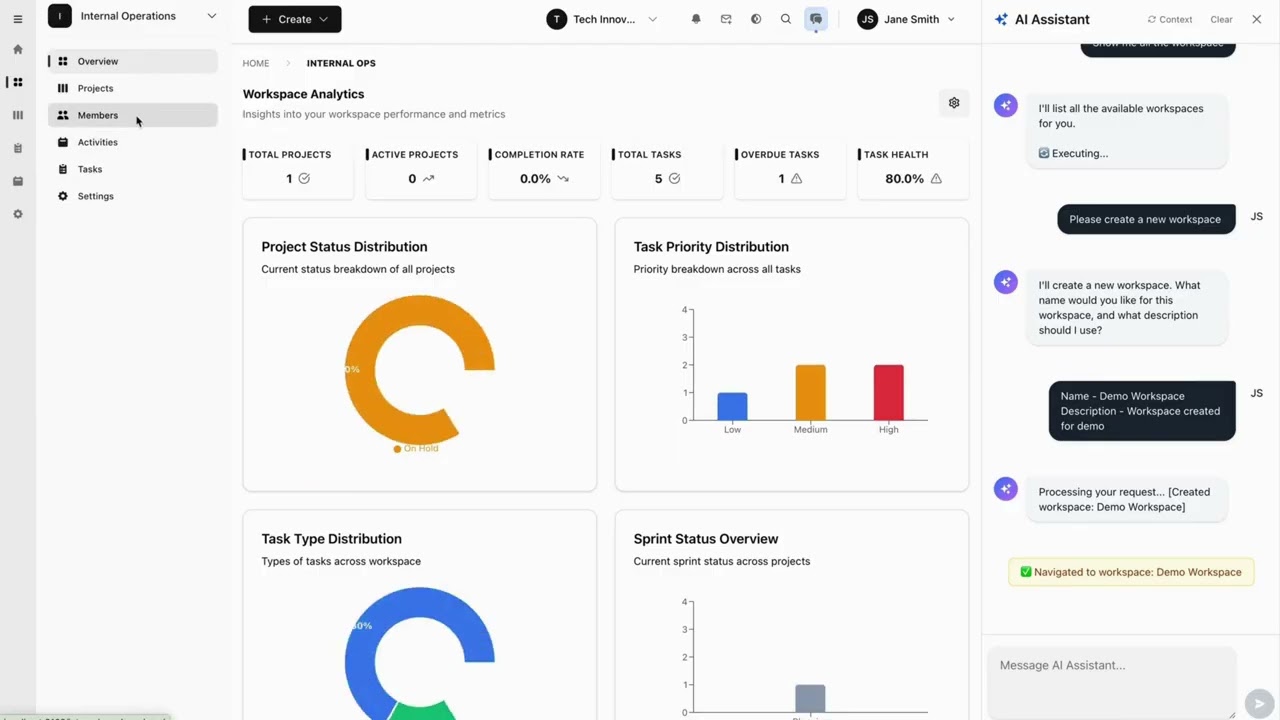
Click to watch: See how Conversational AI Task Execution works in Taskosaur
Taskosaur is an open source project management platform with conversational AI for task execution in-app. The AI assistant handles project management tasks through natural conversation, from creating tasks to managing workflows directly within the application.




Taskosaur combines traditional project management features with Conversational AI Task Execution, allowing you to manage projects through natural conversation. Instead of navigating menus and forms, you can create tasks, assign work, and manage workflows by simply describing what you need.
[!NOTE] Default Ports: Both
docker compose -f docker-compose.dev.yml upandnpm run devwill automatically start the Backend on port 3000 and the Frontend on port 3001 by default. Please ensure these ports are available on your system before proceeding.
The fastest way to get started with Taskosaur is using Docker Compose:
Clone the repository
git clone https://github.com/Taskosaur/Taskosaur.git taskosaur
cd taskosaur
Set up environment variables
cp .env.example .env
This creates the .env file used for the app, you may customize the values, if you need.
Start with Docker Compose
docker compose -f docker-compose.dev.yml up
This automatically:
Access the application
See DOCKER_DEV_SETUP.md for detailed Docker documentation.
If you prefer to run services locally:
Clone the repository
git clone https://github.com/Taskosaur/Taskosaur.git taskosaur
cd taskosaur
Install dependencies
npm install
Environment Setup
Create a .env file in the root directory:
# Database Configuration
DATABASE_URL="postgresql://taskosaur:taskosaur@localhost:5432/taskosaur"

# Application
NODE_ENV=development

# Authentication & Security
JWT_SECRET="your-jwt-secret-key-change-this"
JWT_REFRESH_SECRET="your-refresh-secret-key-change-this-too"
JWT_EXPIRES_IN="15m"
JWT_REFRESH_EXPIRES_IN="7d"

# Encryption for sensitive data
ENCRYPTION_KEY="your-64-character-hex-encryption-key-change-this-to-random-value"

# Redis Configuration (for Bull Queue)
REDIS_HOST=localhost
REDIS_PORT=6379
REDIS_PASSWORD=

# Email Configuration (optional, for notifications)
SMTP_HOST=smtp.example.com
SMTP_PORT=587
SMTP_USER=your-email@taskosaur.com
SMTP_PASS=your-app-password
SMTP_FROM=noreply@taskosaur.com
EMAIL_DOMAIN="taskosaur.com"

# Frontend URL (for email links and CORS)
FRONTEND_URL=http://localhost:3001
CORS_ORIGIN="http://localhost:3001"

# Backend API URL (for frontend to connect to backend)
NEXT_PUBLIC_API_BASE_URL=http://localhost:3000/api

# File Upload
UPLOAD_DEST="./uploads"
MAX_FILE_SIZE=10485760

# Queue Configuration
MAX_CONCURRENT_JOBS=5
JOB_RETRY_ATTEMPTS=3

# Jira Integration - SSRF allowlist
# Comma-separated hostnames. Supports exact match or single-level wildcard (*.atlassian.net).
# Use * to allow any host (not recommended in production).
# Defaults to *.atlassian.net when unset.
# JIRA_ALLOWED_HOSTS=*.atlassian.net
# Self-hosted Jira Data Center example:
# JIRA_ALLOWED_HOSTS=jira.mycompany.com,*.atlassian.net
Setup Database
# Run database migrations
npm run db:migrate

# Seed the database (idempotent - safe to run multiple times)
npm run db:seed

# Or seed with admin user only
npm run db:seed:admin
Start the Application
# Development mode (runs both frontend and backend)
npm run dev

# Or start individually
npm run dev:frontend    # Start frontend only (port 3001)
npm run dev:backend     # Start backend only (port 3000)
Access the Application
All commands are run from the root directory:
npm run dev              # Start both frontend and backend concurrently
npm run dev:frontend     # Start frontend only (Next.js on port 3001)
npm run dev:backend      # Start backend only (NestJS on port 3000)
npm run build            # Build all workspaces (frontend + backend)
npm run build:frontend   # Build frontend for production
npm run build:backend    # Build backend for production
npm run build:dist       # Build complete distribution package
All seed commands are idempotent and safe to run multiple times:
npm run db:migrate         # Run database migrations
npm run db:migrate:deploy  # Deploy migrations (production)
npm run db:reset           # Reset database (deletes all data!)
npm run db:seed            # Seed database with sample data
npm run db:seed:admin      # Seed database with admin user only
npm run db:generate        # Generate Prisma client
npm run db:studio          # Open Prisma Studio (database GUI)
npm run prisma             # Run Prisma CLI commands directly
npm run test               # Run all tests
npm run test:frontend      # Run frontend tests
npm run test:backend       # Run backend unit tests
npm run test:watch         # Run backend tests in watch mode
npm run test:cov           # Run backend tests with coverage
npm run test:e2e           # Run backend end-to-end tests
npm run lint               # Lint all workspaces
npm run lint:frontend      # Lint frontend code
npm run lint:backend       # Lint backend code
npm run format             # Format backend code with Prettier
npm run clean              # Clean all build artifacts
npm run clean:frontend     # Clean frontend build artifacts
npm run clean:backend      # Clean backend build artifacts
Automatic code quality checks with Husky:
--no-verify (emergencies only)git commit -m "feat: add feature" # Runs checks automatically
taskosaur/
├── backend/                # NestJS Backend (Port 3000)
│   ├── src/
│   │   ├── modules/       # Feature modules
│   │   ├── common/        # Shared utilities
│   │   ├── config/        # Configuration
│   │   └── gateway/       # WebSocket gateway
│   ├── prisma/            # Database schema and migrations
│   ├── public/            # Static files
│   └── uploads/           # File uploads
├── frontend/              # Next.js Frontend (Port 3001)
│   ├── src/
│   │   ├── app/          # App Router pages
│   │   ├── components/   # React components
│   │   ├── contexts/     # React contexts
│   │   ├── hooks/        # Custom hooks
│   │   ├── lib/          # Utilities
│   │   └── types/        # TypeScript types
│   └── public/           # Static assets
├── docker/               # Docker configuration
│   └── entrypoint-dev.sh # Development entrypoint script
├── scripts/              # Build and utility scripts
├── .env.example          # Env