tfmcp: Terraform Model Context Protocol Tool
⚠️ This project includes production-ready security features but is still under active development. While the security system provides robust protection, please review all operations carefully in production environments. ⚠️
tfmcp runs local Terraform workflows through the Model Context Protocol (MCP). It helps AI assistants inspect a project, prepare execution, review a saved plan, apply that same plan, and check the result. Registry and HCP/TFE tools support these local workflows.
🎮 Demo
See tfmcp in action with Claude Desktop:
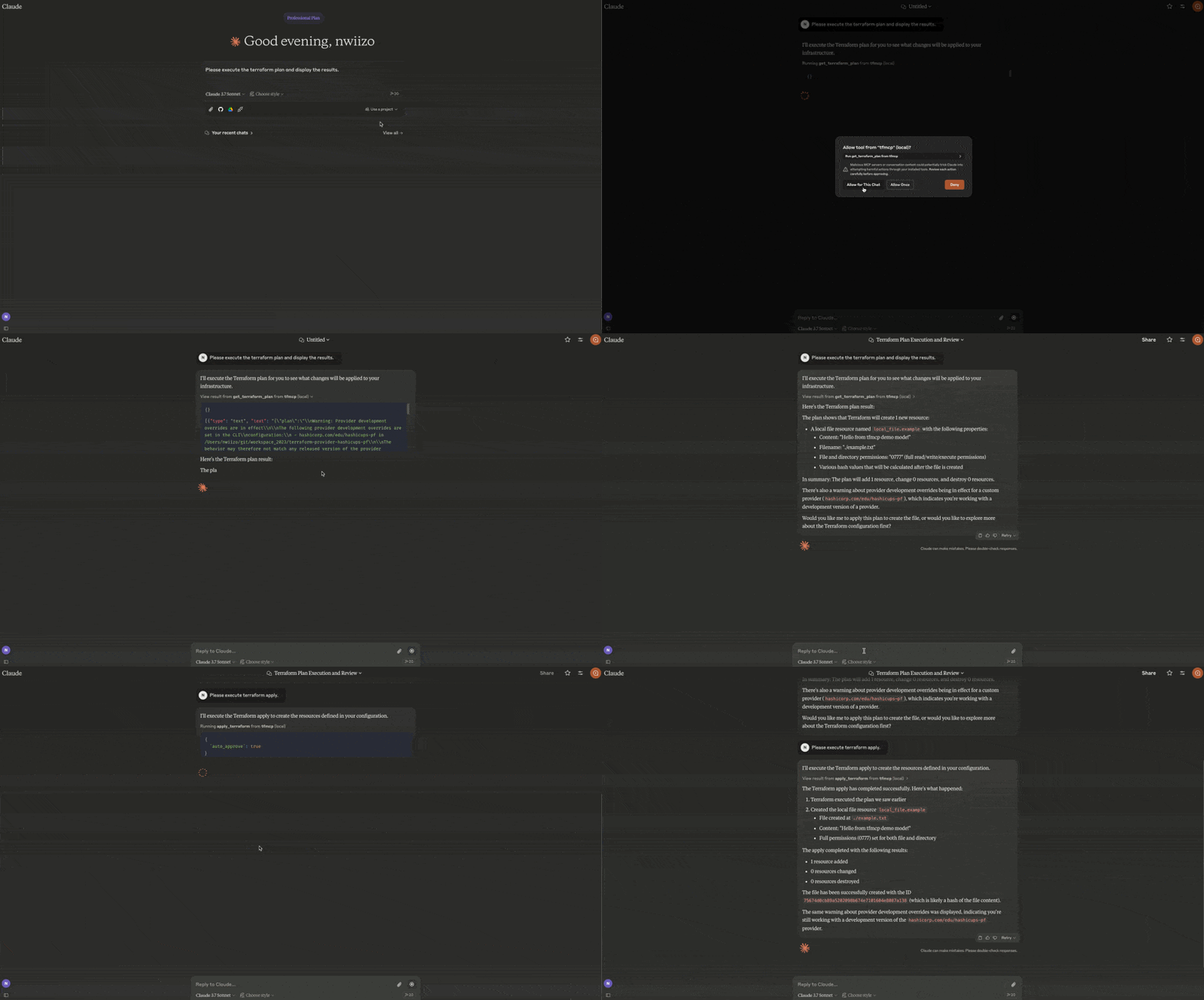
- Reading Terraform configuration files
- Analyzing Terraform plan outputs
- Applying Terraform configurations
- Managing Terraform state
- Creating and modifying Terraform configurations
🎉 Current Release
tfmcp v0.2.4 is the current release:
cargo install tfmcp --version 0.2.4
What's new in v0.2.4
- Reviewed destroy plans with the same saved-plan and permission checks as apply
- Saved-plan listing and disposal to reclaim the 64-plan capacity
- Retained apply results, failed/unknown outcomes, and recovery guidance
- Sensitive output redaction for both full and named output queries
- RMCP 3.5.0, updated dependencies and images, with the Rust 1.88 MSRV retained
Features
| Area | Capabilities |
|---|---|
| Local Terraform | Validate, format, plan/apply workflows, import guidance, outputs, providers, dependency graphs, refresh-only flows, and guarded state operations |
| Repository intelligence | Entrypoint/project detection, configuration analysis, quality checks, security checks, module health, plan review, and drift/state-safety inspection |
| Registry | Public/private provider, module, and policy lookup with HashiCorp-compatible aliases |
| HCP Terraform / TFE | Organizations, projects, workspaces, runs, plans, applies, variables, policy sets, variable sets, tags, stacks, and gated operations |
| MCP deployment | stdio and Streamable HTTP, MCP 2026-07-28 discovery, structured tool results, cache hints, toolsets, resources, health/metrics, sessions, Host/Origin validation, rate limits, TLS wiring, and audit logging |
| Packaging | Cargo, Docker/OCI metadata, MCP Registry metadata, Rust Edition 2024 |
Installation
From Source
# Clone the repository
git clone https://github.com/nwiizo/tfmcp
cd tfmcp

# Build and install
cargo install --path .
From Crates.io
cargo install tfmcp
Using Docker
# Clone the repository
git clone https://github.com/nwiizo/tfmcp
cd tfmcp

# Build the Docker image
docker build -t tfmcp .

# Run the container
docker run -it tfmcp
Requirements
- Rust 1.88.0+ (Rust Edition 2024)
- Terraform CLI 1.15.8 installed and available in
PATH - An MCP-compatible AI client (for example, Claude Desktop or Codex)
- Docker (optional, for containerized deployment)
Usage
$ tfmcp --help
✨ A CLI tool to manage Terraform configurations and operate Terraform through the Model Context Protocol (MCP).

Usage: tfmcp [OPTIONS] [COMMAND]

Commands:
  mcp       Launch tfmcp as an MCP server
  analyze   Analyze Terraform configurations
  help      Print this message or the help of the given subcommand(s)

Options:
  -c, --config <PATH>    Path to the configuration file
  -d, --dir <PATH>       Terraform project directory
  -V, --version          Print version
  -h, --help             Print help
Using Docker
When using Docker, you can run tfmcp commands like this:
# Run as MCP server (default)
docker run -it tfmcp

# Run with specific command and options
docker run -it tfmcp analyze --dir /app/example

# Mount your Terraform project directory
docker run -it -v /path/to/your/terraform:/app/terraform tfmcp --dir /app/terraform

# Set environment variables
docker run -it -e TFMCP_LOG_LEVEL=debug tfmcp
Integrating with Claude Desktop
To use tfmcp with Claude Desktop:
-
If you haven't already, install tfmcp:
cargo install tfmcpAlternatively, you can use Docker:
docker build -t tfmcp . -
Find the path to your installed tfmcp executable:
which tfmcp -
Add the following configuration to
~/Library/Application\ Support/Claude/claude_desktop_config.json:
{
  "mcpServers": {
    "tfmcp": {
      "command": "/path/to/your/tfmcp",  // Replace with the actual path from step 2
      "args": ["mcp"],
      "env": {
        "HOME": "/Users/yourusername",  // Replace with your username
        "PATH": "/usr/local/bin:/usr/bin:/bin:/usr/sbin:/sbin",
        "TERRAFORM_DIR": "/path/to/your/terraform/project"  // Optional: specify your Terraform project
      }
    }
  }
}
If you're using Docker with Claude Desktop, you can set up the configuration like this:
{
  "mcpServers": {
    "tfmcp": {
      "command": "docker",
      "args": ["run", "--rm", "-v", "/path/to/your/terraform:/app/terraform", "tfmcp", "mcp"],
      "env": {
        "TERRAFORM_DIR": "/app/terraform"
      }
    }
  }
}
-
Restart Claude Desktop and enable the tfmcp tool.
-
tfmcp will automatically create a sample Terraform project in
~/terraformif one doesn't exist, ensuring Claude can start working with Terraform right away. The sample project is based on the examples included in theexample/demodirectory of this repository.
Local plan/apply workflow
Start with tfmcp --dir /path/to/project mcp --toolsets terraform.
The default toolset supports preparation and plan review; the terraform
toolset also exposes initialization and gated local writes.
- Call
prepare_terraform_changeto inspect the selected directory, Terraform version, workspace, backend, configuration validity, and state readability.readymeans the inspected prerequisites passed; input variables and provider credentials are checked by the actual plan. Initialize withinit_terraformwhen required, then repeat preparation. - Call
get_terraform_planwith{}or, for example,{"var_files":["environment.tfvars"]}. The result includes aplan_id,target,created_at,has_changes, and a redacted Terraform JSONplanstring. Usereplacefor resource replacement addresses orrefresh_only:trueto preview drift without modifying state. - Pass the returned
plan_idtoanalyze_plan,review_terraform_plan, andsummarize_plan_for_pr. These calls reuse the saved result. Omitting the ID creates a new plan. A review decision is advisory and does not authorize apply. - After reviewing and approving the change, call
apply_terraformwith{"plan_id":"<returned ID>","auto_approve":true}. BothTFMCP_ALLOW_DANGEROUS_OPS=trueandTFMCP_ALLOW_AUTO_APPROVE=truemust already be configured on the server. The saved plan determines the applied changes, including when configuration files have subsequently been edited. - Check
success,status,exit_code,diagnostics,state_verified, andrecovery.next_stepsin the apply result. Retrieve the plan's final status and retainedapply_resultwithget_terraform_plan({"plan_id":"<returned ID>"}). After failure or timeout, inspect state and create a new plan; the attempted ID cannot be applied again.
Migration from v0.2.2: apply_terraform requires plan_id; calls that only
provide auto_approve now return an explanatory error. Approval happens in the
client before the call, because Terraform receives no interactive input.
For a reviewed teardown, create a plan with get_terraform_plan({"destroy":true}),
review its plan_id, then call destroy_terraform with that ID and
auto_approve:true. The server must also have TFMCP_DELETE_ENABLED=true, in
addition to both apply permissions. Passing a destroy plan to apply_terraform
enforces the same permissions. destroy cannot be combined with refresh_only
or replace. Migration from v0.2.3: destroy_terraform now requires a saved
destroy plan; it no longer creates an unreviewed plan or waits for a prompt.
Use list_terraform_plans to find retained IDs and their targets and statuses.
Use discard_terraform_plan({"plan_id":"<ID>"}) to delete an unneeded plan's
temporary files and free capacity. Discard does not change infrastructure,
cancel an operation, or roll back an apply; inspect failed or unknown outcomes
before removing their records. These tools are available in the default and
Terraform toolsets.
Saved plans use private temporary directories and are bound to the project,
workspace, initialized backend metadata, Terraform version, and provider
lockfile. Plan IDs remain valid only for the current server process, with a
maximum of 64 retained plans. Normal server shutdown removes the temporary
files. failed means Terraform returned a nonzero exit code and may have applied
some changes. outcome_unknown means no definitive exit result was obtained,
including timeout or cancellation. Both prevent reapplying the same plan and
include recovery guidance: confirm operations have stopped, inspect the recorded
target and actual resources, resolve the cause, then generate and review a new
plan. No rollback or automatic retry is performed. apply_result is null when a
request was cancelled before a result could be retained. State verification checks
resource addresses, not all attribute values or output values.
Status retrieval waits for an ongoing operation
to finish; live progress and restart recovery are not provided in this release.
MCP Tools
tfmcp provides the following MCP tools for AI assistants:
Core Terraform Operations
| Tool | Description |
|---|---|
init_terraform |
Initialize Terraform working directory |