by ChiR24
A comprehensive Model Context Protocol (MCP) server that enables AI assistants to control Unreal Engine through the native C++ Automation Bridge plugin. Built with TypeScript and C++.
# Add to your Claude Code skills
git clone https://github.com/ChiR24/Unreal_mcpLast scanned: 5/12/2026
{
  "issues": [],
  "status": "PASSED",
  "scannedAt": "2026-05-12T06:37:49.845Z",
  "semgrepRan": false,
  "npmAuditRan": true,
  "pipAuditRan": true
}See how Unreal_mcp compares with popular alternatives.
Unreal_mcp is an open-source ai agents skill for AI coding assistants such as Claude Code, Codex CLI, and ChatGPT, built by ChiR24. A comprehensive Model Context Protocol (MCP) server that enables AI assistants to control Unreal Engine through the native C++ Automation Bridge plugin. Built with TypeScript and C++. It has 911 GitHub stars.
Yes. Unreal_mcp passed SkillsLLM's automated security scan — a dependency vulnerability audit plus prompt-injection heuristics — with no high-severity issues. You can read the full report in the Security Report section on this page.
Clone the repository with "git clone https://github.com/ChiR24/Unreal_mcp" and add it to your Claude Code skills directory (see the Installation section above).
Unreal_mcp is primarily written in C++. It is open-source under ChiR24 on GitHub, so you can review or fork the full source.
Yes. SkillsLLM lists many other AI Agents skills you can browse and compare side by side. Open the AI Agents category from the badge at the top of this page, or use the Related Skills and comparison links further down to weigh Unreal_mcp against similar tools.
No comments yet. Be the first to share your thoughts!
⚠️ Third-Party Software Notice
This skill is third-party open-source software developed and hosted independently on GitHub. SkillsLLM is an informational directory and does not control or maintain the underlying repository.
Any security checks, ratings, or warnings displayed by SkillsLLM are automated and limited in scope. They do not constitute a security certification or guarantee that the software is safe, error-free, or free from malicious code, vulnerabilities, compromised dependencies, or prompt-injection risks.
Review the source code, permissions, dependencies, and configuration before installing or running any third-party skill. Use is at your own risk. To the maximum extent permitted by applicable law, SkillsLLM is not liable for losses arising from third-party software.
📌 Which version is this? This README describes the 0.6 line: the
devbranch and npmunreal-engine-mcp-server@beta. The previous stable release, 0.5.30 (npmlatest), exposes 23 separate tools instead of one; see Upgrading from 0.5.x.
Contents · What it does · How it works · Quick start · The unreal tool · Configuration · Security · Engine plugins · Docker · Documentation · Development · Community
🏗️ Levels and actors Spawn one actor or hundreds in a single call, place and attach them, find the ones sunk into the floor, and load, stream and save levels.
🧩 Blueprints and UI Create Blueprints, variables and components, build whole event graphs in one batch, and lay out UMG widgets, with a preview image to check them.
🎨 Materials and worlds Material graphs and instances, procedural textures, lighting, landscapes, foliage, Niagara effects and PCG graphs.
🕹️ Gameplay Characters and animation, Gameplay Ability System, AI (Behavior Trees, State Trees, EQS), inventory, networking and Enhanced Input.
🎬 Cinematics and audio Level Sequences, cameras, Movie Render Queue and Take Recorder; Sound Cues and MetaSounds.
🧪 Play and verify Run Play-In-Editor with synthetic input, take screenshots the model can see, read logs, profile, run Python, and package builds.
Nearly 400 capabilities in all, behind a single MCP tool. The assistant finds them by searching in plain words, so nobody has to learn their names. The full list is the generated Action Reference.
The MCP Automation Bridge plugin runs inside the editor and does all the work, on the editor's game thread. Clients reach it in one of two ways, and both expose the same single tool, unreal:
| 🌐 Route A · Native HTTP | 🧩 Route B · stdio | |
|---|---|---|
| Path | Client → the plugin's Streamable HTTP server at http://127.0.0.1:3000/mcp |
Client → unreal-engine-mcp-server (Node.js, stdio) → the plugin's WebSocket on 127.0.0.1:8090 |
| Node.js | Not needed | 20.19 or later |
| Capability token | The client sends it in the X-MCP-Capability-Token header |
Read from the project, given UE_PROJECT_PATH |
| Best for | Claude Code, Cursor, VS Code, and several clients sharing one editor | Claude Desktop, and clients that only launch local commands |
Everything listens on 127.0.0.1 and requires the project's capability token unless you change it.
The Quick Start page walks through this with screenshots. You need Unreal Engine 5.0 to 5.8 and a project with C++ code; a Blueprint-only project can use prebuilt binaries.
Download McpAutomationBridge-plugin-<version>.zip from the newest v0.6 pre-release on the Releases page, and copy the McpAutomationBridge folder it contains into your project:
MyGame/Plugins/McpAutomationBridge/
Or use a clone of this repository: copy plugins/McpAutomationBridge/, or reference the folder from your .uproject with "AdditionalPluginDirectories": ["C:/Path/To/Unreal_mcp/plugins"].
Open the project and let Unreal rebuild the plugin. When it's loaded, the status bar shows MCP off. If you see "Engine modules cannot be compiled at runtime", build the project once in Visual Studio, Rider or Xcode. More in Installation.
https://github.com/user-attachments/assets/d8b86ebc-4364-48c9-9781-de854bf3ef7d
Build the plugin once on a machine with the engine and a compiler, then hand out the zip. No compiler is needed on the target machine:
node scripts/package-plugin.mjs "C:/Program Files/Epic Games/UE_5.7"
This writes build/McpAutomationBridge-v<version>-UE5.7-<Platform>.zip, where <version> is the package.json version (currently 0.6.0-beta-e). Unzip it into YourProject/Plugins/. Binaries only work with the engine minor and platform they were built for: a 5.6 build won't load in 5.5, 5.7 or 5.8.
Route A · Native HTTP (no Node.js)
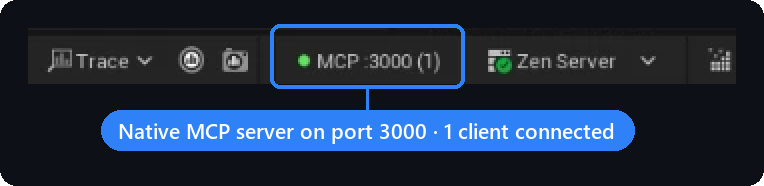
In Edit › Project Settings › Plugins › MCP Automation Bridge, tick Enable Native MCP Server (port 3000 by default), then restart the editor. The status bar now reads MCP :3000 (0).
Read the capability token the plugin generated: <YourProject>/Saved/MCP/capability-token. Treat it like a password.
Add the server to your client and send the token in the X-MCP-Capability-Token header. Claude Code:
claude mcp add --transport http unreal-engine http://127.0.0.1:3000/mcp --header "X-MCP-Capability-Token: <token>"
Or in a project .mcp.json (Claude Code), reading the token from an environment variable:
{
  "mcpServers": {
    "unreal-engine": {
      "type": "http",
      "url": "http://127.0.0.1:3000/mcp",
      "headers": { "X-MCP-Capability-Token": "${UNREAL_MCP_TOKEN}" }
    }
  }
}
Cursor (.cursor/mcp.json) takes the same url and headers without type. VS Code, Windsurf and others: Connecting Clients.
Check it: when the client connects, the count in the status bar goes up.
<img src="https://raw.githubusercontent.com/wiki/ChiR24/Unreal_mcp/assets/screenshots/status-bar.png" alt="Unreal Editor status bar showing MCP :3000 (1): the native MCP server on port 3000 with one client connected" width="520