agent-standup
by Atoll92
Your Claude Code session as a live, animated team call (VS Code extension)
51stars
6forks
HTML
Added 10/10/2026
⚠️ Third-Party Software Notice
This skill is third-party open-source software developed and hosted independently on GitHub. SkillsLLM is an informational directory and does not control or maintain the underlying repository.
Any security checks, ratings, or warnings displayed by SkillsLLM are automated and limited in scope. They do not constitute a security certification or guarantee that the software is safe, error-free, or free from malicious code, vulnerabilities, compromised dependencies, or prompt-injection risks.
Review the source code, permissions, dependencies, and configuration before installing or running any third-party skill. Use is at your own risk. To the maximum extent permitted by applicable law, SkillsLLM is not liable for losses arising from third-party software.
The deep catalog scan for this skill is still queued. Run an instant dependency check now instead.
Installation
# Add to your Claude Code skills
git clone https://github.com/Atoll92/agent-standup
Getting Started
Guides for using ide extensions skills like agent-standup.
Compare with similar skills
See how agent-standup compares with popular alternatives.
Agent Standup
See who is waiting on whom, and who is blocked — across all your Claude Code sessions — at zero token cost. Agent Standup turns the session files Claude Code already writes into a live team call (and a board of every session): it only reads local files and never calls Claude unless you turn on French translation or the jokes.
Your Claude Code session as a live team call. The lead gives orders, sub-agents join the call, work at their desks, share their screen and report back — with voices, expressions and a view of the real work as it happens.
→ Website & download: https://atoll92.github.io/agent-standup/
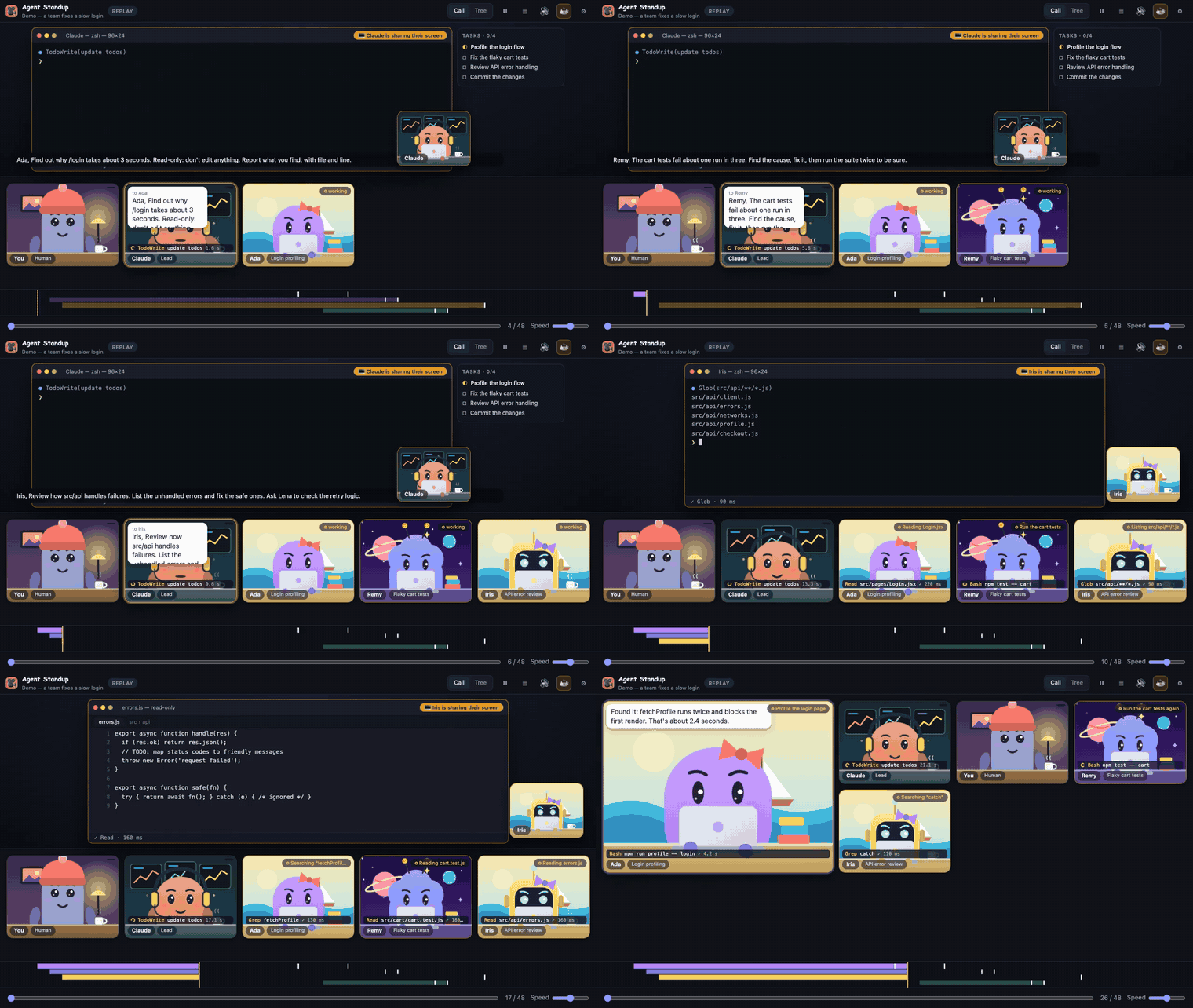
A fictional team fixing a slow login page — the built-in demo (⚙ → Source → Demo). Watch the full 1-minute video.
%20dev%20a%20coffee-ffdd00?logo=buymeacoffee&logoColor=black)
Unofficial community project, not affiliated with or endorsed by Anthropic. "Claude" is a trademark of Anthropic.
What you get
- Token usage per agent — a ⚡ counter in the header and on each tile shows how many tokens each agent used (input + output + cache writes; cache reads shown separately in the tooltip), counted once per message as recorded by Claude Code. Handy to see which sub-agent is the expensive one. It is read from the session files, not an estimate of your bill.
- Stuck or quiet agents — in the live call, a tile pulses amber with ⏳ when a command has been running for over a minute, shows 💤 when a working agent has gone quiet for 3 minutes, and a red ✗ counter for failed tool calls. The browser tab title shows how many agents are working.
- Built-in demo — no session yet? ⚙ → Source → Demo plays a fictional team (no data of yours).
- Live call — follows your newest Claude Code session in real time. Each agent is a small character at its desk; the one who speaks gets the spotlight and keeps it until someone else talks. Agents that talk back-to-back talk over each other, like a real meeting.
- Real voices, lip-sync — lines are spoken aloud; mouths follow the actual volume of the voice.
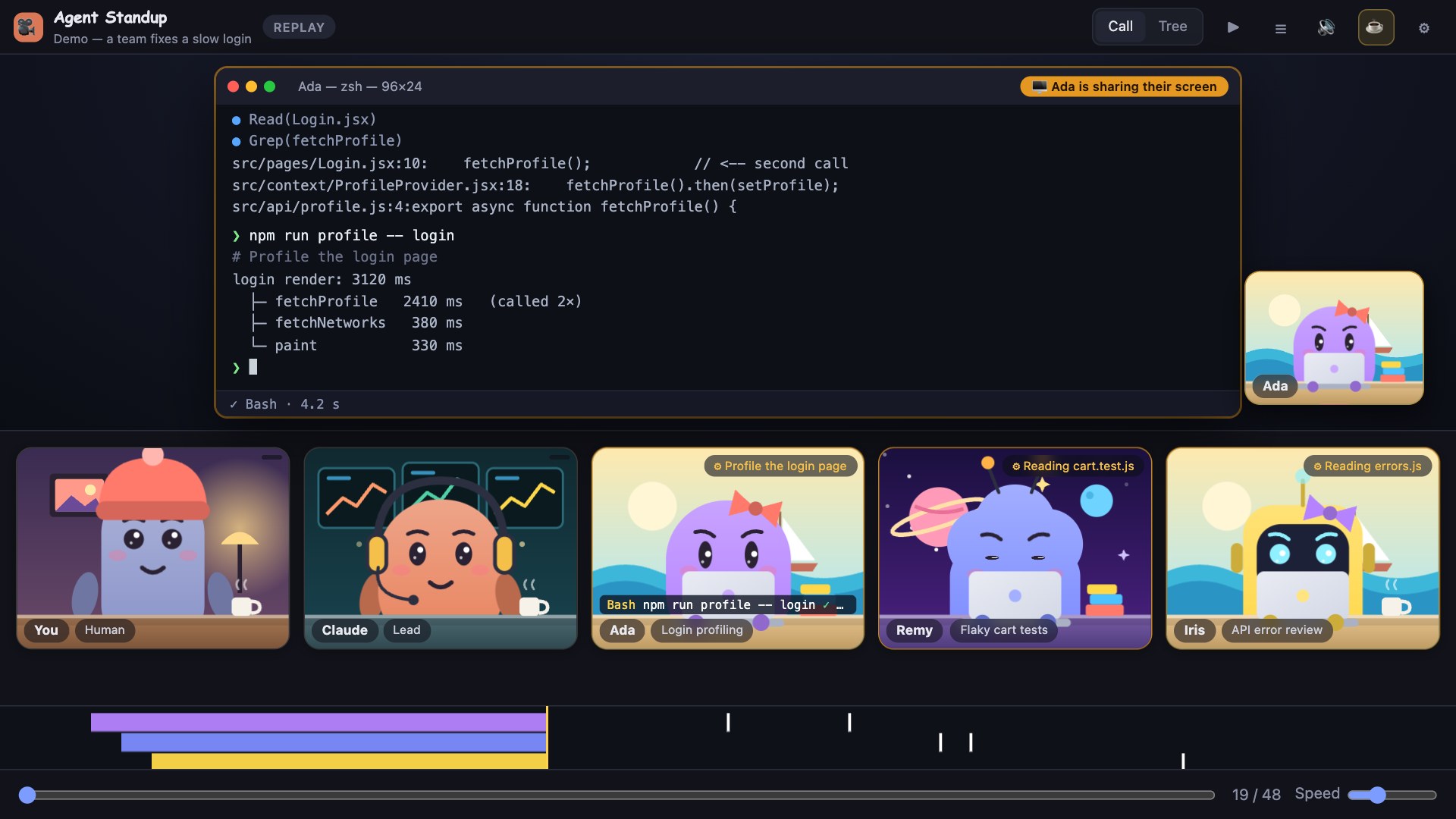
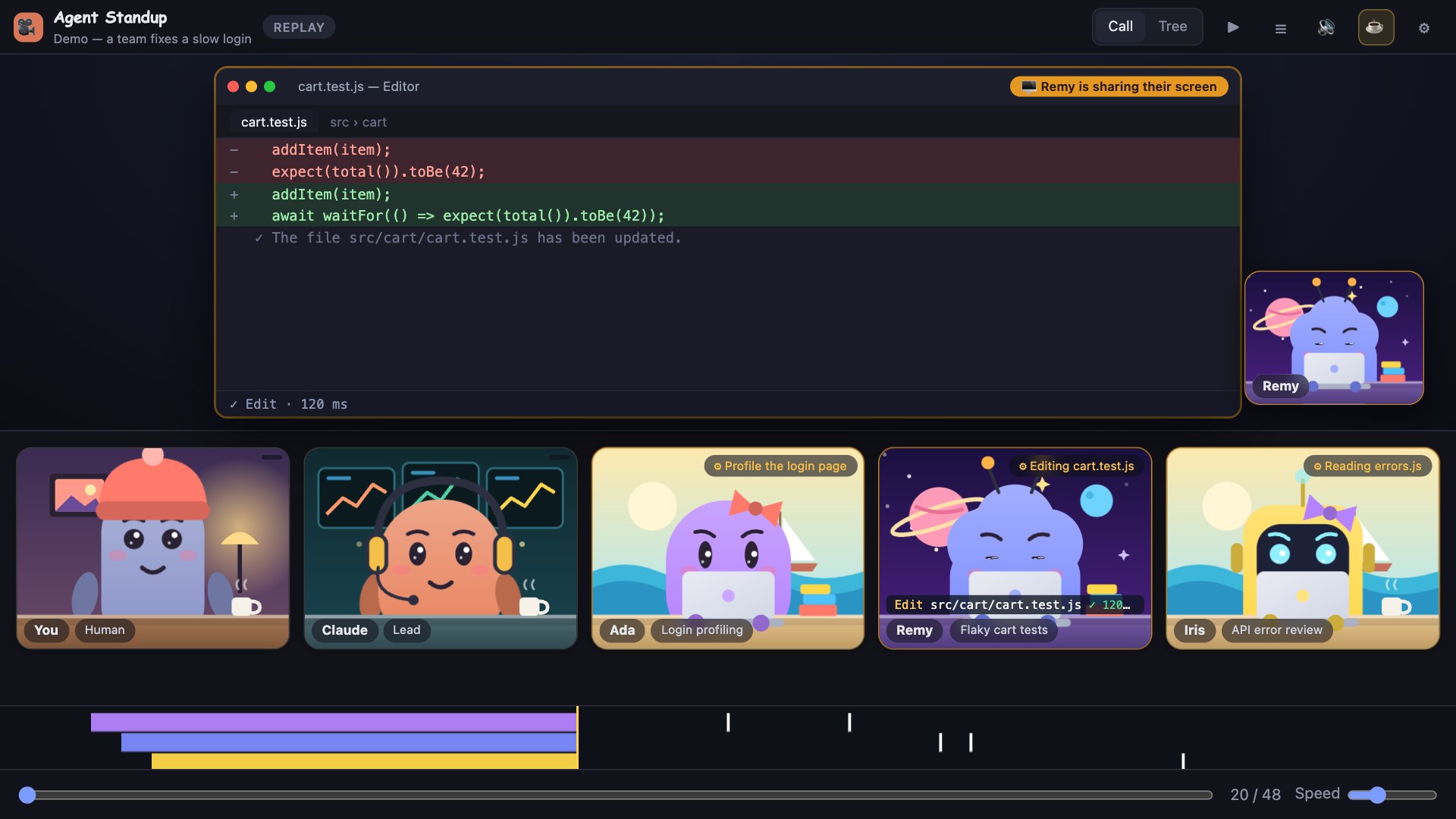
- Live screen sharing with the real output — when an agent works, its screen fills the stage (presenter's camera in the corner, "sharing" badge): a terminal with the command history and the actual output of each command, search results and tool calls; or an editor with the file it reads (real content and line numbers) or the exact diff it applies. See What you see for each agent below.
- Agents come and go — a sub-agent joins when it is given a task and leaves the call 2 minutes (playback time) after its report, with a dissolve animation. It comes back if it gets a new task.
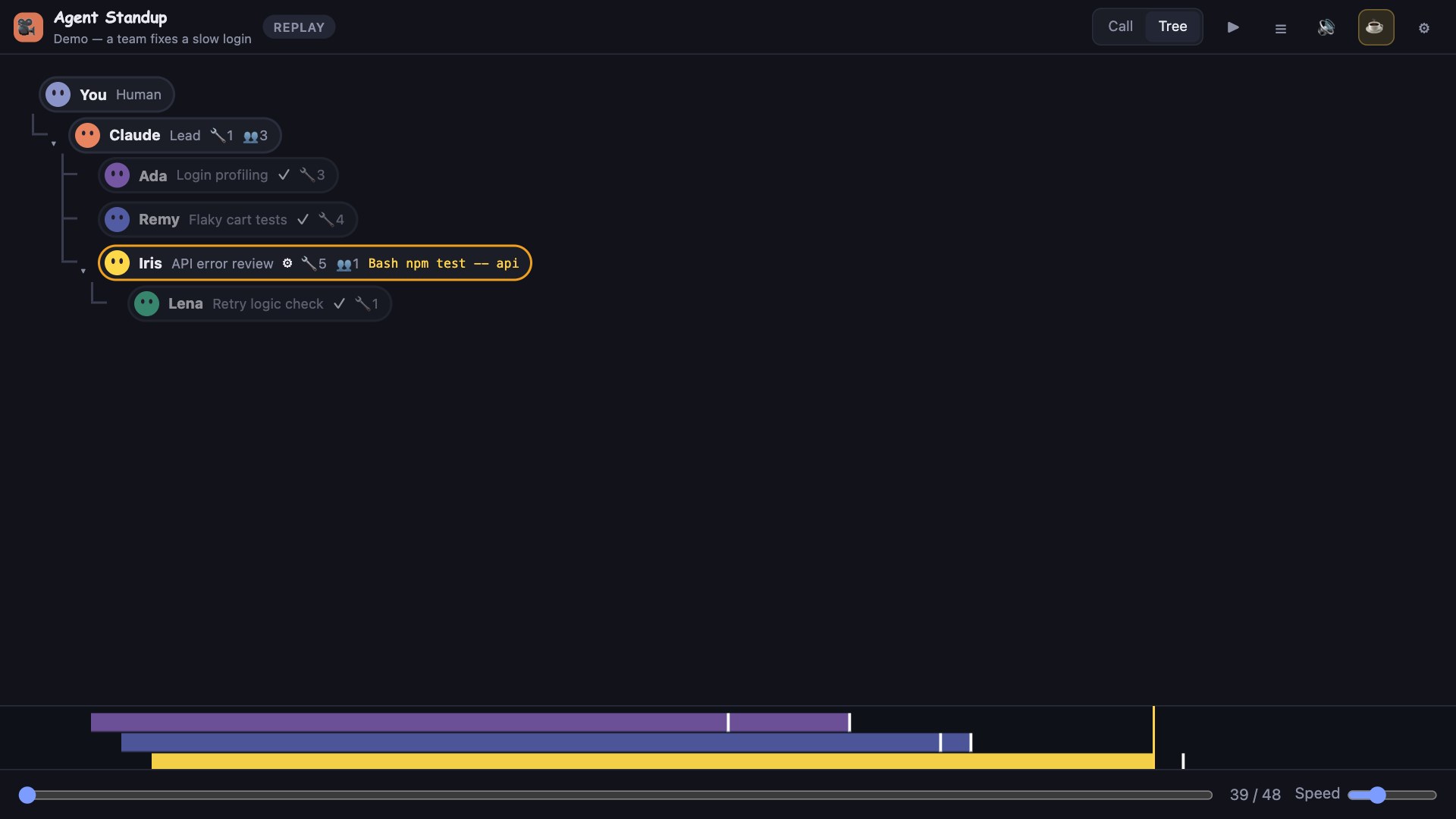
- Sub-agent tree — the full hierarchy (you → Claude → sub-agents → their sub-agents) with status, tool counts and the current action.
- Click any agent — its prompt, tool usage and reports.
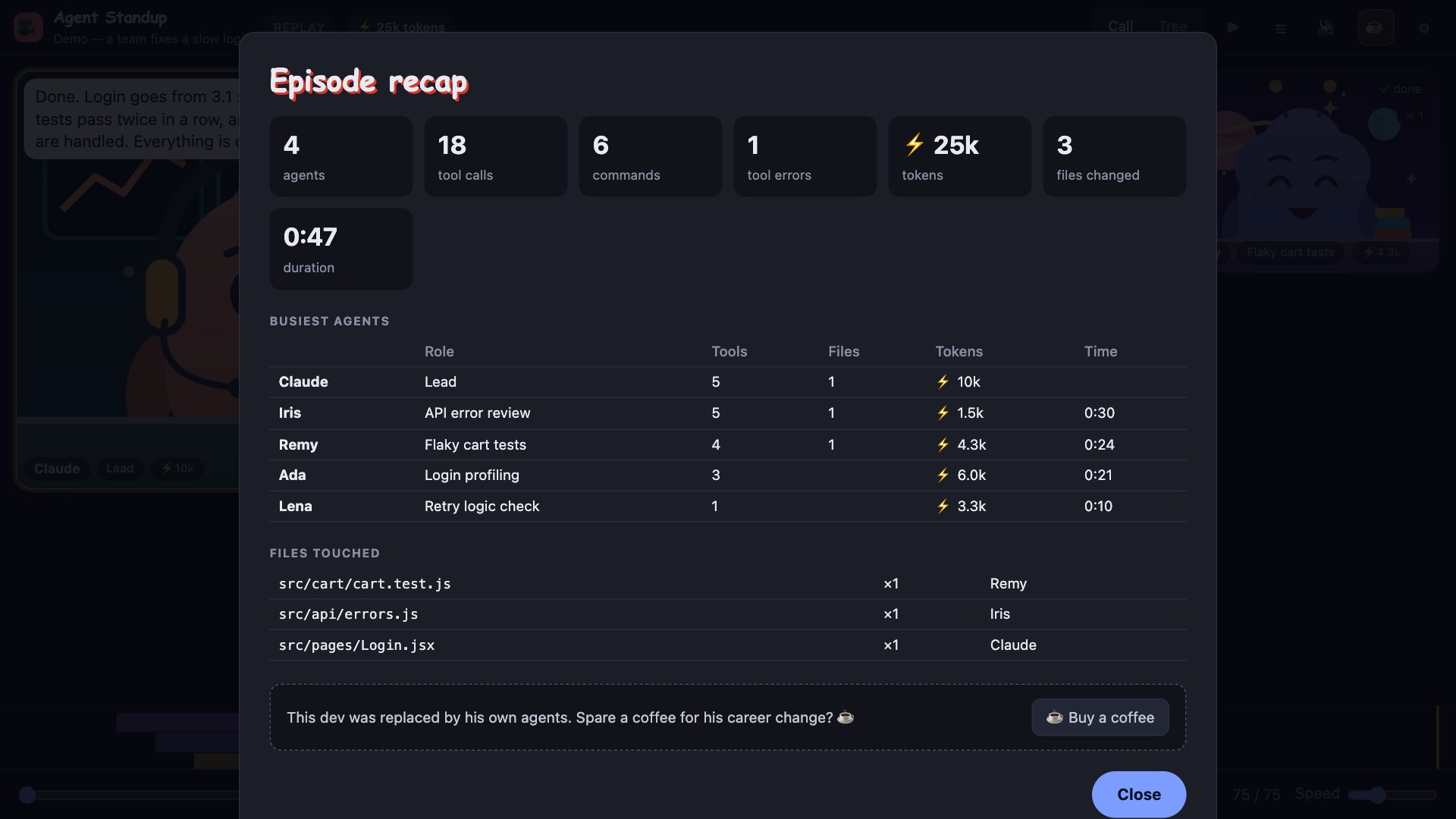
- Replay — pick any past session, scrub through it, see a timeline of who worked when, and get a recap (agents, tool calls, commands, files changed, busiest agents).
- Video export — records the call as a 1280×720
.webmwith voices and subtitles. - French or English — agent text is translated on the fly (see below).
- Office music — optional live web radio (FIP and its themed stations) that fades down smoothly while an agent talks and fades back up when the room goes quiet.
- Office ambience, optional (off by default) and fully synthesised: keyboards that type when agents run commands, clicks when they read, a coffee machine, a phone buzzing, a far-away door… (⚙ → Office ambience). Plus small reactions and jokes between agents ("episode mode").
What you see for each agent
On its tile
- Activity tag (top right) — what the agent is doing right now:
Reading App.jsx,Editing foo.ts,Writing …,Running npm test(or the command's own description),Searching “pattern”,Listing **/*.js,Fetching host,Updating todo list; then✓ donewhen it reports. - Ticker (bottom) — the current tool call and target, with a spinner and a running counter while it executes, then
✓/✗and its real duration. - Status border: orange while working, spotlight while speaking, the tile fades and dissolves 2 minutes after its report.
On the shared screen (appears when an agent uses a tool, stays while a command is still running, then ~4 s after the last action)
- Terminal —
❯ command(with its description), then its real output (first lines, errors in red, “… +N lines”),● Grep(…)/● Glob(…)with matches, a spinner for what is still running. Footer:✓ Bash · 1.2 sor⠋ Bash · running 3.4 s. - Editor — for
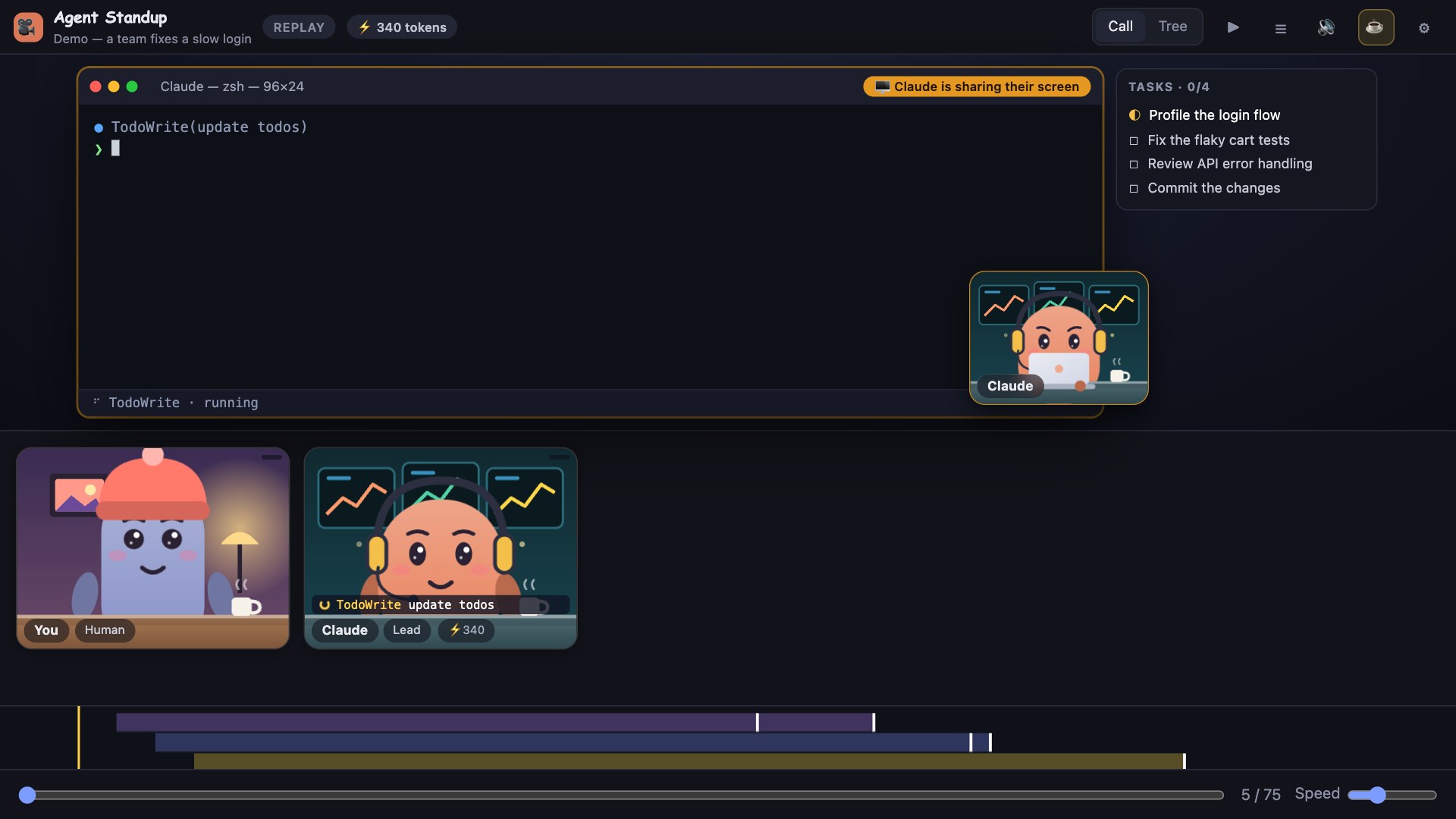
Read: the file with its real content and line numbers (read-only); forEdit: the removed/added lines; forWrite: the new content, with the tool's result line. - Task list — if the agent keeps a todo list, a side panel shows it live (☐ pending, ◐ in progress, ☑ done).
- The presenter's camera lip-syncs when they speak; the subtitle bar shows what they say.
Click an agent — its prompt, tool counts and a Recent activity list (last 30 calls with status, duration, and expandable command + output).
Outputs are trimmed (about 1–2 KB each) to keep the call fast. Results of internal calls (sub-agent launches, messages) are not shown.
Screenshots
| Real commands, real output | The exact change | Who asked whom |
|---|---|---|
 |
 |
 |
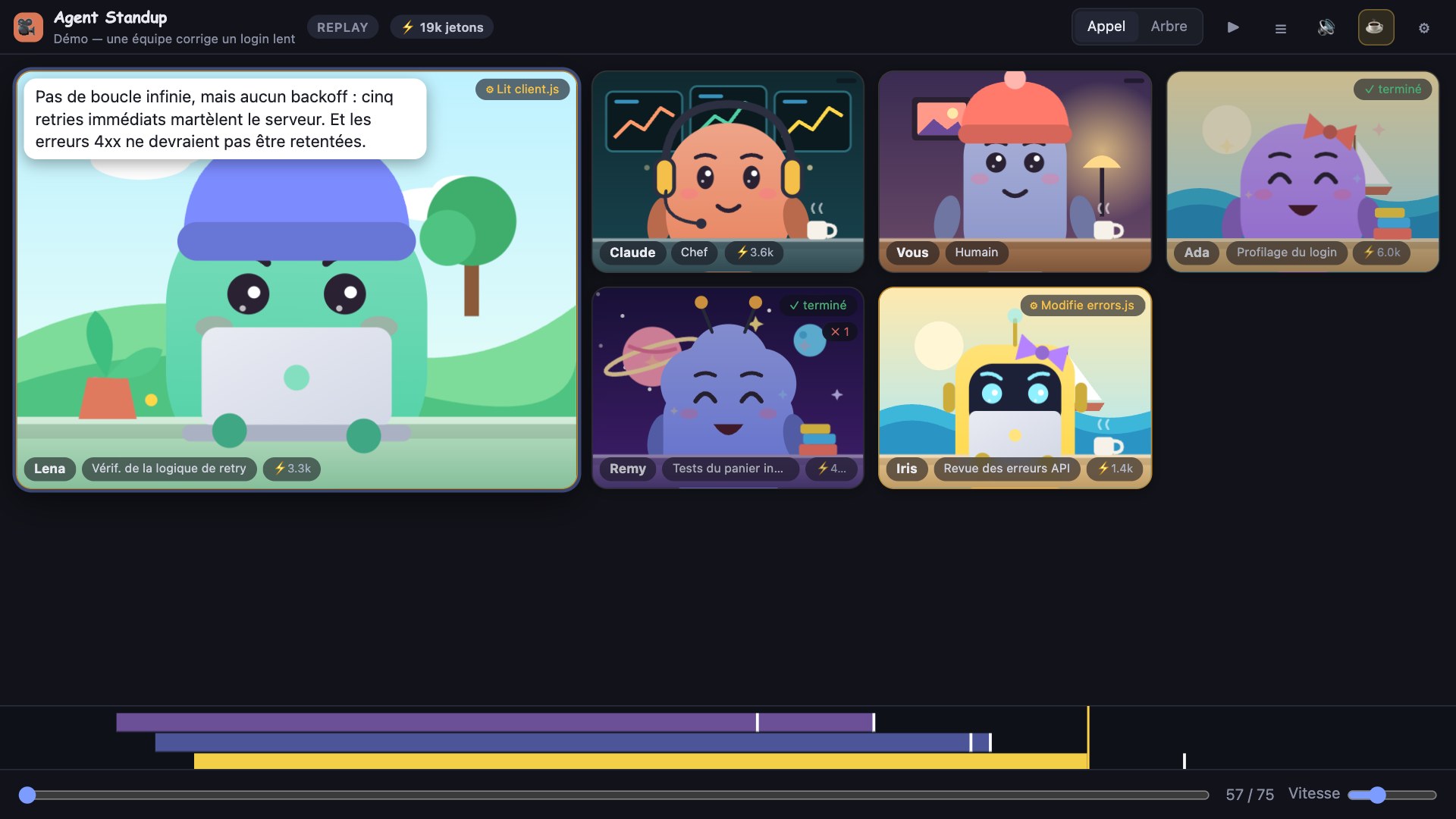
| Task list of an agent | End-of-episode recap | In French |
|---|---|---|
 |
 |
 |
Personality, without noise
Sub-agents answer when they get an order ("Running the tests, as usual.", "Grepping like there's no tomorrow."), say goodbye when they leave, and now and then have a little thought; a failing tool call makes the tile shake; confetti when the lead finishes a long job. It is all local (no API), absent from the transcript, and can be turned off in ⚙ → Little lines & animations.
Glance without the panel (VS Code)
The status bar shows live counts for your workspace (needs you, working, your turn) and turns red when an agent may be waiting for you; hover for the sessions, click to open the call on the most urgent one (agentStandup.statusBar).
Context gauge, highlights, loop watch
The header shows how full the lead's context is (ctx 62%, orange then red, with a warning before auto-compaction); tiles and list rows show it from 50%. In Replay, the Highlights bar jumps to the first error, the longest wait, compactions and possible loops. A 🔁 badge marks an agent repeating the exact same call or failing repeatedly. The context window (200k or 1M) is inferred, because transcripts do not state it.
Languages
Pick one in ⚙ → Language: English, Français, 繁體中文, 简体中文, Español, Deutsch, Português (Brasil), 日本語. The interface (menus, chips, tooltips, recap) is translated; VS Code's command titles, setting descriptions and status bar follow VS Code's own display language. English and French are written by hand; the other languages are AI-drafted and not yet reviewed by native speakers, so corrections are very welcome: each language is one small JSON file (public/locales/<code>.json), see public/locales/README.md to fix or add one (npm run i18n checks the files). The words the agents say stay in the language of your session (French translation of their lines is optional); the little banter lines and the demo exist in English and French.
Your own characters
Replace the drawn characters with your own pixel art. Drop PNG (or GIF/WebP) files, 300 KB at most each, into ~/.agent-standup/characters (⚙ → Characters shows the folder, and in VS Code Open folder opens it; the agentStandup.charactersPath setting changes it):
lead.png(orclaude.png) is the lead,you.pngis you, any other image becomes a sub-agent (one per agent, repeated if you have fewer images than agents);name-talk.pngnext toname.pngis an optional open-mouth frame that shows while the character speaks;- 32×32 or 64×64 px, transparent background, facing front, feet at the bottom looks best. The art is shown crisp (no smoothing) on top of the usual scene and desk, and every status, hand and badge still works. Press Reload in the menu to see changes. A starter pack is in examples/characters.
Agents list
On wide windows (900 px+), a fixed list sits left of the call: every agent with its role and one status line, most urgent first (needs you, stalled, working, waiting, done) and the lead pinned on top. It stays readable with dozens of agents, which a grid of tiles does not. Click a name to put that agent in the spotlight (kept for 25 s even when someone else speaks), double-click for details. Toggle it in ⚙ → Agents list.
All your sessions (Sessions view)
The Sessions tab lists every session active in the last 12 hours, across all projects, with one state each: working, needs you?, waiting on sub-agents, your turn, or idle (and how many sub-agents are active). It refreshes every few seconds and reads only the end of each transcript, so thirty parallel sessions stay cheap. Click a card to follow that session in the call.
At a glance
Every tile carries one status: working (with what it is doing), **waiting on another agen
Frequently Asked Questions
What is agent-standup?
agent-standup is an open-source ide extensions skill for AI coding assistants such as Claude Code, Codex CLI, and ChatGPT, built by Atoll92. Your Claude Code session as a live, animated team call (VS Code extension). It has 51 GitHub stars.
Is agent-standup safe to use?
agent-standup's catalog security scan is still queued. You can run an instant dependency and prompt-injection check now with the "Scan for vulnerabilities" button above.
How do I install agent-standup?
Clone the repository with "git clone https://github.com/Atoll92/agent-standup" and add it to your Claude Code skills directory (see the Installation section above).
What programming language is agent-standup written in?
agent-standup is primarily written in HTML. It is open-source under Atoll92 on GitHub, so you can review or fork the full source.
Are there alternatives to agent-standup?
Yes. SkillsLLM lists many other IDE Extensions skills you can browse and compare side by side. Open the IDE Extensions category from the badge at the top of this page, or use the Related Skills and comparison links further down to weigh agent-standup against similar tools.
Comments (0)
to leave a comment.
No comments yet. Be the first to share your thoughts!
Related Skills
The agent harness performance optimization system. Skills, instincts, memory, security, and research-first development for Claude Code, Codex, Opencode, Cursor and beyond.
276,163
41,206
JavaScript
AI Agentsai-agentsanthropic
The agent harness performance optimization system. Skills, instincts, memory, security, and research-first development for Claude Code, Codex, Opencode, Cursor and beyond.
185,940
28,768
JavaScript
AI Agentsai-agentsanthropic
Makes your AI agent think like the laziest senior dev in the room. The best code is the code you never wrote.
159,976
8,606
JavaScript
AI Agentsagent-skillsai-agents
A cross-platform desktop All-in-One assistant for Claude Code, Codex, OpenCode, OpenClaw, Grok Build & Hermes Agent. Only official website: ccswitch.io
142,223
9,494
Rust
AI Agentsai-toolsclaude-code
An AI skill that provides design intelligence for building professional UI/UX across multiple platforms.
134,338
14,271
Python
CLI Toolsai-skillsantigravity
Popular in IDE Extensions
Top skills in this category by stars
An Obsidian plugin that embeds Claude Code/Codex as an AI collaborator in your vault
15,612
1,056
TypeScript
IDE Extensionsclaude-codecodex
A theoretical reconstruction of the Claude Mythos architecture, built from first principles using the available research literature.
14,912
3,281
Python
IDE Extensionsaianthropic
Claude Code plugin that generates individualized knowledge systems from conversation. You describe how you think and work, have a conversation and get a complete second brain as markdown files you own.
3,493
231
Shell
IDE Extensionsclaude-codeclaude-code-plugin