DaVinci Resolve MCP Server
English | 简体中文



-blue.svg)
-18%20tools-blueviolet.svg)




A Model Context Protocol (MCP) server that lets AI assistants control DaVinci Resolve Studio through the official Scripting API. It provides full API coverage plus guarded workflow helpers for editing, media pool organization, render setup, review markers, grading, Fusion, Fairlight, project lifecycle tasks, extension authoring, and source-safe media analysis.
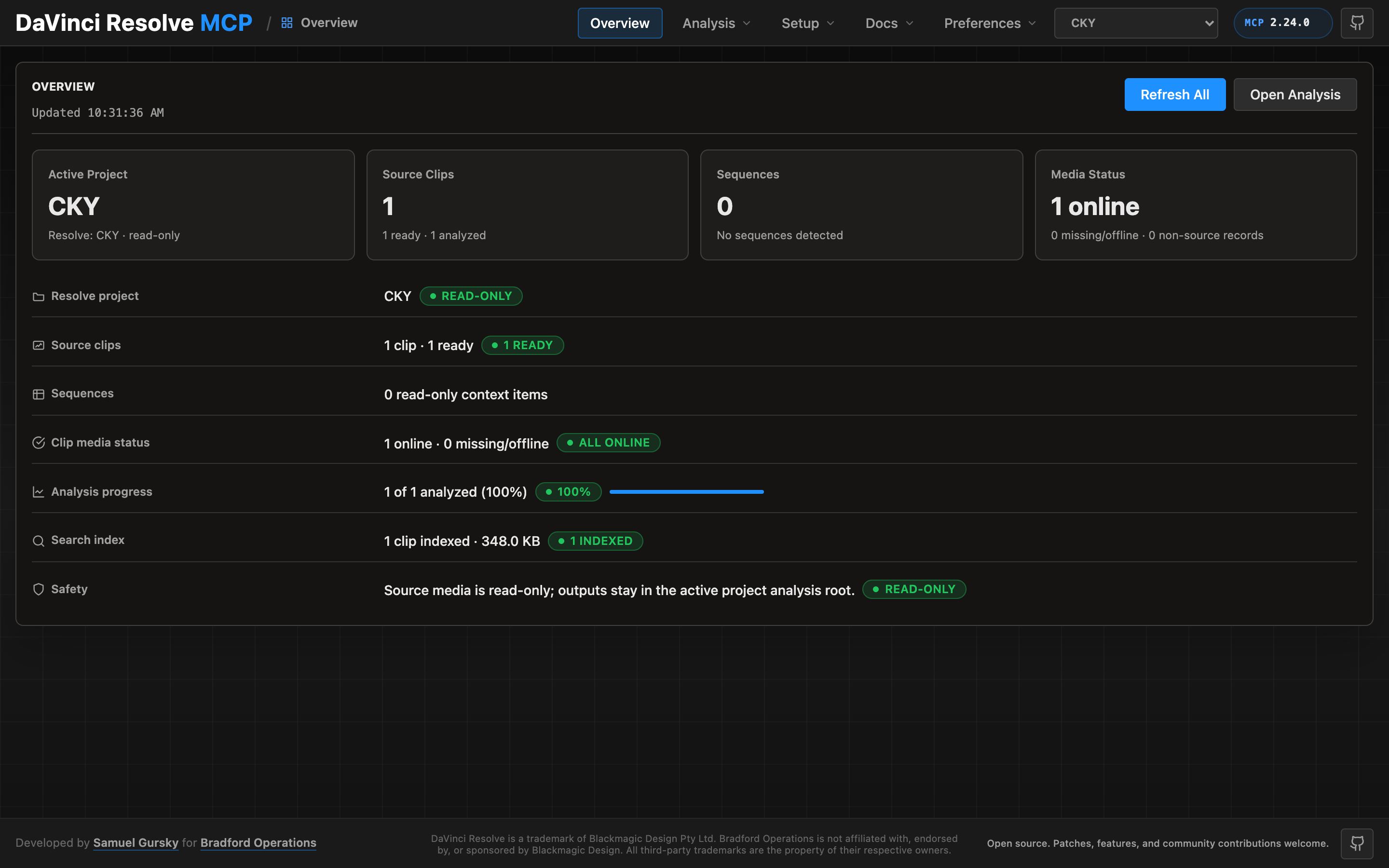
A local browser control panel ships with the server for inspecting Resolve state, running source-safe analysis, drilling into analyzed clips and shots, and editing analysis output inline. See the Control Panel Guide for the full tour.
Quick Start
npx davinci-resolve-mcp setup
Before connecting, open DaVinci Resolve Studio and set Preferences > General > External scripting using to Local. (On the free edition that preference does not help — see Free edition below.) The npm launcher installs a managed copy under your user application-data directory, then runs the universal Python installer. The installer creates a virtual environment, detects Resolve paths, and can configure Claude Desktop, Claude Code, Cursor, VS Code, Windsurf, Zed, Continue, Cline, Roo Code, OpenCode, Codex CLI, and JetBrains IDEs.
For source installs:
git clone https://github.com/samuelgursky/davinci-resolve-mcp.git
cd davinci-resolve-mcp
python install.py
For platform paths, client-specific config, and manual setup, see Installation and Configuration.
The installer and server check the latest GitHub release for MCP updates. Checks are best-effort and throttled; the server never blocks MCP startup for a prompt. The installer can prompt, snooze, ignore a release, disable checks, or apply an opt-in safe auto-update for clean git checkouts.
Free edition (in-app bridge)
Blackmagic gates external scripting to Studio: on the free edition
scriptapp("Resolve") refuses a foreign process, whatever the preference says.
Through Resolve 21.0.x the Workspace ▸ Scripts menu was not gated — a script
launched from it is handed the live resolve object (measured on free 21.0.3.7) —
so the server can reach the free edition through a small script that runs inside
Resolve and re-exports it over an authenticated loopback listener. Resolve 21.1
moved Python scripting to Studio. On free 21.1 the Scripts menu no longer lists
.py files at all (reported on Fedora 44 in #203; a Lua script in the same folder
lists normally). Whether the Console still runs Python there is unconfirmed, so
treat the bridge as a 21.0.x path until that is measured.
python scripts/install_resolve_bridge.py
# restart Resolve, open a project, then: Workspace > Scripts > resolve_bridge
The installer and MCP client use ~/.config/davinci-resolve-mcp/bridge.json
by default. To keep the authenticated bridge config elsewhere, set
DAVINCI_RESOLVE_BRIDGE_CONFIG while running the installer and in the MCP
client environment; both sides will use that path.
Once that listener is running it is used automatically whenever external
scripting is unavailable — no environment variable required. Setting
DAVINCI_RESOLVE_BRIDGE=1 forces the bridge instead: it becomes the only
transport tried, so a bridge that stops answering reports its own fault rather
than quietly falling back to another transport. Use it when the bridge is the
path you intend to depend on.
On macOS, Resolve looks for Python 3 in exactly two places: the
PYTHON3HOME environment variable, then /usr/local/bin/python3. Homebrew,
pyenv, uv and conda land in neither, so the script silently never appears in the
menu. A python.org install works because its installer creates
/usr/local/bin/python3 — but you do not need one: point Resolve at the
interpreter you already have, no sudo required.
launchctl setenv PYTHON3HOME "$(python3 -c 'import sys; print(sys.prefix)')"
Use launchctl setenv, not export — Resolve is launched from the Dock and
never sees your shell's environment. Restart Resolve afterwards. A Lua canary is
installed alongside so you can tell "Python not detected" apart from a wrong
folder.
Two things that bite (#182). The prefix must contain both
lib/libpython3.X.dylib and bin/python3 under that exact unversioned
name — Homebrew's framework builds often ship only bin/python3.13, which is
half a Python as far as Resolve is concerned, and the installer's preflight now
says so instead of reporting a usable prefix. And launchctl setenv does not
survive a reboot; if scripts stop listing weeks later with no error, that is
why. For something persistent, put an interpreter where Resolve already looks
(this one needs sudo, and check that /usr/local/bin does not precede your
normal Python on PATH):
sudo ln -s "$(command -v python3)" /usr/local/bin/python3
Validated on free 21.0.3.7 and Studio 19.1.3.7, both macOS. The Windows paths
added in v2.70.1 (issue #106) shipped unverified; reports on free 21.0.1.11
(issue #109) and free 21.0.3.7 (issue #112) have since shown the bridge
installing, listing and serving from both %PROGRAMDATA% and %APPDATA% on
Windows 11, so those paths are now confirmed rather than assumed. Linux is
confirmed as well: a report on free 20.3.2.9 (issue #129, Fedora 43) shows the
bridge installing to ~/.local/share/DaVinciResolve/Fusion/Scripts/Utility,
listing against the system Python — Linux has none of this discovery problem —
and serving end-to-end. No platform now rests on an assumption: macOS was
validated directly, Windows and Linux on user reports.
Note that the bridge holds its port for as long as it serves. Before v2.70.3 a
Windows bridge could outlive Resolve and block the next session's listener; if
you are on an older build and a bridge stops answering, check for a stale
fuscript.exe still holding the port.
This is the documented in-app path, not a licence circumvention, but Blackmagic could close it — treat it as a supported-until-it-is-not tier. Loopback only, HMAC-signed requests, one-use nonces.
Local Control Panel
Launch the single-user local control panel from the repository root:
venv/bin/python -m src.control_panel
The command starts a loopback-only server and opens the control panel in your browser at a URL that carries a per-launch access token (http://127.0.0.1:8765/#token=…) — use that exact URL; the panel refuses requests without it. To have an AI coding agent do this, ask: "Open the Resolve MCP control panel for this repo." Agents should use venv/bin/python -m src.control_panel unless your Python environment is already active. Persisted analysis jobs refresh the local search index automatically after successful slices; the manual Build Index action is for rebuilding from existing reports.
Server Modes
| Mode | Entry point | Tools | Best for |
|---|---|---|---|
| Compound | src/server.py |
37 | Default mode for most assistants. Related Resolve operations are grouped behind action parameters to keep context usage low. |
| Full / granular | src/server.py --full or src/resolve_mcp_server.py |
389 | Power users who want one MCP tool per Resolve API method. |
The compound server is recommended unless you specifically need the granular one-tool-per-method surface.
Advanced server — beyond the scripting API (optional, Node)
The same package ships a second, optional MCP server: davinci-resolve-advanced-mcp (bin
bin/davinci-resolve-advanced-mcp.mjs). Where the Python server drives a live Resolve over the
sanctioned scripting API, the advanced server does what the API can't — it reads and edits Resolve
files (.drp / .drt / .drx) and applies DB/XML-level changes with no Resolve running, so it
runs cloud or local. 18 tools: drp, drt, drx (per-clip grade codec plus a deterministic,
offline grading/QC catalog — within-camera + cross-camera skin (v2 skin-line metric) + b-roll +
neutral-patch WB matching, match-to-reference, saturation/black-balance, contrast-normalize, ASC CDL
import, lossless grade-transfer + season-look authoring, named-LUT attach, scope reads + intent tags,
verify-grade, display-referred frame extraction, broadcast-legal QC), offline_ref,
conform (frame-oracle conform/relink QC + lineage), color_trace (carry grades across a re-conform),
fusion, audio_plan, fairlight (bus routing), audio, project_read, project_db, pipeline
(a DB-as-truth pipeline: compile YAML project specs into a canonical SQLite DB, then run stages with
gates, provenance, and intent↔actual drift detection), capabilities, `de