ERD Editor
Entity-Relationship Diagram Editor
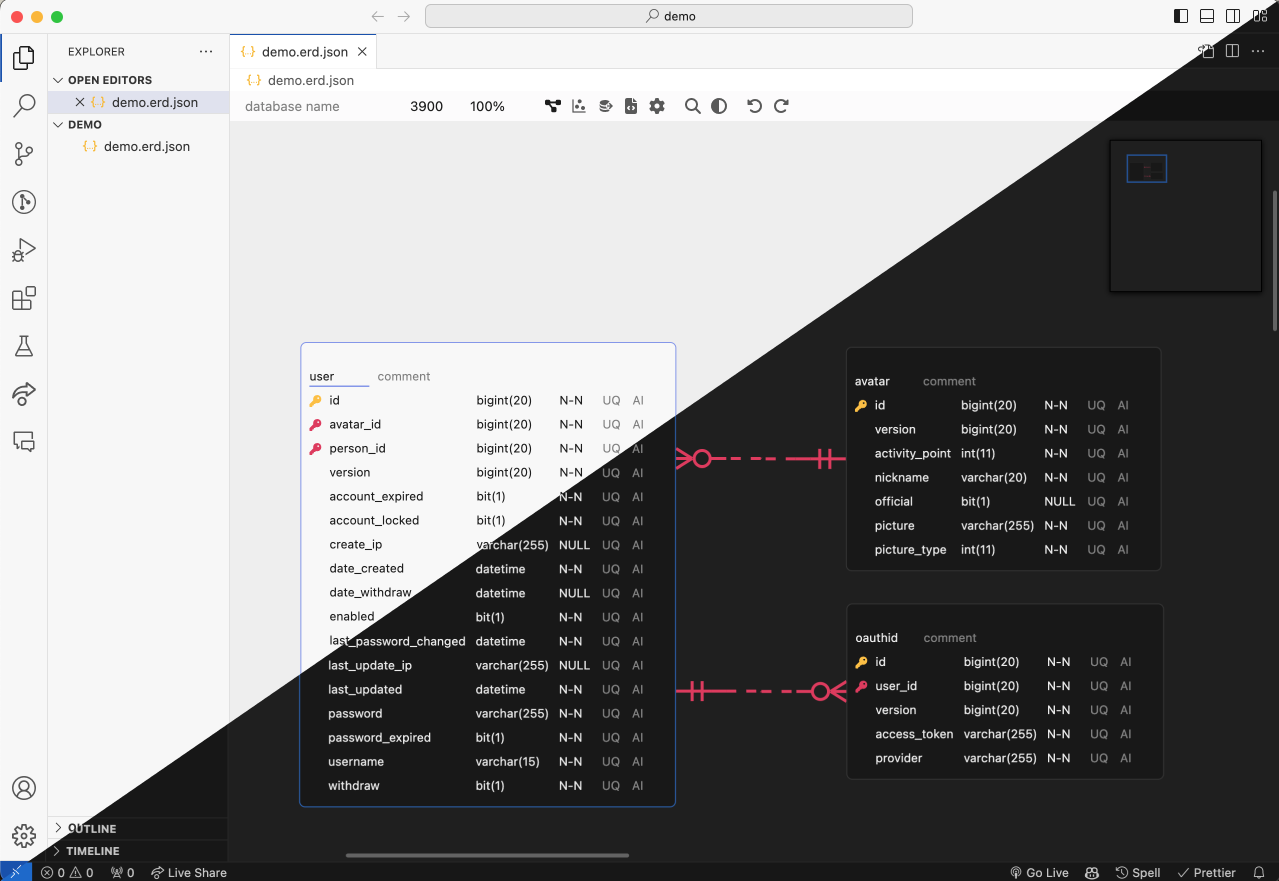
Design a database schema visually, bring in one you already have from SQL DDL, GraphQL SDL, DBML or AML, and take it out as DDL or as generated code. ERD Editor is one editor and one file format on erd-editor.io, in Google Drive, VS Code, IntelliJ-based IDEs and Obsidian, and in your own page as a custom element, and a coding agent edits the same diagrams through its MCP server.
Where to use it
| Install | ||
|---|---|---|
| Web app | erd-editor.io | Installable PWA that launches offline, real-time collaboration |
| Google Drive | Google Workspace Marketplace | Adds ERD Editor to Drive's Open with and New menus, saving back to the same file |
| VS Code | Marketplace | Opens .erd.json files in a custom editor |
| IntelliJ | JetBrains Marketplace | Same, for IntelliJ-based IDEs |
| Obsidian | Community plugins | Opens .erd and .erd.json files in a vault tab, desktop only |
| Your app | npm install @dineug/erd-editor |
The framework-free <erd-editor> custom element |
| Coding agents | @dineug/erd-editor-mcp |
An MCP server for Claude Code, Codex or another client, live in VS Code, a JetBrains IDE or Obsidian, or on the file |
To try it in an IDE, create an empty file with a .erd.json extension and open it. In Obsidian,
run ERD Editor: Create new diagram from Obsidian's command palette. In Google Drive, choose
New → More → ERD Editor.
Features
Design
- Visual schema design — tables, columns, memos, and four relationship cardinalities (Zero One, Zero N, One Only, One N)
- Quick edits —
Alt+Nadds a table andAlt+Entera column,Alt+Ktoggles the primary key on the focused column, or on every selected column when it is one of them, andDeleteorBackspaceremoves the selection, each in one undo step; the Shortcuts page of the editor's Settings tab lists every key - Link existing columns — while you draw a relationship with a mouse or a pen, the buttons
beside the table it ends on either map the parent's key onto columns that table already has or add
new ones, named after the parent table when the key is one word (
user_idforuser'sid), and Map Columns in a relationship's right-click menu changes its columns later - Referential actions — set On Delete and On Update (NO ACTION, CASCADE, SET NULL, SET
DEFAULT, RESTRICT) from a relationship's right-click menu, which marks one the current database
leaves out; the line shows them at its child end as
D:C U:R, and View Option's Referential Actions hides the labels. SQL, DBML and AML import read them, and the DDL export and the code generators that have a place for them write the ones the target supports - Alternate keys — View Option's Alternate Key marks the columns of each unique index over two
or more columns as
AK1.1,AK1.2, and SQL import reads a UNIQUE over several columns as one such index - Table groups — draw a box behind related tables, which you name and can color, with
New Table Group in the canvas menu or the command palette, or group the selected tables from
their right-click menu. A table joins a group when you drop it inside and leaves when you drop it
outside, dragging a group by its title moves its tables with it, each member's header takes the
group's color, View Option hides the groups, and DBML import and the Code Generator's DBML carry
them as
TableGroups - Auto Layout — place every table again by Force, Flow or a vertical or horizontal tree from the canvas menu or the command palette, table groups kept together, in one undo step; Force shows a preview you apply or cancel, and the others land at once
- Copy, paste and colors — copy tables and memos and paste them as new ones, into another
diagram too or into a spreadsheet as a grid, hold
Altwhile dragging to duplicate them, and color a table, memo or table group from its right-click menu - Clean diffs — the scroll position and zoom, the open tab, the code generator's language and name cases and the bracket type are locked by default, so the file keeps the values they had when locked and looking around never changes it; the file, written in a fixed order, also leaves out measured widths, connector anchors and removed items
Import
- SQL DDL import — bring in a
.sqldump from any of the eight vendors below. The parser readsCREATE TABLE,CREATE INDEX,ALTER TABLEconstraints and table and column comments (COMMENT ON, SQL Server'ssp_addextendedproperty), and skips what it does not recognize, so an awkward dump imports partially rather than failing outright - GraphQL SDL import — bring in a schema from any tool that emits SDL. Object types become tables, scalars map to the diagram's own dialect, and the fields that point at another type become the relationships; the root types and the wrapper types Relay, Federation and Hasura generate are left out rather than drawn as tables
- DBML import — bring in a
.dbmlfile written for dbdiagram.io or dbdocs.io, or emitted bysql2dbmlorprisma-dbml-generator. Tables, columns, indexes, enums, header colors, everyRefspelling and eachTableGrouparrive; aProjector a stickyNoteis skipped rather than refused - AML import — bring in an
.amlfile written for Azimutt, in either the v2 or the legacy v1 spelling. Entities, attributes, indexes, enums, colors and every relation arrow arrive; a check and a struct type are skipped rather than refused, and a view arrives as a table - Imports land laid out — a schema picked from the Import menu, the command palette or a host's file dialog arrives with its tables placed by their relationships (in rows when it has none), and one undo puts the previous diagram back. A SQL, DBML, AML or GraphQL file imported into erd-editor.io's schema list or the Google Drive editor becomes a new diagram laid out the same way
- Import and Add — the menu beside Import, and its five formats in the command palette, add a
.sql, GraphQL, DBML, AML or.erd.jsonfile to the diagram instead of replacing it: its tables arrive below everything already there, laid out the same way (an.erd.jsonfile keeps its own placement), selected, and one undo takes them away. A table whose name is already taken arrives as a second table rather than merging, and a foreign key to a table outside the file is dropped
Export and code
- SQL DDL export — Databricks, MariaDB, MSSQL, MySQL, Oracle, PostgreSQL, Snowflake and SQLite,
from the Schema SQL tab, which saves the DDL as a
.sqlfile or copies it - Schema SQL options — a panel beside the DDL picks the database and the bracket type, CREATE
TABLE IF NOT EXISTS or drop and re-create and a
USEorCREATE + USEheader, each where the database has it, and the tables by table group, and keeps SQL of your own to write before and after the tables. The statements, header and tables stay with this editor until you close it and never reach the file; the scripts are saved in the document - Code generation — TypeScript, GraphQL, C#, Java, JPA, Kotlin, Scala, Go, SQLAlchemy, TypeORM, Sequelize, Drizzle, DBML, AML, Mermaid, PHP, Doctrine, Rust, SeaORM, Swift, Zod and JSON Schema, from the Code Generator tab. Its options panel picks the language, the database, the table and column name cases and, for Doctrine, JPA and SeaORM, the bracket type, and saves the code as a file with the language's extension
- Export —
.erd.json,.sql, and a.pngor.svgfrom a dialog with a preview: transparent background, light or dark, the PNG at 1x to 3x or copied to the clipboard instead
Find and navigate
- Quick search —
Ctrl/Cmd+Kopens the command palette to run editor commands (new table, import, export, Auto Layout, tabs, theme, language and more), or to jump to a table after#, a column after@, and a comment or memo after:; Korean also matches by its initial consonants (ㅅㅇㅈfinds 사용자) - Find and replace —
Ctrl/Cmd+Fsearches table and column names, comments and memos, with match case, whole word and regular expressions, and one undo takes back a Replace All - Visualization — Graph mode draws a force-directed view of how the tables relate. Flow mode
lays them out by their relationships, lights a table you hover and the tables it relates to, and
shows names only, keys only or all fields; Focus on this table in a table's right-click menu
opens Flow on that table and its neighbours, or, when it is one of several selected tables, as
Focus on selected tables on all of them and their neighbours, as
Alt+Fdoes for the selection, and neither view writes its layout into the file - Zoom and pan — pinch a trackpad or two fingers to zoom, drag with the middle button to pan from anywhere, and click the zoom level on the floating toolbar to go back to 100%
- Time travel — replay this editing session's history on the canvas and jump to any point in it, from the toolbar
- Diff viewer — compare the diagram with another
.jsonfile from the canvas menu - Undo / redo — every edit, from the toolbar or
Ctrl/Cmd+ZandCtrl/Cmd+Shift+Z, in the editor's own history
Language and theme
- Display language — the editor's menus, panels, dialogs, command palett