open-codesign
by OpenCoworkAI
Open-source Claude Design alternative. One-click import your Claude Code / Codex API key. Prompt → prototype / slides / PDF. Multi-model (Claude, GPT, Gemini, Kimi, GLM, Ollama). BYOK, local-first, MIT.
8,080stars
853forks
TypeScript
Added 4/22/2026
30 days in the Featured rail · terms & refunds
⚠️ Third-Party Software Notice
This skill is third-party open-source software developed and hosted independently on GitHub. SkillsLLM is an informational directory and does not control or maintain the underlying repository.
Any security checks, ratings, or warnings displayed by SkillsLLM are automated and limited in scope. They do not constitute a security certification or guarantee that the software is safe, error-free, or free from malicious code, vulnerabilities, compromised dependencies, or prompt-injection risks.
Review the source code, permissions, dependencies, and configuration before installing or running any third-party skill. Use is at your own risk. To the maximum extent permitted by applicable law, SkillsLLM is not liable for losses arising from third-party software.
CLI Toolsai-designanthropicbyokclaudeclaude-codeclaude-designclaude-design-alternativedeepseekdesign-to-codedesktop-appelectronfigma-alternativegeminilocal-firstmulti-modelollamaopenaiopenroutertypescriptui-generator
Maintainer of this skill?

Automated security scan — not a certification.
Installation
# Add to your Claude Code skills
git clone https://github.com/OpenCoworkAI/open-codesign
Getting Started
Guides for using cli tools skills like open-codesign.
- Getting Started with AI SkillsFirst-time install walkthrough for Claude Code, Codex CLI, and ChatGPT.
- SkillsLLM Features GuideVoting, bookmarks, comments, comparison pages, and security scanning explained.
- What is an AI Skills Marketplace?Definitions, how marketplaces work, and how to choose between them in 2026.
Security ReportVerified
Last scanned: 4/25/2026
{
  "issues": [],
  "status": "PASSED",
  "scannedAt": "2026-04-25T05:48:23.226Z",
  "semgrepRan": false,
  "npmAuditRan": false,
  "pipAuditRan": true
}
Compare with similar skills
See how open-codesign compares with popular alternatives.
Open CoDesign
简体中文: README.zh-CN.md
Your prompts. Your model. Your laptop.
Turn prompts into polished artifacts — locally, openly, and with whichever model you already pay for.
Website · Quickstart · What's new · Changelog · Discussions · Docs · Contributing · Security
Open-source alternative to: Claude Design · v0 by Vercel · Lovable · Bolt.new · Figma AI
What's new
feat/decompose-to-ui-kit(branch) — Image -> componentizedui_kits/<slug>/bundle for coding-agent handoff · Boolean-per-dimension visual parity judge (12 standard checks) · Verify-and-iterate loop · Per-decompose cost row · See BENCHMARKS.md. Refs #225.- v0.2.0 (2026-05-09) — Agentic Design: workspace-backed sessions · permissioned local tools · Files panel upgrades · provider diagnostics · security hardening ·
DESIGN.mddesign systems - v0.1.4 (2026-04-23) — AI image generation · ChatGPT Plus/Codex subscription support · CLIProxyAPI one-click import · API config hardening
- v0.1.3 (2026-04-21) — Gemini
models/prefix fix · OpenAI-compatible relay "instructions required" fix · third-party relay SSE-truncation hint - v0.1.2 (2026-04-21) — Release pipeline · Homebrew / winget / Scoop packaging manifests
Full release history → · Changelog →
What it is
Turn a prompt into a polished prototype, slide deck, or marketing asset, locally, with the model you already use.
Open CoDesign is the open-source Claude Design alternative — built for people who want the speed of AI-native design tools without subscription lock-in, cloud-only workflows, or being forced onto a single provider. An MIT-licensed desktop app, local-first from day one, with BYOK for any model (Claude, GPT, Gemini, DeepSeek, Kimi, GLM, Ollama, or any OpenAI-compatible endpoint) plus direct ChatGPT Plus / Pro / Team subscription sign-in for Codex models. One-click import of existing Claude Code or Codex provider configs, or one-click ChatGPT sign-in, gets you running in under 90 seconds.
See it generate
The Examples gallery also includes three editable, asset-backed starting
points: Daymark (Todo brief, task/project JSON, original logo and design
tokens), Common Ground (workshop brief, schedule CSV and original artwork),
and Trailhead (an original low-fidelity SVG sketch, annotated brief and trip
data). Selecting a pack creates a fresh workspace and copies its reference
files before filling the composer; inspect or edit them in Files, then send
when ready. Nothing is submitted automatically and no existing workspace is
overwritten. These fictional MIT-licensed packs contain inputs, not prebuilt
final interfaces. Tags describe supplied references and requested prototype
behavior, not verified generation results. Bookings and other data are
simulated; the sketch includes text annotations for models without image input.
Preflight receives a bounded, non-exhaustive list of existing workspace file
paths and recognizes local DESIGN.md guidance. An absent App.jsx does not
mean reference inputs are missing; the agent can inspect them before building.
Local CSV references are included in the bounded agent text-file scan alongside
Markdown, JSX, JSON, and SVG inputs.
Preview and final verification resolve local assets relative to the source file
inside the bound workspace. Missing assets and paths outside that workspace
remain verification errors.
While a design is generating, Queue follow-up (Enter) adds a text request for when the agent would otherwise finish. Steer next step supplies it after the current assistant response and tool batch finish; it does not interrupt file writes, streaming tokens, permission decisions, or an unanswered agent question. The current run keeps its model, reasoning setting, and workspace. Queued requests are explicitly marked pending until the agent receives them. Stop, errors, or restarting the app leave undelivered requests recoverable, never automatically resent. Active-run messages are text-only: remove attached files, reference URLs, and queued comments before sending; those drafts are not silently included or discarded. Individual queue editing/removal is not supported. Delivery receipts use the existing local pi session JSONL, not a separate database. After sending, an empty composer stays compact; queue and steering actions appear only while composing another message. Delivery explanations are available on demand, not inserted into the draft. Long tool errors show a short reason with expandable, scrollable original diagnostics.
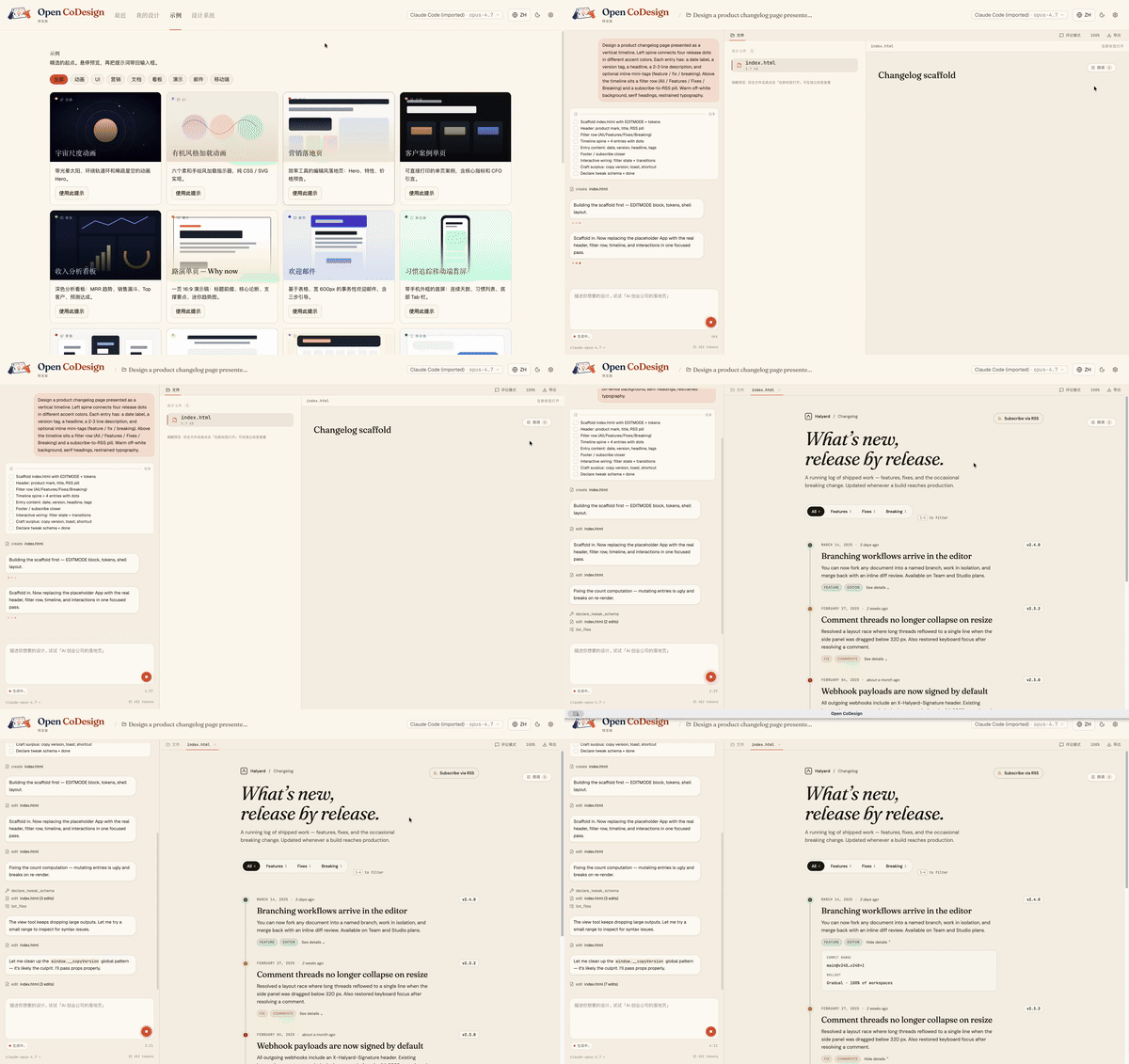
From a blank prompt to a finished artifact, the agent plans, writes, self-checks, and ships something with hover states, tabs, and empty states already wired up:
Why people star it
- Runs on your laptop — no mandatory cloud workspace
- Works with your model — Claude, GPT, Gemini, Ollama, OpenRouter, and more
- Exports real files — HTML, PDF, PPTX, ZIP, Markdown
- Shows its work — live agent activity, visible tool calls, interruptible generation
Why Open CoDesign?
Open source, desktop-native, and built for people who do not want their design workflow locked to one model or one cloud.
| Open CoDesign | Claude Design | v0 by Vercel | Lovable | |
|---|---|---|---|---|
| Open source | ✅ MIT | ❌ Closed | ❌ Closed | ❌ Closed |
| Desktop native | ✅ Electron | ❌ Web only | ❌ Web only | ❌ Web only |
| Bring your own key | ✅ Any provider | ❌ Anthropic only | ❌ Vercel only | ⚠️ Limited |
| Local / offline | ✅ Fully local app | ❌ Cloud | ❌ Cloud | ❌ Cloud |
| Models | ✅ 20+ (Claude, GPT, Gemini, Ollama…) | Claude only | GPT-4o | Multi-LLM |
| Version history | ✅ Local sessions + workspace files | ❌ | ❌ | ❌ |
| Data privacy | ✅ On-device app state | ❌ Cloud-processed | ❌ Cloud | ❌ Cloud |
| Editable export | ✅ HTML, PDF, PPTX, ZIP, Markdown | ⚠️ Limited | ⚠️ Limited | ⚠️ Limited |
| Price | ✅ Free app, provider/subscription cost only | 💳 Subscription | 💳 Subscription | 💳 Subscription |
Highlights
Frequently Asked Questions
What is open-codesign?
open-codesign is an open-source cli tools skill for AI coding assistants such as Claude Code, Codex CLI, and ChatGPT, built by OpenCoworkAI. Open-source Claude Design alternative. One-click import your Claude Code / Codex API key. Prompt → prototype / slides / PDF. Multi-model (Claude, GPT, Gemini, Kimi, GLM, Ollama). BYOK, local-first, MIT. It has 8,080 GitHub stars.
Is open-codesign safe to use?
Yes. open-codesign passed SkillsLLM's automated security scan — a dependency vulnerability audit plus prompt-injection heuristics — with no high-severity issues. You can read the full report in the Security Report section on this page.
How do I install open-codesign?
Clone the repository with "git clone https://github.com/OpenCoworkAI/open-codesign" and add it to your Claude Code skills directory (see the Installation section above).
What programming language is open-codesign written in?
open-codesign is primarily written in TypeScript. It is open-source under OpenCoworkAI on GitHub, so you can review or fork the full source.
Are there alternatives to open-codesign?
Yes. SkillsLLM lists many other CLI Tools skills you can browse and compare side by side. Open the CLI Tools category from the badge at the top of this page, or use the Related Skills and comparison links further down to weigh open-codesign against similar tools.
Comments (0)
to leave a comment.
No comments yet. Be the first to share your thoughts!
Related Skills
Reverse engineer anything with agents, from app behavior down to native binaries.
327,876
82,996
TypeScript
AI Agentsagent-skillsai-agents
The agent harness performance optimization system. Skills, instincts, memory, security, and research-first development for Claude Code, Codex, Opencode, Cursor and beyond.
283,526
42,114
JavaScript
AI Agentsai-agentsanthropic
Fair-code workflow automation platform with native AI capabilities. Combine visual building with custom code, self-host or cloud, 400+ integrations.
207,971
61,180
TypeScript
MCP Serversaiapis
The agent harness performance optimization system. Skills, instincts, memory, security, and research-first development for Claude Code, Codex, Opencode, Cursor and beyond.
185,940
28,768
JavaScript
AI Agentsai-agentsanthropic
Makes your AI agent think like the laziest senior dev in the room. The best code is the code you never wrote.
167,352
9,086
JavaScript
AI Agentsagent-skillsai-agents
Popular in CLI Tools
Top skills in this category by stars
An AI skill that provides design intelligence for building professional UI/UX across multiple platforms.
137,370
14,590
Python
CLI Toolsai-skillsantigravity
CLI tool for configuring and monitoring Claude Code
32,741
3,794
Python
CLI Toolsanthropicanthropic-claude
Universal provider proxy for OpenAI Codex & Claude Code — use any LLM (Claude, Gemini, Grok, DeepSeek, Ollama…) with Codex CLI, App, SDK, and Claude Code
17,589
1,353
TypeScript
CLI Toolsai-gatewayai-tools
Developers Also Liked
Based on votes and bookmarks from developers who liked this skill
from vibe coding to agentic engineering - practice makes claude perfect
67,724
6,748
HTML
AI Agentsagentic-aiagentic-coding
AI coding assistant skill (Claude Code, Codex, OpenCode, Cursor, Gemini CLI, and more). Turn any folder of code, SQL schemas, R scripts, shell scripts, docs, papers, images, or videos into a queryable knowledge graph. App code + database schema + infrastructure in one graph.
76,348
7,585
Python
AI Agentsantigravityclaude-code
An AI skill that provides design intelligence for building professional UI/UX across multiple platforms.
137,370
14,590
Python
CLI Toolsai-skillsantigravity
Persistent Context Across Sessions for Every Agent – Captures everything your agent does during sessions, compresses it with AI, and injects relevant context back into future sessions. Works with Claude Code, OpenClaw, Codex, Gemini, Hermes, Copilot, OpenCode + More
101,684
8,936
TypeScript
AI Agentsaiai-agents
Bash is all you need - A nano claude code–like 「agent harness」, built from 0 to 1
78,809
12,612
Python
AI Agentsagentagent-development
A curated list of awesome Claude Skills, resources, and tools for customizing Claude AI workflows
77,410
9,191
Python
AI Agentsagent-skillsai-agents